Basic usage of Slurm 20.02.3 slurmrest API (a must-see for getting started) No. 1-1
tags: slurm hpc linux java python
This article mainly summarizes the latest version of slurm20.02.3in,slurm REST APIThe basic method of use.
Mainly refer to slurm official website aboutslurm REST API、slurmrestdThe explanation and own experience.
Currently, I plan to dig a hole and write a small series to give myself the motivation to write a blog.
-----------------------------------------------------------------------------------------------------------------------------------------------------------------------------
The slurm REST API is the latest function in the slurm 20.02 version. Its interface conforms to the REST design standard API, which makes it convenient for us to call slurm functions based on the interface.
slurm REST API has two modes: Inet Mode and Listen Mode. This article mainly focuses onListen ModeTo explain.
The slurm clusters used include:1 management node slurmcltd (192.168.0.211), 1 backup node slurmcltd (192.168.0.127), 1 login node slurm-login (192.169.0.90), 2 computing nodes slurmd (192.168.0.218, 192.168.0.128).
1 Start slurm REST API
First of all, when slurm is installed, slurm REST API is not installed by default, and you need to manually choose to install it(The slurm installation part will write a separate blog post after all slurm functions are explained)。
The use of slurm REST API does not require configuration in configuration files such as slurm.conf. The slurm REST API can be started on any node among the management node, standby node, login node and computing node.
On the management node, start the command:
ToDebugging methodstart up:
slurmrestd -vvv 192.168.0.211:6688

Backstagestart up:
slurmrestd 192.168.0.211 &Then press Ctrl+d to log out
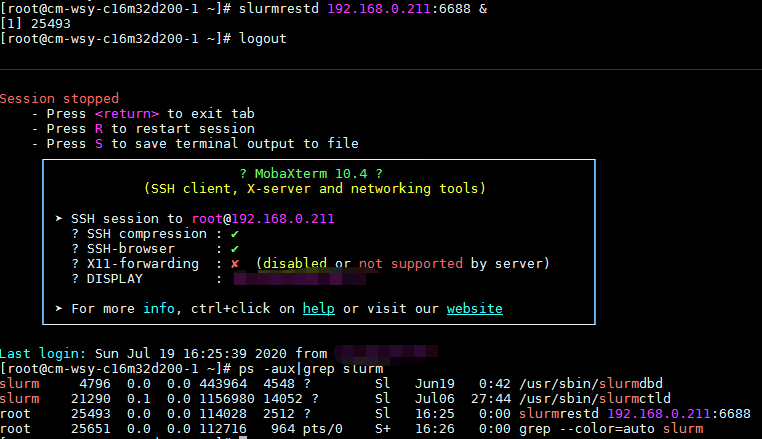
Note: The number of v represents the debug level, followed by the local IP and an unoccupied port number.
2 Interface and parameters of slurm REST API
Originally, the blogger went through the slurm source code and worked hard to sort out the interfaces and parameters of the slurm REST API, but found out laterswaggerhubThere are ready-made ones above. Release here
slurm REST API interfacelink, You can check it according to your needs.
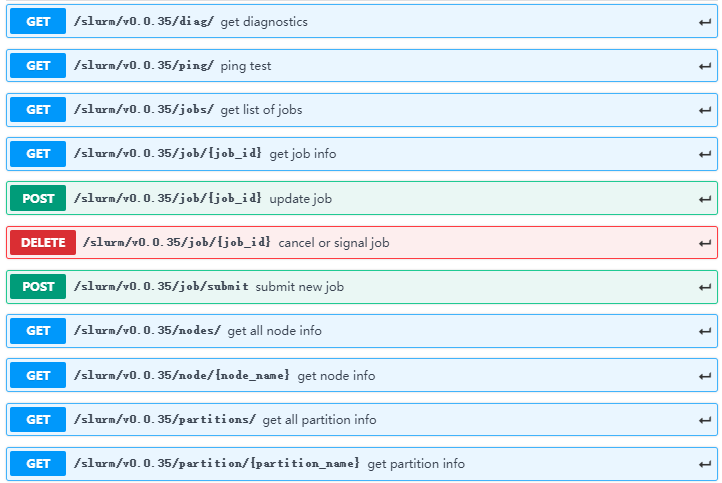
I will provide the simplest case for each interface for your reference.
2.1 postman configuration
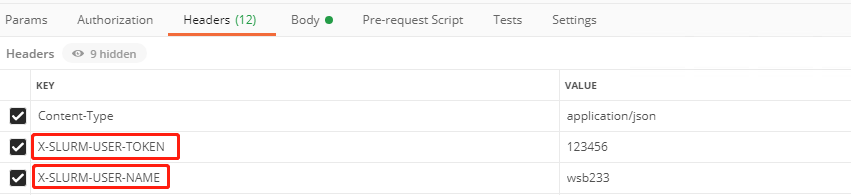
The blogger here uses postman as a demonstration tool for each case, but needs to add slurm certification related to HeadersK-VIt can be called successfully (the same headers are also needed for small related packages such as java and python). The function should be coordinatedauth/jwtUsed, but the blogger failed to install it several times, so he gave upauth/jwtUp.
Although not usedauth/jwt, But these twoKEY
- X-SLURM-USER-NAME
- X-SLURM-USER-TOKEN
Is required.VALUEYou can fill in any value.
POST method needs to add Content-Type
GET DELETE is not required
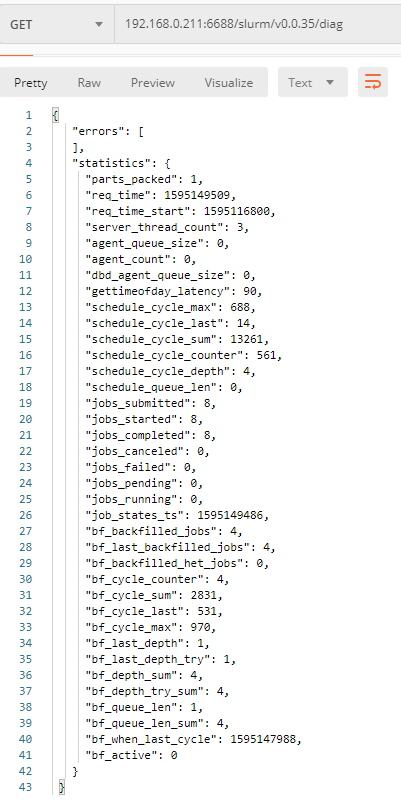
2.2 GET /slurm/v0.0.35/diag/
slurm terminal command: sdiag
2.3 GET /slurm/v0.0.35/ping/
slurm terminal command: scontrol ping
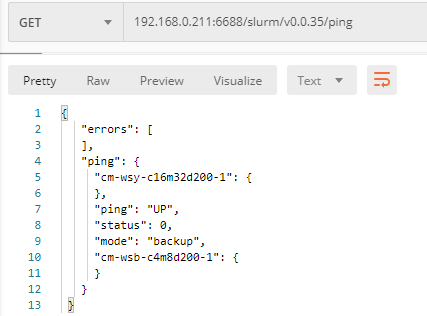
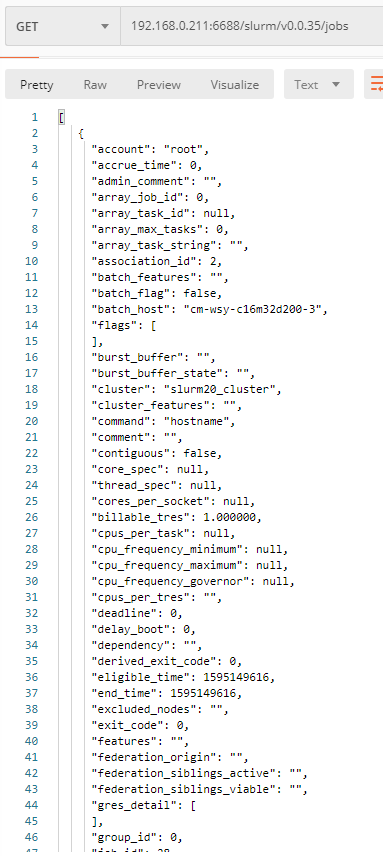
2.4 GET /slurm/v0.0.35/jobs/
slurm terminal command: scontrol show job
The screenshot is not complete
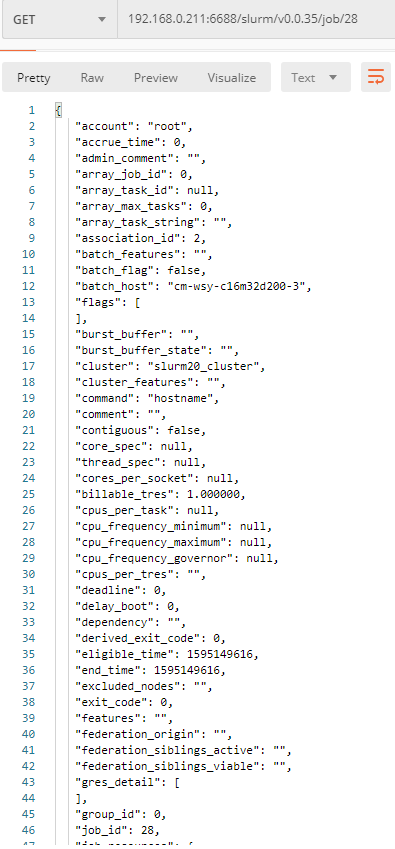
2.5 GET /slurm/v0.0.35/job/{job_id}
slurm terminal command: scontrol show job 28
The screenshot is not complete
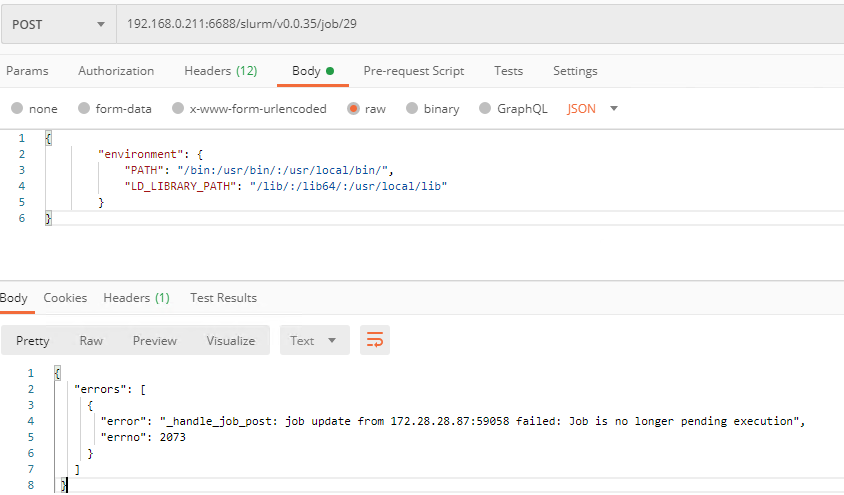
2.6 POST /slurm/v0.0.35/job/{job_id}
slurm terminal command: *
This command is to check whether the task is still in pending state (slightly pit), environment is required.
2.7 DELETE /slurm/v0.0.35/job/{job_id}
slurm terminal command: scancel 29
The information returned by Tucao is too simple

2.8 GET /slurm/v0.0.35/nodes/
slurm terminal command: scontrol show nodes
The screenshot is not complete
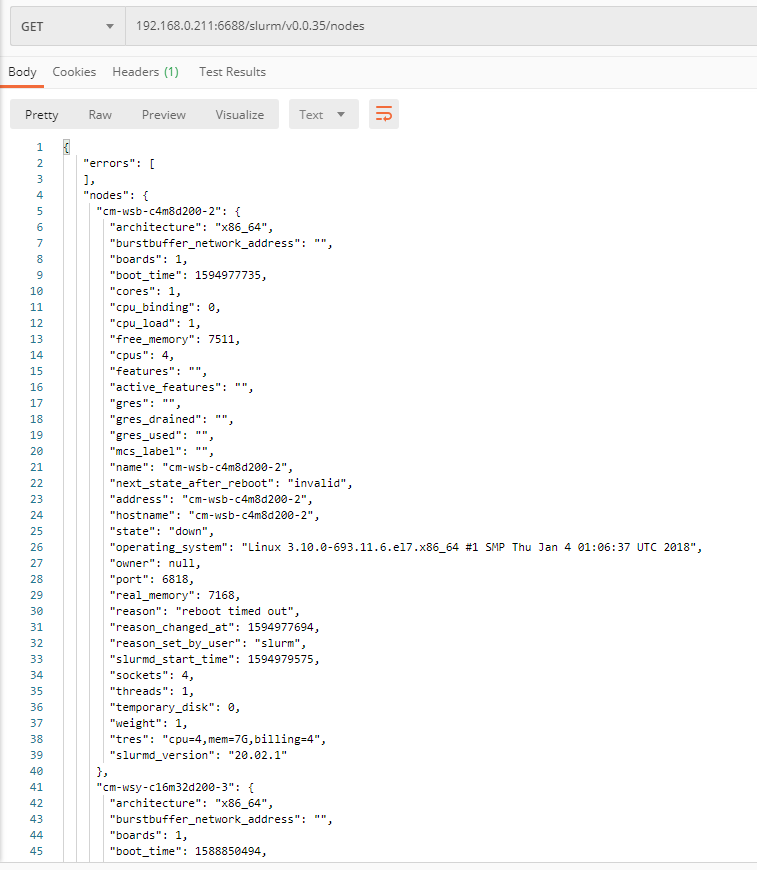
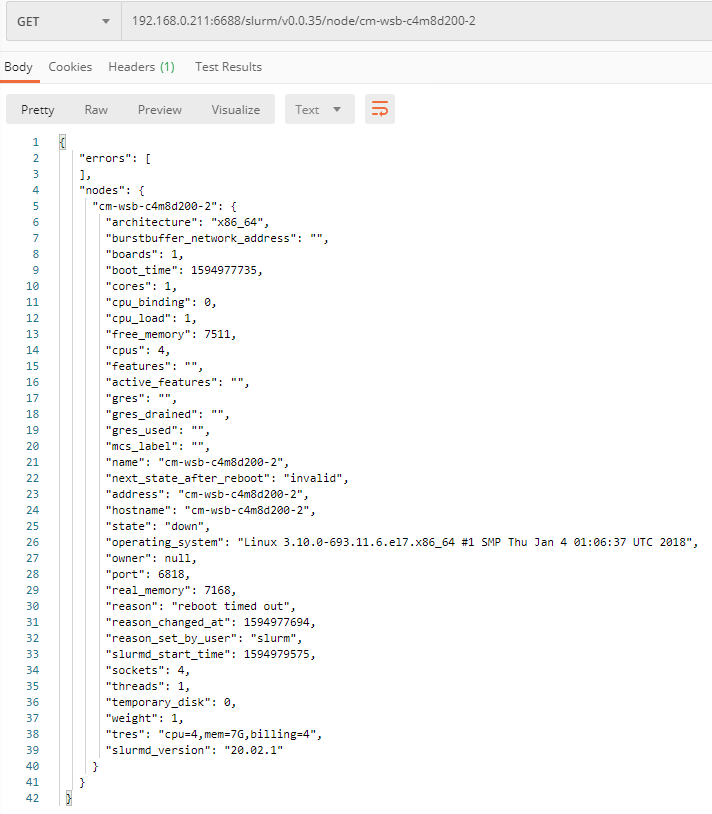
2.9 GET /slurm/v0.0.35/node/{node_name}
Slurm terminal command: scontrol show node cm-wsb-c4m8d200-2
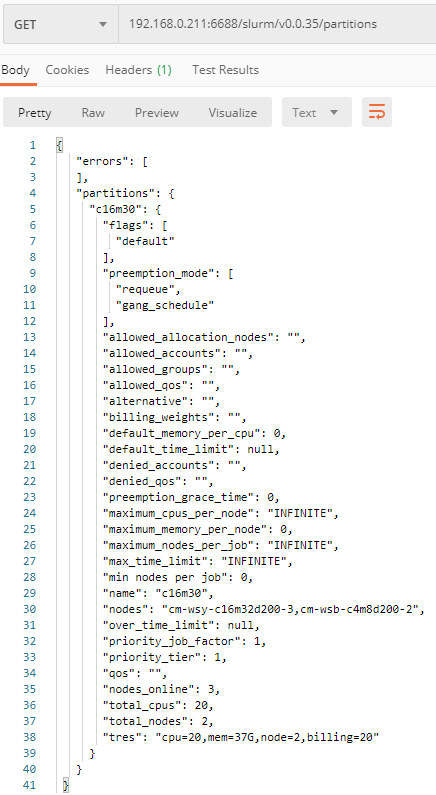
2.10 GET /slurm/v0.0.35/partitions/
slurm terminal command: scontrol show partitions
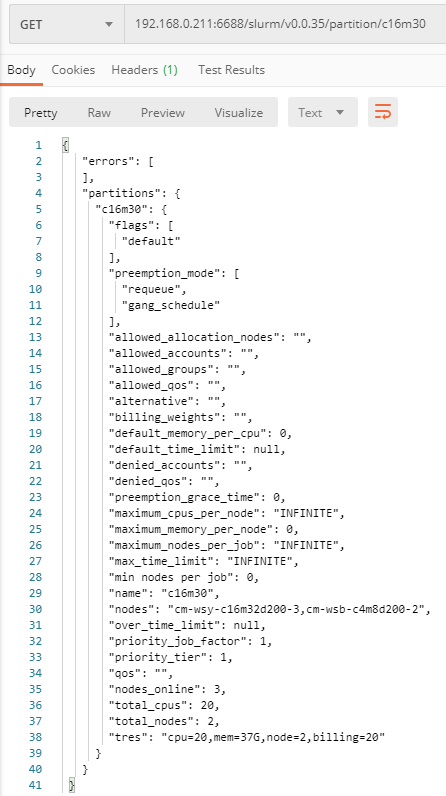
2.11 GET /slurm/v0.0.35/partition/{partition_name}
Slurm terminal command: scontrol show partition c16m30
2.12 POST /slurm/v0.0.35/job/submit
slurm terminal command: sbatch ***.sh
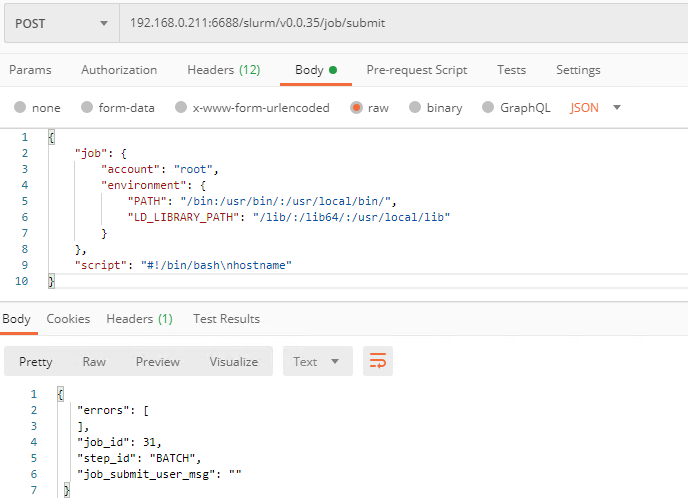
This should be the most useful interface. This is also the interface with the most parameters. The specific parameters can be from the slurm REST API in swaggerhub.linkCheck it in, and fill in selectively. There are three parameters that are required:
accont The account of the submitted task needs to be filled even if slurmdbd is not used, but currently it can only be filled in root
environment Environment variables used when running tasks, mainly specifiedPATH with LD_LIBRARY_PATH
script Corresponds to the script content in the original sbatch submission script task.
The following is the simplest case:
3 summary
The slurm REST API is a blockbuster new feature introduced in version 20.02 of slurm. In general, the user experience is average. However, the most critical task submission function is relatively complete, but it lacks user permission restrictions. In the background slurmdbd, you will find that all tasks submitted through the slurm REST API are root users and have root permissions. If you put them open, In the environment, this is a very dangerous thing.
Therefore, I hope that in the official follow-up version, I can continue to polish the slurm REST API function.
Please indicate the source
If you think it’s helpful to you, you can follow, like, 3Q~
P.S. Actually, the blogger has solved the user permission issue.
Intelligent Recommendation
Basic Usage of Spring Boot (1): Overview and Getting Started
Basic use of Spring boot 1.Spring boot overview 2. Diffility of SSM Project 3. Characteristics of Spring Boot 4.Spring boot Getting Started Step 2. Implementation 1.Spring boot overview Spring boot is...

Technology 19: 1 minute Getting Started Data Governance! Must see! [Technical]
Getting started in 1 minute! Must see! [Technical] Preface: Data research and development specifications are essential during large data development. Data research is convenient to clarify the relatio...
SLURM System Getting Started Guide
Introduction SLURM (Simple Linux Utility for Resource Management) A highly scalable and fault-tolerant cluster manager and job scheduling system that can be used in large-scale computing node clusters...
A brief introduction and basic grammar of the vue framework (a must-see for getting started)
1. A brief introduction to Vue What is Vue.js? Advantages of Vue.js: Small size: only 33k after compression; Higher operating efficiency: Based on virtual DOM, a technology that can perform various ca...
Nodejs (1): Basic Getting Started
Have more articles Shang Silial Valley Video Note: https://github.com/smallc-l-y/demo/blob/notes/nodejs%E5%AD%A6%E4%B9%A0%E7%AC%94%E8%AE%B0.md https://www.cnblogs.com/coder-lzh/p/9232192.html CommonJS...
More Recommendation
Mybatis - Basic Getting Started (1)
Official website document: https://mybatis.org/mybatis-3/en/getting-started.html First, ORM 1, what is ORM ORM, Object Relational Mapping, objects, objects, objects, mapping mappings, relation relatio...

Rabbitmq (1) Basic Getting Started
Official website address: https://www.rabbitmq.com/getstarted.html First, what is rabbitmq RabbitMQ is lightweight and easy to deploy on premises and in the cloud. It supports multiple messaging proto...
Node.js Basic Getting Started -1
Articles directory Node.js 1. What is node.js 2. Download and install 3. Use NPM Four, Common.js 5. Debug 6. The difference between nodejs and js Node.js 1. What is node.js 2. Download and install 1. ...

Getting Started with Visual Basic (1)
1. VB functions and features 1. The graphic elements of the VB design interface are given in the form of "control" tool 2. The object-oriented programming method is adopted, and the design m...