WebGL Simple Tutorial (11): Texture
Article Directory
1 Overview
Before the previous tutorial"WebGL Simple Tutorial (9): Comprehensive Example: Terrain Drawing"In, a colored terrain scene is drawn. The color of the terrain is based on the RGB value assigned by the elevation, and different colors are used to express the ups and downs of the terrain. This is a way to express the rendering of the terrain. In addition, you can also paste the captured digital images on the terrain to get a more realistic terrain effect. This will use our new knowledge in this chapter-texture.
The texture image used here is a satellite image DOM.tif downloaded from Google Earth, and its range just covers the terrain data. For the convenience of use, it is specially converted into a JPG format image: tex.jpg. And put it in the same directory as HTML and JS. The display effect of opening the image with image viewing software is:
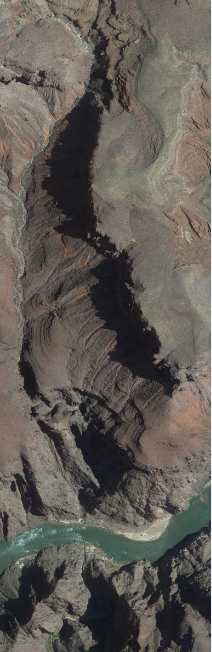
Note that in most browsers (such as chrome), access to local files is not allowed based on security policies. WebGL textures need to use local images, so you need to set the browser to support cross-domain access or establish a server to use within the domain.
2. Examples
based on"WebGL Simple Tutorial (9): Comprehensive Example: Terrain Drawing"Improve the JS code in:
// Vertex shader program
var VSHADER_SOURCE =
  'attribute vec4 a_Position;\n' + //position
  'attribute vec4 a_Color;\n' + //colour
  'uniform mat4 u_MvpMatrix;\n' +
  'varying vec4 v_Color;\n' +
  'varying vec4 v_position;\n' +
  'void main() {\n' +
  '  v_position = a_Position;\n' +
  '  gl_Position = u_MvpMatrix * a_Position;\n' + // Set vertex coordinates
  '  v_Color = a_Color;\n' +
  '}\n';

// Fragment shader program
var FSHADER_SOURCE =
  'precision mediump float;\n' +
  'uniform vec2 u_RangeX;\n' + //X direction range
  'uniform vec2 u_RangeY;\n' + //Y direction range
  'uniform sampler2D u_Sampler;\n' +
  'varying vec4 v_Color;\n' +
  'varying vec4 v_position;\n' +
  'void main() {\n' +
  '  vec2 v_TexCoord = vec2((v_position.x-u_RangeX[0]) / (u_RangeX[1]-u_RangeX[0]), 1.0-(v_position.y-u_RangeY[0]) / (u_RangeY[1]-u_RangeY[0]));\n' +
  '  gl_FragColor = texture2D(u_Sampler, v_TexCoord);\n' +
  '}\n';

//Define a rectangular body: mixed constructor prototype mode
function Cuboid(minX, maxX, minY, maxY, minZ, maxZ) {
  this.minX = minX;
  this.maxX = maxX;
  this.minY = minY;
  this.maxY = maxY;
  this.minZ = minZ;
  this.maxZ = maxZ;
}

Cuboid.prototype = {
  constructor: Cuboid,
  CenterX: function () {
    return (this.minX + this.maxX) / 2.0;
  },
  CenterY: function () {
    return (this.minY + this.maxY) / 2.0;
  },
  CenterZ: function () {
    return (this.minZ + this.maxZ) / 2.0;
  },
  LengthX: function () {
    return (this.maxX - this.minX);
  },
  LengthY: function () {
    return (this.maxY - this.minY);
  }
}

//Define DEM
function Terrain() { }
Terrain.prototype = {
  constructor: Terrain,
  setWH: function (col, row) {
    this.col = col;
    this.row = row;
  }
}

var currentAngle = [0.0, 0.0]; // Rotation angle around X axis and Y axis ([x-axis, y-axis])
var curScale = 1.0; //Current zoom ratio
var initTexSuccess = false; //Is the texture image loaded?

function main() {
  var demFile = document.getElementById('demFile');
  if (!demFile) {
    console.log("Failed to get demFile element!");
    return;
  }

  //Event after loading file
  demFile.addEventListener("change", function (event) {
    //Determine whether the browser supports the FileReader interface
    if (typeof FileReader == 'undefined') {
      console.log("Your browser does not support the FileReader interface!");
      return;
    }

    //Event after reading the file
    var reader = new FileReader();
    reader.onload = function () {
      if (reader.result) {
        var terrain = new Terrain();
        if (!readDEMFile(reader.result, terrain)) {
          console.log("The file format is wrong, the file cannot be read!");
        }

        //Drawing function
        onDraw(gl, canvas, terrain);
      }
    }

    var input = event.target;
    reader.readAsText(input.files[0]);
  });

  // Get the <canvas> element
  var canvas = document.getElementById('webgl');

  // Get WebGL rendering context
  var gl = getWebGLContext(canvas);
  if (!gl) {
    console.log('Failed to get the rendering context for WebGL');
    return;
  }

  // Initialize the shader
  if (!initShaders(gl, VSHADER_SOURCE, FSHADER_SOURCE)) {
    console.log('Failed to intialize shaders.');
    return;
  }

  // Specify the color of empty <canvas>
  gl.clearColor(0.0, 0.0, 0.0, 1.0);

  // Turn on the depth test
  gl.enable(gl.DEPTH_TEST);

  //Empty the color and depth buffer
  gl.clear(gl.COLOR_BUFFER_BIT | gl.DEPTH_BUFFER_BIT);
}

//Drawing function
function onDraw(gl, canvas, terrain) {
  // set vertex position
  //var cuboid = new Cuboid(399589.072, 400469.072, 3995118.062, 3997558.062, 732, 1268);
  var n = initVertexBuffers(gl, terrain);
  if (n < 0) {
    console.log('Failed to set the positions of the vertices');
    return;
  }

  //Set the texture
  if (!initTextures(gl, terrain)) {
    console.log('Failed to intialize the texture.');
    return;
  }

  //Register mouse events
  initEventHandlers(canvas);

  //Drawing function
  var tick = function () {
    if (initTexSuccess) {
      //Set MVP matrix
      setMVPMatrix(gl, canvas, terrain.cuboid);

      //Empty the color and depth buffer
      gl.clear(gl.COLOR_BUFFER_BIT | gl.DEPTH_BUFFER_BIT);

      //Draw a rectangular body
      gl.drawElements(gl.TRIANGLES, n, gl.UNSIGNED_SHORT, 0);
      //gl.drawArrays(gl.Points, 0, n);
    }

    //Request the browser to call tick
    requestAnimationFrame(tick);
  };

  //Start drawing
  tick();
}

function initTextures(gl, terrain) {
  // Pass the range in X direction and Y direction to the shader
  var u_RangeX = gl.getUniformLocation(gl.program, 'u_RangeX');
  var u_RangeY = gl.getUniformLocation(gl.program, 'u_RangeY');
  if (!u_RangeX || !u_RangeY) {
    console.log('Failed to get the storage location of u_RangeX or u_RangeY');
    return;
  }
  gl.uniform2f(u_RangeX, terrain.cuboid.minX, terrain.cuboid.maxX);
  gl.uniform2f(u_RangeY, terrain.cuboid.minY, terrain.cuboid.maxY);

  //Create an image object
  var image = new Image();
  if (!image) {
    console.log('Failed to create the image object');
    return false;
  }
  //Response function for image loading
  image.onload = function () {
    if (loadTexture(gl, image)) {
      initTexSuccess = true;
    }
  };

  //The browser starts to load the image
  image.src = 'tex.jpg';

  return true;
}

function loadTexture(gl, image) {
  // Create a texture object
  var texture = gl.createTexture();
  if (!texture) {
    console.log('Failed to create the texture object');
    return false;
  }

  // Turn on texture unit 0
  gl.activeTexture(gl.TEXTURE0);
  // bind texture object
  gl.bindTexture(gl.TEXTURE_2D, texture);

  // Set texture parameters
  gl.texParameteri(gl.TEXTURE_2D, gl.TEXTURE_MIN_FILTER, gl.LINEAR);
  gl.texParameteri(gl.TEXTURE_2D, gl.TEXTURE_MAG_FILTER, gl.LINEAR);
  gl.texParameteri(gl.TEXTURE_2D, gl.TEXTURE_WRAP_S, gl.CLAMP_TO_EDGE);
  gl.texParameteri(gl.TEXTURE_2D, gl.TEXTURE_WRAP_T, gl.CLAMP_TO_EDGE);

  // Configure texture image
  gl.texImage2D(gl.TEXTURE_2D, 0, gl.RGB, gl.RGB, gl.UNSIGNED_BYTE, image);

  // Pass the texture of unit 0 to the sampler variable in the shader
  var u_Sampler = gl.getUniformLocation(gl.program, 'u_Sampler');
  if (!u_Sampler) {
    console.log('Failed to get the storage location of u_Sampler');
    return false;
  }
  gl.uniform1i(u_Sampler, 0);

  return true;
}

//Read DEM function
function readDEMFile(result, terrain) {
  var stringlines = result.split("\n");
  if (!stringlines || stringlines.length <= 0) {
    return false;
  }

  //Read header information
  var subline = stringlines[0].split("\t");
  if (subline.length != 6) {
    return false;
  }
  var col = parseInt(subline[4]); //DEM wide
  var row = parseInt(subline[5]); //DEM high
  var verticeNum = col * row;
  if (verticeNum + 1 > stringlines.length) {
    return false;
  }
  terrain.setWH(col, row);

  //Read point information
  var ci = 0;
  terrain.verticesColors = new Float32Array(verticeNum * 6);
  for (var i = 1; i < stringlines.length; i++) {
    if (!stringlines[i]) {
      continue;
    }

    var subline = stringlines[i].split(',');
    if (subline.length != 9) {
      continue;
    }

    for (var j = 0; j < 6; j++) {
      terrain.verticesColors[ci] = parseFloat(subline[j]);
      ci++;
    }
  }

  if (ci !== verticeNum * 6) {
    return false;
  }

  //Bounding box
  var minX = terrain.verticesColors[0];
  var maxX = terrain.verticesColors[0];
  var minY = terrain.verticesColors[1];
  var maxY = terrain.verticesColors[1];
  var minZ = terrain.verticesColors[2];
  var maxZ = terrain.verticesColors[2];
  for (var i = 0; i < verticeNum; i++) {
    minX = Math.min(minX, terrain.verticesColors[i * 6]);
    maxX = Math.max(maxX, terrain.verticesColors[i * 6]);
    minY = Math.min(minY, terrain.verticesColors[i * 6 + 1]);
    maxY = Math.max(maxY, terrain.verticesColors[i * 6 + 1]);
    minZ = Math.min(minZ, terrain.verticesColors[i * 6 + 2]);
    maxZ = Math.max(maxZ, terrain.verticesColors[i * 6 + 2]);
  }

  terrain.cuboid = new Cuboid(minX, maxX, minY, maxY, minZ, maxZ);

  return true;
}


//Register mouse events
function initEventHandlers(canvas) {
  var dragging = false; // Dragging or not
  var lastX = -1,
    lastY = -1; // Last position of the mouse

  //Mouse press
  canvas.onmousedown = function (ev) {
    var x = ev.clientX;
    var y = ev.clientY;
    // Start dragging if a moue is in <canvas>
    var rect = ev.target.getBoundingClientRect();
    if (rect.left <= x && x < rect.right && rect.top <= y && y < rect.bottom) {
      lastX = x;
      lastY = y;
      dragging = true;
    }
  };

  //When the mouse leaves
  canvas.onmouseleave = function (ev) {
    dragging = false;
  };

  //Mouse release
  canvas.onmouseup = function (ev) {
    dragging = false;
  };

  //Mouse movement
  canvas.onmousemove = function (ev) {
    var x = ev.clientX;
    var y = ev.clientY;
    if (dragging) {
      var factor = 100 / canvas.height; // The rotation ratio
      var dx = factor * (x - lastX);
      var dy = factor * (y - lastY);
      currentAngle[0] = currentAngle[0] + dy;
      currentAngle[1] = currentAngle[1] + dx;
    }
    lastX = x, lastY = y;
  };

  //Mouse zoom
  canvas.onmousewheel = function (event) {
    if (event.wheelDelta > 0) {
      curScale = curScale * 1.1;
    } else {
      curScale = curScale * 0.9;
    }
  };
}

//Set MVP matrix
function setMVPMatrix(gl, canvas, cuboid) {
  // Get the storage location of u_MvpMatrix
  var u_MvpMatrix = gl.getUniformLocation(gl.program, 'u_MvpMatrix');
  if (!u_MvpMatrix) {
    console.log('Failed to get the storage location of u_MvpMatrix');
    return;
  }

  //Model matrix
  var modelMatrix = new Matrix4();
  modelMatrix.scale(curScale, curScale, curScale);
  modelMatrix.rotate(currentAngle[0], 1.0, 0.0, 0.0); // Rotation around x-axis
  modelMatrix.rotate(currentAngle[1], 0.0, 1.0, 0.0); // Rotation around y-axis
  modelMatrix.translate(-cuboid.CenterX(), -cuboid.CenterY(), -cuboid.CenterZ());

  //Projection matrix
  var fovy = 60;
  var near = 1;
  var projMatrix = new Matrix4();
  projMatrix.setPerspective(fovy, canvas.width / canvas.height, 1, 10000);

  //Calculate the height of the initial viewpoint of the lookAt() function
  var angle = fovy / 2 * Math.PI / 180.0;
  var eyeHight = (cuboid.LengthY() * 1.2) / 2.0 / angle;

  //View matrix
  var viewMatrix = new Matrix4(); // View matrix
  viewMatrix.lookAt(0, 0, eyeHight, 0, 0, 0, 0, 1, 0);

  //MVP matrix
  var mvpMatrix = new Matrix4();
  mvpMatrix.set(projMatrix).multiply(viewMatrix).multiply(modelMatrix);

  //Transfer the MVP matrix to the uniform variable u_MvpMatrix of the shader
  gl.uniformMatrix4fv(u_MvpMatrix, false, mvpMatrix.elements);
}

//
function initVertexBuffers(gl, terrain) {
  //A grid of DEM is composed of two triangles
  //      0------1            1
  //      |                   |
  //      |                   |
  //      col       col------col+1
  var col = terrain.col;
  var row = terrain.row;

  var indices = new Uint16Array((row - 1) * (col - 1) * 6);
  var ci = 0;
  for (var yi = 0; yi < row - 1; yi++) {
    //for (var yi = 0; yi < 10; yi++) {
    for (var xi = 0; xi < col - 1; xi++) {
      indices[ci * 6] = yi * col + xi;
      indices[ci * 6 + 1] = (yi + 1) * col + xi;
      indices[ci * 6 + 2] = yi * col + xi + 1;
      indices[ci * 6 + 3] = (yi + 1) * col + xi;
      indices[ci * 6 + 4] = (yi + 1) * col + xi + 1;
      indices[ci * 6 + 5] = yi * col + xi + 1;
      ci++;
    }
  }

  //
  var verticesColors = terrain.verticesColors;
  var FSIZE = verticesColors.BYTES_PER_ELEMENT; //The number of bytes of each element in the array

  // Create a buffer object
  var vertexColorBuffer = gl.createBuffer();
  var indexBuffer = gl.createBuffer();
  if (!vertexColorBuffer || !indexBuffer) {
    console.log('Failed to create the buffer object');
    return -1;
  }

  // Bind the buffer object to the target
  gl.bindBuffer(gl.ARRAY_BUFFER, vertexColorBuffer);
  // write data to the buffer object
  gl.bufferData(gl.ARRAY_BUFFER, verticesColors, gl.STATIC_DRAW);

  //Get the address of the attribute variable a_Position in the shader
  var a_Position = gl.getAttribLocation(gl.program, 'a_Position');
  if (a_Position < 0) {
    console.log('Failed to get the storage location of a_Position');
    return -1;
  }
  // Assign the buffer object to the a_Position variable
  gl.vertexAttribPointer(a_Position, 3, gl.FLOAT, false, FSIZE * 6, 0);

  // Connect the a_Position variable with the buffer object assigned to it
  gl.enableVertexAttribArray(a_Position);

  //Get the address of the attribute variable a_Color in the shader
  var a_Color = gl.getAttribLocation(gl.program, 'a_Color');
  if (a_Color < 0) {
    console.log('Failed to get the storage location of a_Color');
    return -1;
  }
  // Assign the buffer object to the a_Color variable
  gl.vertexAttribPointer(a_Color, 3, gl.FLOAT, false, FSIZE * 6, FSIZE * 3);
  // Connect the a_Color variable with the buffer object assigned to it
  gl.enableVertexAttribArray(a_Color);

  // Write the vertex index to the buffer object
  gl.bindBuffer(gl.ELEMENT_ARRAY_BUFFER, indexBuffer);
  gl.bufferData(gl.ELEMENT_ARRAY_BUFFER, indices, gl.STATIC_DRAW);

  return indices.length;
}
Mainly made the following three changes to use texture.
2.1. Prepare the texture
In WebGL, due to the asynchronous nature of JS, it is necessary to transfer the picture as a texture to the shader for drawing after the JS has loaded the picture. So first, a boolean global variable initTexSuccess is defined here to identify whether the texture image is loaded. In the drawing function onDraw(), a texture function initTextures() is added. Finally, check the initTexSuccess variable in the redraw refresh function tick(), and if it is finished, draw.
var initTexSuccess = false;       //Is the texture image loaded?

//...

//Drawing function
function onDraw(gl, canvas, terrain) {

  //...

  //Set the texture
  if (!initTextures(gl)) {
    console.log('Failed to intialize the texture.');
    return;
  }

  //...

  //Drawing function
  var tick = function () {
    if (initTexSuccess) {
         //...
    }

    //Request the browser to call tick
    requestAnimationFrame(tick);
  };

  //Start drawing
  tick();
}
In the initialization texture function initTextures(), the actual coordinates (local coordinate system coordinates) range in the X direction and Y direction are first passed to the shader. This range is used to calculate the texture coordinates. Then an Image object is created, and the image is loaded through this object. Finally, write a response function for image loading. Once the texture configuration function loadTexture() succeeds, set initTexSuccess to true.
function initTextures(gl, terrain) {
  // Pass the range in X direction and Y direction to the shader
  var u_RangeX = gl.getUniformLocation(gl.program, 'u_RangeX');
  var u_RangeY = gl.getUniformLocation(gl.program, 'u_RangeY');
  if (!u_RangeX || !u_RangeY) {
    console.log('Failed to get the storage location of u_RangeX or u_RangeY');
    return;
  }
  gl.uniform2f(u_RangeX, terrain.cuboid.minX, terrain.cuboid.maxX);
  gl.uniform2f(u_RangeY, terrain.cuboid.minY, terrain.cuboid.maxY);

  //Create an image object
  var image = new Image();
  if (!image) {
    console.log('Failed to create the image object');
    return false;
  }
  //Response function for image loading
  image.onload = function () {
    if (loadTexture(gl, image)) {
      initTexSuccess = true;
    }
  };


  //The browser starts to load the image
  image.src = 'tex.jpg';

  return true;
}
2.2. Configure texture
In the configuration texture function loadTexture(), a texture object is first created and bound to texture unit 0. WebGL supports at least 8 texture units, and the built-in variable names are like gl.TEXTURE0, gl.TEXTURE1...gl.TEXTURE7.
function loadTexture(gl, image) {
  // Create a texture object
  var texture = gl.createTexture();
  if (!texture) {
    console.log('Failed to create the texture object');
    return false;
  }

  // Turn on texture unit 0
  gl.activeTexture(gl.TEXTURE0);
  // bind texture object
  gl.bindTexture(gl.TEXTURE_2D, texture);

  //...

  return true;
}
Then configure the parameters of the texture through the gl.texParameteri() function. This function specifies the interpolation method of the texture when it is scaled, and the method of paving when the texture is filled. This means that linear interpolation is used for texture scaling, and the edge value of the texture image is used for filling when the filling range is insufficient:
function loadTexture(gl, image) {
  //...

  // Set texture parameters
  gl.texParameteri(gl.TEXTURE_2D, gl.TEXTURE_MIN_FILTER, gl.LINEAR);
  gl.texParameteri(gl.TEXTURE_2D, gl.TEXTURE_MAG_FILTER, gl.LINEAR);
  gl.texParameteri(gl.TEXTURE_2D, gl.TEXTURE_WRAP_S, gl.CLAMP_TO_EDGE);
  gl.texParameteri(gl.TEXTURE_2D, gl.TEXTURE_WRAP_T, gl.CLAMP_TO_EDGE);

  //...

  return true;
}
Finally, the texture object is assigned to the texture object through the gl.texImage2D() function. The texture object has been bound to texture unit 0, so texture unit 0 is directly passed to the shader as a uniform variable:
function loadTexture(gl, image) {
  //...

  // Configure texture image
  gl.texImage2D(gl.TEXTURE_2D, 0, gl.RGB, gl.RGB, gl.UNSIGNED_BYTE, image);

  // Pass the texture of unit 0 to the sampler variable in the shader
  var u_Sampler = gl.getUniformLocation(gl.program, 'u_Sampler');
  if (!u_Sampler) {
    console.log('Failed to get the storage location of u_Sampler');
    return false;
  }
  gl.uniform1i(u_Sampler, 0);

  return true;
}
2.3. Using textures
In the vertex shader, the vertex coordinate value a_Position is assigned to the varying variable v_position, which is used to pass to the fragment shader.
// Vertex shader program
var VSHADER_SOURCE =
  'attribute vec4 a_Position;\n' + //position
  'attribute vec4 a_Color;\n' + //colour
  'uniform mat4 u_MvpMatrix;\n' +
  'varying vec4 v_Color;\n' +
  'varying vec4 v_position;\n' +
  'void main() {\n' +
  '  v_position = a_Position;\n' +
  '  gl_Position = u_MvpMatrix * a_Position;\n' + // Set vertex coordinates
  '  v_Color = a_Color;\n' +
  '}\n';
After interpolation, the fragment shader receives the vertex coordinate v_position corresponding to each fragment. Since this value is interpolated based on the actual vertex coordinates (local coordinate system coordinates), this value is also the actual coordinate value. At the same time, the fragment shader also receives the passed texture object u_Sampler, and can use the texture2D() function to obtain the pixel of the corresponding coordinate, and use it as the final value of the fragment:
// Fragment shader program
var FSHADER_SOURCE =
  'precision mediump float;\n' +
  'uniform vec2 u_RangeX;\n' + //X direction range
  'uniform vec2 u_RangeY;\n' + //Y direction range
  'uniform sampler2D u_Sampler;\n' +
  'varying vec4 v_Color;\n' +
  'varying vec4 v_position;\n' +
  'void main() {\n' +
  '  vec2 v_TexCoord = vec2((v_position.x-u_RangeX[0]) / (u_RangeX[1]-u_RangeX[0]), 1.0-(v_position.y-u_RangeY[0]) / (u_RangeY[1]-u_RangeY[0]));\n' +
  '  gl_FragColor = texture2D(u_Sampler, v_TexCoord);\n' +
  '}\n';
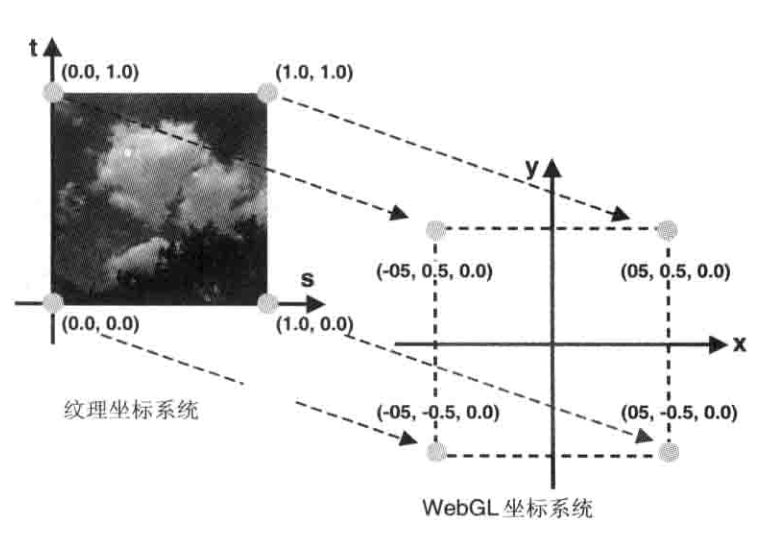
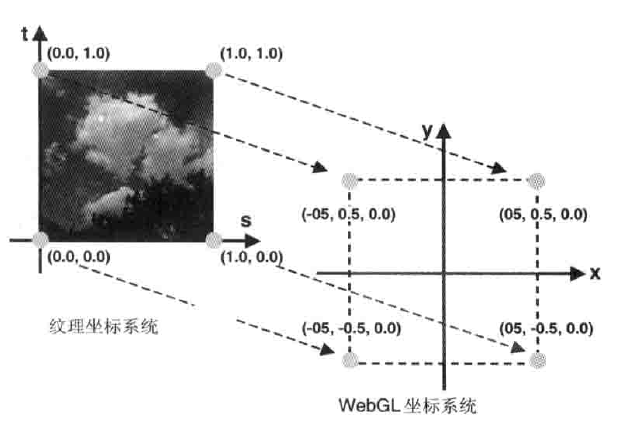
You can see from the above code that v_position is not used directly for interpolation. This is because the texture coordinate range is between 0 and 1, which requires a texture mapping conversion. As shown in the figure, this is a simple linear transformation process:
3. Results
Run with a browser, the final display result is as follows, you can clearly see the texture of mountains and rivers:
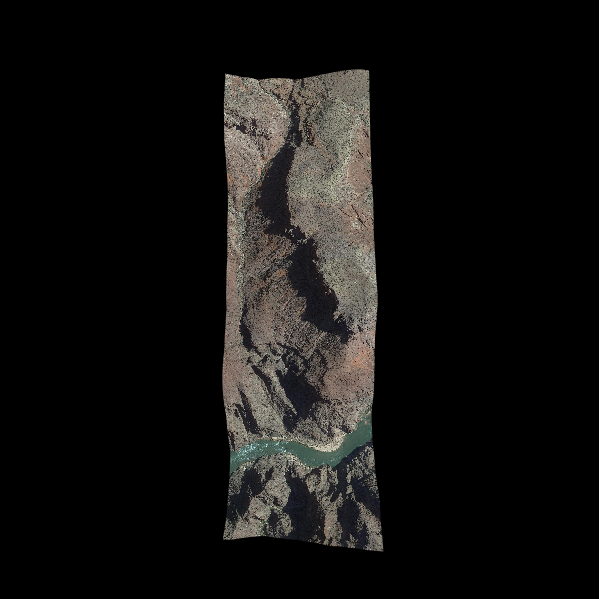
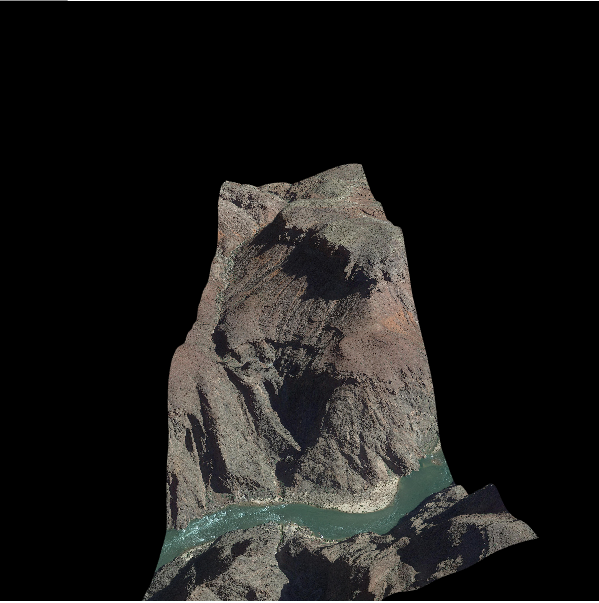
Once again, this example uses local pictures, you need to let the browser set up cross-domain or set up a server to use in the domain.
4. Reference
Originally part of the code and illustrations are from "WebGL Programming Guide", source code link:address . Will continue to update subsequent content in this shared directory.
Intelligent Recommendation
WebGL learning texture map
Original address:WebGL learning texture map In order to make the image get the effect of the material close to the real object, the texture is generally used. There are two types of texture types: dif...
WebGL texture loaded examples
show_texture.html hi_server.go hi.js Source Download Reference material http://www.cnblogs.com/bsman/p/6196871.html https://developer.mozilla.org/en-US/docs/Web/API/WebGLRenderingContext/generateMipma...
Combination of Vue and WebGL-texture
This article introduces the combination of vue and WebGL to add texture to the quadrilateral. Part of the code and pictures in the article are from the "WebGL Programming Guide". code show a...
[WebGL] Teapot and texture
The purpose of the experiment is to achieve mixed textures and use the keyboard to control texture switching running result: Code: A relatively easy experiment......
More Recommendation

WebGL-15. Add texture
Texture coordinates Use the texture coordinates to determine which part of the texture image will override onto the geometry. Texture coordinates are a new set of coordinate systems. Texture coordinat...
Play WebGL (Nine) Texture
Texture unit The texture object is passed to the fragment shader through the sampler (Sampler) in the last section. GLSL built-in Texture function is sampled texture, its first parameter is a texture ...

WebGL Simple Tutorial (12): Surrounding Ball and Projection
Article Directory 1 Overview 2. Detailed implementation 3. Specific code 4. Reference 1 Overview In the previous tutorials, the model view projection matrix (MVP matrix) was set by the object's boundi...

WebGL simple tutorial (15): load gltf model
table of Contents 1 Overview 2. Examples 2.1. Data 2.2. Procedure 2.2.1. File reading 2.2.2. Analysis of glTF format 2.2.3. Initializing the vertex buffer 2.2.4. Other 3. Results 4. Reference 5. Relat...
WebGL simple tutorial (7): draw a rectangular body
Article Directory 1 Overview 2. Example 2.1. Vertex index drawing 2.2. MVP matrix settings 2.2.1. Model matrix 2.2.2. Projection Matrix 2.2.3. View matrix 2.2.4. MVP Matrix 3. Results 4. Reference 1 O...