Use DosBox to write the first assembly Helloworld
tags: compilation
Use DosBox to write the first assembly Helloworld
Forced to learn assembly after all, I feel that writing things in assembly is not as refreshing as writing things in high-level languages. It is too hard-core. If you don't install dosbox, you have to install a virtual machine to use XP, or install dosbox.
1 Install DosBox and related content
ToDosBox official websiteThe next windows version, simple installation, nothing to say.
Then just find a place to put our program, I put itD:\Documents\files\DosappHere, then we need to prepare several applications and put them here for our convenience. They are debug.exe, masm.exe, and link.exe, which are used for debugging, assembly, and connection respectively. (Put the file the teacher sent us inBaidu cloud, Extraction code: a8s7, in fact, it is easy to find when searching online) Put it into the path just used to put the program.
In order to avoid the need to create a drive letter with the mount command every time you open, you can add the mount command to the automatic execution of the open in the configuration file.
The configuration file is in this place,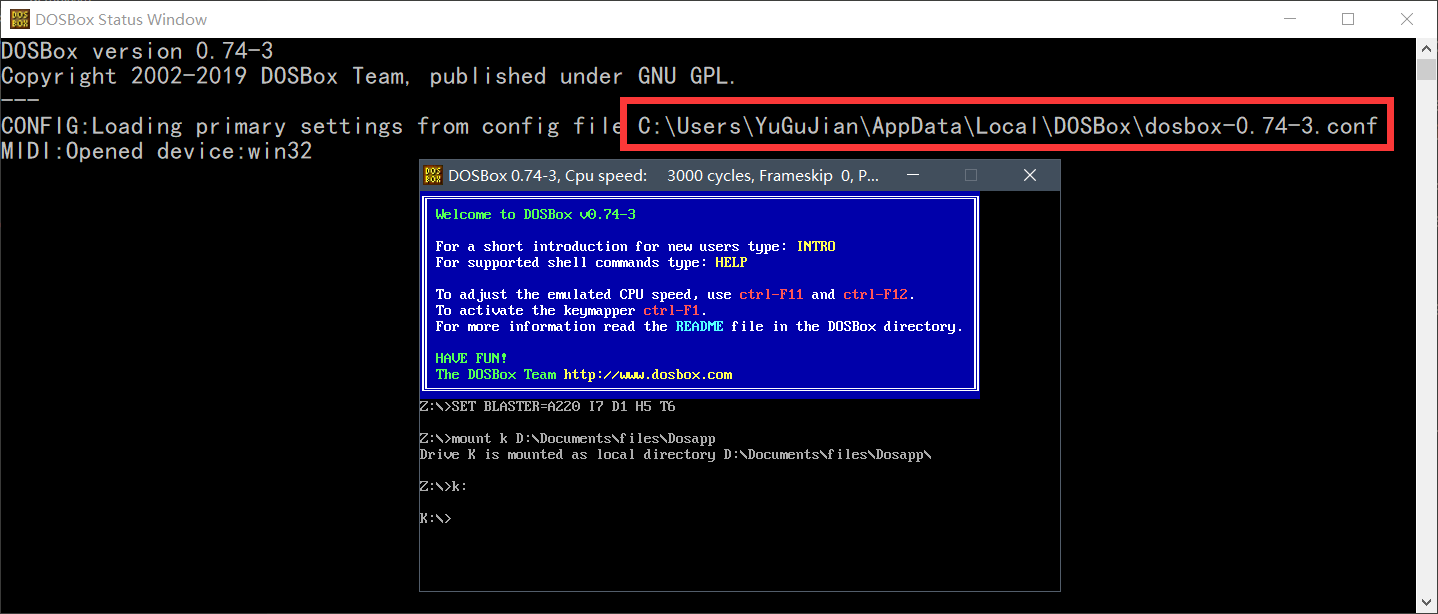
Then load this at the end (k can also be changed to other, the following path is the path we created before).
mount k D:\Documents\files\Dosapp
k:
2 code
inD:\Documents\files\DosappCreate a demo.asm file inside and open it with vscode. Then I found a helloworld program. It took some time to finally figure it out, and it was written in the comments.
One thing I found is that if a line of comment is too long, it will cause compilation errors?
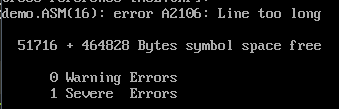
So put;'ASSUME, segment addressing pseudo-instruction' is used to tell the assembler which segment address of each segment currently used by the assembler will be stored in which segment register, but in fact, except for the CS segment register, other segment registers cannot be assigned values. Re-assign other segment registers laterThis changed to two lines, which solved the problem.
; Data segment
DATA SEGMENT
         MESS DB'Hello,World!' ,0DH ,0AH ,24H; DB is a variable that defines byte type, string storage must use DB, not DW
         ; 0DH: Enter
         ; 0AH: line feed
         ; 24H:'$', which is the end symbol
DATA ENDS
 ; End of data segment

 ; Stack segment, there will be a warning if this is not added, this program does not actually need to use the stack
SSEG SEGMENT PARA STACK
    DW 256 DUP(?)
SSEG ENDS
 ; End of stack segment

 ; Code segment
CODE SEGMENT
         ASSUME CS:CODE, DS:DATA; ‘ASSUME, segment addressing pseudo-instruction’ is used to tell the assembler which segment address of each segment currently used is to be stored in which segment register,
                                                         ; But in fact, in addition to the CS segment register, other segment registers can not be assigned values, you need to re-assign other segment registers later
BEGIN:
         MOV AX,DATA; Specify the data segment, but the segment register cannot be assigned directly, it needs to be transitioned through AX
    MOV DS,AX
         MOV DX,OFFSET MESS; Pass the first address of MESS to DX, OFFSET means take the first address
         MOV AH,9; Next, we need to call ‘output string’
                                                 ; The entry parameter of ‘output string’ is DS: DX=string address, the end of the string is the "$" symbol
         INT 21H; System function call
         MOV AH,4CH; Next, we need to call ‘return to DOS system’
         INT 21H; System function call
CODE ENDS
 ; End of data segment

END BEGIN
Use vscode to write code, searched a little about asm extension plug-ins. The x86 and x86_64 Assembly that I use now are more in line with my feelings after I tried several code highlighting plug-ins. The effect is like the picture below.


3 Assemble and run
Then open Dosbox, you can see that it has been automatically executed as soon as it is openedmount k D:\Documents\files\Dosappwithk:。
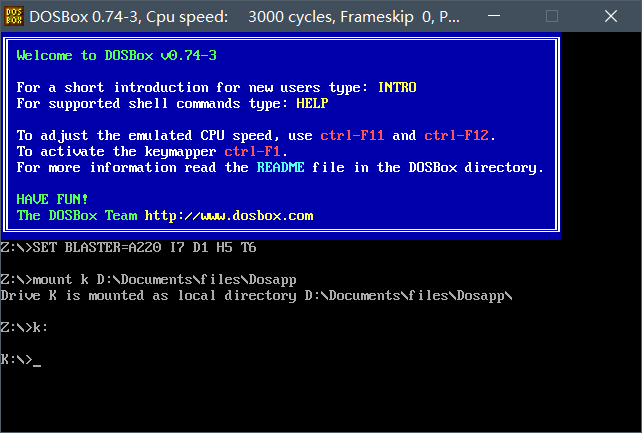
and entermasm demo:Compile, enter after correctlink demo;Make a connection. There is no mistake after enteringdemoYou can run it.Note that one is followed by a colon’:’ and the other is a semicolon’;’, I wrote two semicolons at the beginning, causing the link to fail.

complete.
Intelligent Recommendation

Use DOSBox to run assembly super detailed steps! !
Recently, the school has requested to use hui to write curriculum (the original review was good, but the written test was cancelled, and the whole day is moth !!), but it is helpless to configure the ...
8086 assembly learning-the use of tool DOSBox
mount c d:\; mount disk d to disk C as a virtual disk c: Enter the virtual disk and start the operation (debug.exe program is placed in the virtual disk for calling) Execute debug program name.exe and...

Assembly language from installation to use dosbox
Assembly language from installation to use dosbox Install First use dosbox When linking multiple files Install I putdosboxInstalled to the D drive, directly under D, and then created a new folder in D...
DOSBOX+MASM assembly environment installation and use
1. Software download DOSBOX installation program and MASM download https://github.com/xDarkLemon/DOSBox_MASM/tree/master After opening, as shown in the figure: Double-click DOSBOX0.74-WIN32-Installer....
Use Idea to write the first program "HelloWorld"
Use Idea to write the first program "HelloWorld" The premise is to install the Intellij IDEA software first, and configure the JDK. Idea installation tutorial link: JDK configuration tutoria...
More Recommendation
Assembly learning-use DOSBox+MASMPLUS toolkit to build assembly environment
Moved from the first row to the last row of the classroom, I really can’t listen to what the teacher said~ Hahahaha 1. Download and install DOSBOX and assembly related tools The link is as follo...
dosbox+masm assembly environment installation and use ------ (assembly environment DOSBox+debug+masm configuration 2)
1. Configuration of dosbox+masm environment 1. Download the dosbox installer: DOSBox0.74-win32-installer.exe Link: https://pan.baidu.com/s/1gXPKTT-xKb6BpjOJdhmudA Password: khqs 2. Install. Not...
Run the helloworld program with DOSBOX
The source code is as follows: The code comes from this, and this blog has a step-by-step explanation of the program. Here is mainly to explain the steps to run the source program with DOSBOX: 1) Afte...
Write the first makefile (HelloWorld)
What is makefile Before making Makefie, what will be what is make; make is a command tool, which is a command tool that explains the command in Makefile. It simplifies the instructions below the compi...
First write code, HelloWorld write
HelloWorld 3. Write code 4. Compile a Javac Java file and generate a class file 5. Run the Class file, Java class file [Outer chain picture "failed, the source station may have an anti-theft chai...