[086] When deploying a nodejs program, how do I package the npm module I use into a Docker image so that I can use it offline?
scenes to be used
At the beginning of this article, talk about the usage scenarios encountered. After the nodejs program is written, it must be packaged into a Docker image. When compiling the Dockerfile, the system will download the used modules from the npm module repository. This will encounter two problems:
First, in most cases, we update the program, but only the source code, not the module configuration in package.json. It is a waste of time to download modules from the network every time the image is compiled.
Second, the production environment is isolated from the external network; or the network environment is unstable.
I gave solutions around these two problems and wrote an example in this article.
Solution
First we need to create a nodejs-base image to store the npm modules we need to put in this docker image.
Create a node-js project, because this project is mainly for downloading npm modules, so there is no program and the structure is simple, as shown below:
nodejs-base
  │
  ├─Dockerfile
  ├─main.js
  └─package.json
Dockerfile
FROM node:8-onbuild

# set timezone as china/shanghai
RUN cp /usr/share/zoneinfo/PRC /etc/localtime

# Create app directory
RUN mkdir -p /usr/src/app
WORKDIR /usr/src/app

# Install app dependencies
#COPY package.json /usr/src/app/

# copy app source
COPY . /usr/src/app

RUN npm install

CMD ["node","/usr/src/app/main.js"]
main.js
console.log("main")package.json writes all modules used in the project into this file. In order to avoid errors caused by the automatic module update, a certain version is used.
{
  "name": "train-outline",
  "version": "0.0.1",
  "description": "Learn node.js and express.",
  "main": "main.js",
  "author": "Zhang Chao",
  "license": "MIT",
  "dependencies": {
    "body-parser": "1.17.2",
    "cookie-parser": "1.4.3",
    "express": "4.15.3",
    "jade": "1.11.0",
    "multer": "1.3.0",
    "superagent": "3.5.2"
  }
}
After the local compilation runs normally, upload the entire node-base folder (except node_modules) to the linux server, enter the node-base folder in linux through the cd command, and enter the following command to compile the image:
docker build -t zhangchao/nodejs-base:v1 .Then I write an application example to try it out.
nodejs-base
  │
  ├─.npmrc
  ├─Dockerfile
  ├─package.json
  ├─server.js
  ├─test.jade
  └─yarn.lock
.npmrc
sass_binary_site=https://npm.taobao.org/mirrors/node-sass/
phantomjs_cdnurl=https://npm.taobao.org/mirrors/phantomjs/
electron_mirror=https://npm.taobao.org/mirrors/electron/
registry=https://registry.npm.taobao.org
Dockerfile
FROM zhangchao/nodejs-base:v1

WORKDIR /usr/src/app

# copy app source
COPY . /usr/src/app

EXPOSE 18091
CMD ["node","/usr/src/app/server.js"]
package.json
{
  "name": "train-outline",
  "version": "0.0.1",
  "description": "Learn node.js and express.",
  "main": "main.js",
  "author": "Zhang Chao",
  "license": "MIT",
  "dependencies": {
    "body-parser": "1.17.2",
    "cookie-parser": "1.4.3",
    "express": "4.15.3",
    "jade": "1.11.0",
    "multer": "1.3.0",
    "superagent": "3.5.2"
  }
}
server.js
// var express = require('express');
// var http = require('http');
// var app = express();
// app.set('view engine','jade'); // set template engine
// app.set('views', __dirname); // Set template relative path (relative to current directory)

// app.get('/', function(req, res) {
// res.render('test'); // call the test.jade template under the current path
// })

// var server = http.createServer(app);
// server.listen(3002);


//----------------------------------
var super_request = require('superagent');
var express = require('express');
var app = express();

app.set('view engine', 'jade'); // Set the template engine
app.set('views', __dirname);  // Set the template relative path (relative to the current directory)

app.use(express.static('public'));// static file


// begin
app.get('/', function (req, res) {
    var md = "";

    md = "Hello world !!!"
    res.render('test',{
        s:'hello world!',
        md:md
    });

})


var server = app.listen(18091, function () {

  var host = server.address().address
  var port = server.address().port

  console.log("Application example, access address is http://%s:%s", host, port)

})
test.jade
doctype html
html
    head
        meta(charset="utf-8")
        meta(http-equiv="X-UA-Compatible", content="IE=edge")
        meta(name="viewport", content="width=device-width, initial-scale=1, maximum-scale=1, user-scalable=0")
        title #{s}
    body
        div #{md}
After writing, remove the node_modules folder of the project, upload it to the Linux server, use the cd command to enter the project folder, and execute the following command:
docker build -t zhangchao/app:v1 .

docker run --name app -p 18091:18091 --restart=always -d zhangchao/app:v1
In this way, when only changing the source code without changing package.json, just recompile the app image. The nodejs-base image needs to be recompiled only when package.json needs to be updated.
If the production environment requires isolation from the external network, first find a machine that can connect to the external network to compile the nodejs-base image, and then install it in the production environment.
This deployment method is more suitable for products or projects that require frequent updates.
Intelligent Recommendation

Where is the WHL file downloaded by Python Pip? How do I find and use these WHL files? (WHL offline mounting package production process example)
Python language is currently a burst, relative to other languages, Python does have a big advantage in some respects, simple, easy to use (but there is a problem, it is not easy, this is not coming), ...

How do I use Chinese when MySQL uses stored procedures?
Example This is a stored procedure in which many students have a student in a system, into the name of the students, and the number of students. When using, you will find the following questions: Here...
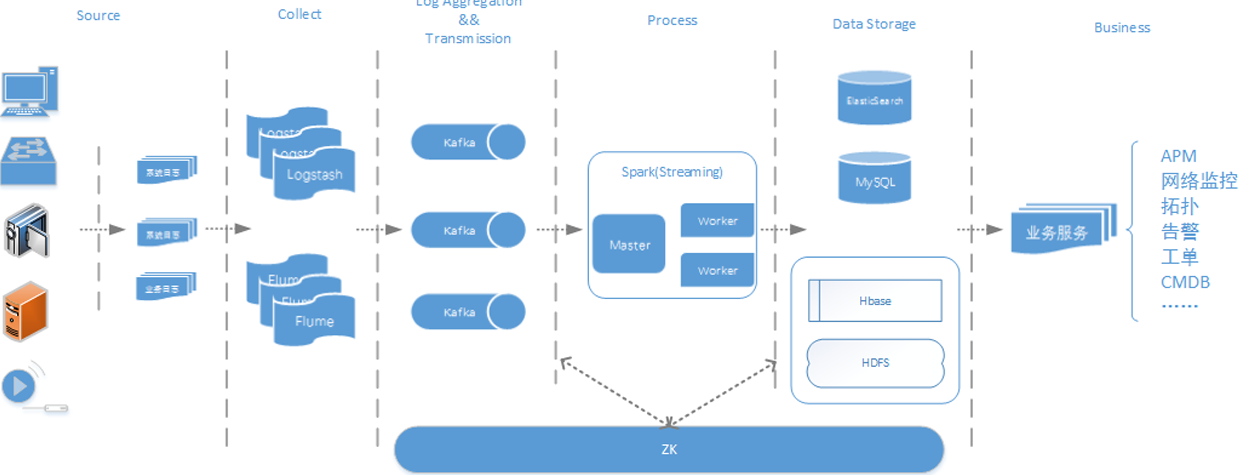
What is hadoop, what can I do, how to use it
First, this document achieves the goal I hope to explain what kind of tools hadoop is in a language that is easier to understand, and try not to involve technical details. Second, what is hadoop, what...
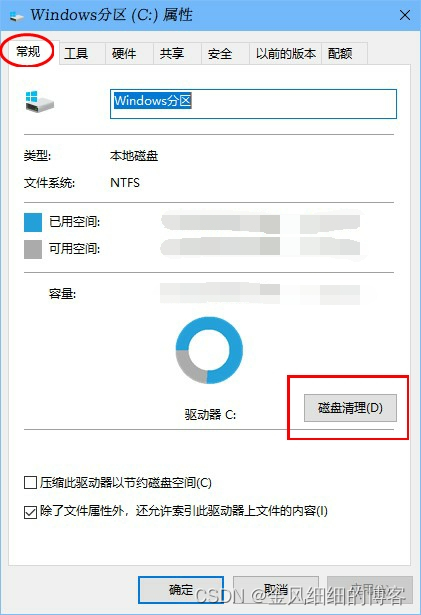
How do I use the Disk Cleanup program that comes with Windows 10?
Have you ever encountered the situation that the computer system C drive has insufficient space? This article will briefly tell you how to use the Disk Cleanup program that comes with Windows 10. Use ...
More Recommendation
How to update the 1.0.0 module package that I have released in npm?
Update released package First check what version of the package has been released: Submit the revised version Use the command: npm version <update_type> update_type has three parameters The firs...
How do I determine how long should I use when you want to create a prefix index to a string?
table of Contents Add string index and prefix index Use prefix index shortcomings and advantages How to determine how long the prefix is used Add string index and prefix index Add a string index:alt...
How do I call the node command in the global npm package in Node?
Sub-process calling system commands can be used to use NODE...
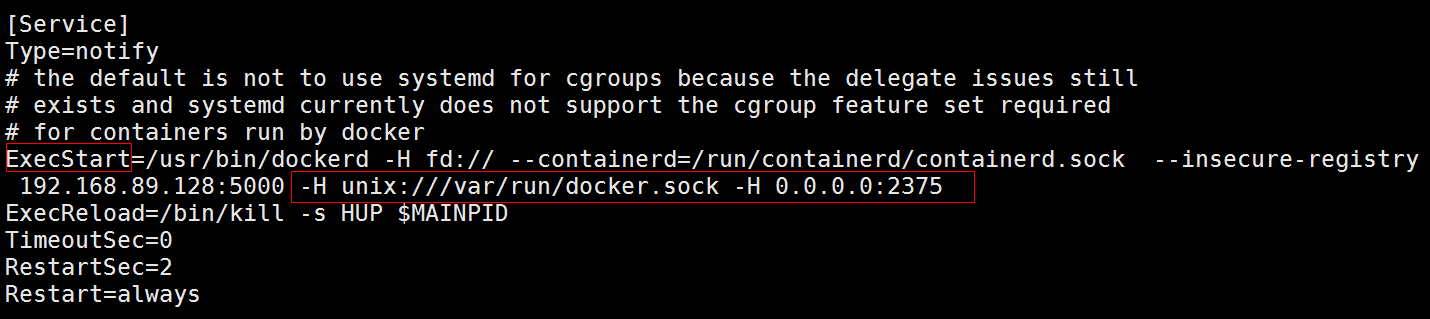
What should I do if I can't connect to the server when I connect to the docker image of the IDEA connection
vim /usr/lib/systemd/system/docker.service At the end of the ExecStart variable, add the following configuration: -H unix:///var/run/docker.sock -H 0.0.0.0:2375 Restart docker after configuration syst...
What should I do if I can't use LL in the docker container?
llActuallyls -lQuick order So we just need to point him as onellJust command edit ~/.bashrcdocument Add in it You can use it No in the docker containervimandnanoWhat to do? Option One: Install, Option...