Spring-cloud creates a highly available eureka cluster
tags: spring-cloud eureka Cluster unavailable-replicas High availability
Recorded a few pits encountered during the deployment of the eureka cluster, especially the last pit. After searching on the Internet for a long time, no results were found, and I finally found myself negligent. So make a special note and provide experience to other friends who have such problems.
In development, a single eureka registration center was used, and the configuration file is as follows:
server:
     port: 5761 # Specify the port of this Eureka instance

eureka:
  server:
         enable-self-preservation: false #Turn off self-protection and delete the node that has been shut down
  instance:
         hostname: discovery1 # Specify the hostname of this Eureka instance
  client:
         registerWithEureka: false #Under the default setting, the service registration center will also try to register itself as a client, and disable its client registration behavior here
         fetchRegistry: false #Since the responsibility of the registry is to maintain service instances, it does not need to retrieve services, so it is also set to false
    serviceUrl:
      defaultZone: http://discovery1:5761/eureka/

security:
  basic:
    enabled: true
  user:
     name: root
     password: root

spring:
  rabbitmq:
      host: localhost
      username: guest
      password: guest
  application:
    name: eureka-server
There is no problem in local development and operation. When you want to go to the test environment, you need to deploy two registration centers to ensure the high availability of the service. Since you have not deployed the eureka cluster before, you searched the configuration file on the Internet. You only need to change the defaultZone. To allow the two registration centers to register with each other. The configuration is as follows:
The first:
server:
     port: 5761 # Specify the port of this Eureka instance

eureka:
  server:
         enable-self-preservation: false #Turn off self-protection and delete the node that has been shut down
  instance:
         hostname: discovery1 # Specify the hostname of this Eureka instance
  client:
         registerWithEureka: false #Under the default setting, the service registration center will also try to register itself as a client, and disable its client registration behavior here
         fetchRegistry: false #Since the responsibility of the registry is to maintain service instances, it does not need to retrieve services, so it is also set to false
    serviceUrl:
      defaultZone: http://discovery2:5761/eureka/
The second station:
server:
  port: 5761 # Specify the port of this Eureka instance

eureka:
  server:
         enable-self-preservation: false #Turn off self-protection and delete the node that has been shut down
  instance:
         hostname: discovery2 # Specify the hostname of this Eureka instance
  client:
         registerWithEureka: false #Under the default setting, the service registration center will also try to register itself as a client, and disable its client registration behavior here
         fetchRegistry: false #Since the responsibility of the registry is to maintain service instances, it does not need to retrieve services, so it is also set to false
    serviceUrl:
      defaultZone: http://discovery1:5761/eureka/
After the operation, I went to the test and entered the http://discover1:5761 page as follows:

The smile on the face gradually disappeared, and the second machine appearedunavailable-replicas (unavailable copy), then went online to check the problem and concluded:
These two items need to be set registerWithEureka = true, fetchRegistry = true
After setting up, deploy again, visit http://discover1:5761 The problem still exists, emmmm......
After trying the various solutions provided by the students on the Internet, it still didn't work, and I fell into contemplation...
Suddenly found that my configuration file seems to be different from theirs. I suddenly realized that I set eureka security in the configuration file, and configured the user name and password.
Therefore, after directly changing the defaultZone, it will definitely not work, and it will certainly not be accessible. Modify the configuration again as follows:
server:
     port: 5761 # Specify the port of this Eureka instance

eureka:
  server:
         enable-self-preservation: false #Turn off self-protection and delete the node that has been shut down
  instance:
         hostname: discovery1 # Specify the hostname of this Eureka instance
  client:
    registerWithEureka: true
    fetchRegistry: true
    serviceUrl:
      defaultZone: http://root:root@discovery2:5761/eureka/

security:
  basic:
    enabled: true
  user:
     name: root
     password: root

spring:
  rabbitmq:
      host: localhost
      username: guest
      password: guest
  application:
    name: eureka-server
I was careless, just modified it according to the method on the Internet, did not consider the configuration of my project, emmmm... wasted a lot of time, so record it to remind classmates like me to solve the problem quickly.
Deploy after modifying again, visithttp://discover1:5761

Perfect, you're done
Intelligent Recommendation
Spring Cloud: Building a highly available Eureka registration center
1. High availability cluster overview of Eureka registration center 1-1. Traditional architecture In this distributed system of microservice architecture, we must fully consider the high availability ...

Spring Cloud Eureka Highly Available Service Registration Center (2)
Cluster schematic If there is only one registry (server), once it hangs up, it will directly GG. In a distributed system, where there is a single point of failure, the entire system is not highly avai...
Spring Cloud study notes (ten) highly available Config cluster
Introduction In the previous section, I learned about the configuration management center Config. If in the actual production environment, many microservices use only one configuration center, it is o...
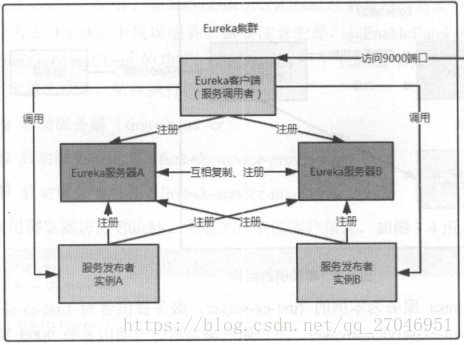
Highly available service registry - Eureka cluster
Eureka cluster framework In a distributed environment such as a microservices architecture, we need to take into account the possibility of a failure, so a highly available deployment is required. Two...

Highly available eureka cluster - a trip to the pit
1.application.yml configuration --- is a character separator, and parts of the profile are not declared public. 2.idea jar package 3.windows to add analog local address Add at the end of the hosts fil...
More Recommendation
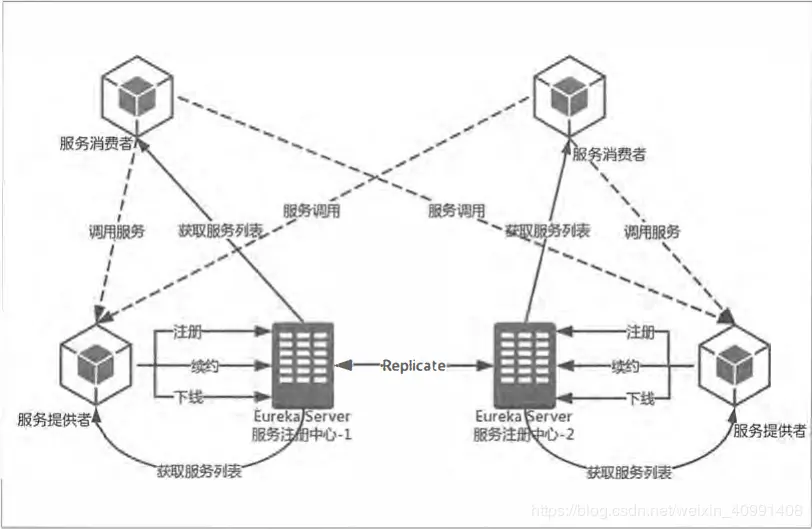
SpringCloud highly available Eureka Server cluster
One: Why build an Eureka Server cluster In a distributed system, the service registration center is the most important basic part. If it is a single point, encountering a failure is devastating, and i...

Registration center cluster, eureka highly available
Today, I made a simple springcloud e-commerce project. The following is part of the process of implementing the registry eureka cluster (3 eureka server instances). The code has been tested and passed...
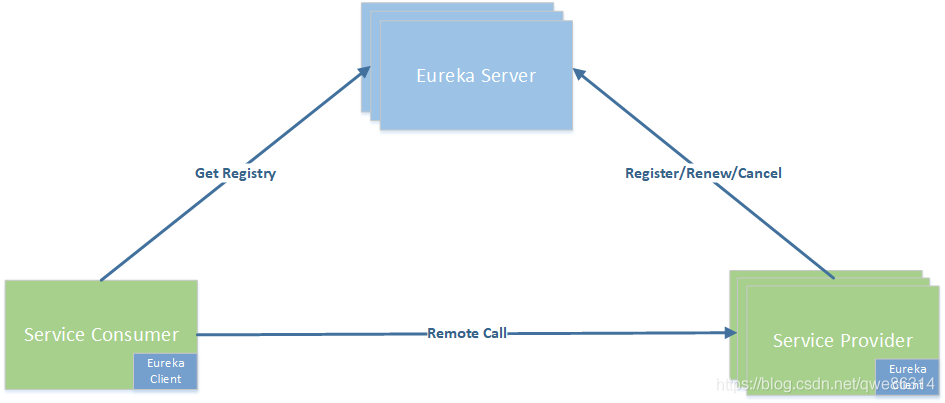
Eureka builds a highly available order payment cluster
Before springcloud, the most popular service registration rpc framework we have heard is dubbo + zookepper. Today we talk about a new service registration component: eureka Address of this project:git...

"Spring cloud microservice combat" reading notes-Spring Cloud Eureka (3) to achieve a highly available registry
Realize a highly available registry In a distributed environment such as a microservice structure, we need to fully consider the failure of the situation, so in the production environment, each compon...
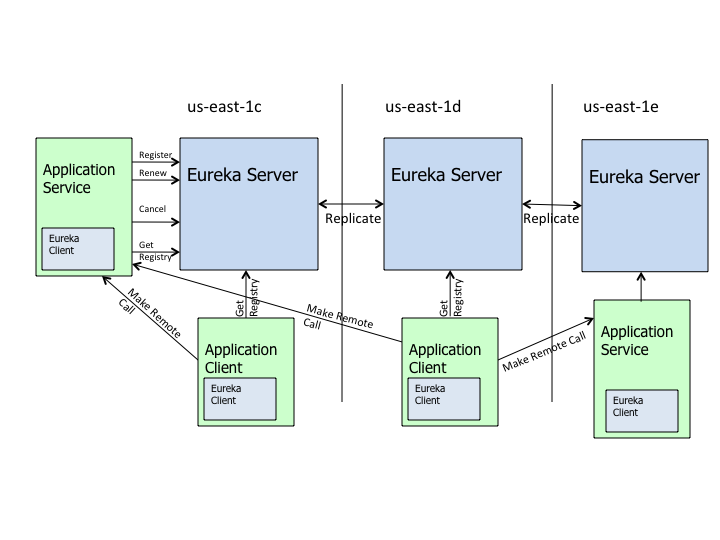
7 days to learn Spring Cloud series of "Spring Cloud Eureka Realizes Highly Available Service Discovery Registry"
I am Kite, the public account "Ancient Kite", a simple programmer encourager. The article will be included inJavaNewBee In, there is also a Java back-end knowledge graph, and the road to go ...