Message middleware interview questions: What should I do if the message is lost?
tags: Interview Message middleware
Interview question
How to ensure the reliable transmission of messages? Or how to deal with the problem of lost messages?
If you are using MQ to deliver very core messages, such as billing and deductions, you must ensure that this MQ is being passed.Never lose the billing message。
Analysis of interview questions
The loss of data may occur in producers, MQ, and consumers. Let's analyze it separately from RabbitMQ and Kafka.
RabbitMQ

Producer lost data
When the producer sends the data to RabbitMQ, the data may be lost in the middle of the road, because the network problem is paralyzed.
At this point you can choose the transaction function provided by RabbitMQ, which is the producer.Before sending dataOpen RabbitMQ transactionchannel.txSelectAnd then send a message, if the message is not successfully received by RabbitMQ, then the producer will receive an exception error, then you can roll back the transactionchannel.txRollbackAnd then retry sending the message; if the message is received, the transaction can be committedchannel.txCommit。
/ / Open the transaction
channel.txSelect
try {
    // send a message here
} catch (Exception e) {
    channel.txRollback

    // Here again resend this message
}

// commit the transaction
channel.txCommit
But the problem is that the RabbitMQ transaction mechanism (synchronization) is basically done, basicallyThroughput will come down because of too much performance。
So in general, if you want to make sure that you don’t lose the message of writing RabbitMQ, you can turn it on.confirm Mode, set to open at the producerconfirm After the pattern, each time you write a message will be assigned a unique id, and if written in RabbitMQ, RabbitMQ will send you a backack The news tells you that the news is ok. If RabbitMQ fails to process this message, it will call back one of yours.nack The interface tells you that this message failed to receive, you can try again. And you can use this mechanism to maintain the state of each message id in memory. If you have not received the callback of this message for more than a certain period of time, then you can resend it.
Transaction mechanism andcnofirm The biggest difference between the mechanisms is thatThe transaction mechanism is synchronousAfter you submit a transaction,BlockingThere, butconfirm Mechanism isasynchronousAfter you send a message, you can send the next message, and then the message RabbitMQ will receive an asynchronous callback to notify you that the message has been received.
So generally in the producersAvoid data lossAre usedconfirm Mechanical.
RabbitMQ lost the data
That is, RabbitMQ lost the data itself, you mustTurn on RabbitMQ persistenceThat is, after the message is written, it will be persisted to the disk, even if RabbitMQ hangs itself.The previously stored data is automatically read after recovery, general data will not be lost. Unless it’s extremely rare, RabbitMQ is not persistent and you hang it yourself.May cause a small amount of data loss, but this probability is small.
Setting persistenceTwo steps:
- Set it to persist when creating a queue
This ensures that RabbitMQ persists the metadata of the queue, but it does not persist the data in the queue. - The second is the message when the message is sent.
deliveryModeSet to 2
is to set the message to be persistent, at which point RabbitMQ will persist the message to disk.
It is necessary to set these two persistences at the same time. RabbitMQ will restart the recovery queue from the disk even if it is hung up and restarted again, and restore the data in this queue.
Note that even if you have a persistence mechanism enabled for RabbitMQ, there is a possibility that the message is written in RabbitMQ, but it has not been able to persist to disk. As a result, RabbitMQ hangs, which causes memory. A little bit of data is lost.
So, persistence can be with the producerconfirm The mechanism works together to notify the producer only after the message has been persisted to disk.ack So, even before it is persisted to disk, RabbitMQ hangs, data is lost, producers can't receive it.ackYou can also reissue yourself.
Consumer lost data
If RabbitMQ loses data, mainly because you are spending it,Just consumed, not processed yet, the result process hangsFor example, if you restart, then you will be embarrassed. RabbitMQ thinks that you are spending, and this data is lost.
This time you have to use RabbitMQ to provideack Mechanism, in simple terms, is that you have to turn off RabbitMQ automaticallyack, can be called by an api, and then every time you make sure that it is processed in your own code, then in the programack One. In this case, if you haven’t finished it yet, there is noack What? That RabbitMQ thinks that you haven't finished processing yet. At this time, RabbitMQ will allocate this consumption to other consumers to process, and the message will not be lost.

Kafka
Consumer lost data
The only thing that can cause consumers to lose data, that is, you consume the news, then the consumerAutomatically submitted offsetLet Kafka think that you have already consumed the news, but in fact you are just ready to deal with this news, you have not dealt with it, you hang it yourself, this time the news is lost.
Isn't this similar to RabbitMQ? Everyone knows that Kafka will automatically submit offset, so longTurn off autocommit Offset, manually submit the offset after processing, you can ensure that the data will not be lost. But at this time it is stillThere may be repeated consumptionFor example, if you have just finished processing, you have not yet submitted offset, and you have to hang it yourself. At this time, you will definitely repeat the consumption once, and you can guarantee that idempotency is good.
One problem encountered in the production environment is that our Kafka consumer consumes the data and then writes it into a memory queue first. As a result, sometimes you just write the message to the memory queue, and then the consumer will automatically Submit the offset. Then at this point we restarted the system, which would result in the loss of data that has not been processed in the memory queue.
Kafka lost the data
One of the more common scenarios is when a Kafka broker crashes and then re-elects the leader of the partition. Think about it, if the other followers happen to have some data that are not synchronized at the same time, the result is that the leader is hung up, and then after electing a follower into a leader, isn't there some data missing? This will lose some data.
The production environment has also been encountered. We are also. Before Kafka's leader machine was down, after switching the follower to leader, it will be found that this data is lost.
Therefore, at this time, it is generally required to set the following four parameters at least:
- Set topic
replication.factorParameters: This value must be greater than 1, requiring at least 2 copies per partition. - Set up on the Kafka server
min.insync.replicasParameter: This value must be greater than 1. This is to ask a leader to at least perceive at least one follower to keep in touch with itself, without leaving the team, so that the leader can hang and have a follower. - Set on the producer side
acks=all: This is asking for every piece of data that must beAfter writing all replicas, you can think that it is a successful write.。 - Set on the producer side
retries=MAX(a very large and very large value, meaning of unlimited retry): this isRequires unlimited retry once the write fails, the card is here.
Our production environment is configured according to the above requirements. After the configuration, at least on the Kafka broker side, it can be guaranteed that the leader will be faulty and the data will not be lost when the leader switches.
Will the producer lose data?
If you follow the above ideas,acks=allIt must not be lost. The requirement is that your leader receives the message and all followers are synchronized to the message before they think the write is successful. If this condition is not met, the producer will automatically retry and try again and again.
Original address of this article:https://jsbintask.cn/2019/01/28/interview/interview-middleware-reliable/,Please indicate the source.
Intelligent Recommendation
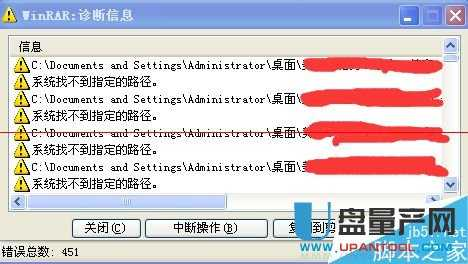
What should I do if a diagnostic message appears when winrar is decompressed?
A friend often downloads a compressed package of .rar, and a "WinRAR: diagnostic information" prompt appears during decompression. There are several kinds of problems in this situation. For ...

What should I do if the official account has no message function?
I believe that many novice editors are the same as me, feeling anxious, disappointed, and helpless about the registered official account without the message function! Today, I will solve this big prob...
What should I do if the Laravel modifies the message queue related code?
First explain, I amLearnkuThe faithful fans, people's tutorials and Wiki are very good, I will not move. The tutorials written by Amway are as follows: How to use a message queue Laravel uses a messag...
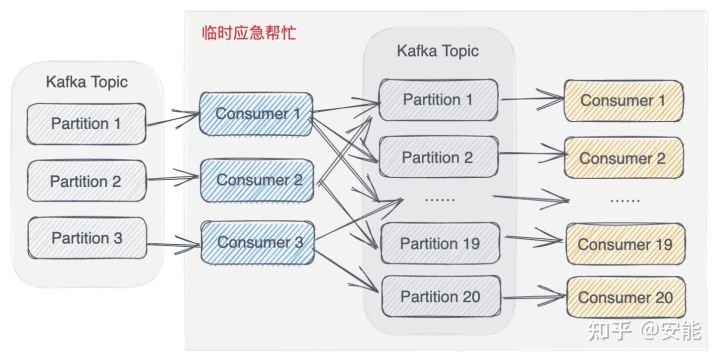
What should I do if there is a backlog of messages in the message queue?
Q: At the beginning, I was skeptical about this question, because the purpose of using message queues is to cut peaks and fill valleys, so as to avoid the impact on downstream services during high tra...
What should I do if there is a lot of EL-Message messages in Element
Add a sentence before prompting the message: There is a problem at the same time. So use the following methods to prompt all the message prompts before the message prompt....
More Recommendation

Message middleware interview questions: high availability of message middleware
thenPreviousThe expansion of the interview questions. Interview question How to ensure that the message queue is highly available? RabbitMQ's high availability RabbitMQ is more representative because ...
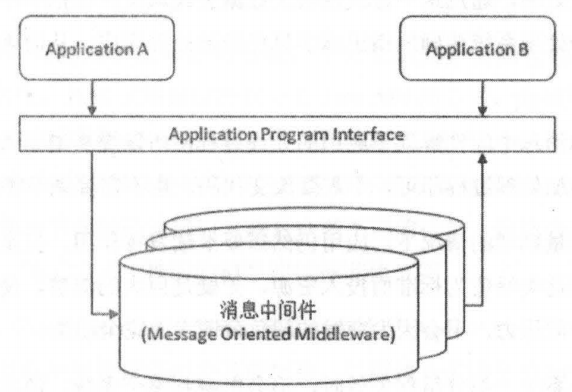
Message middleware: What is message middleware.
What is message middleware Message (Message) refers to the data transmitted between applications. Messages can be very simple, such as only containing text strings, JSON, etc., or they can be very com...

What should I do if the root password is lost?
First, within a few seconds of booting (when the time is displayed in seconds), press Enter; Open the grub interface e to enter the editing interface; Select kernel to add /init 1 There will be tips b...
What should I do if Python is getting lost?
More than once in WeChat, knowing that readers ran over and asked: After reading the base book, even two times, but I still haven't think it is written, what should I do? Programming is a craft life, ...
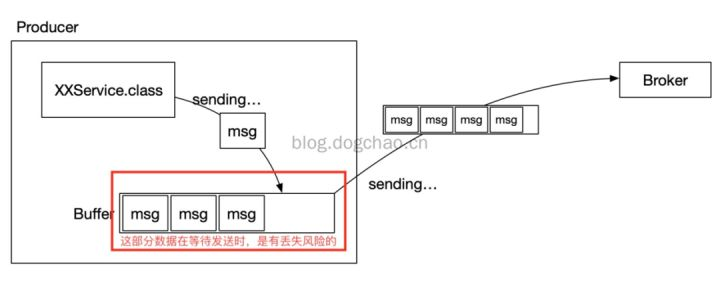
What is Kafka will lose the message? How to do the message is not lost?
As a message middleware, if the message is lost during the operation, it is often difficult to investigate and trace back. Kafka will also have a loss of news. Today I want to analyze several reasons ...