Vue.js event bus (EventBus)
The core concept of many modern JavaScript frameworks and libraries is the ability to encapsulate data and UI in modular, reusable components. This allows developers to avoid writing a lot of duplicate code when developing an entire application. While this is very useful, it also involves data communication between components. There is also such a concept in Vue. Through the previous period of learning, Vue component data communication often has data communication between the parent and child components and the sibling components. That is to say, there are certain principles for component communication in Vue.
Parent-child component communication principle
In order to improve the independence and reusability of components, the parent component will passpropsPass the data down to the subcomponent, passing through when the subcomponent has something to tell the parent component$emitThe event tells the parent component. This ensures that each component operates independently in a relatively isolated environment, which can significantly improve the maintainability of the component.
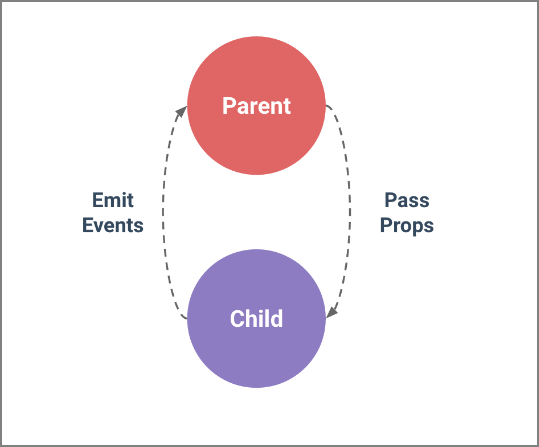
in"Vue component communicationThis article is described in detail in the article. But this set of communication principles has a certain criticism of data communication between sibling components. Of course, there are other ways to handle data communication between sibling components in Vue, such as libraries like Vuex. But in many cases, our application does not require a library like Vuex to handle data communication between components, but consider Vue.Event bus, which isEventBus。
The next content is to learn Vue together.EventBusRelated knowledge points.
Introduction to EventBus
EventBusAlso known as the event bus. Can be used in VueEventBusAs a communication bridge concept, it is like all components share the same event center, you can register to send events or receive events to the center, so the components can notify other components in parallel up and down, but it is too convenient, so if you use it carelessly It will cause a disaster that is difficult to maintain, so a more complete Vuex is needed as a state management center to raise the concept of notification to the shared state level.
How to use EventBus
How to use it in Vue's projectEventBusTo achieve data communication between components? This can be done in the following steps.
initialization
The first thing you need to do is create an event bus and export it so that other modules can use it or listen to it. We can handle it in two ways. First look at the first one, create a new one..jsFile, such asevent-bus.js:
// event-bus.js

import Vue from 'vue'
export const EventBus = new Vue()
All you need to do is introduce Vue and export an instance of it (in this case, I call itEventBus). Essentially it's a component that doesn't have a DOM, it's just a sample method, so it's very lightweight.
Another way, you can directly in the projectmain.jsinitializationEventBus:
// main.js
Vue.prototype.$EventBus = new Vue()
Note that this method is initialized
EventBusIs aGlobal event bus. Later we will spend some time talking about the global event bus.
Now we have createdEventBusThe next thing you need to do is load it in your component and call the same method, just as you pass messages to each other in the parent and child components.
Send event
Suppose you have two subcomponents:DecreaseCountwithIncrementCount, respectively bound in the buttondecrease()withincrement()method. The two methods do very simple things, that is, the value is decremented (increase)1, and the angle value is decremented (increase)180. In both methods, throughEventBus.$emit(channel: string, callback(payload1,…))monitordecreased(withincremented) Channel.
<!-- DecreaseCount.vue -->
<template>
    <button @click="decrease()">-</button>
</template>

<script>
    import { EventBus } from "../event-bus.js";
    export default {
        name: "DecreaseCount",
        data() {
            return {
                num: 1,
                deg:180
            };
        },
        methods: {
            decrease() {
                EventBus.$emit("decreased", {
                    num:this.num,
                    deg:this.deg
                });
            }
        }
    };
</script>

<!-- IncrementCount.vue -->
<template>
    <button @click="increment()">+</button>
</template>

<script>
    import { EventBus } from "../event-bus.js";
    export default {
        name: "IncrementCount",
        data() {
            return {
                num: 1,
                deg:180
            };
        },
        methods: {
            increment() {
                EventBus.$emit("incremented", {
                    num:this.num,
                    deg:this.deg
                });
            }
        }
    };
</script>
The above example, inDecreaseCountwithIncrementCountSent separatelydecreasedwithincrementedChannel. Next, we need to receive these two events in another component, keeping the data in communication between the components.
Receiving events
Now we can be in the componentApp.vueUsed inEventBus.$on(channel: string, callback(payload1,…))MonitorDecreaseCountwithIncrementCountSent separatelydecreasedwithincrementedChannel.
<!-- App.vue -->
<template>
    <div id="app">
        <div class="container" :style="{transform: 'rotateY(' + degValue + 'deg)'}">
            <div class="front">
                <div class="increment">
                    <IncrementCount />
                </div>
                <div class="show-front">
                    {{fontCount}}
                </div>
                <div class="decrement">
                    <DecreaseCount />
                </div>
            </div>

            <div class="back">
                <div class="increment">
                    <IncrementCount />
                </div>
                <div class="show-back">
                    {{backCount}}
                </div>
                <div class="decrement">
                    <DecreaseCount />
                </div>
            </div>
        </div>
    </div>
</template>

<script>
    import IncrementCount from "./components/IncrementCount";
    import DecreaseCount from "./components/DecreaseCount";
    import { EventBus } from "./event-bus.js";
    export default {
        name: "App",
        components: {
            IncrementCount,
            DecreaseCount
        },
        data() {
            return {
                degValue:0,
                fontCount:0,
                backCount:0
            };
        },
        mounted() {
            EventBus.$on("incremented", ({num,deg}) => {
                this.fontCount += num
                this.$nextTick(()=>{
                    this.backCount += num
                    this.degValue += deg;
                })
            });
            EventBus.$on("decreased", ({num,deg}) => {
                this.fontCount -= num
                this.$nextTick(()=>{
                    this.backCount -= num
                    this.degValue -= deg;
                })
            });
        }
    };
</script>
The final result is as follows:
Finally, use a diagram to describe the examples used in the example.EventBusThe relationship between:
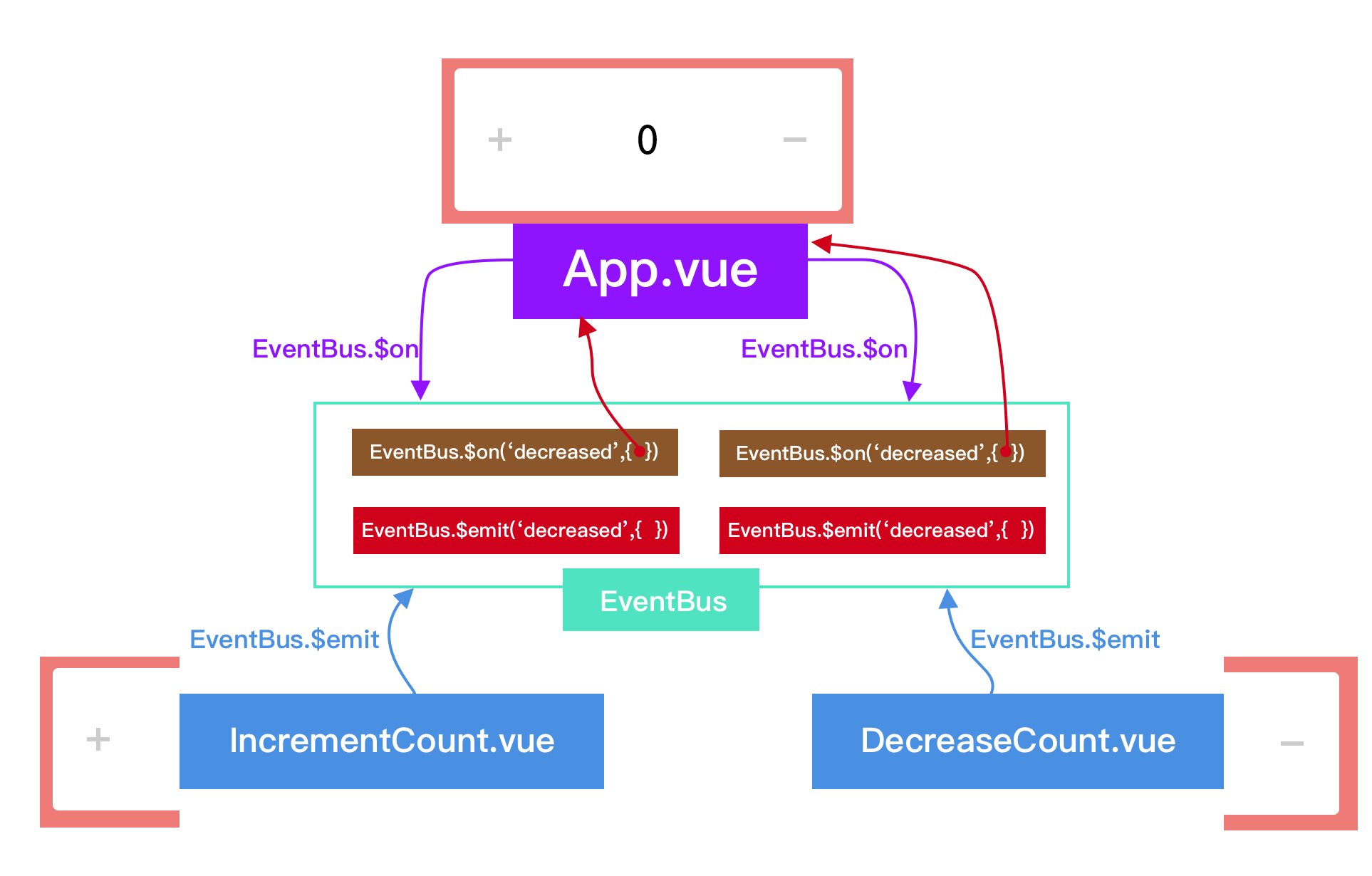
If you only want to monitor the occurrence of an event, you can useEventBus.$once(channel: string, callback(payload1,…)) 。
Remove event listener
If you want to remove the listener for an event, you can do something like this:
import { eventBus } from './event-bus.js'
EventBus.$off('decreased', {})
You can also useEventBus.$off(‘decreased’)To remove all listeners for this event within the app. Or call directlyEventBus.$off()To remove all event channels,Note that you do not need to add any parameters。
Above isEventBusThe way it is used is not very simple. We also saw in the example above, every time you useEventBusNeed to be introduced in each componentevent-bus.js. In fact, we can make things simpler by other means. That is to create a globalEventBus. The next example shows you how to create a global one in a Vue project.EventBus。
Global EventBus
The global EventBus, although not recommended for use in some examples, is a very nice and simple way to share data across components.
It works on a publish/subscribe method, usually calledPub/Sub。
This whole approach can be seen as a design pattern, because if you look at what's around it, you'll find it more like an architectural solution. We'll use plain JavaScript and create two components and demonstrate how EventBus works.
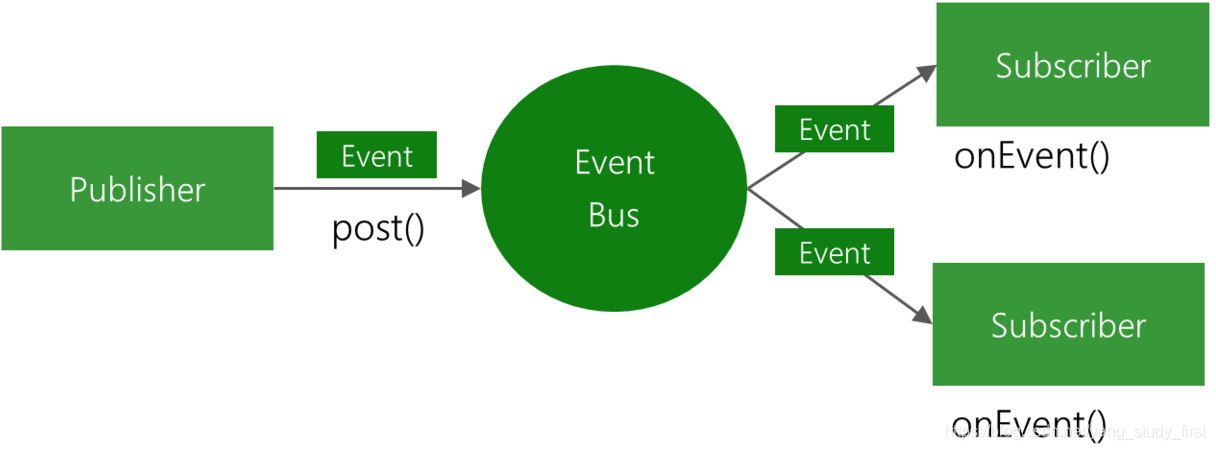
Let's take a look at the picture below and try to understand what happened in this situation.

We can get the following points from the above picture:
- Have a global EventBus
- Subscribe to it for all events
- All components are also posted to it, and the subscription component gets updated
- in conclusion. All components are able to publish events to the bus, then the bus is subscribed by another component, and then the components that subscribe to it are updated
In the code, we will keep it very small and concise. We split it into two parts that will show two components and the code that generates the event bus.
Create a global EventBus
The global event bus is nothing more than a simplevueComponent. code show as below:
var EventBus = new Vue();

Object.defineProperties(Vue.prototype, {
    $bus: {
        get: function () {
            return EventBus
        }
    }
})
Now, this particular bus uses two methods$onwith$emit. One is used to create the emitted event, it is$emitAnother for subscription$on:
var EventBus = new Vue();

this.$bus.$emit('nameOfEvent',{ ... pass some event data ...});

this.$bus.$on('nameOfEvent',($event) => {
    // ...
})
Now let's create two simple components to get the final conclusion.
In the next example, we created oneShowMessageComponents are used to display information, and another one is createdUpdateMessageComponent used to update information.
inUpdateMessageThe required event is triggered in the component. In this example, one will fireupdateMessageEvent, this event was sentupdateMessageChannel:
<!-- UpdateMessage.vue -->
<template>
    <div class="form">
        <div class="form-control">
            <input v-model="message" >
                         <button @click="updateMessage()">Update message</button>
        </div>
    </div>
</template>
<script>
    export default {
        name: "UpdateMessage",
        data() {
            return {
                                 Message: "This is a message"
            };
        },
        methods: {
            updateMessage() {
                this.$bus.$emit("updateMessage", this.message);
            }
        },
        beforeDestroy () {
            $this.$bus.$off('updateMessage')
        }
    };
</script>
At the same timeShowMessageListen for this event in the component:
<!-- ShowMessage.vue -->
<template>
    <div class="message">
        <h1>{{ message }}</h1>
    </div>
</template>

<script>
    export default {
        name: "ShowMessage",
        data() {
            return {
                Message: "I am a message"
            };
        },
        created() {
            var self = this
            this.$bus.$on('updateMessage', function(value) {
                self.updateMessage(value);
            })
        },
        methods: {
            updateMessage(value) {
                this.message = value
            }
        }
    };
</script>
The final result is as follows:
From the above code, we can seeShowMessageComponent listens for a nameupdateMessageA specific event that is triggered when the component is instantiated, or you can fire when the component is created. On the other hand, we have another componentUpdateMessageIt has a button that will emit an event when someone clicks on it. This causes the subscription component to listen for events that are emitted. This producedPub/SubModel, which persists between siblings and is very easy to implement.
to sum up
This article mainly learns about Vue in two cases.EventBusRelated knowledge points. Mainly involvedEventBusHow to instantiate and how to pass$emitHow to send the channel signal, how is it passed?$onTo receive channel signals. Finally, I briefly introduced how to create a globalEventBus. From the examples we can understand thatEventBusData communication between sibling components can be better implemented.
If you need to reprint, please indicate the source:https://www.w3cplus.com/vue/event-bus.html
Copyright is owned by the author.
Please contact the author for authorization for commercial reprint, please indicate the source for non-commercial reprint.
Original:https://www.w3cplus.com/vue/event-bus.html?utm_source=tuicool&utm_medium=referral w3cplus.com
Intelligent Recommendation
EventBus of Android event bus
First language EventBus is an Android-optimized publish/subscribe message bus, which simplifies communication between components in the application, and between components and background threads. For ...
Event bus: EventBus
When non-parent-child components need to communicate, in addition to vuex, there isEvent busUp Introduction EventBus is also called event bus. In Vue, you can use EventBus as a communication bridge co...

EventBus event processing bus
Write first EventBus is an event processing bus, which can replace Android's traditional Intent, Handler, Broadcast or interface functions to transfer data and execute methods between Fragment, Activi...

Android EventBus event bus
Android EventBus Preface: Mainly analyze and understand from three aspects: what is EventBus, why use EventBus and how to use EventBus. What is EventBus (what) Why use EventBus (why) How to use EventB...
EventBus 3.0 Event Bus
How to use EventBus 3.0 and some problems encountered during use Hmm~ I am a new Android programmer This is the first article I wrote on the blog, and I finally finished writing with a nervous mood De...
More Recommendation
【Event Bus】Analyze EventBus
The above learning is based on the advanced light of Android...
Flutter event bus EventBus
In Android native, there are broadcasts that can transfer data across pages. In Flutter, we can customize an event bus to transfer data across pages. step Define a singleton class Add a Map<String ...
Eventbus event bus
What is Eventbus event bus Eventbus is a message bus that implements the observer mode, used to simplify the components of the program, thread communication, can easily switch threads, open up threads...
Eventbus: Event Bus Framework
Eventbus framework First, use the scene: Second, EVENTBUS Advantages Third, EVENTBUS principle: Fourth, Eventbus use: 1. Create an event type 2. In the module that needs to be subscribed to the event,...
Android event bus Eventbus
Eventbus can be used in communication between components within the application, components and background threads Create related events OnResume registration, you can also register elsewhere Onpuse l...