JQuery DataTables custom button implementation
tags: jquery-datatables jquery-datatables-buttons jquery-datatable-api
A brief description of the implementation of custom buttons
There are two ways to use custom buttons. Let's introduce them with examples. (Official website example)
The two implementation methods are:
- Direct definition
The other is firstDefine extension, And then use the extended name directly in the button to initialize
You can implement it in the following three steps
1. Download dependencies
Because Buttons belong to the extended function of JQuery DataTables, we download the extended JS in the normal JS and CSS environment. Or we directly use a packaged JS, the official website has such a function.
Resource download + Chinese download instruction document:http://datatables.club/extensions/buttons/
Custom package download link:https://datatables.net/download/
We only choose the basics here. (You can choose to expand, merge and compress)
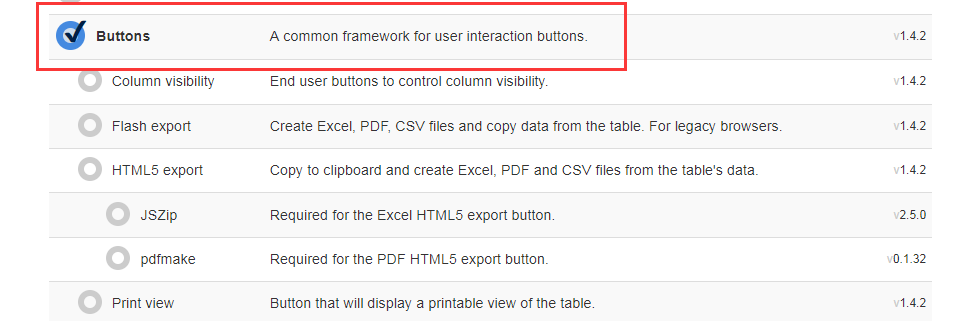
<!--Finally, these four files are enough, of course JQuery is also necessary-->

<link rel="stylesheet" type="text/css" href="https://cdn.datatables.net/1.10.16/css/jquery.dataTables.min.css"/>
<link rel="stylesheet" type="text/css" href="https://cdn.datatables.net/buttons/1.4.2/css/buttons.dataTables.min.css"/>

<script type="text/javascript" src="https://cdn.datatables.net/1.10.16/js/jquery.dataTables.min.js"></script>
<script type="text/javascript" src="https://cdn.datatables.net/buttons/1.4.2/js/dataTables.buttons.min.js"></script>
2. Custom button syntax
//Method 1: Directly define the button function (choose one of the two)
$('#myTable').DataTable( {
    ajax: '/api/data'
    buttons: [
        {
            text: 'Reload',
            action: function ( e, dt, node, config ) {
                dt.ajax.reload();
            }
        }
    ]
} );


//Method 2: First define the extension, and then use the extension (advantage: after defining the extension, you can define it in one place and use it in multiple places)
//1. Define extension
$.fn.dataTable.ext.buttons.reload = {
    text: 'Reload',
    action: function ( e, dt, node, config ) {
        dt.ajax.reload();
    }
};

//2. Use extensions when configuring
$('#myTable').DataTable( {
    ajax: '/api/data',
    buttons: [
        'reload'
    ]
} );
3. Reference examples
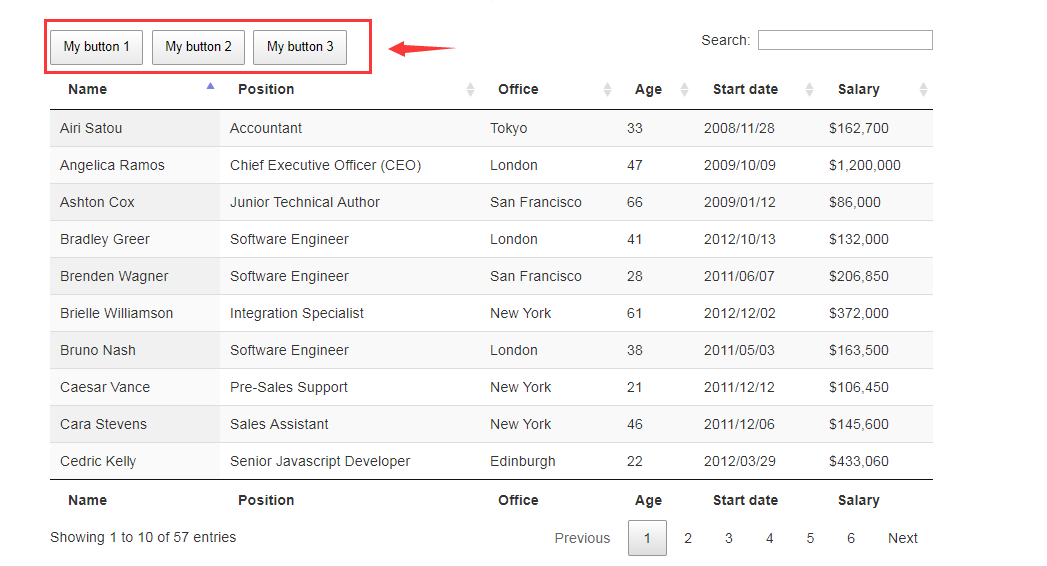
//Example code
$.fn.dataTable.ext.buttons.alert = {
    className: 'buttons-alert',

    action: function ( e, dt, node, config ) {
        alert( this.text() );
    }
};


$(document).ready(function() {
    $('#example').DataTable( {
        dom: 'Bfrtip',
        buttons: [
            {
                extend: 'alert',
                text: 'My button 1'
            },
            {
                extend: 'alert',
                text: 'My button 2'
            },
            {
                extend: 'alert',
                text: 'My button 3'
            }
        ]
    } );
} );
Reference blog post
Buttons Chinese document:http://datatables.club/extensions/buttons/
Custom button official website description:https://datatables.net/extensions/buttons/custom
Examples of custom buttons on the official website:https://datatables.net/extensions/buttons/examples/initialisation/plugins
Intelligent Recommendation
JQuery DataTables server-side custom query (the latest version introduction)
I have taken a lot of detours in using JQuery DataTables to do queries, and searched"JQuery DataTables Custom Query"The relevant blog post is either too old or nonsense. I can only go throug...
jQuery---Countdown button implementation
The following is only for jQuery Countdown writing implementation First use pictures to understand relevant content 2. Without further ado, the above function codes ...

Implementation of Custom Shape Button
Implementation of Custom Shape Button For most iOS development, this is rarely encountered. After all, an irregular button is not common on the mobile terminal, but it will inevitably encounter some s...
Custom button implementation tab
Recently, due to the need for rapid development, changed the taste, and turned from the previous pure code layout to the Storyboard layout. It is still a half-time when developing a small iOS app. Thi...
jQuery Mobile custom theme button button
Custom theme button button Recommend a linux command line website:https://rootopen.com...
More Recommendation
Use of jQuery dataTables
jQuery's plugin dataTables is an excellent form plugin that provides sorting for tables, browser paging, server paging, filtering, formatting, and more. A large number of demos and detailed doc...

JQuery DataTables learning
Share the artificial intelligence tutorial of my teacher, God! Zero basis, easy to understand! You are also welcome to reprint this article. Sharing knowledge, benefiting the people and realizing the ...
Use jQuery dataTables - 1
jQuery's plugin dataTables is an excellent form plugin that provides sorting for tables, browser paging, server paging, filtering, formatting, and more. A large number of demos and detailed documentat...
JQuery DataTables parameters (1)
Create a common parameter set dataTablesSettings.js...
Jquery datatables api (transfer)
Learning can refer to:http://www.guoxk.com/node/jquery-datatables ...