RxBus demo analysis
Label (space separated): RxJava
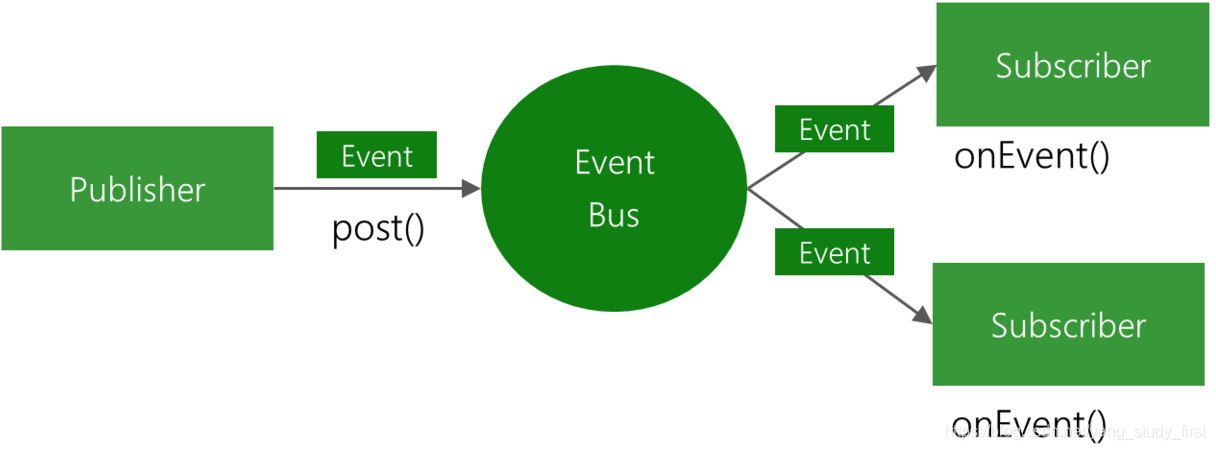
### Here is the event bus implemented by Rx, similar to EventBus and Otto, using rx implementation, effectively reducing the size of the jar, and using the same as EventBus, is also sending events, The observer then subscribes to the event and responds to it after receiving the event. ###example (not very good here (after all, two activities, better can be passed back)) is used here Login, if the login is successful, send a UserEvent event in the LoginActivity, then register the event in the MAinActivity, and process the event received after registration. LoginActivity.class logic
                                mDataBean = user.getData();
                                if (mDataBean != null){
                                    String username = mDataBean.getUsername();
                                    String imageUrl = mDataBean.getLogo_url();
                                    String useremail = mDataBean.getEmail();
                                    UserEvent event = new UserEvent(username,imageUrl,useremail);
                                    RxBus.getDefault().post(event);
                                    new Handler().postDelayed(new Runnable() {
                                        @Override
                                        public void run() {
                                            mBuilder.build().dismiss();
                                            LoginActivity.this.finish();
                                        }
                                    },500);
                                }

Copy code
Logic in MainActivity.class
 /**
           * Receive events and do related processing
     */
    private void subscribeEvent(){
        RxSubscriptions.remove(mRxSub);
        mRxSub = RxBus.getDefault().toObservable(UserEvent.class)
                .map(new Func1<UserEvent, UserEvent>() {
                    @Override
                    public UserEvent call(UserEvent userEvent) {
                        return userEvent;
                    }
                })
                .subscribe(new RxBusSubscriber<UserEvent>() {
                    @Override
                    public void onEvent(UserEvent userEvent) {
                        if (userEvent != null){
                            mTvEmail.setText(userEvent.mUserEmail);
                            mTvName.setText(userEvent.mUserName);
                            Glide.with(MainActivity.this)
                                    .load(userEvent.mImageUrl).asBitmap()
                            .into(mIvAvator);
                        }
                    }

                    @Override
                    public void onError(Throwable e) {
                        super.onError(e);
                    }
                });
    }

Copy code
Of course, don't forget to register event listeners.
    /*Register to subscribe to the RxBus event*/
        subscribeEvent();
Copy codeSticky events are like we send at any time. If there are no registrants to receive after sending, they will be cached in a cache, waiting for the observer to receive, and wait until the observer registers to receive and consume. Of course, the sticky event of RxBus will only be consumed by the last saved event.
##### Let's first look at an example below. Here we send a sticky event first, of course, for comparison, our general events and sticky events are triggered when clicked.
 mTest.setOnClickListener(new View.OnClickListener() {
            @Override
            public void onClick(View v) {
                RxBus.getDefault().post(new TestEvent("Normal Ceshi"));
                RxBus.getDefault().postSticky(new TestEvent("Sticky Ceshi"));
                startActivity(new Intent(MainActivity.this,TestActivity.class));
            }
        });
Copy code
Of course, although they are triggered, the message we pass is not feasible (for comparison). At this time, we register and receive the observer in the TestActivity after the jump. Let's look at the logic. (Of course, the general registration and the above code are the same, here is not written, directly registered on the sticky event)
 /**
           * Accept sticky events and do related processing
     */
    public void subscribeStickyEvent(){
        if (mRxStickySub != null && !mRxStickySub.isUnsubscribed()){
                         RxSubscriptions.remove(mRxStickySub); //Remove
        } else {
            TestEvent testEvent = RxBus.getDefault().getStickyEvent(TestEvent.class);

            mRxStickySub = RxBus.getDefault().toObservableSticky(TestEvent.class)
                    .map(new Func1<TestEvent, TestEvent>() {
                        @Override
                        public TestEvent call(TestEvent testEvent) {
                            try {
                                                         / / Actively intercept the exception here
                            } catch (Exception e){

                            }
                            return testEvent;
                        }
                    }).subscribe(new RxBusSubscriber<TestEvent>() {
                        @Override
                        public void onEvent(TestEvent testEvent) {
                            Toast.makeText(TestActivity.this, testEvent.test, Toast.LENGTH_SHORT).show();
                        }

                        @Override
                        public void onError(Throwable e) {
                            super.onError(e);
                        }
                    });
        }

        RxSubscriptions.add(mRxStickySub);
    }
Copy code
Let's take a look at the renderings.
 @Override
    protected void onDestroy() {
        super.onDestroy();
                 //Remove here. It is also possible to test normal send events. If it is sent before registration, it will not be received.
        RxSubscriptions.remove(mRxSub);
                 //This is ok, the timely event is sent before registration, but the sticky event will remain until there is an observer registration event and receive
        RxSubscriptions.remove(mRxStickySub);
    }
Copy code
Because I didn't call this destruction before (preventing memory leaks), when I clicked on the jump, the general event also appeared in the bullet box, and the sticky event appeared 3 times ((>_<)