USB and BT HID reports descriptor practice and packet capture analysis
Article content tips
This article mainly explains how to obtain and view USB and BLE HoGP HID device report descriptors, and how to read the report based on the obtained descriptors. Then it explained how to use the hidrd-convert tool to convert the descriptor in C language format according to the hex report descriptor, which is meaningful for our coding. Among them, we also intercepted USB logic analyzer, Wireshark and other tools to view the input report.
How to understand HID report descriptor
The following two pdfs are almost inseparable for how to understand the HID report descriptor:
Look at the document first (USB HID device) To understand some basic concepts:
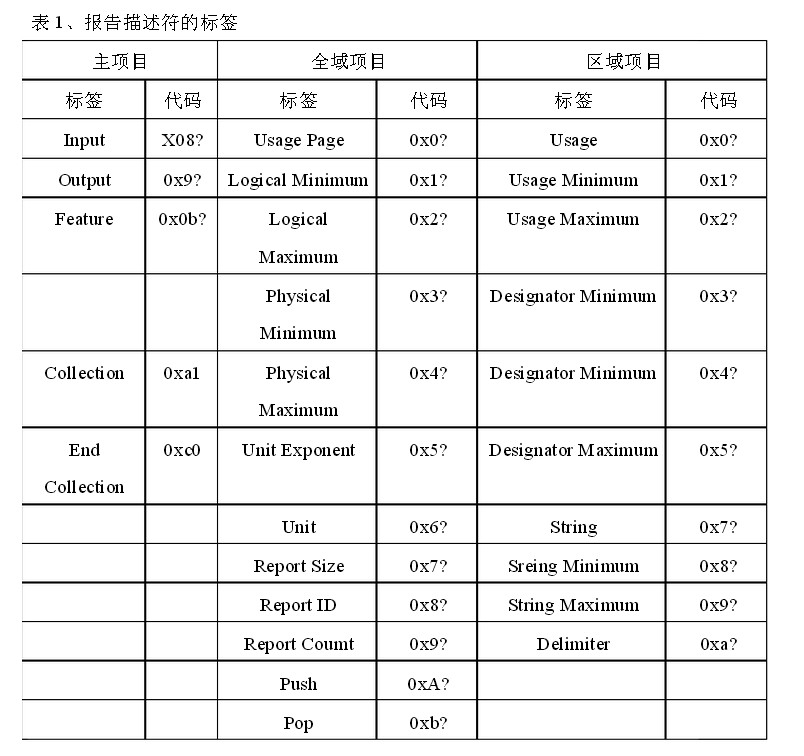
- Item meaning
- Collection and end collection: the meaning of namespace, which is equivalent to multiple usage pages
- usage page and usage
- Logical Minimum and Logical Maximum
- Usage Minimum and Usage Maximum
- input
- report size and report count
Personally think that this document is prepared first, and then combined with some articles to understand it is faster. The following are the steps that I think are quick to understand:
1. Look at this (Tutorial about USB HID Report Descriptors) Article, understand some basic concepts, mainly to understand concepts 4 and 5
2. Don't be too entangled in how to convert from hex to report in a format that is convenient for everyone to read
For example, for the following descriptor, we should look at the comments directly, and then we can know that the description is mouse, and then find the corresponding description in the usage table pdf according to the value of usage page and usage, and then know if the mouse is based on the understanding of the basic concepts What kind of report will be generated when a button is pressed:
    0x05, 0x01,  // Usage Page (Generic Desktop)
    0x09, 0x02,  // Usage (Mouse)
    0xA1, 0x01,  // Collection (Application)
    0x85, 0x01,  // Report Id (1)
    0x09, 0x01,  //   Usage (Pointer)
    0xA1, 0x00,  //   Collection (Physical)
    0x05, 0x09,  //     Usage Page (Buttons)
    0x19, 0x01,  //     Usage Minimum (01) - Button 1
    0x29, 0x03,  //     Usage Maximum (03) - Button 3
    0x15, 0x00,  //     Logical Minimum (0)
    0x25, 0x01,  //     Logical Maximum (1)
    0x75, 0x01,  //     Report Size (1)
    0x95, 0x03,  //     Report Count (3)
    0x81, 0x02,  //     Input (Data, Variable, Absolute) - Button states
    0x75, 0x05,  //     Report Size (5)
    0x95, 0x01,  //     Report Count (1)
    0x81, 0x01,  //     Input (Constant) - Padding or Reserved bits
    0x05, 0x01,  //     Usage Page (Generic Desktop)
    0x09, 0x30,  //     Usage (X)
    0x09, 0x31,  //     Usage (Y)
    0x09, 0x38,  //     Usage (Wheel)
    0x15, 0x81,  //     Logical Minimum (-127)
    0x25, 0x7F,  //     Logical Maximum (127)
    0x75, 0x08,  //     Report Size (8)
    0x95, 0x03,  //     Report Count (3)
    0x81, 0x06,  //     Input (Data, Variable, Relative) - X & Y coordinate
    0xC0,        //   End Collection
    0xC0,        // End Collection
3. See the following section "1. Use usbhid-dump to obtain report descriptors" to understand the source of the report bytes
It should be noted that input is reported to the host (such as PC, Android), so it can only be counted as input, and can only be counted as output when the host reaches the device
4. Read the article "HID reports"Combine with the pdf to figure out why the report of a keyboard is 8 bytes, and what is the data transmitted in the USB interrupt IN. You can also see the example given by the USB analyzer.
5. Understand how hex corresponds to different tags,See this article
HoGP in BT, USB HID device
How to read HID reports
Report generated by HoGP of Bluetooth BLE
How to view report under Linux
Here we need to distinguish between USB HID and HID devices generated by BT through HoGP. The tools that can be used for HID device descriptors generated by these two methods are different.
USB HID device
1. Use usbhid-dump tool to get report descriptor
Under Linux, if a USB HID device is inserted, you can see the specific information in dmesg, and then you can see the hid input device number generated by it. For example, the following device generates multiple hid input devices
[290714.058419] usb 3-4: New USB device strings: Mfr=1, Product=2, SerialNumber=3
[290714.058420] usb 3-4: Product: BLE Remote KMA Dongle
[290714.058421] usb 3-4: Manufacturer: Telink
[290714.058422] usb 3-4: SerialNumber: TLSR826X
[290714.058535] usb 3-4: ep 0x81 - rounding interval to 64 microframes, ep desc says 80 microframes
[290714.060464] usblp 3-4:1.0: usblp0: USB Bidirectional printer dev 29 if 0 alt 0 proto 2 vid 0x248A pid 0x981D
[290714.092288] input: Telink BLE Remote KMA Dongle as /devices/pci0000:00/0000:00:14.0/usb3/3-4/3-4:1.3/0003:248A:981D.000B/input/input22
[290714.145485] hid-generic 0003:248A:981D.000B: input,hidraw2: USB HID v1.11 Keyboard [Telink BLE Remote KMA Dongle] on usb-0000:00:14.0-4/input3
[290714.155837] input: Telink BLE Remote KMA Dongle as /devices/pci0000:00/0000:00:14.0/usb3/3-4/3-4:1.4/0003:248A:981D.000C/input/input23
[290714.209579] hid-generic 0003:248A:981D.000C: input,hidraw3: USB HID v1.11 Mouse [Telink BLE Remote KMA Dongle] on usb-0000:00:14.0-4/input4
Three HID Input devices are generated above, and we select one of them to analyze the HID report descriptor. The descriptor of a selected device is:
$ sudo usbhid-dump  -d 248a -i 255 | grep -v : | xxd -r -p | hidrd-convert -o spec
Usage Page (Desktop),                   ; Generic desktop controls (01h)
Usage (Mouse),                          ; Mouse (02h, application collection)
Collection (Application),
    Report ID (1),
    Usage (Pointer),                    ; Pointer (01h, physical collection)
    Collection (Physical),
        Usage Page (Button),            ; Button (09h)
        Usage Minimum (01h),
        Usage Maximum (05h),
        Logical Minimum (0),
        Logical Maximum (1),
        Report Count (5),
        Report Size (1),
        Input (Variable),
        Report Count (1),
        Report Size (3),
        Input (Constant),
        Usage Page (Desktop),           ; Generic desktop controls (01h)
        Usage (X),                      ; X (30h, dynamic value)
        Usage (Y),                      ; Y (31h, dynamic value)
        Logical Minimum (-127),
        Logical Maximum (127),
        Report Size (8),
        Report Count (2),
        Input (Variable, Relative),
        Usage (Wheel),                  ; Wheel (38h, dynamic value)
        Logical Minimum (-127),
        Logical Maximum (127),
        Report Size (8),
        Report Count (1),
        Input (Variable, Relative),
    End Collection,
End Collection,
Usage Page (Consumer),                  ; Consumer (0Ch)
Usage (Consumer Control),               ; Consumer control (01h, application collection)
Collection (Application),
    Report ID (3),
    Report Size (16),
    Report Count (2),
    Logical Minimum (1),
    Logical Maximum (668),
    Usage Minimum (Consumer Control),   ; Consumer control (01h, application collection)
    Usage Maximum (AC Send),            ; AC send (028Ch, selector)
    Input,
End Collection,
Usage Page (Desktop),                   ; Generic desktop controls (01h)
Usage (Sys Control),                    ; System control (80h, application collection)
Collection (Application),
    Report ID (4),
    Report Size (2),
    Report Count (1),
    Logical Minimum (1),
    Logical Maximum (3),
    Usage (Sys Sleep),                  ; System sleep (82h, one-shot control)
    Usage (Sys Power Down),             ; System power down (81h, one-shot control)
    Usage (Sys Wake Up),                ; System wake up (83h, one-shot control)
    Input (No Preferred, Null State),
    Report Size (6),
    Input (Constant, Variable),
End Collection,
Usage Page (Desktop),                   ; Generic desktop controls (01h)
Usage (00h),
Collection (Application),
    Report ID (5),
    Usage Page (FF00h),                 ; FF00h, vendor-defined
    Usage (01h),
    Logical Minimum (-127),
    Logical Maximum (127),
    Report Size (8),
    Report Count (7),
    Feature (Variable),
End Collection,
Usage Page (Desktop),                   ; Generic desktop controls (01h)
Usage (Keyboard),                       ; Keyboard (06h, application collection)
Collection (Application),
    Usage Page (Keyboard),              ; Keyboard/keypad (07h)
    Usage Minimum (KB Leftcontrol),     ; Keyboard left control (E0h, dynamic value)
    Usage Maximum (KB Right GUI),       ; Keyboard right GUI (E7h, dynamic value)
    Logical Minimum (0),
    Logical Maximum (1),
    Report Count (8),
    Report Size (1),
    Input (Variable),
    Input (Constant, Variable),
    Report Count (5),
    Usage Page (LED),                   ; LEDs (08h)
    Usage Minimum (01h),
    Usage Maximum (05h),
    Output (Variable),
    Report Count (1),
    Report Size (3),
    Output (Constant),
    Report Count (6),
    Report Size (8),
    Logical Minimum (0),
    Logical Maximum (164),
    Usage Page (Keyboard),              ; Keyboard/keypad (07h)
    Usage Minimum (None),               ; No event (00h, selector)
    Usage Maximum (KB ExSel),           ; Keyboard ExSel (A4h, selector)
    Input,
End Collection
Usage Page (Consumer),                  ; Consumer (0Ch)
Usage (Consumer Control),               ; Consumer control (01h, application collection)
Collection (Application),
    Report ID (3),
    Report Size (16),
    Report Count (2),
    Logical Minimum (1),
    Logical Maximum (668),
    Usage Minimum (Consumer Control),   ; Consumer control (01h, application collection)
    Usage Maximum (AC Send),            ; AC send (028Ch, selector)
    Input,
End Collection,
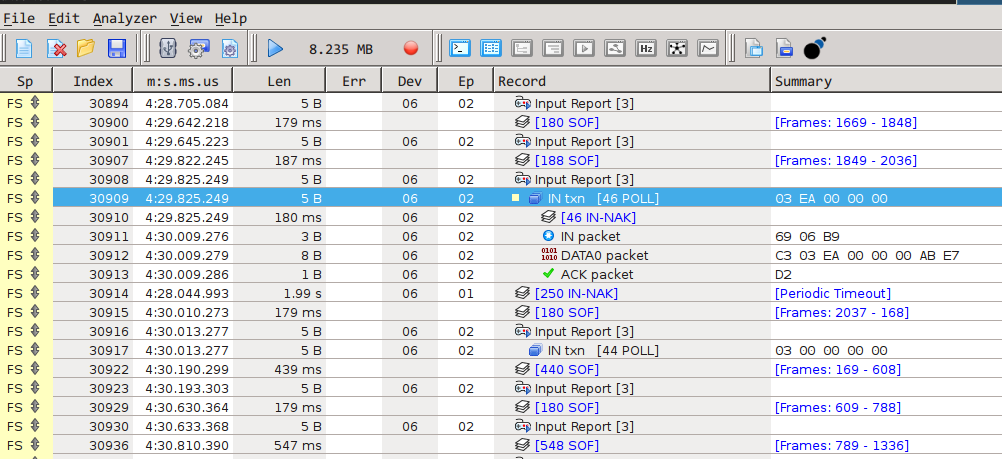
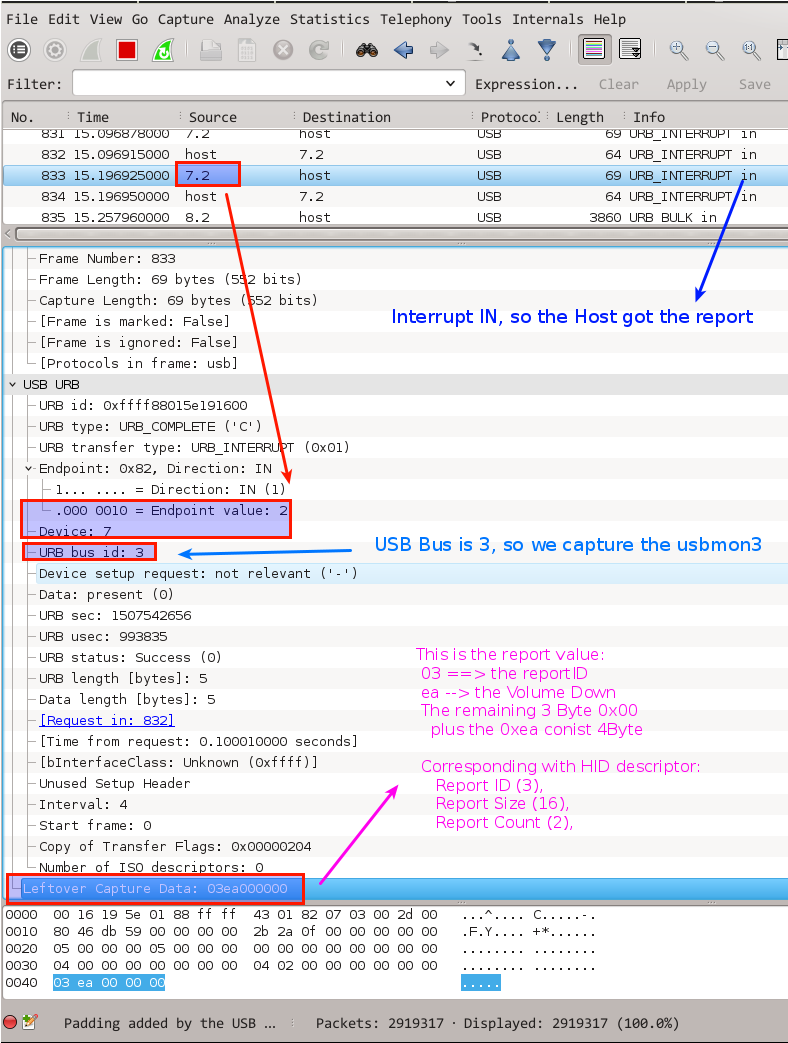
It can be seen that its report size=16, that is, 16bits, that is, 2Bytes, that is, each Filed is represented by 2B, and report count=2, that is, there are two files, so the number of bytes reported for each input (inside Only input, this example only has input) A total of 4 Bytes. There is also a report ID = 3, so we can know that every time a report is sent, there will be 5 bytes, the format is:
reportID + 4B reportValue
This is reflected and explained in the following figure Wireshark, and also represented by the following USB logic analyzer figure. At the same time, there is also a log in the usbhid-dump example, which can be analyzed in detail.
Use the debug interface to view the descriptors of BLE HoGP and USB HID
See the content at the end of the article.
Monitor the obtained report
Use usbhid-dump
Press Volume Down:
$ sudo usbhid-dump -es -m  248a:981d
Starting dumping interrupt transfer stream
with 1 minute timeout.

003:029:004:STREAM             1507801668.759133
 03 EA 00 00 00

003:029:004:STREAM             1507801668.907180
 03 00 00 00 00
Use hid's debugging interface to get report descriptor
Regardless of whether it is a HID device generated by HoGP from USB HID or BLE, the corresponding debugging interface is exposed under /sys/kernel/debug/hid. From here, we can combine the hidrd tool to obtain their HID report descriptor .
This method is especially useful for BLE HoGP devices, if there is no Bluetooth subcontracting tool around us.
First switch to the root user, and then enter the debug interface directory:
root@hexiongjun-9020:~# cd /sys/kernel/debug/hid/
root@hexiongjun-9020:/sys/kernel/debug/hid# ls
0003:04CA:0061.0001  0003:248A:981D.0013  0003:248A:981D.0014  0003:413C:2107.0002
There are two files, rdesc and event, in these devices. The former of these two files is the report descriptor, and the dump one comes out as an example:
root@hexiongjun-9020:/sys/kernel/debug/hid# cat 0003*/rdesc
05 01 09 02 a1 01 09 01 a1 00 05 09 19 01 29 03 15 00 25 01 95 08 75 01 81 02 05 01 09 30 09 31 09 38 15 81 25 7f 75 08 95 03 81 06 c0 c0


  INPUT[INPUT]
    Field(0)
      Physical(GenericDesktop.Pointer)
      Application(GenericDesktop.Mouse)
      Usage(8)
        Button.0001
        Button.0002
        Button.0003
        Button.0003
        Button.0003
        Button.0003
        Button.0003
        Button.0003
      Logical Minimum(0)
      Logical Maximum(1)
      Report Size(1)
      Report Count(8)
      Report Offset(0)
      Flags( Variable Absolute )
    Field(1)
      Physical(GenericDesktop.Pointer)
      Application(GenericDesktop.Mouse)
      Usage(3)
        GenericDesktop.X
        GenericDesktop.Y
        GenericDesktop.Wheel
      Logical Minimum(-127)
      Logical Maximum(127)
      Report Size(8)
      Report Count(3)
      Report Offset(8)
      Flags( Variable Relative )


Button.0001 ---> Key.LeftBtn
Button.0002 ---> Key.RightBtn
Button.0003 ---> Key.MiddleBtn
Button.0003 ---> Key.SideBtn
Button.0003 ---> Key.ExtraBtn
Button.0003 ---> Key.ForwardBtn
Button.0003 ---> Key.BackBtn
Button.0003 ---> Key.TaskBtn
GenericDesktop.X ---> Relative.X
GenericDesktop.Y ---> Relative.Y
GenericDesktop.Wheel ---> Relative.Wheel
The hex array in the first part is the report descriptor in hex format, and the latter is the parsed report descriptor in a human-friendly style.
View method of report descriptor for Bluetooth and USB HID devices
The previous string of hex values is a descriptor in hex format. We can use hidrd-convert to convert. We will use this as an example below.
$ echo '05 01 09 02 a1 01 09 01 a1 00 05 09 19 01 29 03 15 00 25 01 95 08 75 01 81 02 05 01 09 30 09 31 09 38 15 81 25 7f 75 08 95 03 81 06 c0 c0' | xxd -r -p | hidrd-convert -o spec
Usage Page (Desktop),               ; Generic desktop controls (01h)
Usage (Mouse),                      ; Mouse (02h, application collection)
Collection (Application),
    Usage (Pointer),                ; Pointer (01h, physical collection)
    Collection (Physical),
        Usage Page (Button),        ; Button (09h)
        Usage Minimum (01h),
        Usage Maximum (03h),
        Logical Minimum (0),
        Logical Maximum (1),
        Report Count (8),
        Report Size (1),
        Input (Variable),
        Usage Page (Desktop),       ; Generic desktop controls (01h)
        Usage (X),                  ; X (30h, dynamic value)
        Usage (Y),                  ; Y (31h, dynamic value)
        Usage (Wheel),              ; Wheel (38h, dynamic value)
        Logical Minimum (-127),
        Logical Maximum (127),
        Report Size (8),
        Report Count (3),
        Input (Variable, Relative),
    End Collection,
End Collection
The function of hidrd-convet is not only to convert hex array into viable spec format, but also into C language segmentation and XML format.
View the github homepage of common hidid tools for specific views, or use hidrd-convert --help instructions.
In addition, the hidrd project has not been updated for many years, and the basic functions are available, but there may be problems. In Ubuntu 14.04 and 16.04, the ld-config configuration is incorrect, so the library cannot be found when running hidrd related programs. I submitted this in the projectissue:library is not found when execute the hid-convert in Ubuntu 14.04 and 16.04 after make install #19For this problem, you can set the LD_LIBRARY_PATH environment variable to solve it.
Report in USB analyzer
If you use the Beagle USB Analyzer to capture packets, the input report will be parsed by the analyzer, and the results are as follows:
WireShark subcontracting view report
Wireshark captures and analyzes USB, you need to install the usbmon module first:
sudo modprobe usbmonThen determine the USB Bus ID of the USB device to be analyzed:
$ lsusb | grep 248A:981D -i
Bus 003 Device 029: ID 248a:981d
Based on this, it is known that it is located on USB Bus3, so after opening Wireshark, select usbmon3, and then you can capture packets.
Like the USB analyzer, we choose the same Volume Down as an example. The following is a screenshot with an explanation of Wireshark's analysis:
How to view report under Windows
The following data is report data. The format is ReportID + Input Value Arrary
reference
1. Tutorial about USB HID Report Descriptors
2. DigiMend: Collecting tablet diagnostics
Intelligent Recommendation
USB (5) -USB-HID class descriptor
In the previous chapter, the USB necessary descriptor configuration is described in detail, and then we will introduce the HID class in USB. By viewing the official document of the USB HID class, the ...
USB protocol Detailed explanation of the 9th: USB Descriptor - HID Descriptor)
table of Contents 1.HID device overview 2.HID descriptor composition 3.STM32 Configure Descriptor Collection Code (must be in order) 4. HID descriptor composition detailed 1.HID device overview A larg...
USB HID report descriptor parsing _ notes ---- Remarks
Original Address :: related articles 1、USB HID device descriptor report Detailed ---- 2、USB HIDReportTellandReportTellTraceStatesymbolsimpleIntroduction ---- 3、USB HID Report Descriptor Detailed ...

USB_21, USB interface HID device: physical descriptor
The physical descriptor is also calledEntity descriptor. It is used to describe the behavioral characteristics of the device. A physical descriptor is a data structure that provides information about ...

USB_20, USB interface HID device: report descriptor
1. Overview of report descriptor 1.1) Report descriptor The report descriptor is different from other USB descriptors. It is not a simple table. The report descriptor is the mo...
More Recommendation
USB (6) -HID (Structure Implementation of Report Descriptor)
The USB HID device is transmitted through the report (Report), and the report has an input report and output report. The input report is sent to the host; the output report is the host sent to the USB...
HID device for USB protocol analysis
Brief description The USB HID class is a standard device class for USB devices and includes many devices. The HID class device defines a device that is a human-computer interaction operation and is us...
STM32 USB slave HID analysis
STM32 USB slave HID analysis Chip: STM32F407VE Compiler: KEIL5 Author: SY Date: 2017-7-20 16:01:26 Overview willSTM32ofUSBInitialized toUSBSlave, using standardHIDprotocol. The control board comes wit...

https practice of packet capture analysis process
Overview: This article mainly studies the flow of the HTTPS protocol. Through packet capture and analysis of the handshake process, it will mainly focus on HTTPS optimization. Explore: 1、WHAT What is ...
HID device (mouse) report descriptor analysis
1. The report descriptor is a collection of report description items (Item); 2. The project has long projects and short projects, and their data formats are different; (HID class definition P36) Short...