Importerror: Cannot Import name ‘filefind‘ from ’trarteds.utils’ vSCode+Jupyter Notebook
tags: Deep learning vscode jupyter ide
Importerror: Cannot Import name ‘filefind’ from ‘tractlets.utils’ error
I use VSCode's built -in Jupyter Notebook plug -in.
I still used it a few days ago. Today, it may be due to the update or installation of a new package, which causes an error during the import package, which causes the kernel to be unable to start. The official solution is referred to:solution
Here I importtraitletsReport an error, so I use itpipReinstalltraitletsThis bag
python -m pip install traitlets -U --force-reinstall
After the reinstallation is over, there is no error in the kernel normally
Intelligent Recommendation
Win10 + Jupyter + flashback + appears importerror: Cannot Import name 'secure_write' from 'jupyter_core.paths' errors
Problem Description After the Jupyter opened, it flicked and didn't prompt. Then use Anaconda Prompt Run the instruction Jupyter Notebook, you can find that the following error: solution Operation dir...

ImportError: cannot import name 'pyplot' from 'matplotlib'
The current file name is:matplotlib.py Running error: Solution: Putmatplotlib.py The file name is changed to another name and cannot be associated with the module name. from matplotlib import pyplot t...
ImportError: cannot import name 'DEFAULT_CHANNEL_LAYER' from 'channels'
There is an error running the project: ImportError: cannot import name ‘DEFAULT_CHANNEL_LAYER’ from ‘channels’ This is the case in my django configuration file. There are also ...
ImportError: cannot import name 'connections' from 'haystack'
ImportError: cannot import name ‘connections’ from ‘haystack’ haystack and django-haystack, these two packages have conflicts. The online method just deletes the haystack, but ...
ImportError: cannot import name 'Bar' from 'pyecharts'
Recently been plagued by pyecharts from pyecharts import Bar Error message: Checked a lot of information, did not find the answer under the official github, and finally had to contact the author, and ...
More Recommendation
ImportError: cannot import name 'Map' from 'pyecharts'
When using pyecharts draw a map, according to methods online, but the above error occurred No version is specified during installation, use the following command to install directly: You will successf...

ImportError: cannot import name 'BDeuScore' from 'pgmpy.estimators.BDeuScore'
Pgmpy package itself solve the problem The first step is to find __init__.py found references BDeuScore, as shown in the B solutionDeuScore replaced BdeuScore The second part, open BDeuScore, found th...
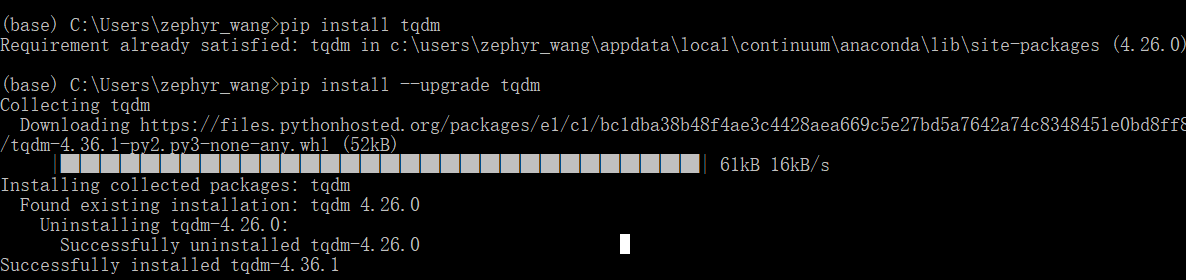
ImportError: cannot import name 'auto' from 'tqdm'
ImportError: cannot import name ‘auto’ from ‘tqdm’ Error phenomenon: import tensorflow_datasets as tfds, this line of code will report above. Cause of error: tqdm is not up-to-...
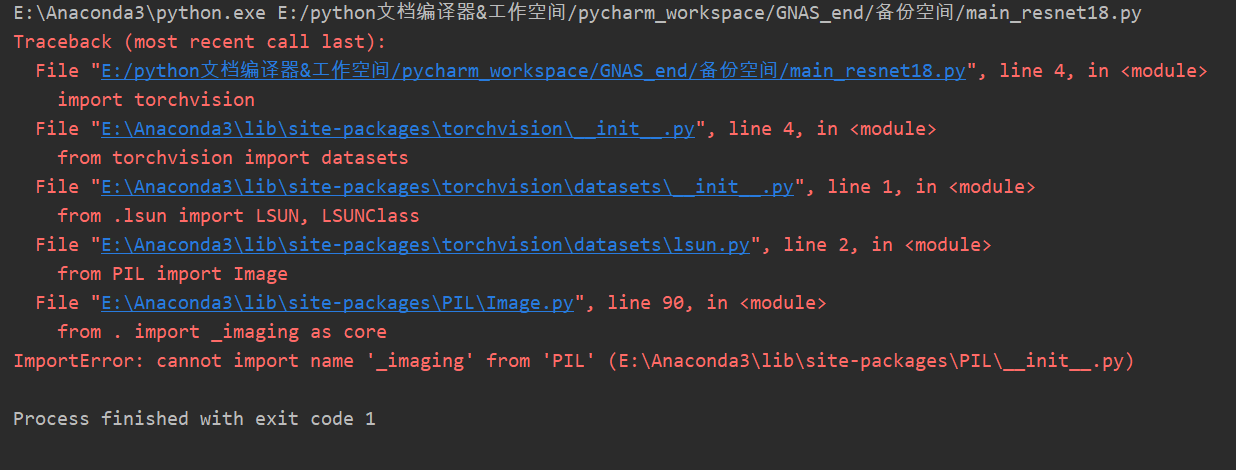
ImportError cannot import name _imaging from PIL
This is the import problem of PIL,As shown below The solution is as follows: Update your pillow (or install the specified version), the command is as follows: pip install --upgrade pillow Note: Every ...

ImportError: cannot import name 'cross_validation' from 'sklearn'
When using sklearn (scikit-learn) import cross_validation, the error is reported as follows: ImportError: cannot import name 'cross_validation' from 'sklearn' The original code is: the reason: s...