PYTHON3 Modbus_tk
Pip install modbus_tk can not be installed, go to the official website to download in PIP
Modbus Slave / Poll
Modbus Slave (used to simulate the client (slave)) and Modbus Poll (used to simulate the server (master))
Modbus Poll is a very popular Modbus Master simulator for testing and debugging slave devices. Supports Modbus RTU / ASCII and Modbus TCP / IP.
First, the use of the simulator
1.1 Configuration Modbus Poll
Configure the connection of the Modbus Poll
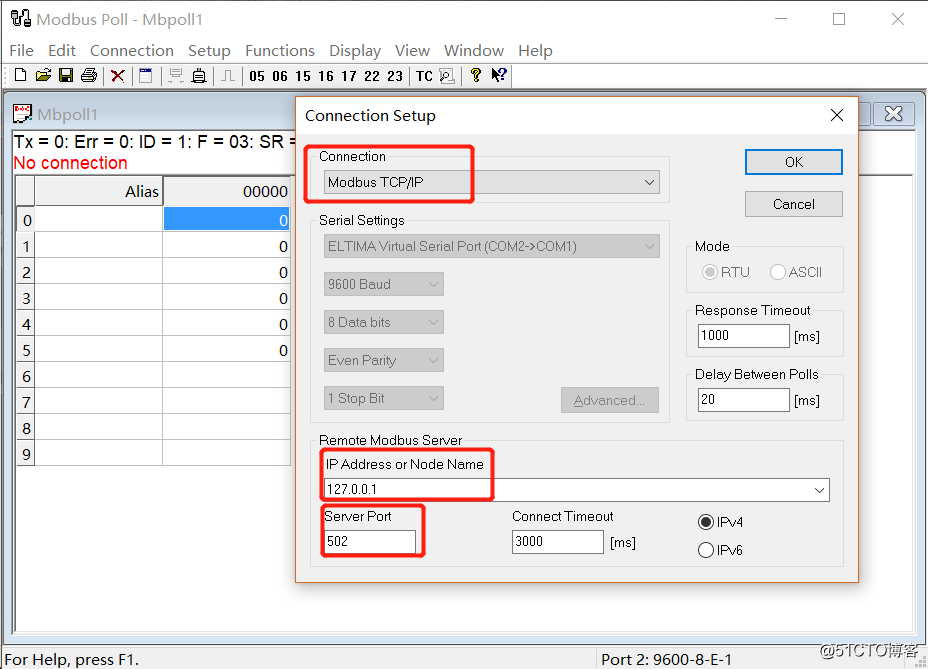
Configure the parameters of the Modbus Poll
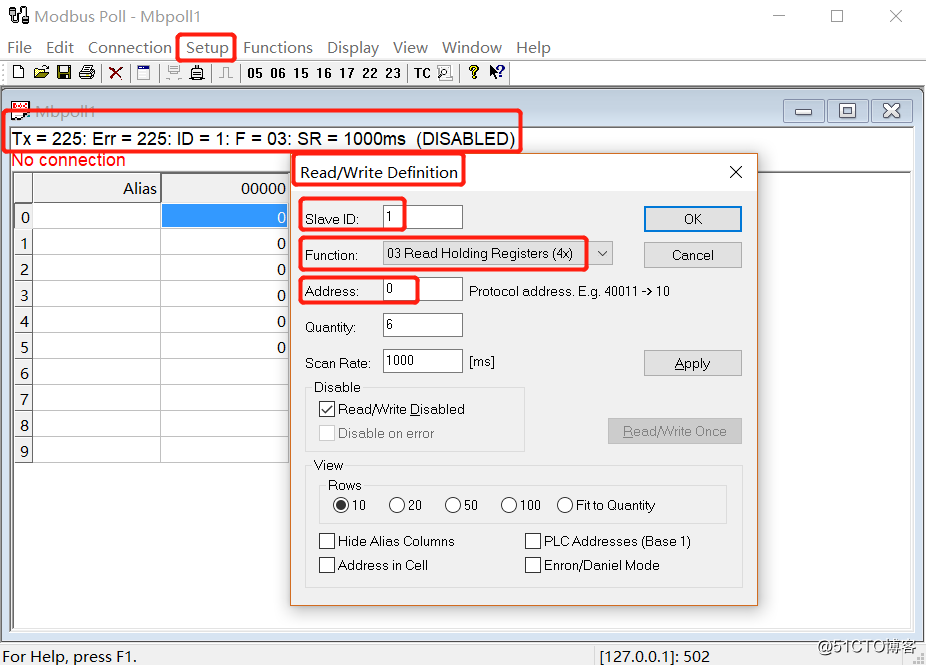
Parameter Description
TX: the number of times a data frame is sent to the primary station
Error: Number of communication errors
ID: Device address of the simulated Modbus subdevice
F: Modbus function code used
SR: scan cycleSlave ID: Modbus slave address
Features:
registerFunction codeAddress: Register start address, defaults from 0
Quantity: The number of consecutive registers, the default is 10
Scan rate: the period of reading data, in milliseconds, default 1000ms
Register function code
| Code | Chinese name | Register PLC address | Bit manipulation/word operation | Number of operations |
|---|---|---|---|---|
| 01 | Read coil status | 00001-09999 | Bit operation | Single or multiple |
| 02 | Read discrete input state | 10001-19999 | Bit operation | Single or multiple |
| 03 | Read holding register | 40001-49999 | Word operation | Single or multiple |
| 04 | Read input register | 30001-39999 | Word operation | Single or multiple |
| 05 | Write a single coil | 00001-09999 | Bit operation | single |
| 06 | Write a single holding register | 40001-49999 | Word operation | single |
| 15 | Write multiple coils | 00001-09999 | Bit operation | single |
| 16 | Write multiple holding registers | 40001-49999 | Word operation | single |
1.2 Configuring Modbus Slave
Configure the connection of Modbus Slave
Select the TCP / IP protocol. IP configuration address (only local), port number.
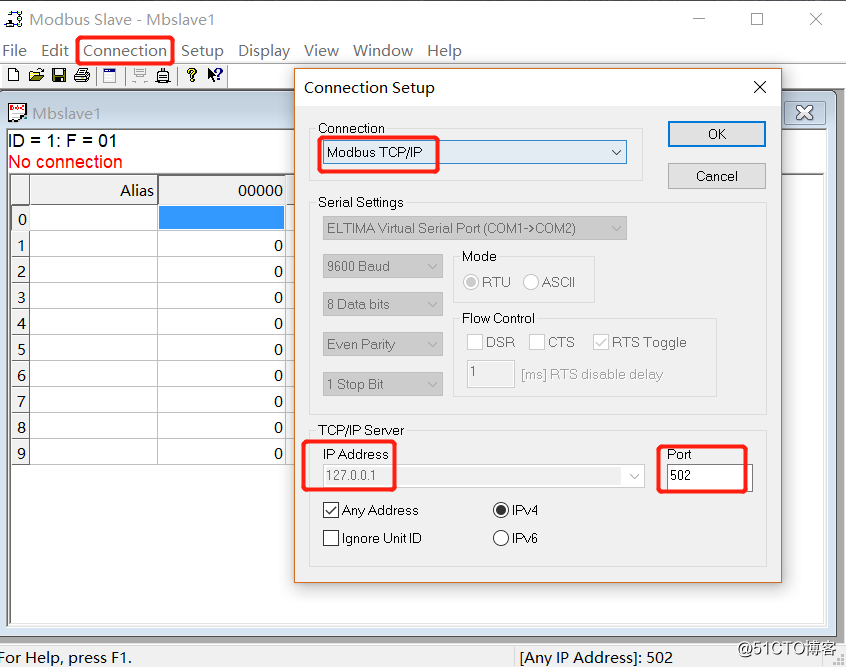
Configure parameters of Modbus Slave
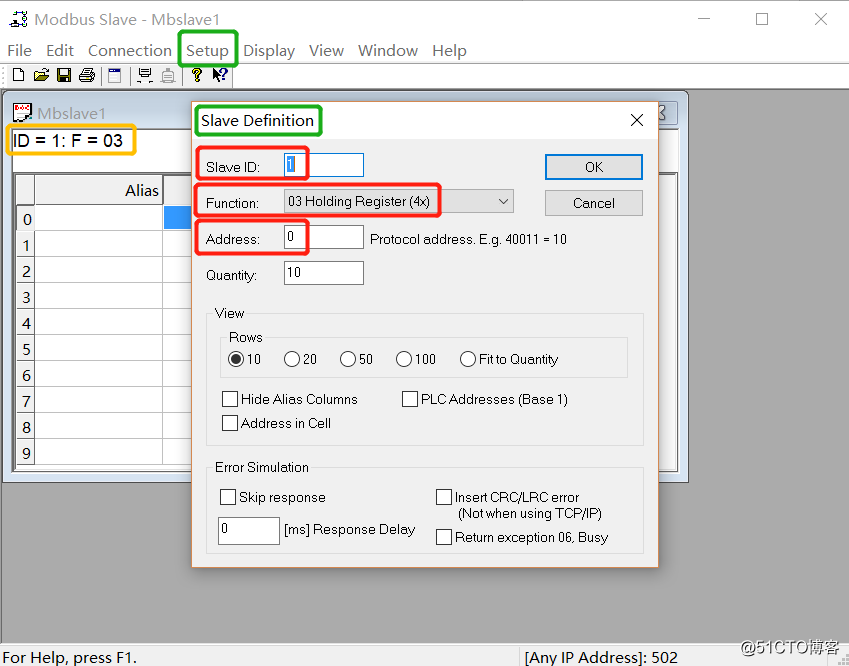
Parameter Description
Slave ID: Modbus slave address, default is 1
Function: Register function code
Register function code
| Code | Chinese name | Register PLC address | Bit manipulation/word operation | Number of operations |
|---|---|---|---|---|
| 01 | Read coil status | 00001-09999 | Bit operation | Single or multiple |
| 02 | Read discrete input state | 10001-19999 | Bit operation | Single or multiple |
| 03 | Read holding register | 40001-49999 | Word operation | Single or multiple |
| 04 | Read input register | 30001-39999 | Word operation | Single or multiple |
Second, the test connection of the simulator
== The configuration of the simulator at both ends is directly configured as described above. ==
Both windows are open to the communication traffic interface (in the display -> communication...). Used to view records.
method one:
Set the value of Modbus Slave
- Let the number 2 register increase the value by 1 per second.
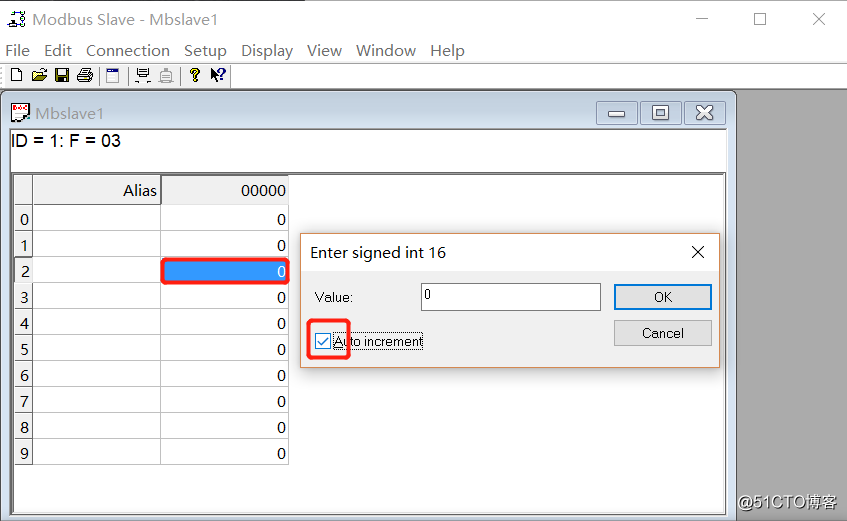
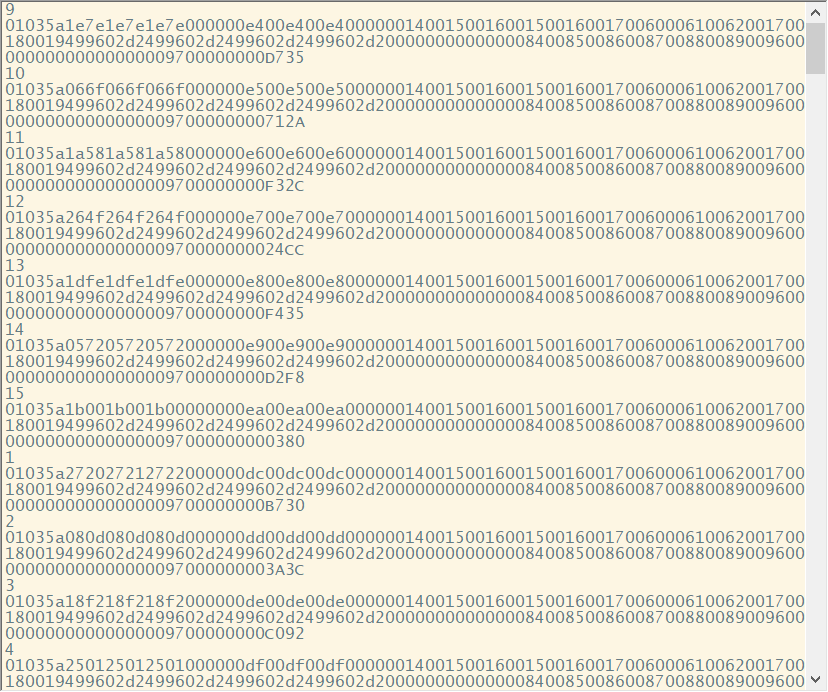
As shown above, click OK, you can view the data information in two windows.
As shown below:
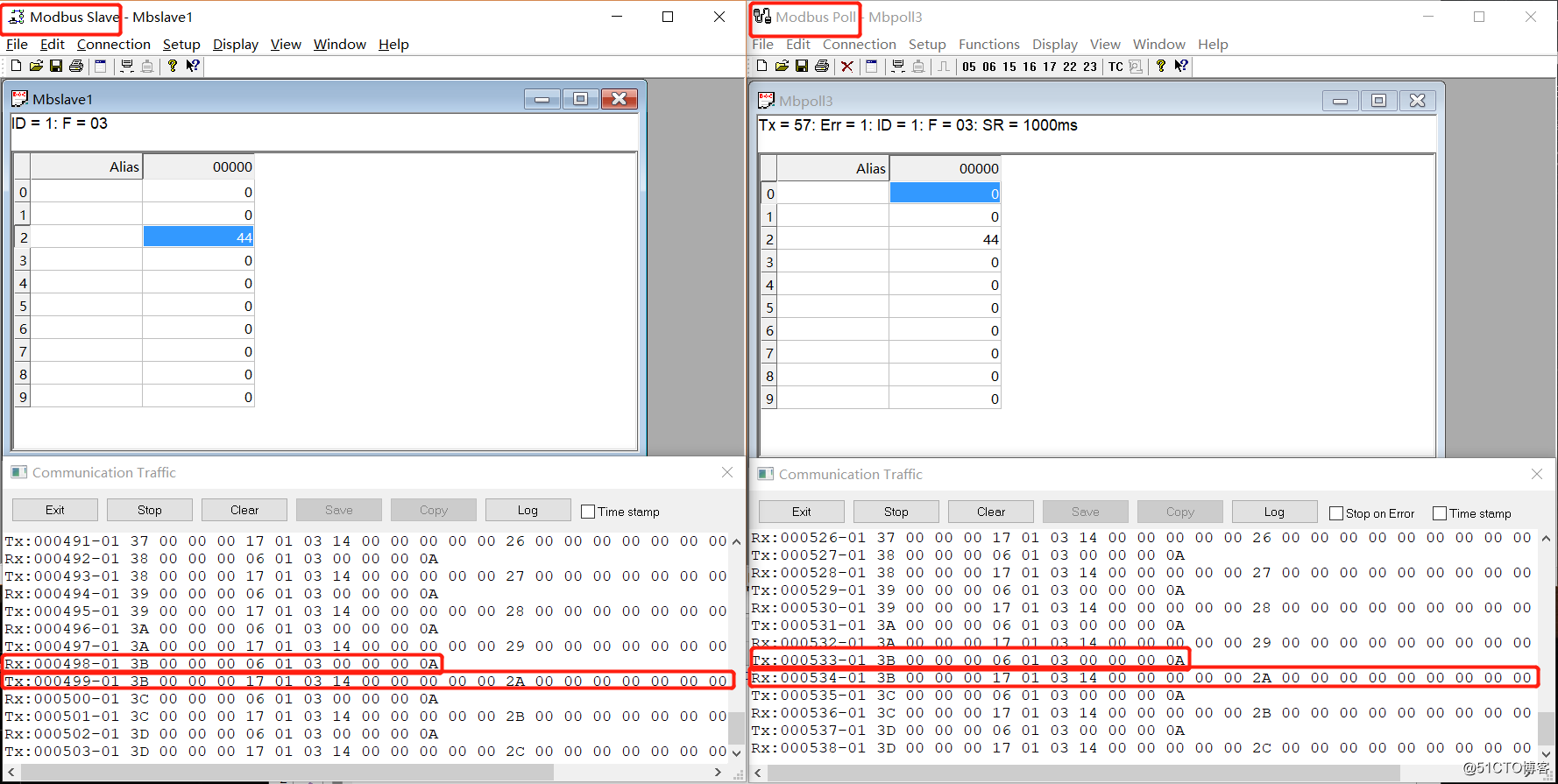
Content of data information:
- First 6 bytes: serial number
- 7th byte: address
- 8th byte: function code
Method 2:
Set the value of Modbus Poll
- Let the value of the first register become 9
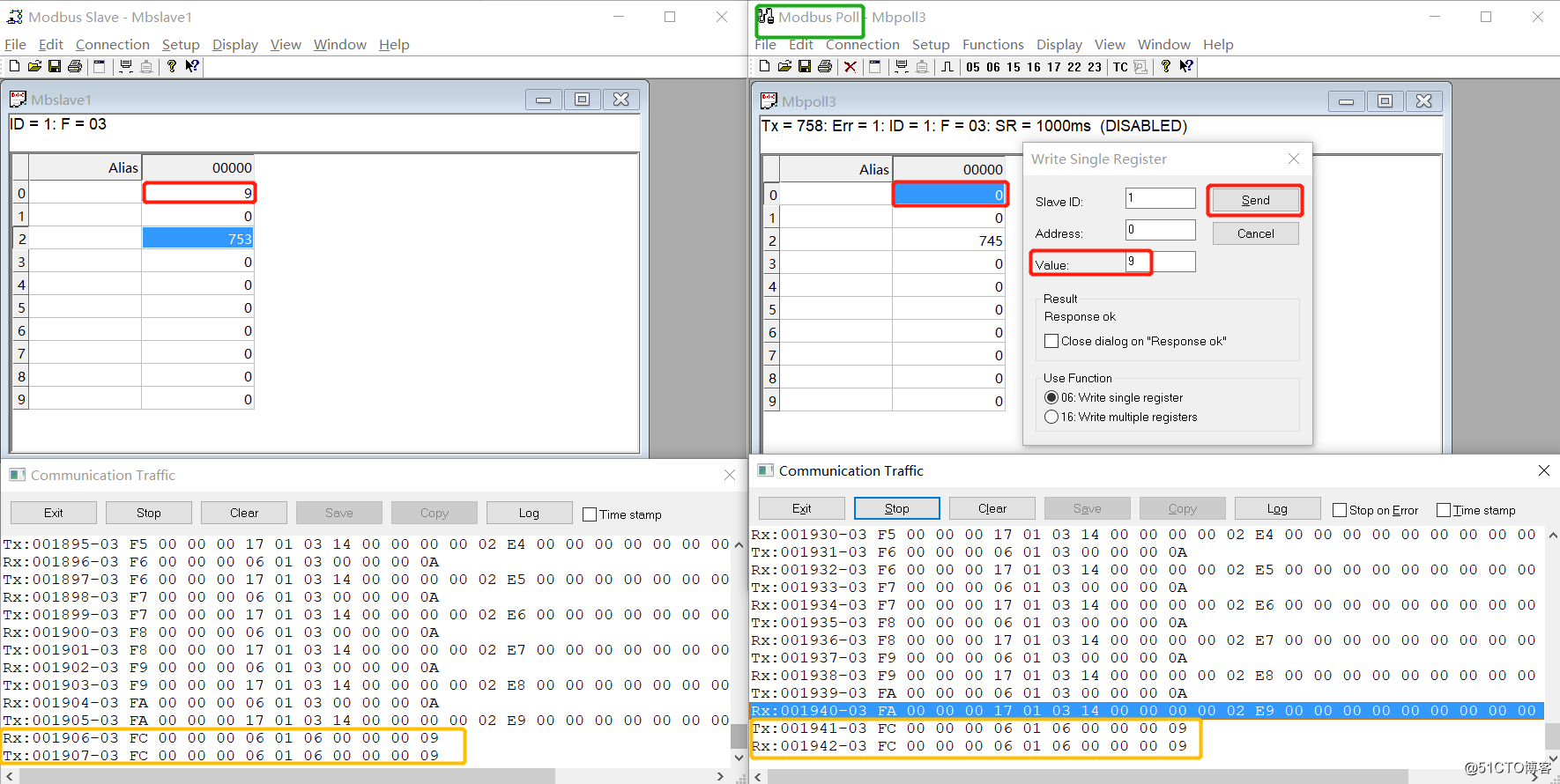
As shown above, you can see that the register value of the corresponding position has been changed to 9.
Content of data information
Different from the data format returned in the previous method
- First 6 bytes: serial number
- 7th byte: address
- 8th byte: function code
- Last 4 bytes: numeric
Third, Modbus Python module package - modbus_tk
Environment python 3.6.2
Simulate Modbus Master, write Python files that manipulate Modbus Slave
Need to import the modbus_tk module first
pip install modubs_tkVery simple code, just connect + execute
import modbus_tk.modbus_tcp as mt
import modbus_tk.defines as md

# Remote connection to the slave side (from)
master = mt.TcpMaster("127.0.0.1", 502)
master.set_timeout(5.0)

 # @slave=1 : identifier of the slave. from 1 to 247. 0 for broadcasting all slaves
 # @function_code=READ_HOLDING_REGISTERS: Function Code
 # @starting_address=1: Start address
 # @quantity_of_x=3: number of registers/coils
 # @output_value: An integer or iterable value: 1/[1,1,1,0,0,1]/xrange(12)
# @data_format
# @expected_length
aa = master.execute(slave=1, function_code=md.READ_HOLDING_REGISTERS, starting_address=1, quantity_of_x=3, output_value=5)
 Print(aa) # The value of all registers fetched
 Print(aa[0]) # Get the value of the first register
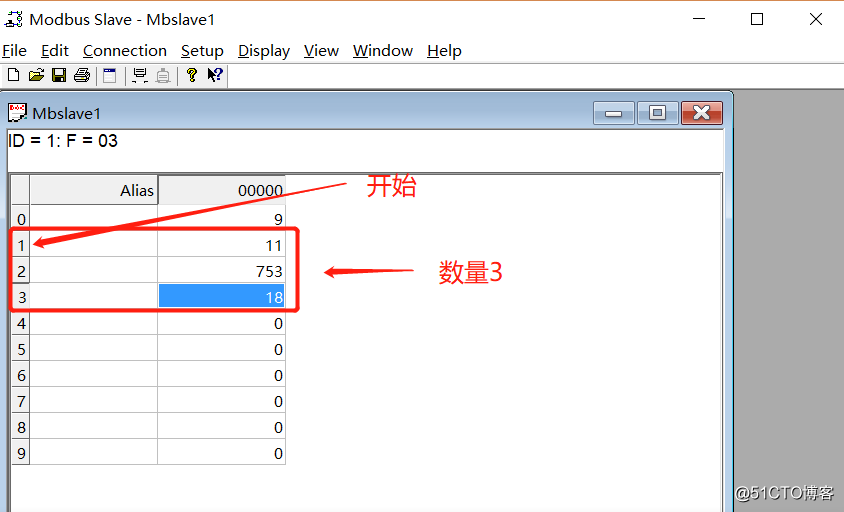
The results obtained:
(11, 753, 18)
11
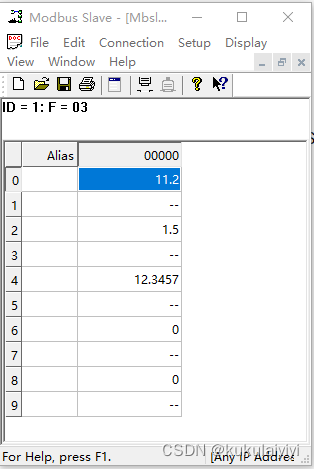
In contrast to Modbus Slave:
Intelligent Recommendation
Python Modbus_TK Module Learning Notes (RTU Slaver routines)
Git address: https://github.com/ljean/modbus-tk Find the Modbus RTU Slaver routine Copy the routine to the Centos directory with the pagoda View CentOS serial number Here I am using it /dev/ttyS1 Just...
Float point problem encountered when using modbus_tk for communication
Recently, I am working on a control-related project, which requires the controller to read and write data through modbus. The code is written in python. There is no problem when reading real-type data...
Use python to make MODBUS RTU master station debugging tool (two)-modbus_tk configuration
This article isUse python to make MODBUS RTU master station debugging tool (1)-GUI programming Follow-up. 1 modbus_tk modbus_tkIt is a modbus protocol stack implemented by python, and modbus communica...
More Recommendation
Python is based on the MODBUS_TK library to implement the MODBUSTCP main station and slave station [Very detailed]
Python is based on the MODBUS_TK library to implement the MODBUSTCP main station and from the station Modbus protocol Modbus communication process Modbus storage area Modbus-TCP protocol Modbus-TCP pa...
Python3
Python3 Python3 basic syntax coding Identifier Python reserved words Comment Line and indent type of data String Python3 basic syntax coding By default, Python 3 source files are encoded in UTF-8, and...
#Python3 @
Python3 decorator What is a decorator? Decorators, as the name suggests, can be understood as a decorative effect. After defining a function, you want to re-create this function with new functions, bu...
#Python3
Digital pyramid Method Two;...
python3
Work, based on python3 developed some features need to be added before the line logging, logging configuration before you can specify the output log rules, but based on the lack of time, automatically...