OpenGL simply implement gradient color + keyboard movement
tags: OpenGL C++ python Machine learning
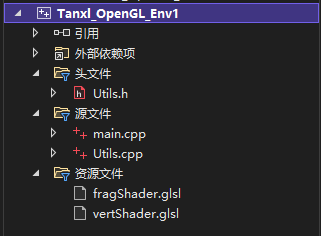
- UTILS's header files and implementation from "Computer Graphics
Programing IN OPENGL WITH C++》 - The configuration of the relevant environment is the same as the book, but if I learn OpenGL, I recommend OpenGL SuperBible Seventh Edition.
Utils.h
#include <GL\glew.h>
#include <GLFW\glfw3.h>
#include <SOIL2\soil2.h>
#include <string>
#include <iostream>
#include <fstream>
#include <cmath>
#include <vector>
#include <glm\glm.hpp>
#include <glm\gtc\type_ptr.hpp>
#include <glm\gtc\matrix_transform.hpp>

class Utils
{
private:
	static std::string readShaderFile(const char *filePath);
	static void printShaderLog(GLuint shader);
	static void printProgramLog(int prog);
	static GLuint prepareShader(int shaderTYPE, const char *shaderPath);
	static int finalizeShaderProgram(GLuint sprogram);

public:
	Utils();
	static bool checkOpenGLError();
	static GLuint createShaderProgram(const char *vp, const char *fp);
	static GLuint createShaderProgram(const char *vp, const char *gp, const char *fp);
	static GLuint createShaderProgram(const char *vp, const char *tCS, const char* tES, const char *fp);
	static GLuint createShaderProgram(const char *vp, const char *tCS, const char* tES, char *gp, const char *fp);
	static GLuint loadTexture(const char *texImagePath);
	static GLuint loadCubeMap(const char *mapDir);

	static float* goldAmbient();
	static float* goldDiffuse();
	static float* goldSpecular();
	static float goldShininess();

	static float* silverAmbient();
	static float* silverDiffuse();
	static float* silverSpecular();
	static float silverShininess();

	static float* bronzeAmbient();
	static float* bronzeDiffuse();
	static float* bronzeSpecular();
	static float bronzeShininess();
};
Utils.cpp
#include <GL\glew.h>
#include <GLFW\glfw3.h>
#include <SOIL2\soil2.h>
#include <string>
#include <iostream>
#include <fstream>
#include <cmath>
#include <glm\glm.hpp>
#include <glm\gtc\type_ptr.hpp> // glm::value_ptr
#include <glm\gtc\matrix_transform.hpp> // glm::translate, glm::rotate, glm::scale, glm::perspective
#include "Utils.h"
using namespace std;

Utils::Utils() {}

string Utils::readShaderFile(const char *filePath) {
	string content;
	ifstream fileStream(filePath, ios::in);
	string line = "";
	while (!fileStream.eof()) {
		getline(fileStream, line);
		content.append(line + "\n");
	}
	fileStream.close();
	return content;
}

bool Utils::checkOpenGLError() {
	bool foundError = false;
	int glErr = glGetError();
	while (glErr != GL_NO_ERROR) {
		cout << "glError: " << glErr << endl;
		foundError = true;
		glErr = glGetError();
	}
	return foundError;
}

void Utils::printShaderLog(GLuint shader) {
	int len = 0;
	int chWrittn = 0;
	char *log;
	glGetShaderiv(shader, GL_INFO_LOG_LENGTH, &len);
	if (len > 0) {
		log = (char *)malloc(len);
		glGetShaderInfoLog(shader, len, &chWrittn, log);
		cout << "Shader Info Log: " << log << endl;
		free(log);
	}
}

GLuint Utils::prepareShader(int shaderTYPE, const char *shaderPath)
{
	GLint shaderCompiled;
	string shaderStr = readShaderFile(shaderPath);
	const char *shaderSrc = shaderStr.c_str();
	GLuint shaderRef = glCreateShader(shaderTYPE);
	glShaderSource(shaderRef, 1, &shaderSrc, NULL);
	glCompileShader(shaderRef);
	checkOpenGLError();
	glGetShaderiv(shaderRef, GL_COMPILE_STATUS, &shaderCompiled);
	if (shaderCompiled != 1)
	{
		if (shaderTYPE == 35633) cout << "Vertex ";
		if (shaderTYPE == 36488) cout << "Tess Control ";
		if (shaderTYPE == 36487) cout << "Tess Eval ";
		if (shaderTYPE == 36313) cout << "Geometry ";
		if (shaderTYPE == 35632) cout << "Fragment ";
		cout << "shader compilation error." << endl;
		printShaderLog(shaderRef);
	}
	return shaderRef;
}

void Utils::printProgramLog(int prog) {
	int len = 0;
	int chWrittn = 0;
	char *log;
	glGetProgramiv(prog, GL_INFO_LOG_LENGTH, &len);
	if (len > 0) {
		log = (char *)malloc(len);
		glGetProgramInfoLog(prog, len, &chWrittn, log);
		cout << "Program Info Log: " << log << endl;
		free(log);
	}
}

int Utils::finalizeShaderProgram(GLuint sprogram)
{
	GLint linked;
	glLinkProgram(sprogram);
	checkOpenGLError();
	glGetProgramiv(sprogram, GL_LINK_STATUS, &linked);
	if (linked != 1)
	{
		cout << "linking failed" << endl;
		printProgramLog(sprogram);
	}
	return sprogram;
}

GLuint Utils::createShaderProgram(const char *vp, const char *fp) {
	GLuint vShader = prepareShader(GL_VERTEX_SHADER, vp);
	GLuint fShader = prepareShader(GL_FRAGMENT_SHADER, fp);
	GLuint vfprogram = glCreateProgram();
	glAttachShader(vfprogram, vShader);
	glAttachShader(vfprogram, fShader);
	finalizeShaderProgram(vfprogram);
	return vfprogram;
}

GLuint Utils::createShaderProgram(const char *vp, const char *gp, const char *fp) {
	GLuint vShader = prepareShader(GL_VERTEX_SHADER, vp);
	GLuint gShader = prepareShader(GL_GEOMETRY_SHADER, gp);
	GLuint fShader = prepareShader(GL_FRAGMENT_SHADER, fp);
	GLuint vgfprogram = glCreateProgram();
	glAttachShader(vgfprogram, vShader);
	glAttachShader(vgfprogram, gShader);
	glAttachShader(vgfprogram, fShader);
	finalizeShaderProgram(vgfprogram);
	return vgfprogram;
}

GLuint Utils::createShaderProgram(const char *vp, const char *tCS, const char* tES, const char *fp) {
	GLuint vShader = prepareShader(GL_VERTEX_SHADER, vp);
	GLuint tcShader = prepareShader(GL_TESS_CONTROL_SHADER, tCS);
	GLuint teShader = prepareShader(GL_TESS_EVALUATION_SHADER, tES);
	GLuint fShader = prepareShader(GL_FRAGMENT_SHADER, fp);
	GLuint vtfprogram = glCreateProgram();
	glAttachShader(vtfprogram, vShader);
	glAttachShader(vtfprogram, tcShader);
	glAttachShader(vtfprogram, teShader);
	glAttachShader(vtfprogram, fShader);
	finalizeShaderProgram(vtfprogram);
	return vtfprogram;
}

GLuint Utils::createShaderProgram(const char *vp, const char *tCS, const char* tES, char *gp, const char *fp) {
	GLuint vShader = prepareShader(GL_VERTEX_SHADER, vp);
	GLuint tcShader = prepareShader(GL_TESS_CONTROL_SHADER, tCS);
	GLuint teShader = prepareShader(GL_TESS_EVALUATION_SHADER, tES);
	GLuint gShader = prepareShader(GL_GEOMETRY_SHADER, gp);
	GLuint fShader = prepareShader(GL_FRAGMENT_SHADER, fp);
	GLuint vtgfprogram = glCreateProgram();
	glAttachShader(vtgfprogram, vShader);
	glAttachShader(vtgfprogram, tcShader);
	glAttachShader(vtgfprogram, teShader);
	glAttachShader(vtgfprogram, gShader);
	glAttachShader(vtgfprogram, fShader);
	finalizeShaderProgram(vtgfprogram);
	return vtgfprogram;
}

GLuint Utils::loadCubeMap(const char *mapDir) {
	GLuint textureRef;
	string xp = mapDir; xp = xp + "/xp.jpg";
	string xn = mapDir; xn = xn + "/xn.jpg";
	string yp = mapDir; yp = yp + "/yp.jpg";
	string yn = mapDir; yn = yn + "/yn.jpg";
	string zp = mapDir; zp = zp + "/zp.jpg";
	string zn = mapDir; zn = zn + "/zn.jpg";
	textureRef = SOIL_load_OGL_cubemap(xp.c_str(), xn.c_str(), yp.c_str(), yn.c_str(), zp.c_str(), zn.c_str(),
		SOIL_LOAD_AUTO, SOIL_CREATE_NEW_ID, SOIL_FLAG_MIPMAPS);
	if (textureRef == 0) cout << "didnt find cube map image file" << endl;
	//	glBindTexture(GL_TEXTURE_CUBE_MAP, textureRef);
	// reduce seams
	//	glTexParameteri(GL_TEXTURE_CUBE_MAP, GL_TEXTURE_WRAP_S, GL_CLAMP_TO_EDGE);
	//	glTexParameteri(GL_TEXTURE_CUBE_MAP, GL_TEXTURE_WRAP_T, GL_CLAMP_TO_EDGE);
	//	glTexParameteri(GL_TEXTURE_CUBE_MAP, GL_TEXTURE_WRAP_R, GL_CLAMP_TO_EDGE);
	return textureRef;
}

GLuint Utils::loadTexture(const char *texImagePath)
{
	GLuint textureRef;
	textureRef = SOIL_load_OGL_texture(texImagePath, SOIL_LOAD_AUTO, SOIL_CREATE_NEW_ID, SOIL_FLAG_INVERT_Y);
	if (textureRef == 0) cout << "didnt find texture file " << texImagePath << endl;
	// ----- mipmap/anisotropic section
	glBindTexture(GL_TEXTURE_2D, textureRef);
	glTexParameteri(GL_TEXTURE_2D, GL_TEXTURE_MIN_FILTER, GL_LINEAR_MIPMAP_LINEAR);
	glGenerateMipmap(GL_TEXTURE_2D);
	if (glewIsSupported("GL_EXT_texture_filter_anisotropic")) {
		GLfloat anisoset = 0.0f;
		glGetFloatv(GL_MAX_TEXTURE_MAX_ANISOTROPY_EXT, &anisoset);
		glTexParameterf(GL_TEXTURE_2D, GL_TEXTURE_MAX_ANISOTROPY_EXT, anisoset);
	}
	// ----- end of mipmap/anisotropic section
	return textureRef;
}

// GOLD material - ambient, diffuse, specular, and shininess
float* Utils::goldAmbient() { static float a[4] = { 0.2473f, 0.1995f, 0.0745f, 1 }; return (float*)a; }
float* Utils::goldDiffuse() { static float a[4] = { 0.7516f, 0.6065f, 0.2265f, 1 }; return (float*)a; }
float* Utils::goldSpecular() { static float a[4] = { 0.6283f, 0.5559f, 0.3661f, 1 }; return (float*)a; }
float Utils::goldShininess() { return 51.2f; }

// SILVER material - ambient, diffuse, specular, and shininess
float* Utils::silverAmbient() { static float a[4] = { 0.1923f, 0.1923f, 0.1923f, 1 }; return (float*)a; }
float* Utils::silverDiffuse() { static float a[4] = { 0.5075f, 0.5075f, 0.5075f, 1 }; return (float*)a; }
float* Utils::silverSpecular() { static float a[4] = { 0.5083f, 0.5083f, 0.5083f, 1 }; return (float*)a; }
float Utils::silverShininess() { return 51.2f; }

// BRONZE material - ambient, diffuse, specular, and shininess
float* Utils::bronzeAmbient() { static float a[4] = { 0.2125f, 0.1275f, 0.0540f, 1 }; return (float*)a; }
float* Utils::bronzeDiffuse() { static float a[4] = { 0.7140f, 0.4284f, 0.1814f, 1 }; return (float*)a; }
float* Utils::bronzeSpecular() { static float a[4] = { 0.3936f, 0.2719f, 0.1667f, 1 }; return (float*)a; }
float Utils::bronzeShininess() { return 25.6f; }
The following is the effect of implementing code and implementation.
main.cpp
#include <GL\glew.h>
#include <GLFW\glfw3.h>
#include <iostream>
#include <string>
#include <iostream>
#include <fstream>
#include <math.h>
#include "Utils.h"
using namespace std;

#define numVAOs 1

GLuint PosA, PosB;
GLuint PosX, PosY;

float movex;
float movey;

float movespeed = 0.01f;

GLuint renderingProgram;
GLuint vao[numVAOs];

void init(GLFWwindow* window) {
	renderingProgram = Utils::createShaderProgram("vertShader.glsl", "fragShader.glsl");
	glGenVertexArrays(numVAOs, vao);
	glBindVertexArray(vao[0]);
}

void display(GLFWwindow* window, double currentTime) {

	float SinCurrent = sin(currentTime) * 0.5f;
	float CosCurrent = cos(currentTime) * 0.5f;

	PosA = glGetUniformLocation(renderingProgram, "SinCurrentTime");
	glProgramUniform1f(renderingProgram, PosA, SinCurrent);
	PosB = glGetUniformLocation(renderingProgram, "CosCurrentTime");
	glProgramUniform1f(renderingProgram, PosB, CosCurrent);

	glUseProgram(renderingProgram);
	glDrawArrays(GL_TRIANGLES, 0, 6);
}

int main(void) {
	if (!glfwInit()) { exit(EXIT_FAILURE); }
	glfwWindowHint(GLFW_CONTEXT_VERSION_MAJOR, 4);
	glfwWindowHint(GLFW_CONTEXT_VERSION_MINOR, 3);
	GLFWwindow* window = glfwCreateWindow(600, 600, "Tanxl_Game TEST VERSION /// 0.00.00.06", NULL, NULL);
	glfwMakeContextCurrent(window);
	if (glewInit() != GLEW_OK) { exit(EXIT_FAILURE); }
	glfwSwapInterval(1);

	init(window);

	while (!glfwWindowShouldClose(window))
	{
		PosX = glGetUniformLocation(renderingProgram, "MoveX");
		glProgramUniform1f(renderingProgram, PosX, movex);
		PosY = glGetUniformLocation(renderingProgram, "MoveY");
		glProgramUniform1f(renderingProgram, PosY, movey);
		if (glfwGetKey(window, GLFW_KEY_LEFT) == GLFW_PRESS)
		{
			cout << "LEFT_PUSHED!" << endl;
			movex -= movespeed;
		}
		else if (glfwGetKey(window, GLFW_KEY_RIGHT) == GLFW_PRESS)
		{
			cout << "RIGHT_PUSHED!" << endl;
			movex += movespeed;
		}
		else if (glfwGetKey(window, GLFW_KEY_DOWN) == GLFW_PRESS)
		{
			cout << "DOWN_PUSHED!" << endl;
			movey -= movespeed;
		}
		else if (glfwGetKey(window, GLFW_KEY_UP) == GLFW_PRESS)
		{
			cout << "UP_PUSHED!" << endl;
			movey += movespeed;
		}
		display(window, glfwGetTime());
		glfwSwapBuffers(window);
		glfwPollEvents();
	}

	glfwDestroyWindow(window);
	glfwTerminate();
	exit(EXIT_SUCCESS);
}
fragShader.glsl
#version 430
out vec4 color;
uniform float SinCurrentTime;
uniform float CosCurrentTime;
void main(void)
{
	color = vec4(SinCurrentTime + 0.5, CosCurrentTime + 0.5, 0.0, 1.0);
}
vertShader.glsl
#version 430

uniform float MoveX;

uniform float MoveY;

void main(void)
{
  if      (gl_VertexID == 0) gl_Position = vec4(  0.25 + MoveX, -0.25 + MoveY, 0.0, 1.0);//MIDDLE
  else if (gl_VertexID == 1) gl_Position = vec4( -0.25 + MoveX, -0.25 + MoveY, 0.0, 1.0);
  else if (gl_VertexID == 2) gl_Position = vec4(  0.25 + MoveX,  0.25 + MoveY, 0.0, 1.0);
  else if (gl_VertexID == 3) gl_Position = vec4( -0.25 + MoveX, -0.25 + MoveY, 0.0, 1.0);
  else if (gl_VertexID == 4) gl_Position = vec4( -0.25 + MoveX,  0.25 + MoveY, 0.0, 1.0);
  else if (gl_VertexID == 5) gl_Position = vec4(  0.25 + MoveX,  0.25 + MoveY, 0.0, 1.0);
}
The effect after execution is as follows
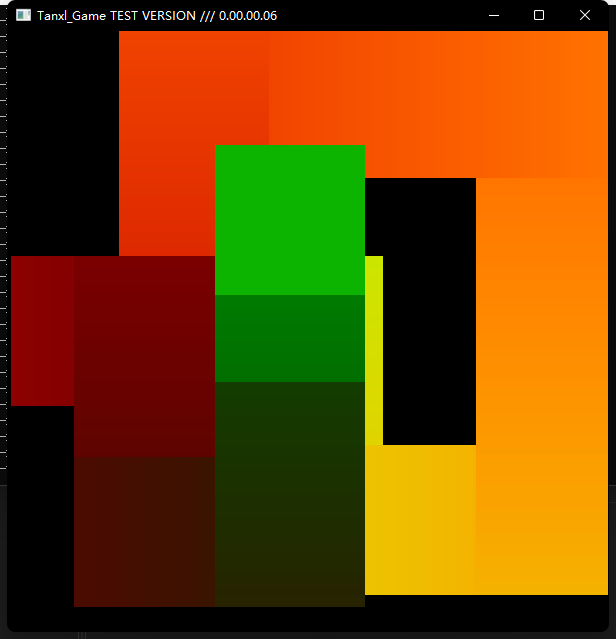
You can freely control the square movement.
Intelligent Recommendation
Implement text color gradient display using CSS
Directly attached operation results...
Graphics opengl experiment one-gradient color six-pointed star
In Windows system, install the GLUT library: open glut-3.7.6-bin.zip, take out glut.h, glut32.lib, and glut32.dll, and place them separately. Use Visual Studio C++ to compile the existing project proj...

How does Cocos Xiaobai implement the movement of the object through the keyboard?
How to move? What is the principle? When we move through the keyboard, be sure to capture the status of our keyboard, press the keyboard to press a key bit, we have a coded code, but how to capture th...

C / C ++ cursor: Keyboard Upload button Implement menu movement
mind Mapping . Do not want to listen to the process directory to move to the code implementation . Article catalog mind Mapping 1. Cursor mobile function gotoxy () 2. Get the keyboard key value: _kbhi...
More Recommendation
Qt Implement the keyboard direction button to control Label movement
keyboarddialog.h keyboarddialog.cpp main.cpp...
OpenGL South Post Computer Graphics Experimental Report II — Gradient transformation and movement of two textures
OpenGL South Post Computer Graphics Experimental Report II — Gradient transformation and movement of two textures Computer graphics newRequest OpenGL configuration reference: Southern Post Old P...

ECharts column -like diagram, folding drawing gradient gradient, filling gradient color, mouse movement style, dual Y -axis
Install: Introduction: Introduction to main.js: Draw a chart: (I encapsulate it here as a component for use) Effect 1: Pillar graph graphy color+X axis can be dragged+dual Y axis Code: After introduci...
OpenGL Celestial Movement
The method of computer graphics to simulate the movement of celestial bodies Celestial movement: 1. Simulate the rotation and revolution of the earth 2. Simulate the moon and satellite revolving aroun...
The movement and perspective of the OpenGL camera
Today I studied the movement of the camera, and wrote it by the way First, the code...