Codeblocks+wxWidgets drawing
Recently I have to use codeblocks+wxWidgets to do an experimental result graph. The version used is codeblocksSVN perfect configuration green version, SVN6852, download addresshttp://bt.neu6.edu.cn/viewthread.php?tid=692508&highlight=codeblocks
This version is used because it does not need to be configured, so it is convenient to quickly finish what is on hand now.
To create a new project, select wxWidgets Project:
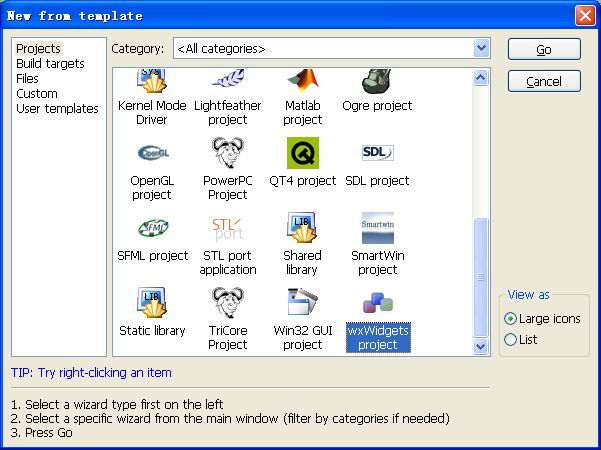
After the first step is a welcome interface, no need to pay attention, next;
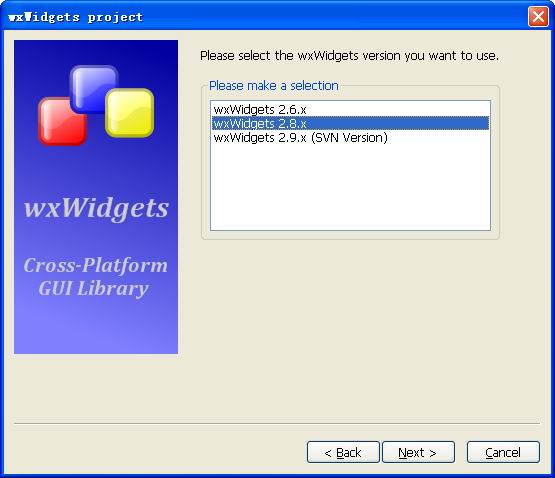
Pop-up window prompts to select the version of wxWidgets, my version is integrated with 2.8.x, select it and click next;
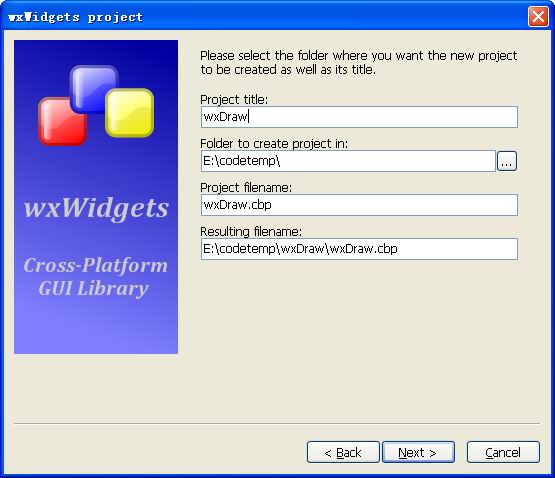
Set the path and project name:
Enter the author information, ignore it, next;
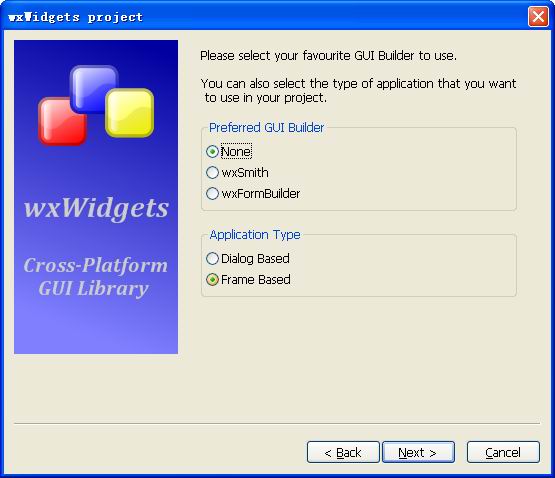
Choosing the type of GUI to use, I have a simple function, select None, next
Enter the path of wxWidgets. Since the green version is used, there is no need to set it. Keep the global symbol $(#wx) and continue all the way to next;
Finally, the project is completed and the project list is as follows:
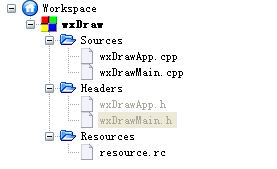
Replace the contents of wxDrawApp.cpp:
#include "wxDrawApp.h"

//(*AppHeaders
#include "wxDrawMain.h"
#include <wx/image.h>

IMPLEMENT_APP(MyApp)

bool MyApp::OnInit()
{

    Line *line = new Line(wxT("Line"));
    line->Show(true);

    return true;
}
Change the contents of wxDrawMain.cpp:
#include "wxDrawMain.h"
Line::Line(const wxString& title)
       : wxFrame(NULL, wxID_ANY, title, wxDefaultPosition, wxSize(280, 180))
{
  this->Connect(wxEVT_PAINT, wxPaintEventHandler(Line::OnPaint));
  this->Centre();
}


void Line::OnPaint(wxPaintEvent& event)
{
    wxPaintDC dc(this);

         // draw a line segment
    wxCoord x1 = 50, y1 = 60;
    wxCoord x2 = 190, y2 = 60;

    dc.DrawLine(x1, y1, x2, y2);
}
Change the contents of wxDrawApp.h:
#include <wx/wx.h>

class MyApp : public wxApp
{
  public:
    virtual bool OnInit();
};
Change the contents of wxDrawMain.h:
#include <wx/wx.h>

class Line : public wxFrame
{
public:
    Line(const wxString& title);
    void OnPaint(wxPaintEvent& event);
};
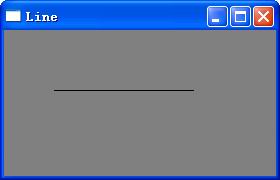
Anyone who has some experience in MFC and C++ can understand this code. A new Line class is created, which overloads the OnPaint function in the library and completes the function of drawing a line segment.
The effect is as follows:
The contents of the OnPaint response function can be modified to complete various complex renderings. Paste a few useful code examples below:
void Line::OnPaint(wxPaintEvent& event)
{
    wxPaintDC dc(this);

    // draw a line segment
    wxCoord x1 = 50, y1 = 60;
    wxCoord x2 = 190, y2 = 60;

    dc.DrawLine(x1, y1, x2, y2);

         // Add text
    dc.DrawText(wxT("fjsadk"), 40, 60);
    dc.DrawText(wxT("fwefdecd"), 70, 80);

         // point
    dc.DrawPoint(10,10);
    dc.DrawPoint(10,20);
    dc.DrawPoint(20,10);
    dc.DrawPoint(20,20);

         // brush
    wxColour col1, col2;

    col1.Set(wxT("#0c0c0c"));
    col2.Set(wxT("#000000"));

    wxBrush brush(wxColour(255, 255, 255), wxTRANSPARENT);
    dc.SetBrush(brush);

    dc.SetPen(wxPen(col1, 1, wxSOLID));
    dc.DrawRectangle(10, 15, 90, 60);

    dc.SetPen(wxPen(col1, 1, wxDOT));
    dc.DrawRectangle(130, 15, 90, 60);

    dc.SetPen(wxPen(col1, 1, wxLONG_DASH));
    dc.DrawRectangle(250, 15, 90, 60);

    dc.SetPen(wxPen(col1, 1, wxSHORT_DASH));
    dc.DrawRectangle(10, 105, 90, 60);

    dc.SetPen(wxPen(col1, 1, wxDOT_DASH));
    dc.DrawRectangle(130, 105, 90, 60);

    dc.SetPen(wxPen(col1, 1, wxTRANSPARENT));
    dc.DrawRectangle(250, 105, 90, 60);

         // draw graphics
    wxColour gray, white, red, blue;
    wxColour orange, green, brown;

    gray.Set(wxT("#d4d4d4"));
    white.Set(wxT("#ffffff"));
    red.Set(wxT("#ff0000"));
    orange.Set(wxT("#fa8e00"));
    green.Set(wxT("#619e1b"));
    brown.Set(wxT("#715b33"));
    blue.Set(wxT("#0d0060"));

    dc.SetPen(wxPen(gray));

    dc.DrawRectangle(20, 20, 50, 50);
    dc.DrawRectangle(30, 40, 50, 50);

    dc.SetBrush(wxBrush(white));
    dc.DrawRectangle(100, 20, 50, 50);
    dc.DrawRectangle(110, 40, 50, 50);
    wxRegion region1(100, 20, 50, 50);
    wxRegion region2(110, 40, 50, 50);
    region1.Intersect(region2);
    wxRect rect1 = region1.GetBox();
    dc.SetClippingRegion(region1);
    dc.SetBrush(wxBrush(red));
    dc.DrawRectangle(rect1);
    dc.DestroyClippingRegion();

    dc.SetBrush(wxBrush(white));
    dc.DrawRectangle(180, 20, 50, 50);
    dc.DrawRectangle(190, 40, 50, 50);
    wxRegion region3(180, 20, 50, 50);
    wxRegion region4(190, 40, 50, 50);
    region3.Union(region4);
    dc.SetClippingRegion(region3);
    wxRect rect2 = region3.GetBox();
    dc.SetBrush(wxBrush(orange));
    dc.DrawRectangle(rect2);
    dc.DestroyClippingRegion();

    dc.SetBrush(wxBrush(white));
    dc.DrawRectangle(20, 120, 50, 50);
    dc.DrawRectangle(30, 140, 50, 50);
    wxRegion region5(20, 120, 50, 50);
    wxRegion region6(30, 140, 50, 50);
    region5.Xor(region6);
    wxRect rect3 = region5.GetBox();
    dc.SetClippingRegion(region5);
    dc.SetBrush(wxBrush(green));
    dc.DrawRectangle(rect3);
    dc.DestroyClippingRegion();

    dc.SetBrush(wxBrush(white));
    dc.DrawRectangle(100, 120, 50, 50);
    dc.DrawRectangle(110, 140, 50, 50);
    wxRegion region7(100, 120, 50, 50);
    wxRegion region8(110, 140, 50, 50);
    region7.Subtract(region8);
    wxRect rect4 = region7.GetBox();
    dc.SetClippingRegion(region7);
    dc.SetBrush(wxBrush(brown));
    dc.DrawRectangle(rect4);
    dc.DestroyClippingRegion();

    dc.SetBrush(white);
    dc.DrawRectangle(180, 120, 50, 50);
    dc.DrawRectangle(190, 140, 50, 50);
    wxRegion region9(180, 120, 50, 50);
    wxRegion region10(190, 140, 50, 50);
    region10.Subtract(region9);
    wxRect rect5 = region10.GetBox();
    dc.SetClippingRegion(region10);
    dc.SetBrush(wxBrush(blue));
    dc.DrawRectangle(rect5);
    dc.DestroyClippingRegion();

}
from:http://www.cnblogs.com/ziqiao/archive/2011/11/14/2248268.html
Intelligent Recommendation

Install wxWidgets under Ubuntu, configure, compile, create a project and implement "hello world" (CodeBlocks) detailed graphic tutorial
3.2 Install CodeBlocks compilation environment 3.2.1 Install build-essential input the command: 3.2.2 Install gdb input the command: 3.3 Install Code::Blocks 3.3.1 Install Code::Blocks input the comma...
codeblocks
1. Install codeblocks From this website: http://pkgs.org/download/ Download epel-release which is, Download the latest epel-release rpm from Install epel-release rpm: Install wine-common...
[Wxwidgets] WXWIDGETS window identifier
Window identifier The window identifier is an integer used to uniquely determine the window in an event system. In fact, the window identifier does not have to be unique within the scope of the entire...
The HelloWorld wxWidgets
1. Install MSYS2 2. Install the wxWidgets in MSYS2 3. Test code is as follows: 4. Dynamic compilation g++ Hello.cpp `wx-config --cxxflags --libs` -o hello 5. statically compiled g++ -static Hello.cpp ...
Compile wxWidgets
First withvimScript willvcxprojof/mdChange to/mt. wxWidgetsThe default isDynamic library, To be changed toStatic library. Then the compiled library is notMore than two hundred,, NotMore than 300,Yes19...
More Recommendation
WXWIDGETS: WXCOLOURDATABASE
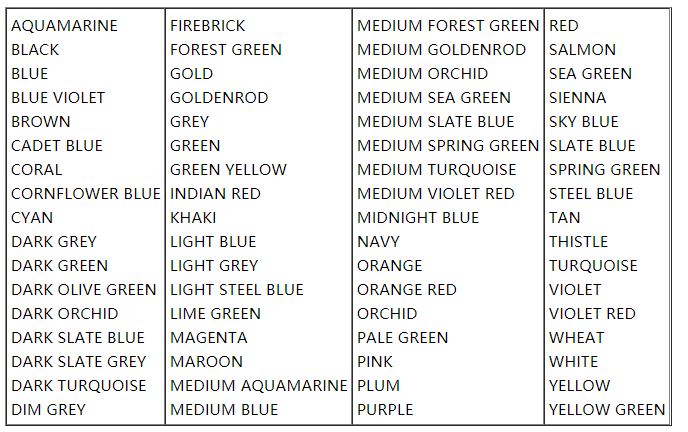
WXWIDGETS: WXCOLOURDATABASE WXWIDGETS: WXCOLOURDATABASE Usage detailed description WXWIDGETS: WXCOLOURDATABASE Usage detailed description #include <wx/gdicmn.h> WXWIDGETS maintains a standard RG...
WXWIDGETS: Namespace
WXWIDGETS: Namespace WXWIDGETS: Namespace WXWIDGETS: Namespace If you want to have your own class in the namespace XXX and worry about the WXWIDGETS macro, just try the following (in your .cpp file): ...
WXWIDGETS: WXCalculateLayoutEvent
WXWIDGETS: WXCalculateLayoutEvent WXWIDGETS: WXCalculateLayoutEvent Usage detailed description WXWIDGETS: WXCalculateLayoutEvent Usage detailed description #include <wx/laywin.h> WXCalculateLayo...
WXWIDGETS: WXGridRangeselectrEventTevent
WXWIDGETS: WXGridRangeselectrEventTevent WXWIDGETS: WXGridRangeselectrEventTevent Usage detailed description WXWIDGETS: WXGridRangeselectrEventTevent Usage detailed description #include <wx/grid.h&...
WXWIDGETS: WXGridEventorCreatedEvent
WXWIDGETS: WXGridEventorCreatedEvent WXWIDGETS: WXGridEventorCreatedEvent Usage detailed description WXWIDGETS: WXGridEventorCreatedEvent Usage detailed description #include <wx/grid.h> WXGridEd...