Netty thread model and basics
Why use Netty
Netty is an asynchronous event-driven web application framework for rapid development of maintainable high-performance and high-profile servers and clients. Netty has the advantages of high performance, higher throughput, lower latency, reducing resource consumption, minimizing unnecessary memory replication.
Netty and NIO
NIO's shortcomings
- NIO's class library and API are complicated, high learning costs, you need to master Selector, Serversocketchannel, SocketChannel, Bytebuffer, etc.
- Need you need to be familiar with Java multi-threaded programming. This is because NIO programming involves Reactor mode, you must be very familiar with multi-threaded and network programming, in order to write high quality NIO programs.
- Notorked Epoll bug. It will cause the Selector empty polling, eventually leading to the CPU usage to 100%. Until JDK1.7 is still not fundamentally solved.
Advantages of Netty
- Netty has a good package for JDK's own NIO API, and the API is simple, and the learning cost is low.
- Powerful, built a variety of decoder encoders, support multiple protocols.
- High performance, compare other mainstream NIO frames, the best performance of Netty.
- The community is active, and it is found that the bug will fix it in time, the iterative version is short, and new features are continuously added.
Dubbo, Elasticsearch has Netty, quality is verified.
Netty thread model
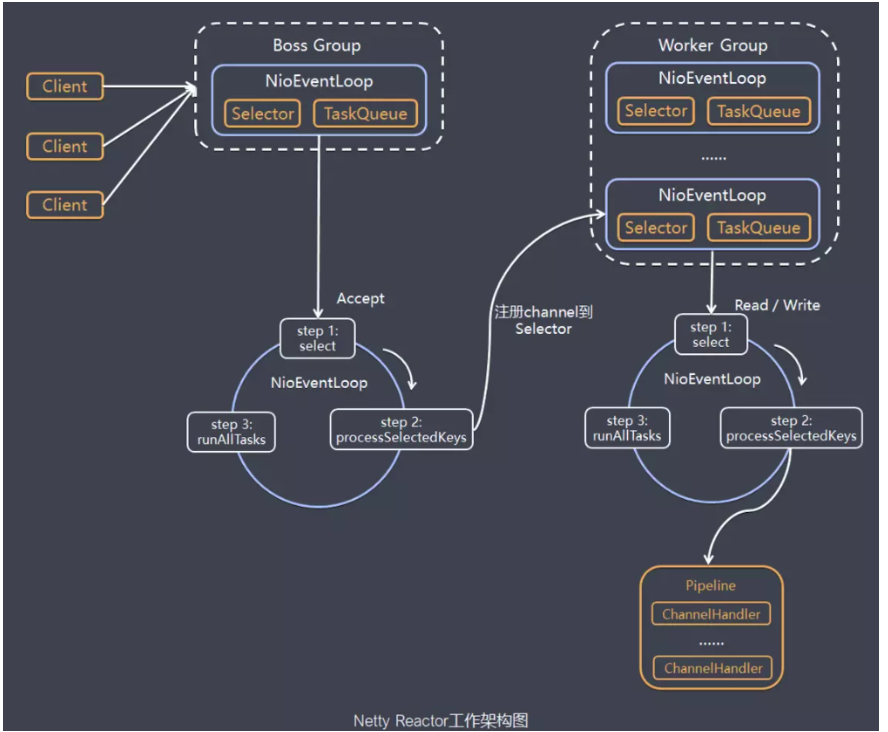
Model explanation
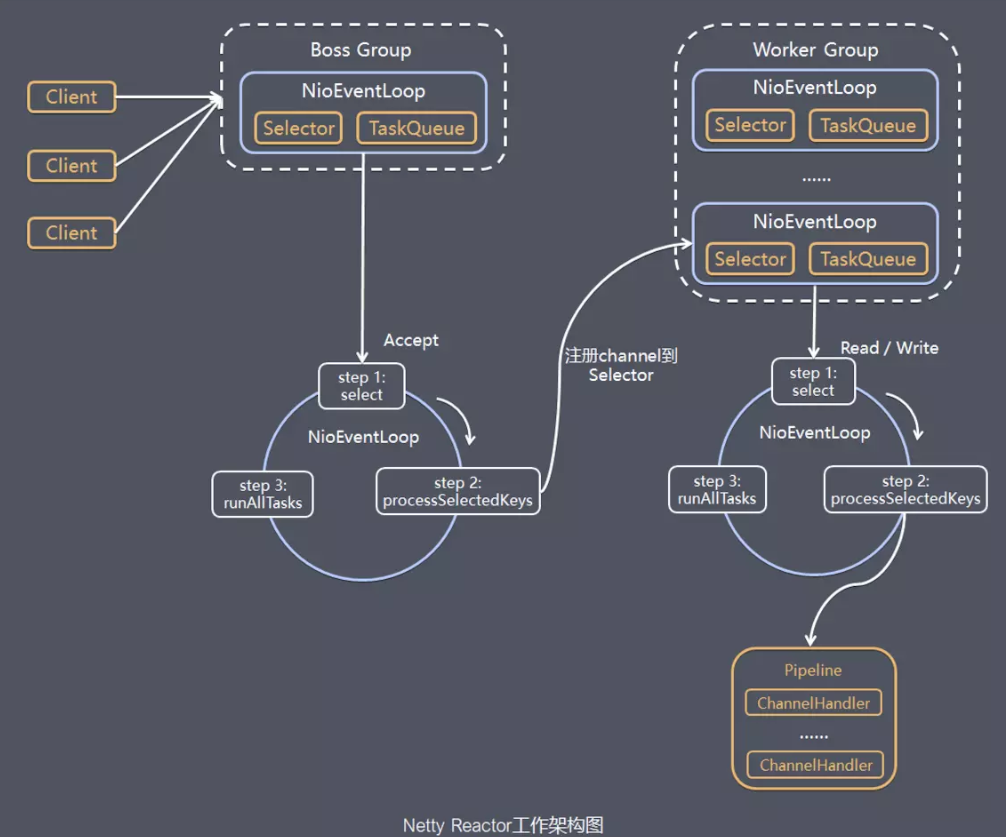
- 1.netty abstract two sets of thread pools BossGroup and WorkerGroup, BossGroup dedicated to receive client connections, WorkerGroup is responsible for the reading and writing of the network.
- 2. BossGroup and workergroup types are nioeventloopgroup. NioEventLoopGroup is equivalent to an event loop thread group, which contains multiple event loop threads, each event loop thread is NiOEventLoop.
- 3.Every nioeventloop has a SelectorTo monitor network communication registered on SocketChannel.
- 4. 3 steps per BOSS NIOEVENTLOOP thread internal loop:
- Processing the Accept event, establish a connection with the client to generate NiosocketChannel.
- Register NiosocketChannel to Selector on a WORKER NIOEVENTLOOP.
- Handling the task of the task queue, ie RunAllTask.
- 5. 3 steps performed within the internal loop of each Worker NioEventLoop thread:
- Polling registered all NiosocketChannel's read, Write events on your own Selector.
- Processing I / O events, ie Read, Write events, in the corresponding NiosocketChannel handling business.
- RunAllTasks handle tasks for task queue TaskQueue, some time-consuming business processing can generally be put into TaskQueue slowly, which does not affect the flow of data in pipeline.
- 6. Each Worker NioEventLoop processes the NiosocketChannel service, uses PIPELINE, which maintains a lot of Handler processors to process data in the NiosocketChannel used in Pipeline.
Netty Client & Server Development
Create and configure server launcher
Bootstrap、ServerBootstrap
Bootstrap means booting, a Netty application is usually starting by a bootstrap, the main function is to configure the entire Netty program, in series, the Bootstrap class in Netty is the launch boot class of the client program, ServerBootstrap is the server launch boot class.
Bootstrap and ServerBootstrap are factory classes that create clients and server launches provided by Netty, using this factory class to create a startup class.
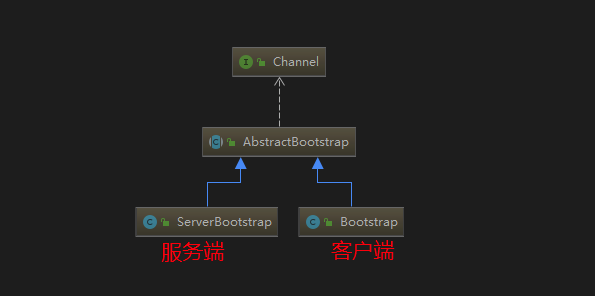
It can be seen that it is inherited in the AbstractBootstrap abstraction class, so the substantially configured method is the same.
In general, the steps to create a starter using Bootstrap can be divided into the following steps:
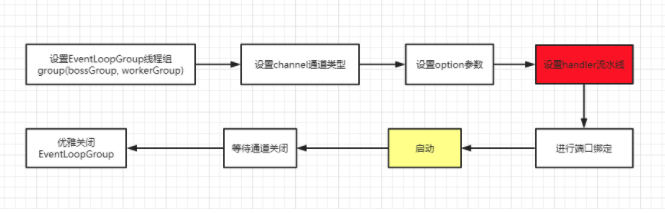
group()
The server should use two thread groups:
- BossGroup is used to listen to client connections, which is responsible for creating connections to clients and registering the connection into the Selector of Workergroup.
- Workergroup is used to handle read and write events that occur in each connection.
Generally created a thread group directly using the following new:
EventLoopGroup bossGroup = new NioEventLoopGroup();
EventLoopGroup workerGroup = new NioEventLoopGroup();
The default thread is twice the number of CPU cores. Assume that you want to customize the number of threads, you can use a paramer:
/ / Set the number of BOSSGROUP threads 1
EventLoopGroup bossGroup = new NioEventLoopGroup(1);
/ / Set the number of workergroup threads 8
EventLoopGroup workerGroup = new NioEventLoopGroup(8);
channel()
This method is used to set the channel type. When the connection is established, the corresponding Channel instance is created according to this setting.
Commonly used is these two channel types because it is asynchronous non-blocking. So is the first choice:
- NiosocketChannel: Asynchronous non-blocking client TCP Socket connection.
- NioserversocketChannel: Asynchronous Non-blocking server-side TCP Socket connection.
There is also synchronous blocking, usually no one:
- OiosocketChannel: Synchronous blocking client TCP Socket connection.
- OioserversocketChannel: Synchronous blocking server-side TCP Socket connection.
Option () and childoption ()
Option () Settings the server is used to receive the connection, that is, the BoosGroup thread. Option () common parameters:
SO_BACKLOG // socket parameter, the server accepts the queue length, if the queue is full, the client connection will be rejected. Default, Windows is 200, and the other is 128.
ChildOption () is a connection to the parent management, which is the WorkerGroup thread. Childoption () common parameters:
SO_RCVBUF  // Socket parameter, TCP data receive buffer size.
TCP_NODELAY // TCP parameters, immediately send data, the default value is true.
SO_KEEPALIVE // Socket parameter, connection is not live, the default is false. When this feature is enabled, TCP actively detects the validity of idle connections.
pipeline(ChannelPipeline)
CHANNELPIPELINE is the responsibility chain of Netty handling requests, and ChannelHandler is a processor for processing a request. Each Channel in Netty has only one CHANNELPIPIPELINE, and their composition is as follows:
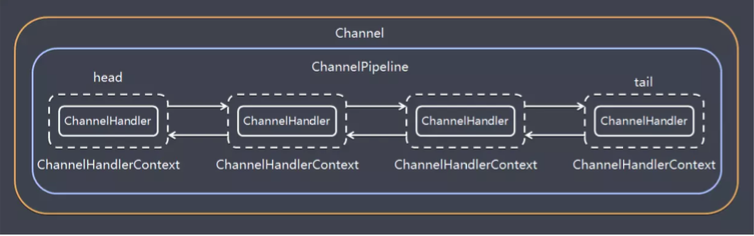
Processor Handler is divided into two: ChannelInBoundHandleRadapter (inbound processor), ChannelOutBoundHandler (outbound processor).
A Channel contains a ChannelPipeline, but also to maintain the ChannelPipeline in a doubly linked list composed of ChannelHandlerContext, and each in turn is associated with a ChannelHandlerContext of ChannelHandler, by ChannelHandlerContext context object, you can get Channel, the Pipeline and other objects can be Read and write and other operations.
Read events (inbound events) and WRITE events (outbound events) In a two-way linked list, the inbound event will be passed from the Linkshead to the last inbound handler, and the outbound event will pass from the linked list tail forward to The one outstarted Handler. Two types of Handler interfere with each other, and the sequence of the same type of Handler is affected.
In the bootstrap, the ChildHandler () method needs to initialize the channel, instantiate a ChannelInitializer, which requires rewriting the INITCHANEL () initialization channel method, and the assembly line is in this place. code show as below:
// Initialize the channel object in the form of anonymous internal class
bootstrap.childHandler(new ChannelInitializer<SocketChannel>() { // Create a channel initialization object, set the initialization parameters, execute before SocketChannel
     @Override
     protected void initChannel(SocketChannel ch) throws Exception {
    // Set the processor for Workergroup's SocketChannel, call our custom NettyServerHandler
      ch.pipeline().addLast(new NettyServerHandler());
   }
 });
Custom NETTYSERVERHANDLER code is as follows:
package com.chengzw.netty.base;

import io.netty.buffer.ByteBuf;
import io.netty.buffer.Unpooled;
import io.netty.channel.ChannelHandlerContext;
import io.netty.channel.ChannelInboundHandlerAdapter;
import io.netty.util.CharsetUtil;

/**
   * Custom Handler needs to inherit a HandleRadapter that Netty is specified.
   * @Author Chengzhi
   * @since 2021/3/25 9:31 afternoon
 */
public class NettyServerHandler extends ChannelInboundHandlerAdapter {


    /**
           * Read the data sent by the client
     *
           * @Param CTX context object, containing channel Channel, Pipeline Pipeline
           * @Param MSG is the data sent by the client
     * @throws Exception
     */
    public void channelRead(ChannelHandlerContext ctx, Object msg) throws Exception {
        System.out.println(Server Reading Thread + Thread.currentThread().getName());
        // convert MSG into a Bytebuf, similar to NIO's BYTEBUFFER
        ByteBuf buf = (ByteBuf) msg;
        System.out.println("The message sent by the client is:" + buf.toString(CharsetUtil.UTF_8));
    }


    /**
           * Data reading is completed after processing
     *
           * @Param CTX context object, containing channel Channel, Pipeline Pipeline
     * @throws Exception
     */
    @Override
    public void channelReadComplete(ChannelHandlerContext ctx) throws Exception {
        ByteBuf buf = Unpooled.copiedBuffer("HelloClient".getBytes(CharsetUtil.UTF_8));
        ctx.writeAndFlush(buf);
    }

    /**
           * Treatment exception, generally need to turn off the channel
     *
     * @param ctx
     * @param cause
     * @throws Exception
     */
    @Override
    public void exceptionCaught(ChannelHandlerContext ctx, Throwable cause) throws Exception {
        ctx.close();
    }

}
bind()
Provides the server address and port number for the server or client binding server, the default is asynchronous startup, if the SYNC () method is synchronized.
 // SYNC synchronization
ChannelFuture channelFuture = bootstrap.bind(9000).sync();

// asynchronous
/ / Sign up for the CF to listen to the events we care
channelFuture.addListener(new ChannelFutureListener() {
      @Override
      public void operationComplete(ChannelFuture future) throws Exception {
          if (channelFuture.isSuccess()) {
             System.out.println("Listening port 9000 success");
          } else {
             System.out.println("Monitor port 9000 failed");
          }
      }
 });
Elegantly close EventLoopGroup
/ / Release all resources, including the created thread
bossGroup.shutdownGracefully();
workerGroup.shutdownGracefully();
Service launcher complete code
package com.chengzw.netty.base;

import io.netty.bootstrap.ServerBootstrap;
import io.netty.channel.*;
import io.netty.channel.nio.NioEventLoopGroup;
import io.netty.channel.socket.SocketChannel;
import io.netty.channel.socket.nio.NioServerSocketChannel;

/**
   * Netty server
   * @Author Chengzhi
   * @since 2021/3/25 9:31 afternoon
 */
public class NettyServer {

    public static void main(String[] args) throws InterruptedException {
        // Create two thread groups BossGroup and workergroup, the number of sub-thread NiOEventloop's number is twice the number of CPU core
        // bossgroup is only to process connection requests, real and client business processing, will be handed over to Workergroup completion
        EventLoopGroup bossGroup = new NioEventLoopGroup(1); // 1 thread
        EventLoopGroup workerGroup = new NioEventLoopGroup(8); // 8 threads

        try {
            // Create a startup object on the server side
            ServerBootstrap bootstrap = new ServerBootstrap();
            // Use chain programming to configure parameters
            bootstrap.group(bossGroup, workerGroup) // Set two thread groups
                    // Use NioserversocketChannel to implement the channel of the server, which is used to instantiate the new Channel to receive the client's connection.
                    .channel(NioServerSocketChannel.class)
                    // Initialize the server connection queue size, the server processing client connection request is sequentially handled, so only one client connection can be processed at the same time.
                    // When multiple clients come at the same time, the server will not be processed by the client connection request to wait in the queue.
                    .option(ChannelOption.SO_BACKLOG, 1024)
                    .childHandler(new ChannelInitializer<SocketChannel>() { // Create a channel initialization object, set the initialization parameters, execute before SocketChannel
                        @Override
                        protected void initChannel(SocketChannel ch) throws Exception {
                            // Set the processor for Workergroup's SocketChannel, call our custom NettyServerHandler
                            ch.pipeline().addLast(new NettyServerHandler());
                        }
                    });
            System.out.println("netty server start ...");
            // Bind a port and synchronize, generate a ChannelFuture asynchronous object, can judge the execution of the asynchronous event by isotone (), etc.
            / / Start the server (and bind port), bind is an asynchronous operation, the SYNC method is waiting for the asynchronous operation.
            // SYNC synchronization
            ChannelFuture channelFuture = bootstrap.bind(9000).sync();

            // asynchronous
            / / Sign up for the CF to listen to the events we care
            /*channelFuture.addListener(new ChannelFutureListener() {
                @Override
                public void operationComplete(ChannelFuture future) throws Exception {
                    if (channelFuture.isSuccess()) {
                                                 System.out.println ("Successful Listening Port 9000");
                    } else {
                                                 System.out.println ("Listening Port 9000 Failure");
                    }
                }
            });*/
            // Waiting for the server listening port to close, CloseFuture is an asynchronous operation
            // Synchronous waiting for channel closing processing through the SYNC method, here will block the waiting channel shutdown completion, internal call is Object Wait () method
            // In this case, CF.Channel (). CloseFuture (). Sync (); The main purpose of this statement is that if the above code is missing, the thread of the main method,
            // If the main thread will run the bind (). Sync () method, you will enter the Finally code block, and the previously started NettyServer will also turn off, and the entire program is over.
            // Original example has an English comment:
            // Wait until the server socket is closed,In this example, this does not happen, but you can do that to gracefully shut down your server.
            // Thread enters the WAIT state, that is, the main thread will not perform in Finally, NettyServer continues to run, if you listen to Close event, you can close the channel and NettyServer,
            channelFuture.channel().closeFuture().sync();
        } finally {
            // Resource elegant release
            bossGroup.shutdownGracefully();
            workerGroup.shutdownGracefully();
        }
    }
}
Create and configure client launcher
The client only needs a nioeventloopgroup, the rest of the code and the server are similar.
First customize NetTyClientHandler to process the business of the client CHANELINE.
package com.chengzw.netty.base;

import io.netty.buffer.ByteBuf;
import io.netty.buffer.Unpooled;
import io.netty.channel.ChannelHandlerContext;
import io.netty.channel.ChannelInboundHandlerAdapter;
import io.netty.util.CharsetUtil;

/**
   * Custom Handler needs to inherit a HandleRadapter that Netty is specified.
 * @Author Chengzhi
   * @since 2021/3/25 9:50 afternoon
 */
public class NettyClientHandler extends ChannelInboundHandlerAdapter {

    /**
           * This method is triggered when the client connection server is completed
     *
     * @param ctx
     * @throws Exception
     */
    @Override
    public void channelActive(ChannelHandlerContext ctx) throws Exception {
        ByteBuf buf = Unpooled.copiedBuffer("HelloServer".getBytes(CharsetUtil.UTF_8));
        ctx.writeAndFlush(buf);
    }

    /**
           * Triggered when the channel is read, that is, the server sends data to the client
     *
     * @param ctx
     * @param msg
     * @throws Exception
     */
    @Override
    public void channelRead(ChannelHandlerContext ctx, Object msg) throws Exception {
        ByteBuf buf = (ByteBuf) msg;
        System.out.println("Received the server message:" + buf.toString(CharsetUtil.UTF_8));
        System.out.println("The address of the server:" + ctx.channel().remoteAddress());
    }

    /**
           * Treatment exception, generally need to turn off the channel
     *
     * @param ctx
     * @param cause
     * @throws Exception
     */
    @Override
    public void exceptionCaught(ChannelHandlerContext ctx, Throwable cause) throws Exception {
        cause.printStackTrace();
        ctx.close();
    }
}
Then configure the client launcher:
package com.chengzw.netty.base;

import io.netty.bootstrap.Bootstrap;
import io.netty.channel.ChannelFuture;
import io.netty.channel.ChannelInitializer;
import io.netty.channel.EventLoopGroup;
import io.netty.channel.nio.NioEventLoopGroup;
import io.netty.channel.socket.SocketChannel;
import io.netty.channel.socket.nio.NioSocketChannel;
/**
   * Netty client
   * @Author Chengzhi
   * @since 2021/3/25 9:52 afternoon
 */
public class NettyClient {
    public static void main(String[] args) throws Exception {
        // Client requires an event cycle group
        EventLoopGroup group = new NioEventLoopGroup();
        try {
            // Create a client startup object
            // Note that the client is not serverbootstrap but bootstrap
            Bootstrap bootstrap = new Bootstrap();
            // Set related parameters
            bootstrap.group(group) // Set thread group
                    .channel(NioSocketChannel.class) // Use NiosocketChannel as the client's channel to implement
                    .handler(new ChannelInitializer<SocketChannel>() {
                        @Override
                        protected void initChannel(SocketChannel ch) throws Exception {
                            // Add to processor
                            ch.pipeline().addLast(new NettyClientHandler());
                        }
                    });

            System.out.println("netty client start..");
            // Start the client to connect the server side
            ChannelFuture channelFuture = bootstrap.connect("127.0.0.1", 9000).sync();
            / / Listening to channel closing
            channelFuture.channel().closeFuture().sync();
        } finally {
            group.shutdownGracefully();
        }
    }
}
Reference link
- https://netty.io/wiki/user-guide-for-4.x.html#wiki-h3-5
- https://zhuanlan.zhihu.com/p/181239748
Welcome to pay attention

Intelligent Recommendation
Thread model in Netty
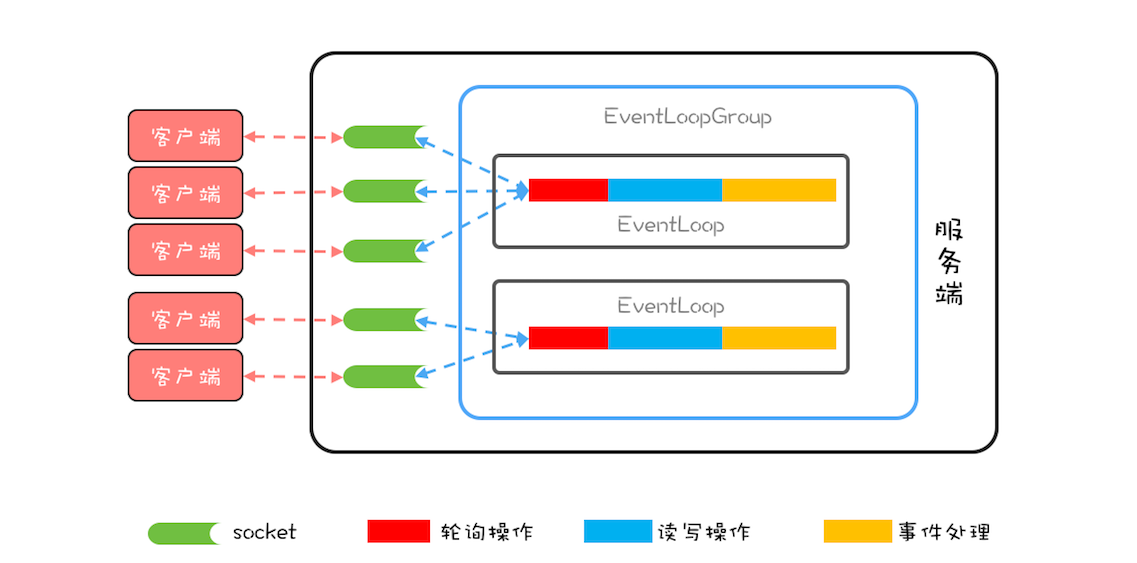
The core concept in Netty isEvent loop (EventLoop), Which is actually Reactor in Reactor mode,Responsible for monitoring network events and calling event handlers for processing.In the 4.x version of ...
Netty features and thread model
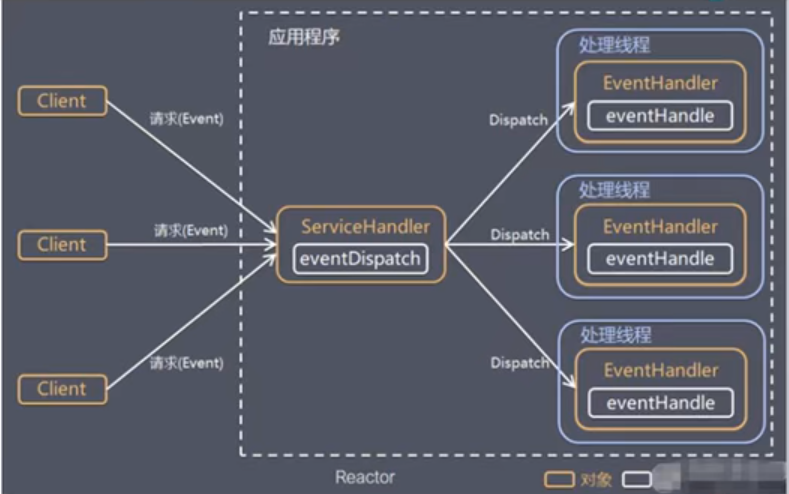
Zero copy hard driver - kernel buffer - protocol engine only DMA copy avoids cpu copy There was actually a cpu copy of kernel buffer - socket buffer, but the copied information can rarely be ignored; ...
013. NETTY thread model
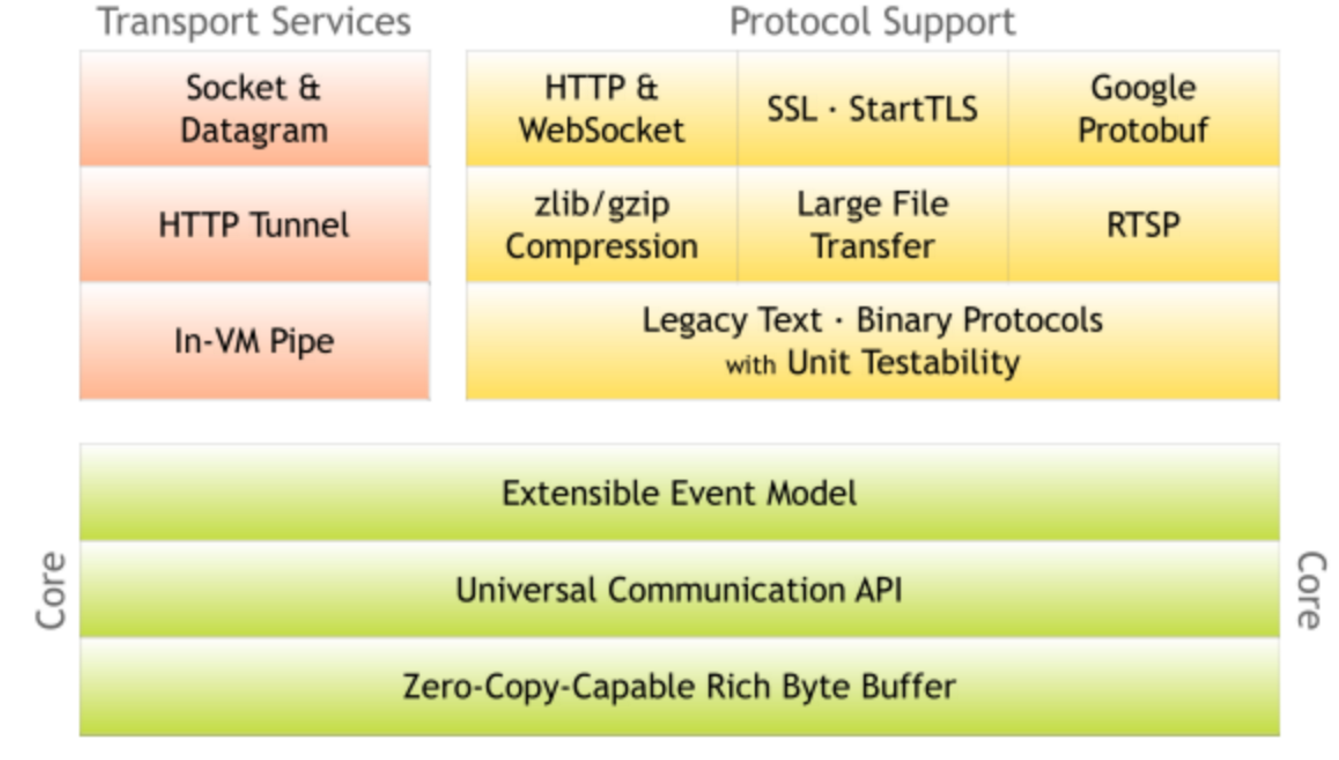
Introduction to Netty Netty is a high-performance, high-scalable asynchronous event-driven network application framework, which greatly simplifies network programming such as TCP and UDP clients and s...
Netty thread model and gameplay
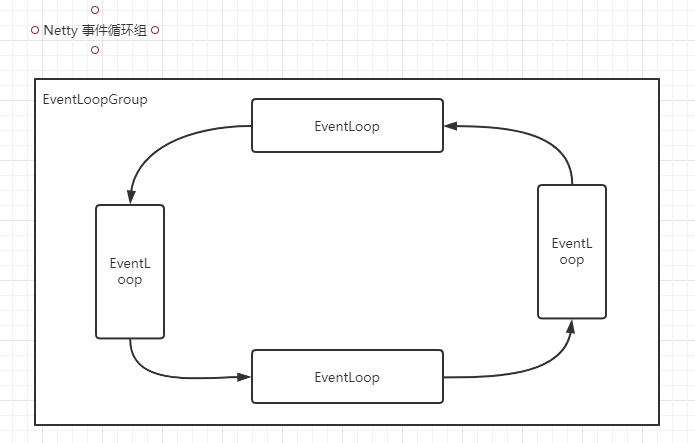
Event cycle group All I / O operations in Netty are asynchronous, and the asynchronous execution results are obtained by channelfuture. Asynchronously executes a thread pool EventLoopGroup, it ...
Netty - Thread Model Reactor
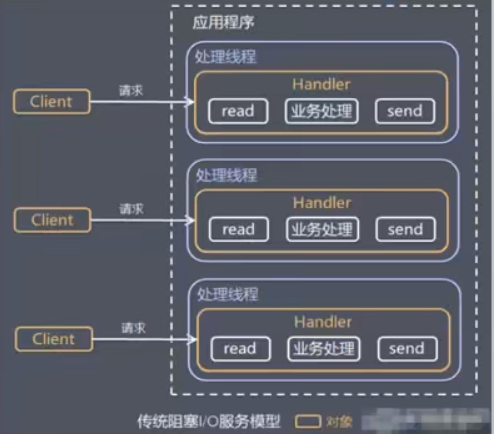
table of Contents Thread model 1, traditional IO service model 2, Reactor mode reactor Three modes: to sum up Netty model Excommissum Thread model 1, traditional IO service model Blocked IO mode Get i...
More Recommendation
Netty thread model [next]
Hey everyone, I amJava small white 2021。 The programmer of the halfway is in the development of aircraft, and the opportunity to find a more interesting thing under the development of a surveying cour...
【Netty】 thread model
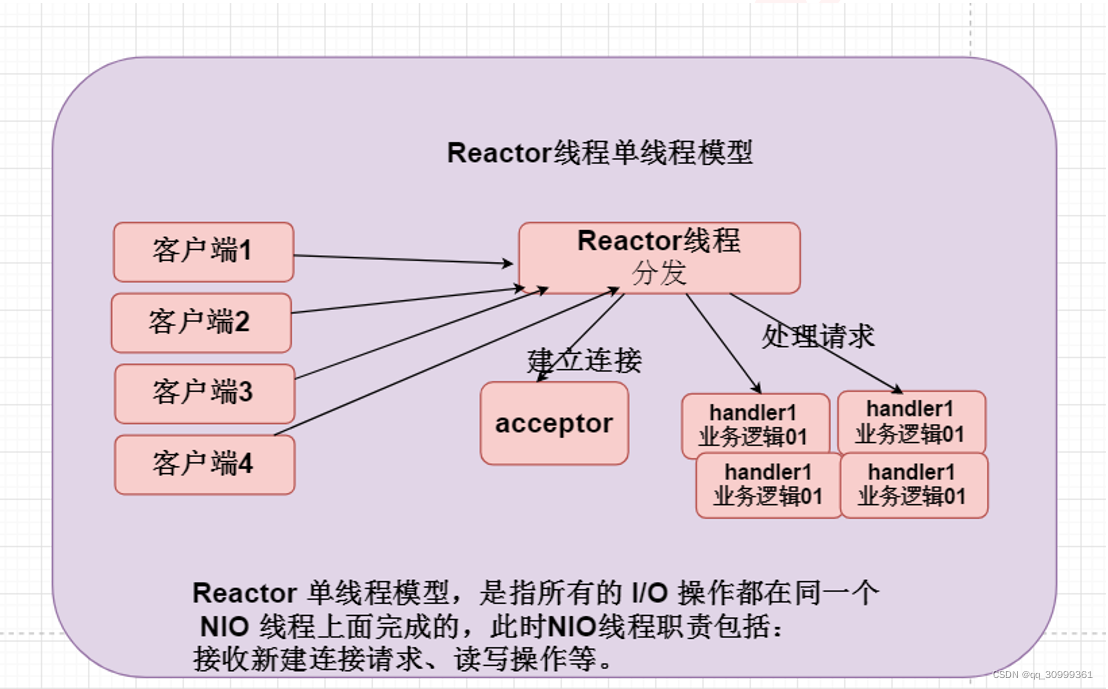
content 1. Single Reactor single thread 2. Single Reactor Multi -thread 3. Reactor Main Strike Model Single -threaded model (single Reactor single thread) Multi -threaded model (single Reactor multi -...
Netty entry thread model
Single-threaded model: the boss thread is responsible for connection and data reading and writing Hybrid model: the boss thread is responsible for connection and data reading and writing, and the work...
Redis source code parsing: 09redis database implementations (key operation, key timeout function key space notification)
This chapter of the Redis database server implementations are introduced, indicating achieve Redis database-related operations, including key-value pairs in the database to add, delete, view, update a...
PAT B1041-B1045 Question
1、b1041 2、b1042 3、b1043 4、b1044 5、b1045...