Use #pragma execution_character_set("utf-8") to solve the garbled Chinese characters displayed in QT
tags: qt show Chinese qt utf-8 Chinese garbled
In many cases, when using qt as an interface, Chinese characters need to be displayed, and garbled characters will be displayed accidentally. Shown as follows:
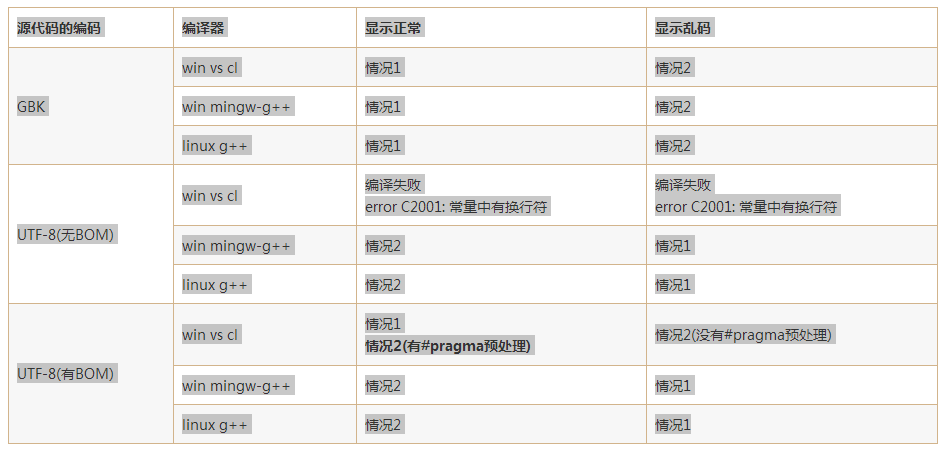
The fundamental reason is the compiler's support for encoding. Some encoding formats do not support Chinese, or do not fully support Chinese. There are many ways to make qt support Chinese display on the Internet, but it will make the code difficult to read.

Go directly to the solution:
#pragma execution_character_set("utf-8")

#include <QApplication>
#include <QWidget>//Window control base class

int main(int argc, char **argv)
{
    QApplication a(argc, argv);
    QWidgetw;
    w.setWindowTitle("you are my eye");

    w.show();
    spp.exec();
    return 0;
}
Intelligent Recommendation
[wine5.0] Solve the problem of garbled characters in all wine software (Chinese is not displayed)
Preface After ubuntu installed wine5.0, garbled characters (or Chinese fonts are not displayed) often occur. In fact, this is because the font files related to windows will not be installed when insta...
Perfectly solve the problem of Chinese garbled characters displayed on the vs code console
1. If you want to display the execution result on the console, please modify the "externalConsole": false in the launch.json file, just change false to true Launch.json content: 2. Test sour...

Solve the problem of Chinese garbled characters displayed in the .properties file in idea
Click: File->Settings->Editor->File Encodings, then set the encoding format to UTF-8, check Transparent native-to-ascaii conversion, click Apply, and click OK. ...
How to solve the problem of garbled characters displayed in MATLAB Chinese
How to solve the problem of garbled characters displayed in MATLAB Chinese Recently, it has been found that the codes written in different versions of matlab cannot be interoperable. For example, the ...
Solve the problem of Qt Chinese garbled and Chinese character encoding (UTF-8/GBK)
Original address:: related articles 1、QT Note 79: Writing at the specified location---- 2、A simple solution to display garbled characters in Qt Chinese characters---- 3、What to do if qt cannot output ...
More Recommendation
Completely solve the problem of Qt Chinese garbled and Chinese character encoding (UTF-8/GBK)
1. Qt Creator environment settings 1.The cpp or h file will be displayed garbled after uploading from the window to Ubuntu. The reason is that the default setting of the ubuntu environment is utf-8, a...
Reprint Completely solve the problem of Qt Chinese garbled and Chinese character encoding (UTF-8/GBK)
Respect the author and support originality. If you need to reprint, please attach the original address: https://blog.csdn.net/libaineu2004/article/details/19245205 This article is a bit long and has a...
Solve the problem of garbled characters caused by QT encoding Error:Could not decode “xxx.cpp” with “UTF-8/System
1. Solve the error message If we use utf-8 encoding, and the code downloaded from the Internet is written in a Chinese system environment GBK, then congratulations, you must encounter such an error me...

How to correctly display UTF-8 characters in DOS window, solve SQLite Chinese garbled problem
IronRuby: Ask how to execute the bat file after the UTF-8 character is correctly displayed in the DOS window. InIronRuby - Writing automated test scripts shows that the results displayed under NetBean...

Solve the problem that Chinese characters still appear garbled in the HTML page written by EditPlus after setting UTF-8
Solve EditPlus after setting UTF-8. Chinese characters are still garbled in the written HTML page I believe some students found when they used EditPlus to write HTML pages, although the UTF-8 e...