SecureCRT login session password decryption
tags: python
This article is to forget the password entered when the Security login is forgotten. I chose to save the password. I forgot the password later. You need to save the password through the password of the SecureCRT to restore the login password of the machine.
The following is my operational steps, hereby recorded, with memo.
Environment: Python3.7, Win10 64 -bit, Pycharm2020.1
Due to the decrypted code, the Crypto library of Python needs to be installed first. Note that PyCryptodome below is the software name installed on the Windows platform. You do n’t need to doubt it. You can install this.
Install PyCrypto, PIP Install PyCryptodome (this is this)
Open the SecureCRT software, open the options in turn-> global options-> conventional-> configuration fold Edit the software open.

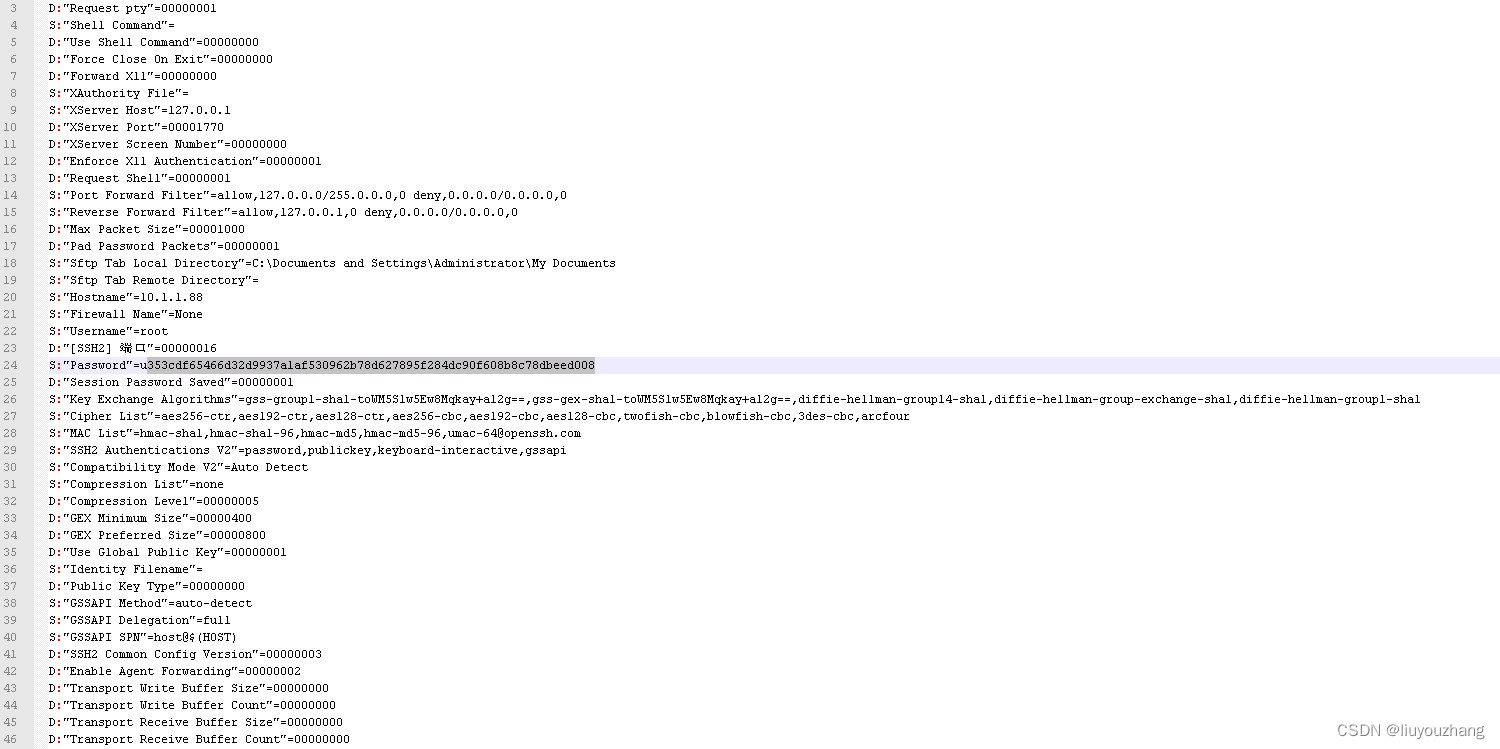
Open the login configuration information file (.ini ending) corresponding to each IP address. As shown in the following position, you can see the ciphertext of the password. Here our SecureCRT is a 7.0 version. There is a letter U prefix in front of the ciphertext to remove the prefix and remove , Copy a string of ciphertexts. Pay attention to different SecureCRT versions, the prefix of the ciphertext here may be different.
 In pycharm, open the console command line and run
python SecureCRTDecrypt.py dec "353cdf65466d32d9937a1af530962b78d627895f284dc90f608b8c78dbeed008" (python37_env01) C:\Users\mythinkpadpc\PycharmProjects\pythonProject\SecureCRT>python SecureCRTDecrypt.py dec "353cdf65466d32d9937a1af530962b78d627895f284dc90f608b8c78dbeed008"
(Output password bright text) root.88
You can see the output results in the console.
Pay the complete code, which is convenient for students who do not have ladders:
#!/usr/bin/env python3
import os
from Crypto.Hash import SHA256
from Crypto.Cipher import AES, Blowfish


class SecureCRTCrypto:

    def __init__(self):
        '''
        Initialize SecureCRTCrypto object.
        '''
        self.IV = b'\x00' * Blowfish.block_size
        self.Key1 = b'\x24\xA6\x3D\xDE\x5B\xD3\xB3\x82\x9C\x7E\x06\xF4\x08\x16\xAA\x07'
        self.Key2 = b'\x5F\xB0\x45\xA2\x94\x17\xD9\x16\xC6\xC6\xA2\xFF\x06\x41\x82\xB7'

    def Encrypt(self, Plaintext: str):
        '''
        Encrypt plaintext and return corresponding ciphertext.
        Args:
            Plaintext: A string that will be encrypted.
        Returns:
            Hexlified ciphertext string.
        '''
        plain_bytes = Plaintext.encode('utf-16-le')
        plain_bytes += b'\x00\x00'
        padded_plain_bytes = plain_bytes + os.urandom(Blowfish.block_size - len(plain_bytes) % Blowfish.block_size)

        cipher1 = Blowfish.new(self.Key1, Blowfish.MODE_CBC, iv=self.IV)
        cipher2 = Blowfish.new(self.Key2, Blowfish.MODE_CBC, iv=self.IV)
        return cipher1.encrypt(os.urandom(4) + cipher2.encrypt(padded_plain_bytes) + os.urandom(4)).hex()

    def Decrypt(self, Ciphertext: str):
        '''
        Decrypt ciphertext and return corresponding plaintext.
        Args:
            Ciphertext: A hex string that will be decrypted.
        Returns:
            Plaintext string.
        '''

        cipher1 = Blowfish.new(self.Key1, Blowfish.MODE_CBC, iv=self.IV)
        cipher2 = Blowfish.new(self.Key2, Blowfish.MODE_CBC, iv=self.IV)
        ciphered_bytes = bytes.fromhex(Ciphertext)
        if len(ciphered_bytes) <= 8:
            raise ValueError('Invalid Ciphertext.')

        padded_plain_bytes = cipher2.decrypt(cipher1.decrypt(ciphered_bytes)[4:-4])

        i = 0
        for i in range(0, len(padded_plain_bytes), 2):
            if padded_plain_bytes[i] == 0 and padded_plain_bytes[i + 1] == 0:
                break
        plain_bytes = padded_plain_bytes[0:i]

        try:
            return plain_bytes.decode('utf-16-le')
        except UnicodeDecodeError:
            raise (ValueError('Invalid Ciphertext.'))


class SecureCRTCryptoV2:

    def __init__(self, ConfigPassphrase: str = ''):
        '''
        Initialize SecureCRTCryptoV2 object.
        Args:
            ConfigPassphrase: The config passphrase that SecureCRT uses. Leave it empty if config passphrase is not set.
        '''
        self.IV = b'\x00' * AES.block_size
        self.Key = SHA256.new(ConfigPassphrase.encode('utf-8')).digest()

    def Encrypt(self, Plaintext: str):
        '''
        Encrypt plaintext and return corresponding ciphertext.
        Args:
            Plaintext: A string that will be encrypted.
        Returns:
            Hexlified ciphertext string.
        '''
        plain_bytes = Plaintext.encode('utf-8')
        if len(plain_bytes) > 0xffffffff:
            raise OverflowError('Plaintext is too long.')

        plain_bytes = \
            len(plain_bytes).to_bytes(4, 'little') + \
            plain_bytes + \
            SHA256.new(plain_bytes).digest()
        padded_plain_bytes = \
            plain_bytes + \
            os.urandom(AES.block_size - len(plain_bytes) % AES.block_size)
        cipher = AES.new(self.Key, AES.MODE_CBC, iv=self.IV)
        return cipher.encrypt(padded_plain_bytes).hex()

    def Decrypt(self, Ciphertext: str):
        '''
        Decrypt ciphertext and return corresponding plaintext.
        Args:
            Ciphertext: A hex string that will be decrypted.
        Returns:
            Plaintext string.
        '''
        cipher = AES.new(self.Key, AES.MODE_CBC, iv=self.IV)
        padded_plain_bytes = cipher.decrypt(bytes.fromhex(Ciphertext))

        plain_bytes_length = int.from_bytes(padded_plain_bytes[0:4], 'little')
        plain_bytes = padded_plain_bytes[4:4 + plain_bytes_length]
        if len(plain_bytes) != plain_bytes_length:
            raise ValueError('Invalid Ciphertext.')

        plain_bytes_digest = padded_plain_bytes[4 + plain_bytes_length:4 + plain_bytes_length + SHA256.digest_size]
        if len(plain_bytes_digest) != SHA256.digest_size:
            raise ValueError('Invalid Ciphertext.')

        if SHA256.new(plain_bytes).digest() != plain_bytes_digest:
            raise ValueError('Invalid Ciphertext.')

        return plain_bytes.decode('utf-8')


if __name__ == '__main__':
    import sys


    def Help():
        print('Usage:')
        print('    SecureCRTCipher.py <enc|dec> [-v2] [-p ConfigPassphrase] <plaintext|ciphertext>')
        print('')
        print('    <enc|dec>              "enc" for encryption, "dec" for decryption.')
        print('                           This parameter must be specified.')
        print('')
        print('    [-v2]                  Encrypt/Decrypt with "Password V2" algorithm.')
        print('                           This parameter is optional.')
        print('')
        print('    [-p ConfigPassphrase]  The config passphrase that SecureCRT uses.')
        print('                           This parameter is optional.')
        print('')
        print('    <plaintext|ciphertext> Plaintext string or ciphertext string.')
        print('                           NOTICE: Ciphertext string must be a hex string.')
        print('                           This parameter must be specified.')
        print('')


    def EncryptionRoutine(UseV2: bool, ConfigPassphrase: str, Plaintext: str):
        try:
            if UseV2:
                print(SecureCRTCryptoV2(ConfigPassphrase).Encrypt(Plaintext))
            else:
                print(SecureCRTCrypto().Encrypt(Plaintext))
            return True
        except:
            print('Error: Failed to encrypt.')
            return False


    def DecryptionRoutine(UseV2: bool, ConfigPassphrase: str, Ciphertext: str):
        try:
            if UseV2:
                print(SecureCRTCryptoV2(ConfigPassphrase).Decrypt(Ciphertext))
            else:
                print(SecureCRTCrypto().Decrypt(Ciphertext))
            return True
        except:
            print('Error: Failed to decrypt.')
            return False


    def Main(argc: int, argv: list):
        if 3 <= argc and argc <= 6:
            bUseV2 = False
            ConfigPassphrase = ''

            if argv[1].lower() == 'enc':
                bEncrypt = True
            elif argv[1].lower() == 'dec':
                bEncrypt = False
            else:
                Help()
                return -1

            i = 2
            while i < argc - 1:
                if argv[i].lower() == '-v2':
                    bUseV2 = True
                    i += 1
                elif argv[i].lower() == '-p' and i + 1 < argc - 1:
                    ConfigPassphrase = argv[i + 1]
                    i += 2
                else:
                    Help()
                    return -1

            if bUseV2 == False and len(ConfigPassphrase) != 0:
                print('Error: ConfigPassphrase is not supported if "-v2" is not specified')
                return -1

            if bEncrypt:
                return 0 if EncryptionRoutine(bUseV2, ConfigPassphrase, argv[-1]) else -1
            else:
                return 0 if DecryptionRoutine(bUseV2, ConfigPassphrase, argv[-1]) else -1
        else:
            Help()


    exit(Main(len(sys.argv), sys.argv))
refer to:
1. SECURECRT password acquisition;
2、(150 messages) Retrieve the SecureCRT password_ITINNS_007 blog-CSDN blog
3、[Turn] Retos of the password of SecureCRT -Capital Code -Blog Garden
I have tried these three articles, maybe these are python2, anyway, I can't use it anyway.
Other versions of SecureCRT, this program is not necessarily applicable. The above is just that I personally verify that it can be used on the SecureCRT 7.0.
Intelligent Recommendation
JS decryption learning --Steam login password decryption analysis
I am a little white, and I have a disadvantage to welcome the big guys to communicate Well, enter the topic We directly catch the package Obviously the second package is what we want. The first packag...
Ssh remember password automatic login, clone session
1, install the prerequisite software Basic tool Automated answering tool 2, login script Create an ssh login auto-response script with expect Fill in the following 3, the registered alias Add to then ...
Case: Automatic login, remember password (session + JSP)
Used to judge whether cookie is worth servlet Main page INDEX.JSP Success page Success.jsp Failure page error.jsp...

Session -Verification Code Registration and Remember Password Login
Articles directory 1. Demand analysis 2. User login function 2.1. Process analysis 2.2, code implementation 2.3, the result demonstration 3. Log in to remember the password function 3.1. Process analy...
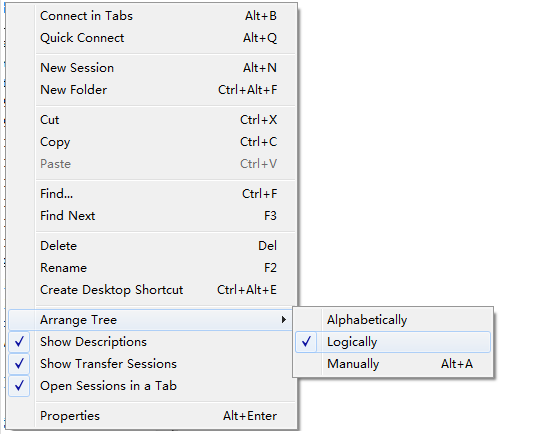
SecureCRT session label sorting
Session backordering techniques demand The newly created labels are s1, s2, s3, ... s10, but the sorting is s10, s1, s2... not sorted from small to large. E.g: solution In the Session Manager panel-Se...
More Recommendation
Realize js automatic login user name and password base64 encryption and decryption
1. Use the background to encrypt the user name and password for base64, and the browser to enter the login address url to log in. Java implementation of base64 encryption and decryption methods...
[Ovirt notes] Analysis and organization of encryption and decryption of administrator login password
Pre-text description As a member of the code farmer, I need to keep learning. I will share some analysis summaries and study notes into a blog to communicate with everyone. I also hope to record my ow...
Prevent remote password interception and decryption, SSH authentication and ordinary user login
Add user: useradd yang Generate key [yang@localhost /]$ ssh-keygen -t rsa Generating public/private rsa key pair. Enter file in which to save the key(/home/yang/.ssh/id_rsa): Enter passphrase (empty f...
Front end password encryption rear end decryption guarantee login security
At present, many websites need to log in to safety certification. When logging in, enter the username password. Although the password is not seen, the front end will press F12 or see the user's input ...
BCryptPasswordEncoder implements user login + registration password encryption and decryption (personal learning)
Front and rear end separation implementation simple version login registration Continue the last article, register for the user Vue-Element-Admin + Gateway + JWT implements simple login effect The fro...