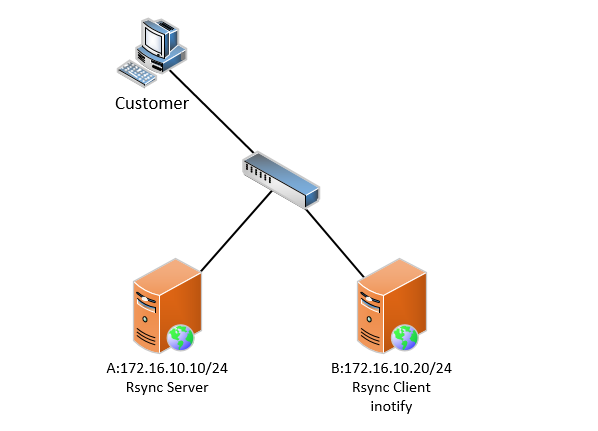
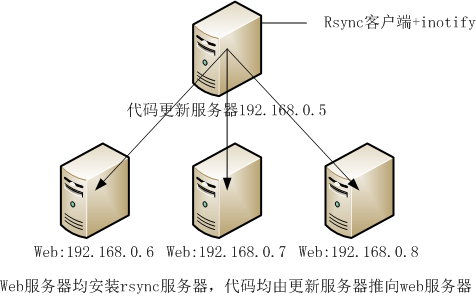
Chapter 1 Real-time data synchronizationIntroduction
1.1 What is real-time synchronization: how to achieve real-time synchronization
A. To take advantage of monitoring services (inotify), monitoring changes in information in the synchronized data server directory
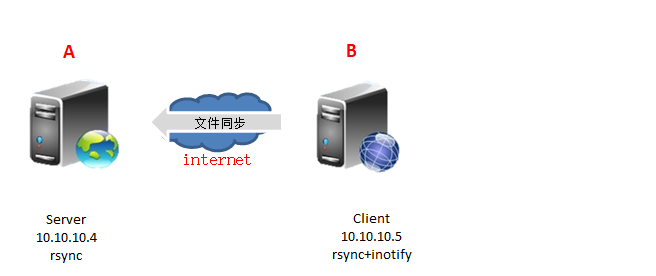
B. Use the data in the catalog to make changesrsyncPush the service to the backup server
1.2 Real-time synchronization method
inotify+rsync Way to achieve data synchronization
sersync Way to achieve real-time data synchronization
1.2.1 Introduction to real-time synchronization principle

1.3 inotify+rsync Way to achieve data synchronization
1.3.1 InotifyIntroduction
InotifyIt is a powerful, fine-grained one. Asynchronous file system event monitoring mechanism,linuxKernel from2.6.13Started, joined InotifySupport, passInotifyCan monitor the file systemAdd, delete, modify, moveVarious events,With this kernel interface, third-party software can monitor various changes to files in the file system, and inotify-tools It is the software that implements such monitoring. Chinese Zhou Yang also developed similar real-time synchronization software in Jinshan Company.sersync。
Tips:
sersyncThe software is actually inotifyDeveloped on the basis of software, the function is more powerful. More timed retransmission mechanism, filtering mechanism provides interface to do CDN, support multi-threaded operation.
InotifyIt is actually an event-driven mechanism that provides a mechanism for real-time response to events for application monitoring file system events without having to pass through such things ascronWait for the polling mechanism to get the event.cronSuch mechanisms are not only unable to be real-time, but also consume a lot of system resources. In contrast,inotifyEvent-driven, real-time response to event processing, and no system resource consumption caused by polling. It is a very natural event notification interface and is consistent with natural world event mechanisms.
inotifyThere are several software implementations:
inotify-tools,sersync,lrsyncd
1.3.2 inotify+rsyncWay of use
inotify Monitoring of synchronized data directory information
rsync Complete real-time synchronization of data information
usescriptCombine
1.4 deployinotifySoftware premise
need2.6.13Later kernel version can supportinotifysoftware.2.6.13After the kernel version, not installedinotifyThere should be these three files before the software.
[root@backup ~]# ll /proc/sys/fs/inotify/
total 0
-rw-r--r-- 1 root root 0 Oct 17 10:12 max_queued_events
-rw-r--r-- 1 root root 0 Oct 17 10:12 max_user_instances
-rw-r--r-- 1 root root 0 Oct 17 10:12 max_user_watches
1.4.1 Description of three important documents
| file |
Defaults |
Function description |
| max_user_watches |
8192 |
SettinginotifywaitorinotifywatchThe number of files the command can monitor (single process) |
| max_user_instances |
128 |
Set what each user can runinotifywaitorinotifywatchNumber of processes of the command |
| max_queued_events |
16384 |
SettinginotifyInstance eventeventThe number of events the queue can hold |
1.4.2 [Service Optimization] You can increase the value of the three files to monitor the larger range.
1.4.3 [Official Description] Three important documents
[root@nfs01 ~]# man proc
/proc/sys/fs/inotify (since Linux 2.6.13)
       This   directory   contains    files    max_queued_events,
       max_user_instances, and max_user_watches, that can be used
       to limit the amount of kernel memory consumed by the  inotify interface.
for further details, see inotify(7).
bymanManual number7Found in the level inotifyA detailed description of the default file.
[root@nfs01 ~]# man 7 inotify
/proc/sys/fs/inotify/max_queued_events
       The  value  in this file is used when an application calls
       inotify_init(2) to set an upper limit  on  the  number  of
       events  that  can  be  queued to the corresponding inotify
       instance.  Events in excess of this limit are dropped, but
       an IN_Q_OVERFLOW event is always generated.

/proc/sys/fs/inotify/max_user_instances
       This  specifies  an  upper  limit on the number of inotify
       instances that can be created per real user ID.

/proc/sys/fs/inotify/max_user_watches
       This specifies an upper limit on  the  number  of  watches
       that can be created per real user ID.
1.5 inotifySoftware introductionAnd parameter description
1.5.1 Two installation methods
1) yum install -y inotify-tools
2) Manual compilation and installation
Note: YUM Installation needs to haveepelsource
http://mirrors.aliyun.com
Manual compilation and installation methods need togithubDownload the package
inotifySoftware reference link:
https://github.com/rvoicilas/inotify-tools/wiki
1.5.2 inotifyMainly installed two software
inotifywait: (main)
Waiting for a specific file system event on the monitored file or directory (open close deleteOccurs, and is blocked after execution, suitable forshellUsed in scripts
inotifywatch:
Collect statistics used by the monitored file system, which refers to the number of times the file system events occur.
Description: When real-time real-time synchronization, mainly useinotifywaitMonitor the directory
1.5.3 inotifywaitCommand parameter description
| parameter |
meaning |
| -m, --monitor (Important parameters) |
Keep listening for events forever. Without this option, inotifywait will exit after one event is received. Always keep event listeners. |
| -d, --daemon |
111 |
| -r, --recursive (Important parameters) |
Watch all subdirectories of any directories passed as arguments. Recursive monitoring of directory data information changes |
| -o, --outfile <file> |
Print events to <file> rather than stdout. Print events into a file, equivalent to standard correct output |
| -s, --syslog |
Output errors to syslog(3) system log module rather than stderr. Send an error tosyslogEquivalent to standard error output |
| -q, --quiet (Important parameters) |
If specified once, the program will be less verbose. Specifically, it will not state when it has completed establishing all inotify watches. Less output information (only print event information) |
| --exclude <pattern> |
Exclude all events on files matching the extended regular expression <pattern>. Exclude files or directories |
| --excludei <pattern> |
Like --exclude but case insensitive. Case insensitive when excluding files or directories |
| --timefmt <fmt> (Important parameters) |
Print using a specified printf-like format string; read the man page for more details. Specified time output format |
| --format <fmt> (Important parameters) |
Print using a specified printf-like formatstring; read the man page for more details. Print uses a specified output similar format string; that is, the actual monitor output |
| -e (Important parameters) |
Listen for specific event(s). If omitted, all events are listened for. Specifies to listen for the specified event. If omitted, all events are monitored. |
| The above information can be passed inotifywait --help obtain |
|
1.5.4 -e[parameter] Event that can be specifiedTypes of
| Event name |
Event description |
| access |
file or directory contents were read File or directory content is read |
| modify |
file or directory contents were writterv File or directory content is written |
| attrib |
file or directory attributes changed File or directory property change |
| close_write (Important parameters) |
file or directory closed, after being opened in writeable mode. The file or directory is closed and closed after the write mode is turned on. |
| close_nowrite |
file or directory closed, after being opened in read-only mode. File or directory is closed, closed after read-only mode is turned on |
| close |
file or directory closed, regardless of read/write mode File or directory is closed, regardless of read or write mode |
| open |
file or directory opened File or directory is opened |
| moved_to Pull |
file or directory moved to watched directory The file or directory is moved to the monitored directory |
| moved_from Push |
file or directory moved from watched directory The file or directory is moved from the monitored directory |
| move (Important parameters) |
file or directory moved to or from watched directory The file or directory triggers an event regardless of whether it is moved to or removed from the monitoring directory. |
| create (Important parameters) |
file or directory created within watched directory The file or directory is created in the monitoring directory |
| delete (Important parameters) |
file or directory deleted within watched directory File or directory is deleted in the monitoring directory |
| delete_self |
file or directory was deleted The file or directory is deleted and the directory itself is deleted |
| unmount |
file system containing file or directory unmounted |
| The above information can be passed inotifywait --help obtain |
|
1.5.4.1 【Instance】inotifywaitEvent test in monitoring
1Create an event
[root@nfs01 data]# touch test2.txt
[root@nfs01 ~]#  Inotifywait -mrq /data --timefmt "%d-%m-%y %H:%M" --format "%T %w%f Event Information: %e" -e create
 17-10-17 11:19 /data/test2.txt Event Information: CREATE
2Delete event
[root@nfs01 data]# \rm -f test1.txt
[root@nfs01 ~]#  Inotifywait -mrq /data --timefmt "%d-%m-%y %H:%M" --format "%T %w%f Event Information: %e" -e delete
 17-10-17 11:28 /data/test1.txt Event Information: DELETE
3Modify event
[root@nfs01 data]# echo "132" > test.txt
[root@nfs01 ~]#  Inotifywait -mrq /data --timefmt "%d-%m-%y %H:%M" --format "%T %w%f Event Information: %e" -e close_write
 17-10-17 11:30 /data/test.txt Event information: CLOSE_WRITE,CLOSE
4Mobile event moved_to
[root@nfs01 data]# mv /etc/hosts .
[root@nfs01 ~]#  Inotifywait -mrq /data --timefmt "%d-%m-%y %H:%M" --format "%T %w%f Event Information: %e" -e moved_to
 17-10-17 11:33 /data/hosts Event Information: MOVED_TO
Mobile event moved_from
[root@nfs01 data]# mv ./hosts  /tmp/
[root@nfs01 ~]# Inotifywait -mrq /data --timefmt "%d-%m-%y %H:%M" --format "%T %w%f Event Information: %e" -e moved_from
 17-10-17 11:34 /data/hosts Event Information: MOVED_FROM
1.5.5 inotifywait parameter --format <fmt>Format definition parameter
| Command parameter |
Parameter Description |
| %w(Important parameters) |
Monitor file or directory name information when an event occurs |
| %f(Important parameters) |
When the event occurs, the file or directory information of the trigger event in the monitoring directory will be displayed, otherwise it will be empty. |
| %e(Important parameters) |
Display event information, separate event information separated by commas |
| %Xe |
Display event information, different event informationxSeparate, you can modifyXSpecify a separator |
| %T(Important parameters) |
Output time format information defined in the time format, --timefmt option Syntax format specifies time information This format is passedstrftimeFunction to match time format information |
| The above information can be passed inotifywait --help obtain |
|
1.5.6 inotifywait parameter--timefmt <fmt>Time format parameter
| Command parameter |
Parameter Description |
| %d(Important parameters) |
The day of the month as a decimal number(range 01 to 31) On the first few days of the month, the multiplier is displayed as a decimal number (the range is 01-31 ) |
| %m(Important parameters) |
The month as a decimal number (range 01 to 12). Display month, display information in decimal (range 01-12 ) |
| %M |
The minute as a decimal number (range 00 to 59). Display minutes, display information in decimal (range 00-59 ) |
| %y(Important parameters) |
The year as a decimal number without a century (range 00 to 99). Year information, the display information is decimal, and there is no century information |
| %Y |
The year as a decimal number including the century. Year information, the display information is decimal, and contains century information |
| %H |
The hour as a decimal number using a 24-hour clock (range 00 to 23). Hour information, display information in decimal, use 24Hour system 00-23 ) |
| Description: The above information can be passed man strftimeAccess to information |
|
1.5.6.1 Modify the date format of the output
[root@nfs01 ~]# inotifywait -mrq  /data --timefmt "%d/%m/%y %H:%M" --format "%T %w%f"
17/10/17 11:12 /data/test1.txt
1.5.7 -e[parameter] Summary of important monitoring event parameters:
| important events |
Containing events |
instruction manual |
| close |
close_write close_nowrite |
File or directory is closed, regardless of read or write mode That includes write off and read off |
| close_write |
create |
Include file creation events, but does not include directory creation events |
| move |
moved_to moved_from |
The file or directory triggers an event regardless of whether it is moved to or moved out of the monitoring directory. That contains information to move in or out of the monitoring directory event |
| Summary of important parameters: According to the above instructions, in actual use, just monitor the following events create create, delete delete, movedjto Move in, close_write repair change inotifywait -mrq /data --format "%w%f" -e create,delete,moved_to,close_write |
||
1.6 CorrectinotifywaitCommand test
CorrectinotifywaitDescription of the command test:
Need to open two connection windows
1windowruninotifywait
2windowOperate the folder and view it in a windowinotifywaitMonitoring record
1.6.1 , the logic of creating a file↓
[root@nfs01 ~]# inotifywait /data
Setting up watches.
Watches established.
/data/ CREATE test1.txt
/data/ OPEN test1.txt
/data/ ATTRIB test1.txt
/data/ CLOSE_WRITE,CLOSE test1.txt
 Create a file, inotifywait shows the process of creating a file↑
[root@nfs01 data]# touch test1.txt
1.6.2 Create directory logic↓
[root@nfs01 data]# mkdir testdir
[root@nfs01 ~]#
/data/ CREATE,ISDIR testdir
1.6.3 Monitor files in subdirectories↓
[root@nfs01 data]# touch  testdir/test01.txt
[root@nfs01 ~]# inotifywait -mrq  /data
/data/testdir/ OPEN test01.txt
/data/testdir/ ATTRIB test01.txt
/data/testdir/ CLOSE_WRITE,CLOSE test01.txt
1.6.4 sedCommand modification logic
[root@nfs01 data]# sed 's#132#123#g' test.txt -i

[root@nfs01 ~]#  Inotifywait -mrq /data --timefmt "%d-%m-%y %H:%M" --format "%T %w%f Event Information: %e" -e moved_from
 /data/Test.txt event information: OPEN
 /data/sedDh5R8v Event Information: CREATE
 /data/sedDh5R8v Event Information: OPEN
 /data/Test.txt event information: ACCESS
 /data/sedDh5R8v Event Information: MODIFY
 /data/sedDh5R8v Event Information: ATTRIB
 /data/sedDh5R8v Event Information: ATTRIB
 /data/Test.txt event information: CLOSE_NOWRITE,CLOSE
 /data/sedDh5R8v Event information: CLOSE_WRITE,CLOSE
 /data/sedDh5R8v Event Information: MOVED_FROM
 /data/test.txt Event Information: MOVED_TO
sedCommand replacement logic :
01. Create a temporary file
02. Put the contents of the original file into a temporary file, modify the contents of the replacement temporary file, and the original file is not changed.
03. Rename the temporary file to overwrite the original file
1.6.5 inotifywaitMonitoring -e Use of parameters
inotifywait -mrq /data --timefmt "%d/%m/%y %H:%M" --format "%T %w%f event information: %e" -e create
Description: indicates that only listeningcreateevent
inotifywait -mrq /data --timefmt "%d/%m/%y %H:%M" --format "%T %w%f event information: %e"
Description: Do not specify-eParameter, indicating that all events are listened to
02. Delete eventdelete
    #  Inotifywait -mrq /data --timefmt "%F %H:%M" --format "%T %w%f Event Information: %@e" -e delete
    2017-10-17 11:28 /data/02.txt event information: DELETE
    2017-10-17 11:28 /data/03.txt event information: DELETE
    2017-10-17 11:28 /data/04.txt Event Information: DELETE
03. Modify eventclose_write
  # Inotifywait -mrq /data --timefmt "%F %H:%M" --format "%T %w%f Event Information: %@e" -e delete,close_write
    2017-10-17 11:30 /data/Oldgirl.txt event information: CLOSE_WRITE@CLOSE
    2017-10-17 11:30 /data/.oldgirl.txt.swx Event Information: CLOSE_WRITE@CLOSE
    2017-10-17 11:30 /data/.oldgirl.txt.swx Event Information: DELETE
    2017-10-17 11:30 /data/.oldgirl.txt.swp Event Information: CLOSE_WRITE@CLOSE
    2017-10-17 11:30 /data/.oldgirl.txt.swp Event Information: DELETE
    2017-10-17 11:30 /data/.oldgirl.txt.swp Event Information: CLOSE_WRITE@CLOSE
    2017-10-17 11:30 /data/.oldgirl.txt.swp Event Information: DELETE
04. Mobile eventmoved_to
    inotifywait -mrq /data --timefmt "%F %H:%M" --format "%T %w%f Event information: %@e" -e delete,close_write,moved_to
    2017-10-17 11:34 /data/hosts Event Information: MOVED_TO
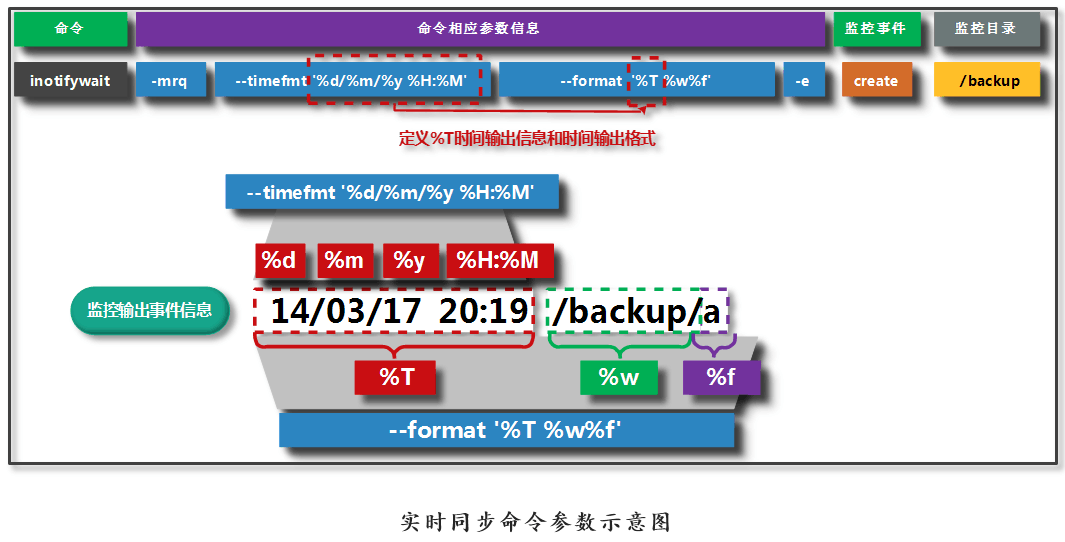
1.7 Real-time synchronization command parameter diagram
Chapter 2 inotify+rsyncReal-time synchronization service deployment
2.1 First milestone: deploymentrsyncservice
2.1.1 rsyncServer deployment
1)Whether the software exists
[root@backup ~]# rpm -qa |grep rsync
rsync-3.0.6-12.el6.x86_64
Requirements: It is useful to query a command. But don't know which package it belongs to
yum provides rysnc
provides Find what package provides the given value
2)Perform software service configuration
[root@backup ~]# vim /etc/rsyncd.conf
uid = rsync
gid = rsync
use chroot = no
max connections = 200
timeout = 300
pid file = /var/run/rsyncd.pid
lock file = /var/run/rsync.lock
log file = /var/log/rsyncd.log
ignore errors
read only = false
list = false
hosts allow = 172.16.1.0/24
auth users = rsync_backup
secrets file = /etc/rsync.password

[backup]
comment = "backup dir by oldboy"
path = /backup

[nfsbackup]
comment = "nfsbackup dir by hzs"
path = /nfsbackup
3)creatersyncManagement user
[root@backup ~]# useradd -s /sbin/nologin -M rsync
4)Create a data backup storage directory,Directory modification owner
[root@backup ~]# mkdir /nfsbackup/
[root@backup ~]# chown -R rsync.rsync /nfsbackup/
5)Create an authenticated user password file and authorize it600
echo "rsync_backup:oldboy123" >>/etc/rsync.password
chmod 600 /etc/rsync.password
6)start uprsyncservice
rsync --daemon
At this point, the server configuration is complete.
[root@backup ~]# ps -ef |grep rsync
root       2076      1  0 17:05 ?        00:00:00 rsync --daemon
root       2163   1817  0 17:38 pts/1    00:00:00 grep --color=auto rsync
2.1.2 rsyncClient configuration
1)Whether the software exists
[root@backup ~]# rpm -qa |grep rsync
rsync-3.0.6-12.el6.x86_64
2)Create a security certificate and modify the permissions600
echo "oldboy123" >>/etc/rsync.password
chmod 600 /etc/rsync.password
3) Test data transmission
[root@nfs01 sersync]# rsync -avz /data  [email protected]::nfsbackup  --password-file=/etc/rsync.password
sending incremental file list
data/
data/.hzs
data/.tar.gz
data/.txt
2.2 Second milestone: deploymentinotifyservice
First confirm whether there isepelsourceUsed to installinotify-toolssoftware
[root@nfs01 ~]# yum repolist
Loaded plugins: fastestmirror, security
Loading mirror speeds from cached hostfile
 * base: mirrors.aliyun.com
 * epel: mirrors.aliyun.com
 * extras: mirrors.aliyun.com
 * updates: mirrors.aliyun.com
repo id  repo name                                       status
base     CentOS-6 - Base - mirrors.aliyun.com             6,706
epel     Extra Packages for Enterprise Linux 6 - x86_64  12,401
extras   CentOS-6 - Extras - mirrors.aliyun.com              46
updates  CentOS-6 - Updates - mirrors.aliyun.com            722
repolist: 19,875
2.2.1 installationinotifysoftware
Two installation methods
1) yum install -y inotify-tools
2) Manual compilation and installation
Note:
Manual compilation and installation methods need togithubDownload the package
inotifySoftware reference link:
https://github.com/rvoicilas/inotify-tools/wiki
2.2.2 ViewinotifyTwo commands on the installation(inotifywait,inotifywatch)
[root@nfs01 ~]# rpm -ql inotify-tools
/usr/bin/inotifywait      #main
/usr/bin/inotifywatch
2.2.2.1 inotifywaitwithinotifywatchRole:
A total of 2 tools (commands) are installed, namely inotifywait and inotifywatch
 Inotifywait : Wait for a specific file system event (open close delete, etc.) to occur on the monitored file or directory.
 Blocked after execution, suitable for use in shell scripts
 Inotifywatch: collects statistics used by the file system being monitored, and counts the number of times the file system event occurred.
 Description: yum can be used directly after installation. If you need to compile and install, you need to enter the bin directory of the corresponding software directory.

#Command man manual description
# man inotifywait
inotifywait - wait for changes to files using inotify

 Monitor with inotify and wait for changes to file information
# man inotifywatch
inotifywatch - gather filesystem access statistics using inotify
 Monitor with inotify and collect file system access statistics
2.3 Third milestone: writingscript,achieversync+inotifySoftware function combination
2.3.1 rsyncService order:
rsync -avz --delete /data/ [email protected]::nfsbackup --password-file=/etc/rsync.password
2.3.2 inotifyService order:
inotifywait -mrq /data -format "%w%f" -e create,delete,move_to,close_write
2.3.3 Write a script:
[root@nfs01 sersync]# vim /server/scripts/inotify.sh
#!/bin/bash
inotifywait -mrq /data --format "%w%f" -e create,delete,moved_to,close_write|\
while read line
do
        rsync -az --delete /data/ [email protected]::nfsbackup --password-
file=/etc/rsync.password
done
Script description:
forThe loop defines a condition that stops the loop when the condition is not met
whileLoop: loop as long as the conditions are met
2.3.4 Optimize scripts
#!/bin/bash
Path=/data
backup_Server=172.16.1.41
/usr/bin/inotifywait -mrq --format '%w%f' -e create,close_write,delete /data  | while read line
do
    if [ -f $line ];then
        rsync -az $line --delete rsync_backup@$backup_Server::nfsbackup --password-file=/etc/rsync.password
    else
        cd $Path &&\
        rsync -az ./ --delete rsync_backup@$backup_Server::nfsbackup --password-file=/etc/rsync.password
    fi
done
2.4 Fourth milestone: test scripts written
2.4.1 Let the script run in the background
in/data Directory first created6Documents
[root@nfs01 data]# sh  /server/scripts/inotify.sh &
[root@nfs01 data]# touch {1..6}.txt
inbackupOn the server, it has already been synchronized.6Documents.
[root@backup ~]# ll /nfsbackup/
total 8
-rw-r--r-- 1 rsync rsync 0 Oct 17 12:06 1.txt
-rw-r--r-- 1 rsync rsync 0 Oct 17 12:06 2.txt
-rw-r--r-- 1 rsync rsync 0 Oct 17 12:06 3.txt
-rw-r--r-- 1 rsync rsync 0 Oct 17 12:06 4.txt
-rw-r--r-- 1 rsync rsync 0 Oct 17 12:06 5.txt
-rw-r--r-- 1 rsync rsync 0 Oct 17 12:06 6.txt
2.5 usewhileThe script stop method written by the loop statement (kill)
01. ctrl+z suspends the program to run, kill -9 kill
02. Do not suspend the program, directly use the killer three Musketeers to kill the process
Description:killThe three killers are not omnipotent and cannot be killed when the process is suspended;kill -9 (Danger)
2.5.1 See which programs are running in the background
[root@nfs01 data]# jobs
[1]+  Running                 sh /server/scripts/inotify.sh &
2.5.2 fgBring the background program to the foreground
[root@nfs01 data]# fg 1
sh /server/scripts/inotify.sh
2.6 The foreground and background running methods of the process:
fg -- Front desk
bg -- Backstage
2.6.1 Script background running method
    01. sh inotify.sh &
    02. nohup sh inotify.sh &
         03. screen implementation script program running in the background
sh /server/scripts/inotify.sh &
nohup
nohup sh inotify.sh &
2.7 screenImplement the script program running in the background
2.7.1 throughyumFind and findscreenCommand belongs toscreenpackage
[root@test ~]# yum provides screen
Loaded plugins: fastestmirror, security
Loading mirror speeds from cached hostfile
 * base: mirrors.aliyun.com
 * epel: mirrors.aliyun.com
 * extras: mirrors.aliyun.com
 * updates: mirrors.aliyun.com
base                                                      | 3.7 kB     00:00
epel                                                      | 4.3 kB     00:00
extras                                                    | 3.4 kB     00:00
updates                                                   | 3.4 kB     00:00
screen-4.0.3-19.el6.x86_64 : A screen manager that supports multiple logins on
                           : one terminal
Repo        : base
Matched from:
2.7.2 installationscreensoftware
[root@test ~]# yum install -y screen
2.7.3 screenCommand parameter
inshellInput screenYou can enterscreen view
[root@test ~]# screen
ScreenSimple steps to run the program in the background:
screen -ls : can seescreenConversation
screen -r ID :Specify which to enterscreenConversation
ScreenShortcuts used in the command
Ctrl+a c : Create a window
Ctrl+a w : window list
Ctrl+a n : next window
Ctrl+a p : Previous window
Ctrl+a 0-9 : at the first0Windows and sections9Switch between windows
Ctrl+a K(capital) : Close the current window and switch to the next window ,
(When exiting the last window, the terminal automatically terminates and returns to the originalshellstatus)
exit : Close the current window and switch to the next window
(When exiting the last window, the terminal automatically terminates and returns to the originalshellstatus)
Ctrl+a d : Exit the current terminal, return to loadscreenPreviousshellCommand status
Ctrl+a " : Window list is different from w