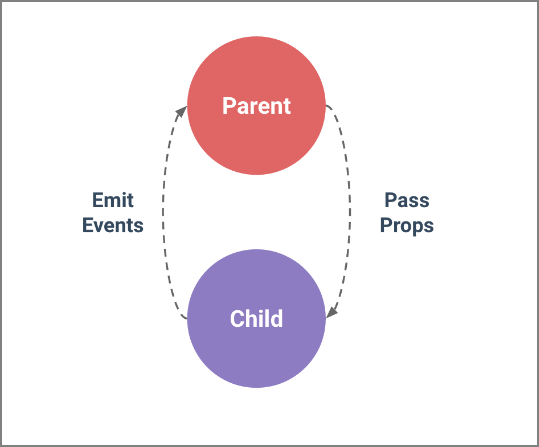
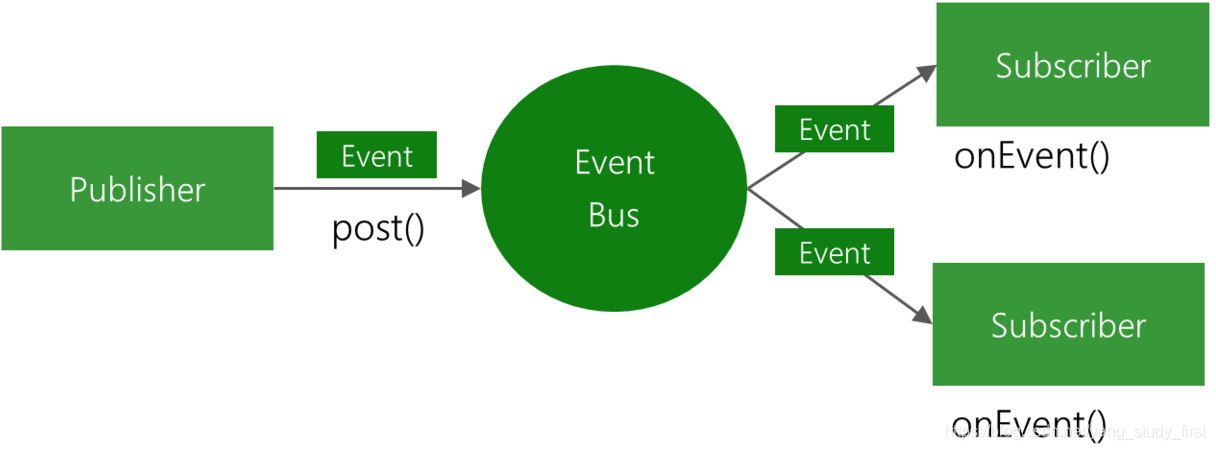
In C#, we can define our own events in a class, and other classes can subscribe to the event, and when something happens, we can notify the class. This is very useful for desktop applications or standalone windows services. But it's a bit of a problem for a web application, because objects are created in web requests, and these objects have very short life cycles, so registering events of certain classes is difficult. In addition, registering events of other classes will make the classes tightly coupled. The event bus can be used to decouple and reuse the logic in the application.
The benefits of the event bus and the problems introduced
The benefits are obvious, that is, an independent onePublishing subscription moduleThe caller can use the module to block some thread switching problems and simply implement the publish and subscribe function.
The downside may be more concealed, but these need to be enough to attract our attention.
- A large amount of abuse will lead to the dispersion of logic, which is difficult to locate after problems arise.
- There is no way to implement a strong type, and problems are found at compile time.
- There is some problem with the readability of the code. The IDE does not recognize these protocols and is not friendly to the IDE.
EventBusTo achieve, otherwise it is recommended to implement it inside the module
Observer mode.
Sample code
So today we introduce a simple event bus, which is an implementation of the event publishing subscription model, which allows us to decouple our module and domain boundaries with the weak reference nature of events in domain-driven design (DDD).
Currently, all source code has been submitted to github at:https://github.com/weizhong1988/Weiz.EventBus
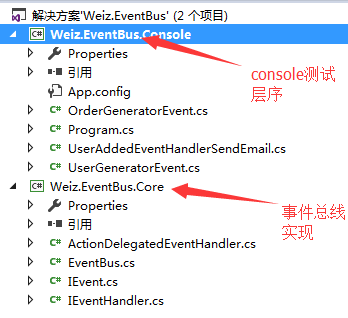
The program directory structure is as follows:
Event bus
The event bus is a singleton object that is shared by all other classes that trigger and process events. To use the event bus, you should first get a reference to it. There are two ways to handle this:
Subscription event
You should define this event before triggering an event. EventBus provides us with a Subscribe method to subscribe to events:
        public void Subscribe<TEvent>(IEventHandler<TEvent> eventHandler) where TEvent : IEvent
        {
            //Sync lock
            lock (_syncObject)
            {
                //Get the type of domain model
                var eventType = typeof(TEvent);
                //If this domain type has been registered in the event bus
                if (_dicEventHandler.ContainsKey(eventType))
                {
                    var handlers = _dicEventHandler[eventType];
                    if (handlers != null)
                    {
                        handlers.Add(eventHandler);
                    }
                    else
                    {
                        handlers = new List<object>
                        {
                            eventHandler
                        };
                    }
                }
                else
                {
                    _dicEventHandler.Add(eventType, new List<object> { eventHandler });
                }
            }
        }
So events are integrated from IEvent, which contains the properties that the class needs to handle events.
 var sendEmailHandler = new UserAddedEventHandlerSendEmail();
 var sendMessageHandler = new UserAddedEventHandlerSendMessage();
 var sendRedbagsHandler = new UserAddedEventHandlerSendRedbags();
 Weiz.EventBus.Core.EventBus.Instance.Subscribe(sendEmailHandler);
 Weiz.EventBus.Core.EventBus.Instance.Subscribe(sendMessageHandler);
 //Weiz.EventBus.Core.EventBus.Instance.Subscribe<UserGeneratorEvent>(sendRedbagsHandler);
 Weiz.EventBus.Core.EventBus.Instance.Subscribe<OrderGeneratorEvent>(sendRedbagsHandler);
Publish event
For event sources, events can be published via the Publish method. Triggering an event is as simple as this:
     public void Publish<TEvent>(TEvent tEvent, Action<TEvent, bool, Exception> callback) where TEvent : IEvent
        {
            var eventType = typeof(TEvent);
            if (_dicEventHandler.ContainsKey(eventType) && _dicEventHandler[eventType] != null &&
                _dicEventHandler[eventType].Count > 0)
            {
                var handlers = _dicEventHandler[eventType];
                try
                {
                    foreach (var handler in handlers)
                    {
                        var eventHandler = handler as IEventHandler<TEvent>;
                        eventHandler.Handle(tEvent);
                        callback(tEvent, true, null);
                    }
                }
                catch (Exception ex)
                {
                    callback(tEvent, false, ex);
                }
            }
            else
            {
                callback(tEvent, false, null);
            }
        }
Here is the call to publish the event:
            var orderGeneratorEvent = new OrderGeneratorEvent { OrderId = Guid.NewGuid() };

            System.Console.WriteLine("{0} Order successfully", orderGeneratorEvent.OrderId);

            Weiz.EventBus.Core.EventBus.Instance.Publish(orderGeneratorEvent, CallBack);
Define processing events
To handle an event, it should be implementedIEventHandlerThe interface is as follows:
    /// <summary>
    /// send email
    /// </summary>
    public class UserAddedEventHandlerSendEmail : IEventHandler<UserGeneratorEvent>
    {

        public void Handle(UserGeneratorEvent tEvent)
        {
            System.Console.WriteLine(string.Format("{0} mail has been sent", tEvent.UserId));
        }
    }
Handling multiple events
Multiple events can be handled in a single processing handle. At this point, you should implement an IEventHandler for each event. such as:
    /// <summary>
    /// red bags.
    /// </summary>
    public class UserAddedEventHandlerSendRedbags : IEventHandler<UserGeneratorEvent>,IEventHandler<OrderGeneratorEvent>
    {
        public void Handle(OrderGeneratorEvent tEvent)
        {
            System.Console.WriteLine(string.Format("Order red envelope for {0} has been sent", tEvent.OrderId));
        }

        public void Handle(UserGeneratorEvent tEvent)
        {
            System.Console.WriteLine(string.Format("{0} registration red envelope has been sent", tEvent.UserId));
        }
    }
At last
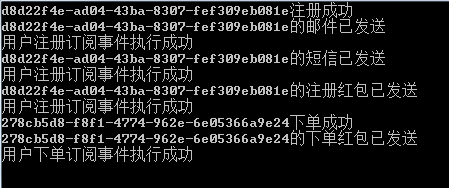
Above, the event bus is introduced, the complete code, please download on github, this is just a simple implementation of EventBus, you can optimize and modify according to your actual scene and needs.