Use of EventBus event bus framework
1. Overview
EventBus definition: it is a publish/subscribe event bus.
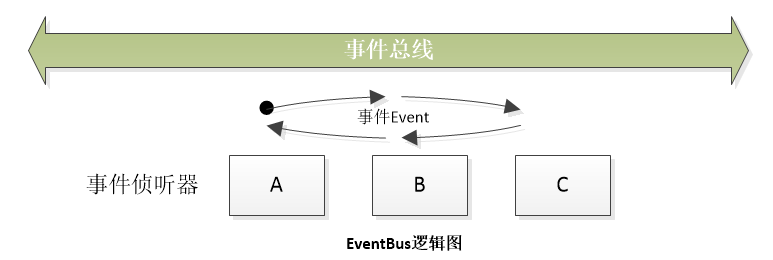
In this way, it should contain 4 components: publisher, subscriber, event, and bus.
So what is the relationship between these four?
Obviously: subscribers subscribe to events to the bus, and senders publish events.
The relationship should be roughly like this:

Subscribers can subscribe to multiple events, senders can publish any event, and publishers can also be subscribers. To
2. Principle
Execute EventBus.getDefault().register(this) in onCreate; it means that EventBus scans the current class and records all methods starting with onEvent.
How to record it? Use Map, Key as the parameter type of the method, and Value contains our method. So after the execution of onCreate is completed, our onEventMainThread has been stored in EventBus in the form of key-value pairs.
Then when the child thread is executed and EventBus.getDefault().post(Object) is called, EventBus will find the corresponding method in the Map according to the type of the actual parameter in the post, so we find our onEventMainThread, and finally call reflection to execute our way.
3. ThreadMode of EventBus
EventBus contains 4 ThreadMode: PostThread, MainThread, BackgroundThread, Async
Method name: onEventPostThread, onEventMainThread, onEventBackgroundThread, onEventAsync
the difference:
OnEventMainThread represents that this method will be executed on the UI thread
OnEventPostThread represents that this method will be executed on the thread where the event is currently posted
The BackgroundThread method, if the event is published in a non-UI thread, it will be executed directly and published in the same thread. If the event is published in the UI thread, it will be added to the background task queue and called one by one using the thread pool.
Async joins the background task queue and uses the thread pool to call. Note that there is no one in the BackgroundThread.
4. Remarks
Note:Almost all EventBus frameworks (EventBus, otto, RxBus), it is not recommended that you register in the parent class, you can only register in the class without subclasses, if you have to Use in BaseActivity, then define an inner class without subclasses in BaseActivity.
Examples are as follows:
public class BaseActivity extend Activity {

      private class EventBusReceiver {
        @Subscribe
        public void onEvnet1(Event1 event) {
            // TODO to do what?
        }
    }

    private EventBusReceiver mEventBusReceiver = new EventBusReceiver();
    @Override
    public void onResume() {
        // register event bus
    }

    @Override
    public void onPause() {
        // unregister event bus
    }
}Intelligent Recommendation
Vue event bus, Eventbus use
purpose of usage Communication within the component is also transmitted data Scope of application The brothers component passes the value, the grandchildren component pass the value, and the component...
The use of Android event bus EventBus
This article learns how to use EventBus 3.0 together. EventBus is used to publish/subscribe event bus, which simplifies communication between components, components and background threads in the appli...
[Eventbus] Eventbus Event Bus Framework Introduction (Eventbus Usage Process)
Article catalog I. Introduction to the Eventbus Event Bus Framework Second, EVENTBUS use process I. Introduction to the Eventbus Event Bus Framework Event delivery mechanism in Android: Use INTEN to d...
Android development framework series EventBus event bus
Introduction GitHub:https://github.com/greenrobot/EventBus Let's talk about what the EventBus thread bus does, the environment, its advantages and disadvantages. What are you doing? In a word, simple ...
Android development framework EventBus Series event bus
Android development framework EventBus Series event bus Introduction GitHub:https://github.com/greenrobot/EventBus EventBus to talk threads bus is doing, environment, advantages, disadvantages. Doing?...
More Recommendation
EventBox: A better event bus framework than EventBus! ! !
Original blog address: Introduction: EventBus is a powerful and lightweight event processing framework, but EventBus enforces the use of custom class types as the acceptance parameters, and the shortc...
Event Bus Framework EventBus Usage and Principle Analysis
Article Directory 1. EventBus framework 1.1 Introduction to EventBus 1.2 Basic use of EventBus 1.2.1 Add Gradle dependency 1.2.2 Define events 1.2.3 Prepare subscribers 1.2.4 Release event 2. EventBus...

EventBus framework in android (subscription event bus)
EventBus is a publish/subscribe event bus optimized for Android. The main function is to replace Intent, Handler, BroadCast are passed between Fragment, Activity, Service, and threads Message. The adv...
Event bus framework EventBus and Otto study notes
Function description: efficient communication and decoupling between modules. One: EventBus GitHub address and usage method:https://github.com/greenrobot/EventBus Use the basic steps (Android Studio a...
Android - event bus EventBus package and use
EventBus can easily realize cross-component and cross-thread data communication. Compared with BroadcastReciver, one of the traditional four components, it is more convenient, lighter, and less coded....