Customize NumberPicker modify the default font color size, select font color size, dividing line color, height
tags: NumberPicker Font split line

import android.content.Context;
import android.graphics.drawable.ColorDrawable;
import android.util.AttributeSet;
import android.view.View;
import android.view.ViewGroup;
import android.widget.EditText;
import android.widget.NumberPicker;
import java.lang.reflect.Field;

public class TextConfigNumberPicker extends NumberPicker {

    public TextConfigNumberPicker(Context context) {
        super(context);
    }

    public TextConfigNumberPicker(Context context, AttributeSet attrs) {
        super(context, attrs);
    }

    public TextConfigNumberPicker(Context context, AttributeSet attrs, int defStyleAttr) {
        super(context, attrs, defStyleAttr);
    }


    @Override
    public void addView(View child) {
        this.addView(child, null);


    }

    @Override
    public void addView(View child, ViewGroup.LayoutParams params) {
        this.addView(child, 0, params);
    }

    @Override
    public void addView(View child, int index, ViewGroup.LayoutParams params) {
        super.addView(child, index, params);
        updateView(child);
    }

    private void updateView(View view) {
        if (view instanceof EditText) {
            //Set the color and size of the general (default) text
            ((EditText) view).setTextColor(getResources().getColor(R.color.whiter));
            ((EditText) view).setTextSize(13);
        }
        try {
                         //Set the size and color of the dividing line
            Field mSelectionDivider = this.getFile("mSelectionDivider");
            mSelectionDivider.set(this, new ColorDrawable(getResources().getColor(R.color.pickline)));
            mSelectionDivider.set(this, 10);
        } catch (Exception e) {
            e.printStackTrace();
        }
    }


         //Reflective acquisition control mSelectionDivider mInputText currently selected view
    public Field getFile(String fieldName) {
        try {
                         //Set the color value of the dividing line
            Field pickerFields = NumberPicker.class.getDeclaredField(fieldName);
            pickerFields.setAccessible(true);
            return pickerFields;
        } catch (Exception e) {
            e.printStackTrace();
        }

        return null;
    }

         //Set the style of the selected control. Note that it should be adjusted in setOnValueChangedListener or setOnScrollChangeListener, setOnScrollListener
         // Use picker.performClick(); the animation effect is different in the two cases
         //At the same time pay attention to his substitute position after the current control is initialized, otherwise it will not be obtained
    public void setMInputStyle(Float size) {
        Field mInputText = this.getFile("mInputText");
        try {
            ((EditText) mInputText.get(this)).setTextSize(size);
        } catch (IllegalAccessException e) {
            e.printStackTrace();
        }
    }
}
Note that the style of the selected control should be set after the current control is initialized. Usage:
 TextConfigNumberPicker numberPicker = dialog.findViewById(R.id.np);
 numberPicker.setMInputStyle(16f);
   //setOnValueChangedListener or setOnScrollChangeListener, setOnScrollListener
        numberPicker.setOnValueChangedListener(new NumberPicker.OnValueChangeListener() {
            @Override
            public void onValueChange(NumberPicker picker, int oldVal, int newVal) {
                             picker.performClick();//Refresh the selected state
            }
        });
Intelligent Recommendation
PowerShell default configuration (font, size, color)
1 font settings Consolas and Microsoft Yahei 2 size setting Type $profile in the PowerShell interface to view the configuration file path. Modify or create a configuration file, write #Set the powersh...
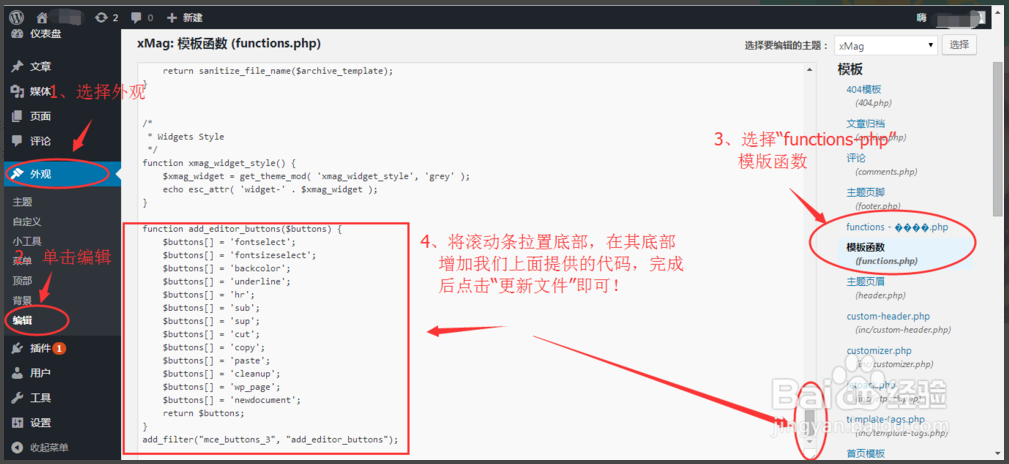
How to modify WP article font format, font size, font color
When using WordPress to edit articles, many friends will be like editors, and find that it does not have the same function buttons as modify the font style, font size, font color, page breaks, etc., w...
iOS modify the font color size of the placeholder of the textField
In the construction of the UI interface long use textField, sometimes need to modify the textField's placeholder font size and color I summarized two methods <p> After iOS 6.0, there is an attri...
Swift to modify the UITextfield's Placeholder font size and color
**//The first ** // second...
iOS modify the font color size of the placeholder of the UITextField
Set the color code fragment of the placeholder of the UITextField: Or the attributed attribute holder attribute provided directly after iOS 6.0: The same effect as the above code. _placeholderLabel de...
More Recommendation
MFC modify the font size and color of the control
Right click on the dialog -> Class Orientation -> Message -> Double click to add WM_CTLCOLOR, you can see the function OnCtlColor in the Dlg class. Update the font and color, execute the abov...
SearchBar to modify Font and placeholder text color size
The basic settings of UISearchBar: (void)setBarButtonItem { //Hide the back button on the navigation bar [self.navigationItem setHidesBackButton:YES]; //View used to put searchBar UIView *titleView = ...
Modify the UIholder's placeholder font color size
UITextField is a commonly used control in iOS development, it has aplaceholderAttribute, which is placeholder text, the default placeholder text color is70% gray. Sometimes, the color of the Placehold...
[OC] Modify the color and font size of placeholderLabel in UISearchBar
Find the searchbar property of the searchbar to modify the property value via KVC Reprinted at: https://www.jianshu.com/p/e10526c8844d...