Detailed explanation of Linux's TCPDUMP command
Detailed explanation of Linux's TCPDUMP command
Install TCPDUMP
download
https://www.tcpdump.org/
Click the red part in the figure to download TCPDUMP and libpcap package.
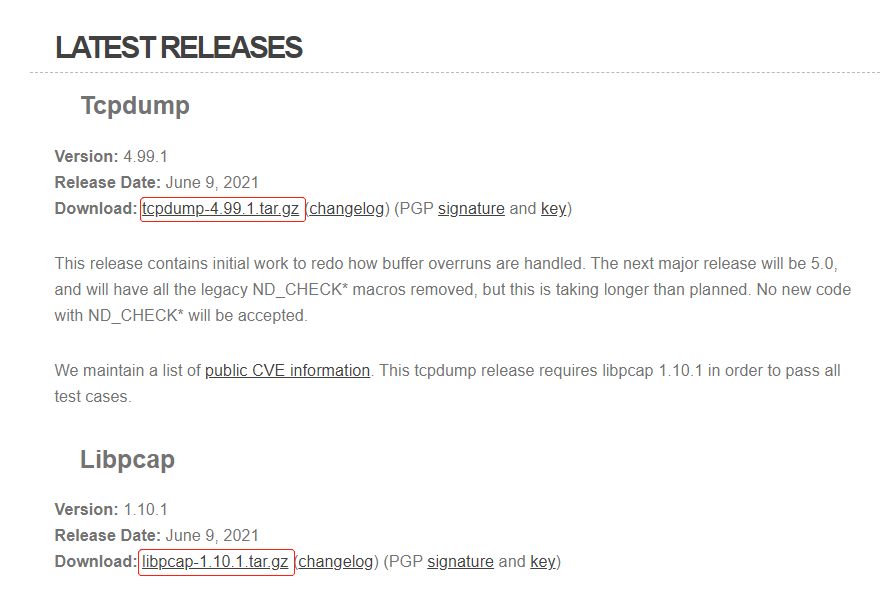
After downloading, upload the decompression package, libpcap is a packet capture library that TCPDUMP relies on.
tar -zxvf tcpdump-4.99.1.tar.gz
tar -zxvf libpcap-1.10.1.tar.gz
Install the libpcap when installing the package, and then install TCPDUMP
cd libpcap-1.10.1
./configure

# If you execute the ./configure: Configure: error: Neither Flex Nor Lex Was Found error. You need to install FLEX, bison first, and then execute ./configure
# yum install flex bison

make
make install

# Install TCPDUmp
cd ../tcpdump-4.99.1
./configure
make
make install
principle
The Linux Capture is to register a virtual underlying network protocol to complete the right to process network messages (network equipment) messages. When the network card receives a network message, it will traverse all the registered network protocols in the system, such as the Ethernet protocol and the X25 protocol processing module to try to perform parsing and processing. When the package module camouflage itself as a network protocol, the system will give this pseudo -protocol once a chance when receiving the message, and let it process the packet received by the network card. At this time, the module will be Take the opportunity to spy on the message, that is, a complete copy of the message after this message, pretending to be received by your own, report to the package module.
Details
tcpdump [ -AbdDefhHIJKlLnNOpqStuUvxX# ] [ -B buffer_size ]
        [ -c count ] [ --count ] [ -C file_size ]
        [ -E spi@ipaddr algo:secret,...  ]
        [ -F file ] [ -G rotate_seconds ] [ -i interface ]
        [ --immediate-mode ] [ -j tstamp_type ] [ -m module ]
        [ -M secret ] [ --number ] [ --print ] [ -Q in|out|inout ]
        [ -r file ] [ -s snaplen ] [ -T type ] [ --version ]
        [ -V file ] [ -w file ] [ -W filecount ] [ -y datalinktype ]
        [ -z postrotate-command ] [ -Z user ]
        [ --time-stamp-precision=tstamp_precision ]
        [ --micro ] [ --nano ]
        [ expression ]
-A
Display each packet in an ASCII code (the link layer head information in the data packet will not display the data packet).
-c count
TCPDUMP will exit after receiving a Count packet.
-C file-size (NT: This option is used to use-W File options)
Before TCPDUMP is preserved directly in the file, check whether the size of the file exceeds File-SIZE. If it exceeds it, turn off this file, and create another file to continue the record of the original packet. 1, 2, and 3 increases. File-size units are M
-d
In the form of easy reading, print the arrangement of the packet matching code on the standard output, and then TCPDUMP stops. (Usually refers to printing some information by ASCII code)
-dd
Print the packet matching code in the form of C language.
-ddd
Print out the packet matching code in the form of a decimal number (there will be an additional 'Count' prefix before the packet matching code).
-D
List all the network card numbers and names of the current host. The network interface name and number number can be used in the -i Flag option of TCPDUMP to specify the network interface to capture the package on it.
This option is useful on the system that does not support the interface list command (for example, the Windows system, or the unix system that lacks iFconfig -A), if the libpcap librarus rely on TCPDUMP compilation, the -D option will not be supported because Among them, lack of pcap_findallDevs () function.
-e
In the printing output of each row, the data link layer head information includes the data packet
-E #I didn't understand
You can decrypt the iPSEC ESP package (NT | RT: IPSEC Encapsulating Security Payload, ipsec package security load, ipsec can be understood as a complete set of IP data packets or an entire IP data package or the entire IP data package or the entire IPSEC. Among them, the upper -level protocol part is encrypted data, and the former working mode is called the tunnel mode; the latter's working mode is called the transmission mode. The working principle, and it needs to be added).
It should be noted that when the terminal starts TCPDUMP, you can set the key (Secret) for IPv4 ESP Packets.
Algorithms that can be used for encryption include DES-CBC, 3DES-CBC, Blowfish-CBC, RC3-CBC, CAST128-CBC, or (None). The default is the DES-CBC (NT: Des, Data EnCryption Standard, data encryption standard The encryption algorithm is unknown, and it needs to be added) .secret to express it in an ASCII string to express. If you start with 0X, the key will be read in hexadecimal.
The definition of ESP in this option follows RFC2406 instead of RFC1827. And, this option is only used to debug. It is not recommended to use this option with real key (Secret), because this option is not safe: the Secret entered in the command line can See by other people through commands such as PS.
In addition to the above syntax format (NT: refers to SPI@iPaddr Algo: Secret), you can also add a syntax input file name to TCPDUMP (NT: SPI@ipaddr algo: secret, ... in a syntax file Name). This file will open this file when receiving the first ESP package, so it is best to cancel some of the privileges given to TCPDUmp at this time (NT: It can be understood. After this file is prevented, when the file is written maliciously, it is maliciously written. It will not cause excessive damage).
-f
Print out the external internet address in the form of numbers.
-F file
Use the file file as an input of the filter condition expression. At this time, the input on the command line will be ignored.
-i interface
Specify the interface that needs to be monitored by TCPDUMP. If there is no specification, TCPDUMP will search for the most configured interface (excluding the Loopback interface) from the system interface list. Once you find the first qualified interface, the search will end immediately.
On the linux operating system of version 2.2 or subsequent version kernel, the virtual network interface of 'Any' can be used to receive a packet on all network interfaces (NT: This will include the purpose of the network interface, and the purpose is not the purpose is not the purpose is not This network interface). It should be noted that if the real network interface cannot work under the "Promiscuous), it cannot grasp its data packet on the virtual network interface of 'Any'.
If the -d logo is specified, TCPDUUP will print the interface number in the system, and the number can be used for the interface parameters here.
-l
Cushioning the standard output. It is useful when observing the printing of the package and the preservation of the packing package.
-L
List the type of data link layer supported by the specified network interface and exit. (NT: Specify the interface through -i to specify)
-m module
Load the SMI MIB module specified by Module. This option can be used multiple times to load different MIB modules for TCPDUMP.
-M
If the Secret of the TCP Segments (TCP Segments) has the TCP-MD5 option (related description in RFC 2385), a public key Secret.
-n
Display IP instead of host names.
-N
The domain name part of the HOST is not printed.
-O
The optimization code used when the package matching is not enabled. When some bugs are suspected to be caused by the optimization code, this option will be useful.
-p
Under normal circumstances, set the network interface to a non -‘mixed” mode. But it must be noted that under special circumstances, this network interface will still work in the ‘mixed’ mode.
-q
Quickly print output.
-r file
Read the package from the specified file (these packages are generally generated through -w options).
-S
When printing the sequence number of the TCP packet, the absolute sequence number is used instead of the relative sequence number.
-s snaplen
Set the tcpdump packet grabbing length to Snaplen. If the default is not set, it will be 68 bytes. 68 bytes for IP, ICMP, TCP, and UDP protocols. The package will generate a short cut. If the package is shortened, the corresponding printing and output row of TCPDUMP will appear '' '[| Proto]' '.
It should be noted that the use of long grasping length will increase the processing time of the packet, and reduce the number of data packets that can be cached by TCPDUMP, which will cause the loss of the data packet. Therefore, we can capture the package we want. Under the premise, the smaller the length of the grasp, the better. Setting Snaplen to 0 means that let TCPDUMP automatically select the appropriate length to grab the data packet.
-T type
Forced TCPDUMP to analyze the packets received by the package structure described by the protocol specified by Type. The currently known Type's desirable protocol is:
AODV (AD-HOC On-Demand Distance Vector Protocol, Routing Protocol on Demand distance vector, use in AD HOC (point-to-point mode) network),
cnfp (Cisco NetFlow protocol),
rpc(Remote Procedure Call),
rtp (Real-Time Applications protocol),
rtcp (Real-Time Applications con-trol protocol),
snmp (Simple Network Management Protocol),
TFTP (Trivial File Transfer Protocol, Broken File Protocol),
VAT (Visual Audio Tool, which can be used for application layer protocols for TV telephone conferences on Internet),),
WB (Distributed White Board, which can be used for application layer protocols for network conferences).
-t
Do not print the timestamp in each line output
-tt
Do not perform formatting the time of each line output (NT: This format may not see its meaning at a glance, such as the timestamp printed to 1261798315)
-ttt
When TCPDUMP output, it will delay for a period of time between the printing of each two lines (in milliseconds)
-tttt
Add the date printing before the time stamp of each row of printing
-u
Print out the unlike NFS handle (NT: handle can be understood as a file handle used in NFS, which will include files in a folder and folder)
-U
Makes the file writing synchronized with the preservation of the package when TCPDUMP is used by the -w option. It really writes this file when it is full)
This parameter does not work on the old version of the libcap library, because the lack of PCAP_CUMP_FLush () function.
-v
When analyzing and printing, detailed output is generated. For example, the survival time, logo, total length and some options of IP packages. This will also open some additional packaged integrity detection, such as IP or ICMP packet heads. Check and.
-vv
Generate more detailed output than -v. For example, the additional domain in the NFS response package will be printed, and the SMB packet will be completely decoded.
-vvv
Generate more detailed output than -vv. For example, the SB, the SE option used in telen will be printed. If Telnet uses the graphic interface at the same time,
The corresponding graphics options will be printed in hexadecimal (NT: Telnet's SB, the SE option's meaning is unknown, and it needs to be added).).
-w
Write the package data directly into the file without analysis and printing output. These packaging data can be re-read and analyze and print through the -R options.
-W filecount
This option is used in conjunction with the -C options, which will limit the number of files that can be opened, and when the file data exceeds the limits set here, cycles in turn instead of the previous file, which is equivalent to a file buffer pool with a filecount file. At the same time, This option will make 0 at the beginning of each file name and 0, which can be used to occupy a place, which can facilitate the correct sorting of these files.
-x
When analysis and printing, TCPDUMP will print the head data of each package, and at the same time printed the data of each package with hexadecimal (but does not include the head of the connection layer). The size of the data packet and the minimum in Snaplen.
-xx
TCPDUMP will print the head data of each package, and at the same time print out the data of each package with hexadecimal, including the head of the data link layer.
-X
When analysis and printing, TCPDUMP will print the head data of each package, and it will print the data of each package in the form of hexadecimal and ASCII code (but excluding the head of the connection layer).
-XX
When analysis and printing, TCPDUmp will print the head data of each package, and will print out the data of each package in the form of hexadecimal and ASCII code, including the head of the data link layer.
-y datalinktype
Set TCPDUMP only the data packet of DataLinkType only by capturing data link layer protocol
-Z user
Make TCPDUMP abandon your super authority (if you start TCPDUmp with the root user, there will be super user permissions), and set the current TCPDUMP user ID to User, set the ID ID to user group ID (NT: TCPDUMP This is here. It can be understood as the corresponding process after tcpdump running)
Intelligent Recommendation
Detailed explanation of TCPDUMP
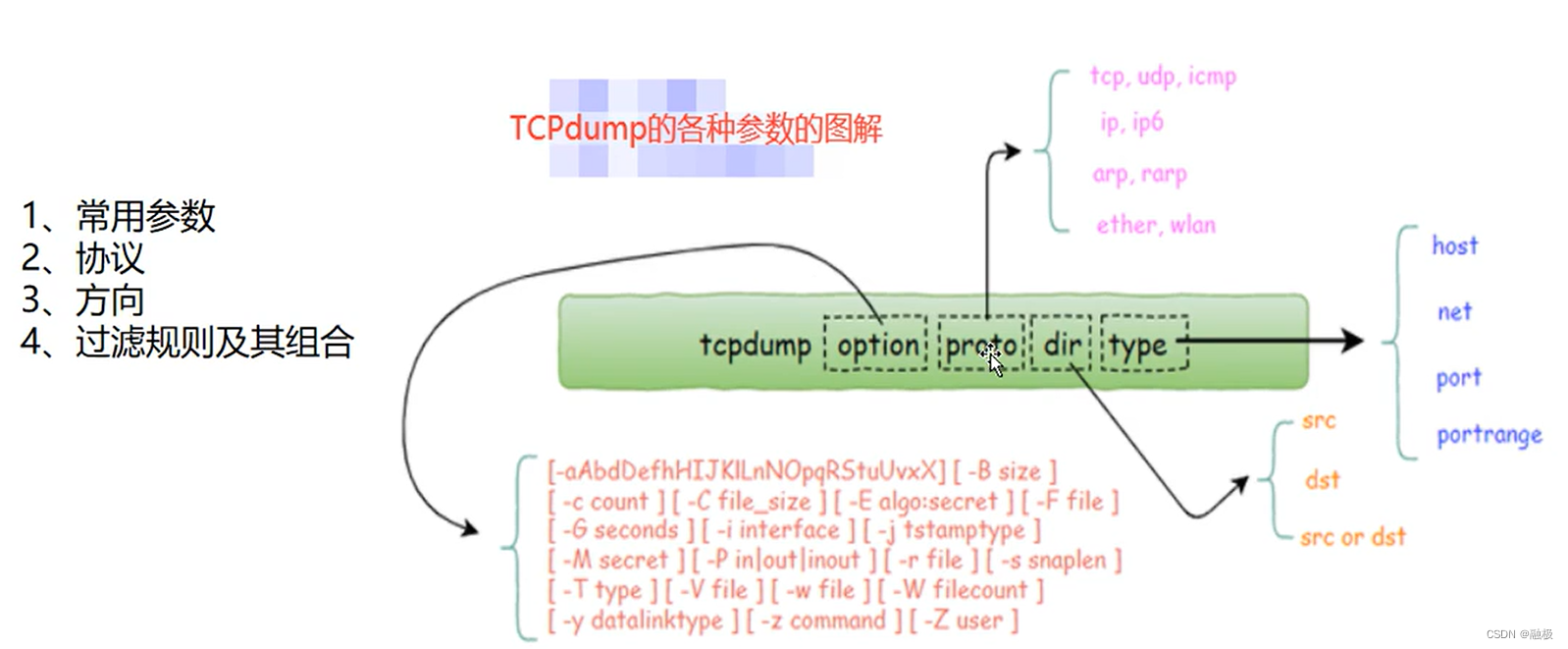
1. The syntax format of TCPDUMP option: optional parameter Proto: protocol filter, recognized keywords are http,tcp,udp,icmp,ip,ip6,arp,rarp Type: Type filter. Understanding keywords host, net, port, ...
Detailed explanation of TCPDUMP tools
Overview TCPDUMP grammar illustration Common filter rules In fact, it is IP, port filtering. Filter based on IP address (host/dst/src) Case 1: Capture all the packets received and all sent by the host...
LINUX's UMASK detailed explanation
LINUX's UMASK detailed explanation After reading a lot of UMASK articles on the Internet, some are too bloated. 1. What exactly is UMASK? According to my personal understanding, it is the preset value...
Packet capture tool: Detailed explanation of tcpdump packet capture command
Introduction: The full name of tcpdump: dump the traffic on a network, a packet analysis tool that intercepts data packets on the network according to the user's definition. tcpdump can completely int...
Detailed explanation of Linux's circulating control for, while, Until command
Detailed explanation of Linux's circulating control for, while, Until command The commands of the circular control are mainly for, while, and the Until command is relatively small. 1. For command The ...
More Recommendation
Detailed tcpdump command
Tcpdump sets the network interface to promiscuous mode to capture every packet that arrives. Some of the common options for TCPdump are given below: -i <interface> specifies the network i...
Detailed usage of the Tcpdump command
The tcpdump command, that is, dump the traffic on a network, the packet analysis tool that intercepts the data packets on the network according to the definition of the user. tcpdump can completely in...
Detailed usage of tcpdump command
1.Introduction to tcpdump In the debugging of network problems, tcpdump should be said to be an indispensable tool. Like most excellent tools under Linux, its characteristics are simple and powerful.I...

Linux command: tcpdump detailed
Foreword: tcpdump is a flexible and powerful packet capture tool that can effectively help troubleshoot network problems. 1 installation 1.1 Check whether to install 2.2 Installation using tools sudo ...
TCPDUMP command and output detailed
Original link I. Howit 1. Specify type Host: Specifies the host NET: Specify the network address Port: Specify port 2. Specify the direction SRC: Source address DST: Target Address 3. Parameter type -...