Machine learning library Dlib+VS2015
tags: Dlib
Introduction
Dlib library is a tool library of machine learning algorithms developed based on C++, which is widely used in robots, embedded devices, mobile phones and high-performance computing devices to solve practical problems. To
The link to the official website of the Dlib library is given below:
Since I recently planned to implement the fhog feature on the VS platform, and found that the library contains this feature, I plan to install it and try the effect.
installation steps
1. Unzip Dlib
1. First download Dlib-19.2 to Disk D (other disks are acceptable). To
2. Unzip and place it in the D drive directory. To
2. Use CMake to make Dlib.lib
The unzipped file does not contain the lib file, it needs to be produced with CMake, and an empty build folder is created as the output folder. To
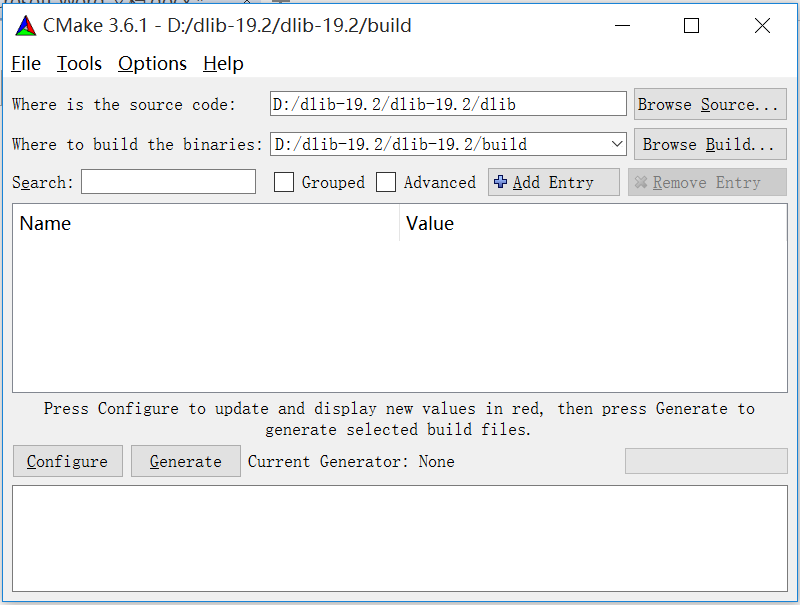
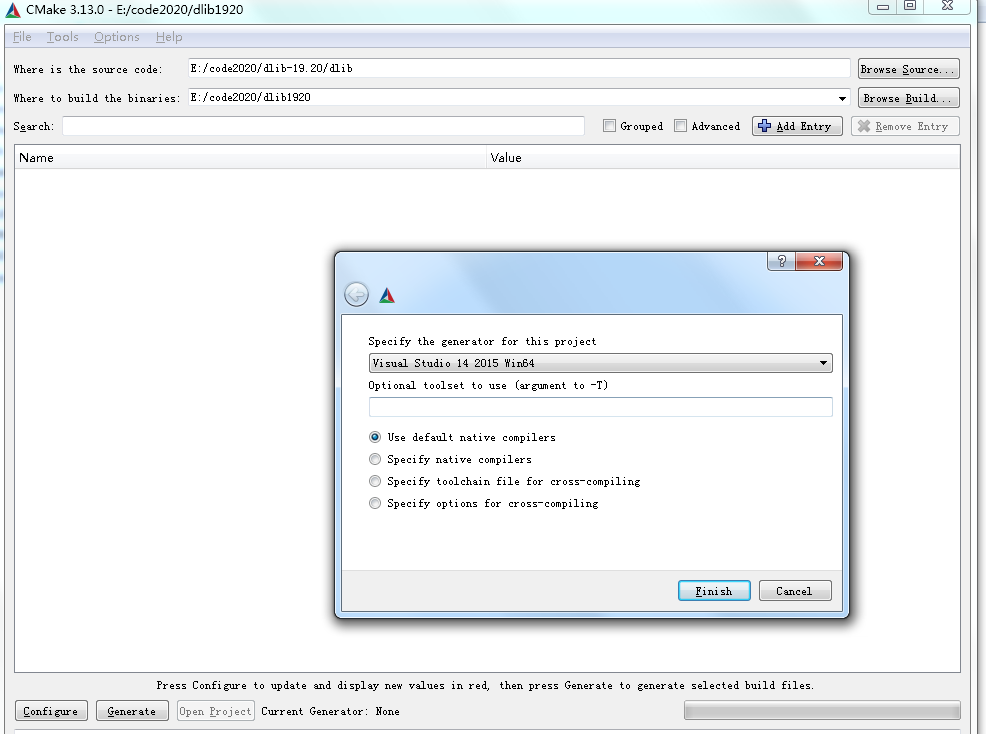
Click Generate and select the corresponding VS version. 19.2 only supports VS2015, so choose VS2015 and use the default Compliers. To
click Finish, and finally the compilation is completed
remind: It will report an error related to CUDA. Don't worry about it. I guess it's about deep learning applications. My computer doesn't have deep learning related things so I ignored this error. The final result shows that this error does not affect the use.
3. VS2015 add DLib library
After the compilation is complete, a dlib project will appear in the build. Open dlib.sln with VS2015. To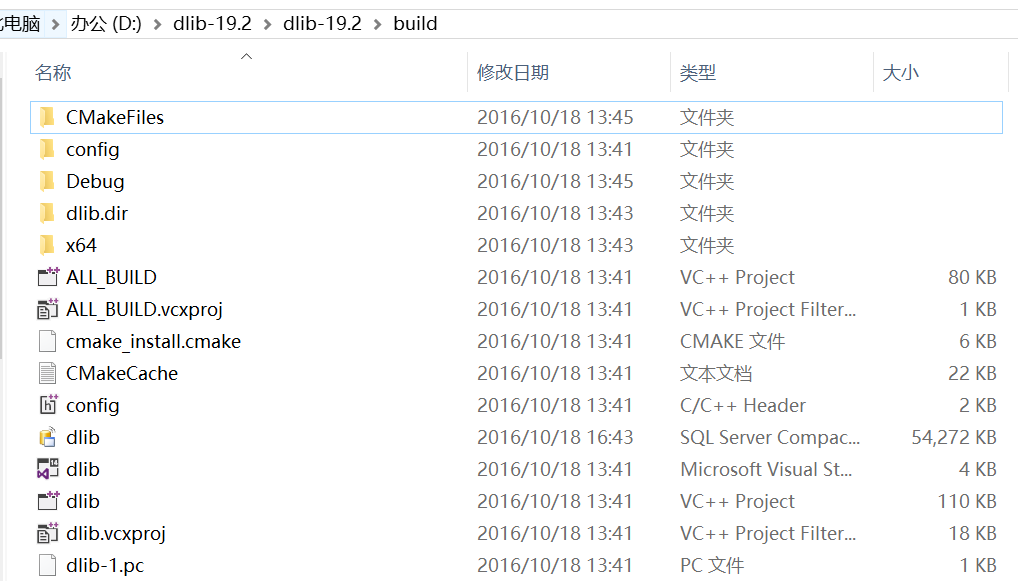
Generate the solution to get the debug folder, which contains the required dlib. To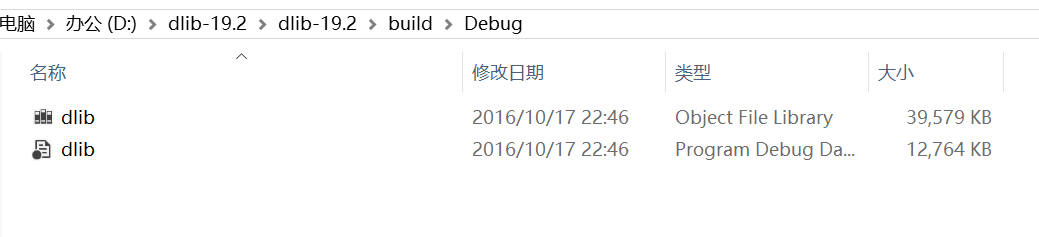
Note: Added in dlibDLIB_JPEG _SUPPORT can read images in jpg format
Project:
Then add the DLib additional library in VS2015, and create a Win32 console program at random. To ensure that all projects are valid, make global changes in the property manager. To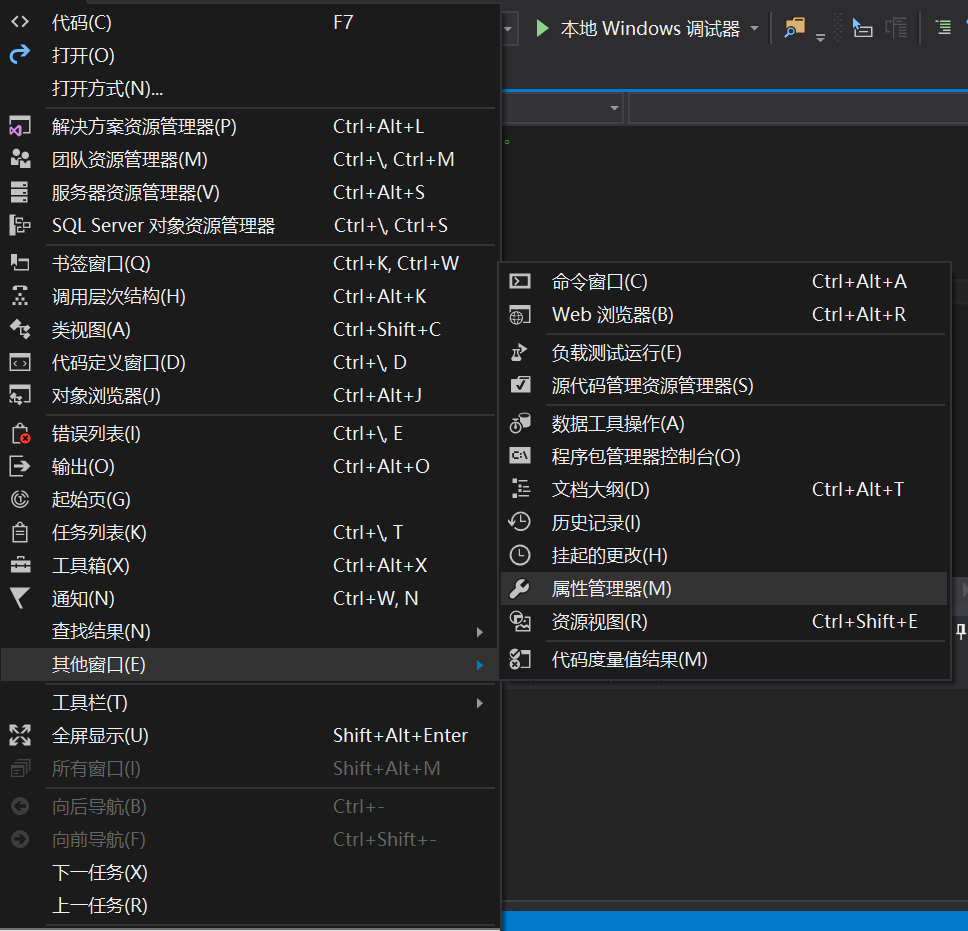
Double-click Microsoft.Cpp.x64.user to pop up the property page, add an additional include directory in the linker-general (note the path name)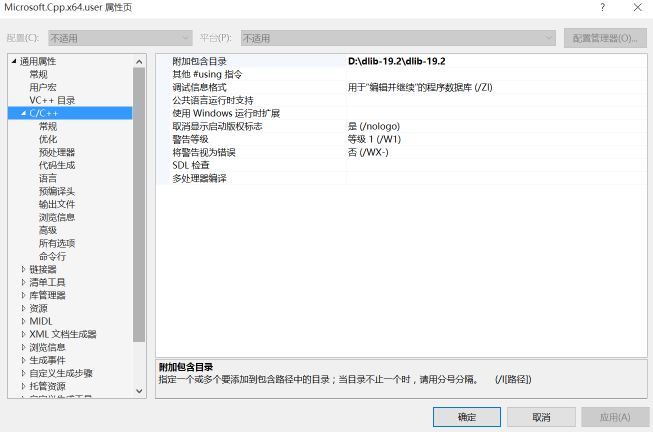
Then attach the library directory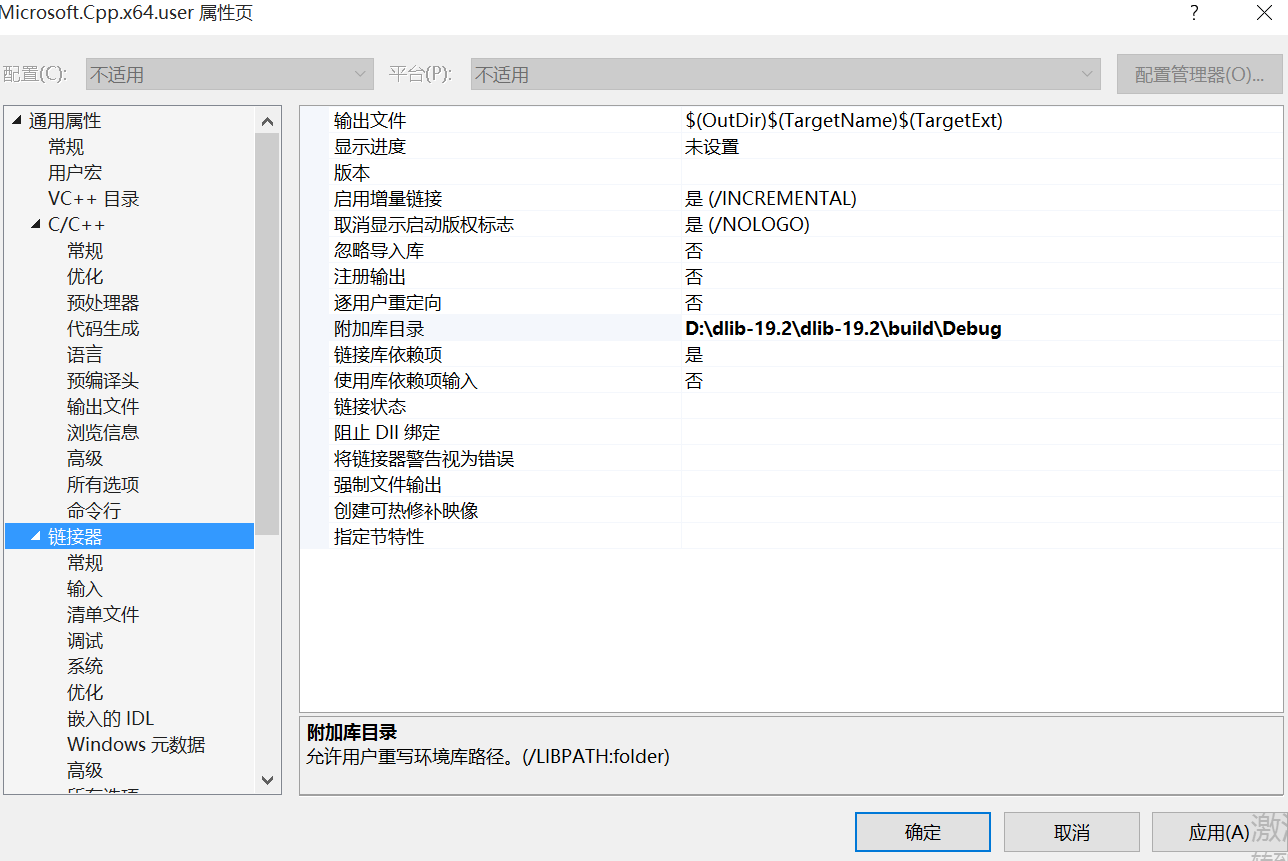
and additional dependencies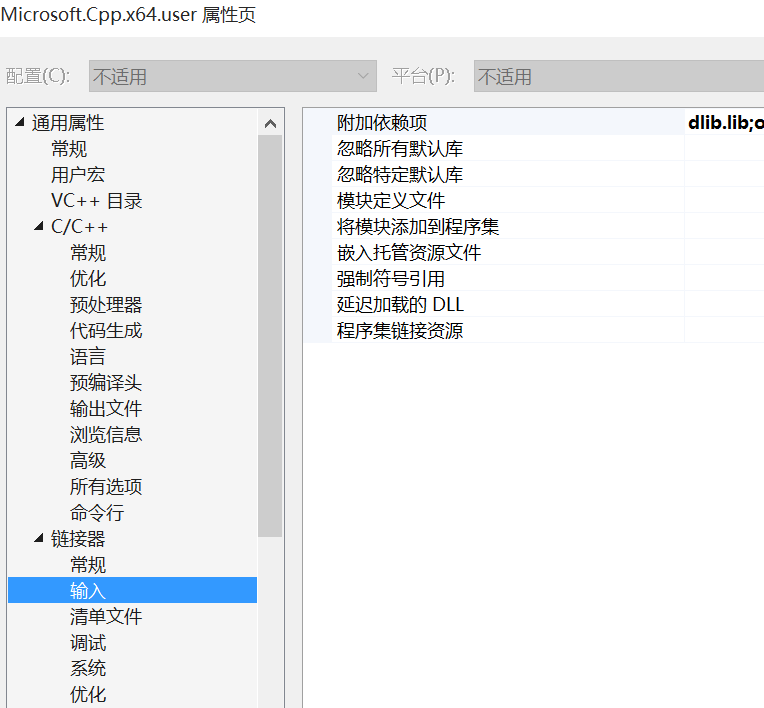
The above is the library adding process of dlib. The adding process of the above-mentioned include directory and additional library directory can also be completed in the VC++ directory.
In your own project, you also need to add #define DLIB_JPEG_SUPPORT before including the header file or add DLIB_JPEG_SUPPORT to the preprocessor of the project
4. Example test
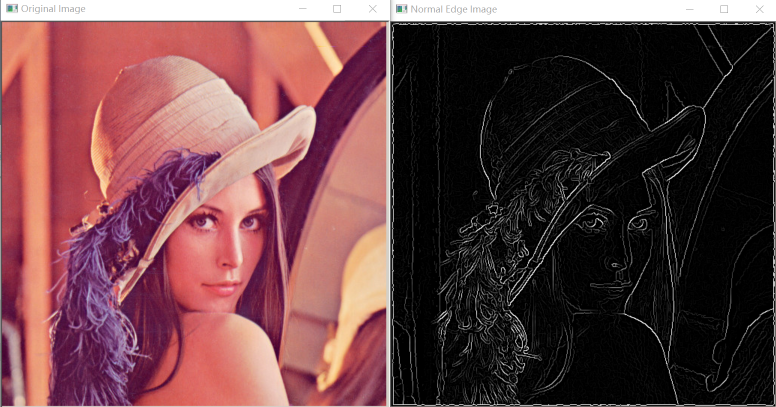
Finally, write a program to test whether it is successful. The program is a simple Canny edge detection sample program, which is the sample program in examples.
// face.cpp: defines the entry point of the console application.
//

#include "stdafx.h"
#include <dlib/gui_widgets.h>
#include <dlib/image_io.h>
#include <dlib/image_transforms.h>
#include <fstream>


using namespace std;
using namespace dlib;

//  ----------------------------------------------------------------------------

int main(int argc, char** argv)
{
    try
    {

        // Declare image
        array2d<rgb_pixel> img;

        string img_path = "lena.jpg";
        load_image(img, img_path);

        // Gaussian blur
        array2d<unsigned char> blurred_img;
        gaussian_blur(img, blurred_img);

        // sobel edge detection
        array2d<short> horz_gradient, vert_gradient;
        array2d<unsigned char> edge_image;
        sobel_edge_detector(blurred_img, horz_gradient, vert_gradient);

        //Non-maximum edge suppression
        suppress_non_maximum_edges(horz_gradient, vert_gradient, edge_image);

        // show result
        image_window my_window(edge_image, "Normal Edge Image");

        // We can also easily display the edge_image as a heatmap or using the jet color
        // scheme like so.
        image_window win_hot(heatmap(edge_image));
        image_window win_jet(jet(edge_image));

        // also make a window to display the original image
        image_window my_window2(img, "Original Image");

        // Sometimes you want to get input from the user about which pixels are important
        // for some task.  You can do this easily by trapping user clicks as shown below.
        // This loop executes every time the user double clicks on some image pixel and it
        // will terminate once the user closes the window.
        point p;
        while (my_window.get_next_double_click(p))
        {
            cout << "User double clicked on pixel:         " << p << endl;
            cout << "edge pixel value at this location is: " << (int)edge_image[p.y()][p.x()] << endl;
        }

        // wait until the user closes the windows before we let the program
        // terminate.
        win_hot.wait_until_closed();
        my_window2.wait_until_closed();


        // Finally, note that you can access the elements of an image using the normal [row][column]
        // operator like so:
        cout << horz_gradient[0][3] << endl;
        cout << "number of rows in image:    " << horz_gradient.nr() << endl;
        cout << "number of columns in image: " << horz_gradient.nc() << endl;
    }
    catch (exception& e)
    {
        cout << "exception thrown: " << e.what() << endl;
    }
}

//  ----------------------------------------------------------------------------
- 1
- 2
- 3
- 4
- 5
- 6
- 7
- 8
- 9
- 10
- 11
- 12
- 13
- 14
- 15
- 16
- 17
- 18
- 19
- 20
- 21
- 22
- 23
- 24
- 25
- 26
- 27
- 28
- 29
- 30
- 31
- 32
- 33
- 34
- 35
- 36
- 37
- 38
- 39
- 40
- 41
- 42
- 43
- 44
- 45
- 46
- 47
- 48
- 49
- 50
- 51
- 52
- 53
- 54
- 55
- 56
- 57
- 58
- 59
- 60
- 61
- 62
- 63
- 64
- 65
- 66
- 67
- 68
- 69
- 70
- 71
- 72
- 73
- 74
- 75
- 76
- 77
- 78
- 79
- 80
Intelligent Recommendation
dlib library learning
dlib library learning dlib library generation Running of examples in the dlib library Vs tips dlib library generation Download dlib from the dlib official website, decompress it, use cmake to compile ...

One of the dlib library learning
One of the dlib library learning 1 Introduction The cross-platform C++ general library Dlib is released, bringing some new features, including a probabilistic CKY parser, a tool for creating applic...
Dlib for machine learning
1) Download dlib Baidu network disk address: https://pan.baidu.com/s/1Z1a_ud__BWXgCWZeSdpL2g Extract code: lzjy 2) Download to local, my local storage location: C:\Users\lyc\Downloads\dlib-19.7.0-cp36...
DLIB library under windows VS2015 environment + cuda10 compilation test
table of Contents DLIB download cmake compilation: VS2015 compilation Engineering link DLIB: DLIB download You can go to the dlib official websitedownload link, But the official website only has the l...
vs2015 compile dlib, test
dlib vs2015 compile test document generated using cmake vs2015 compiler used successfully, static library Use demo test Error: > dlibTest.obj: error LNK2019: unresolved external symbols dgesdd_, th...
More Recommendation

VS2015+dlib environment configuration
(1) Download Dlib 1)dlib download directory, You can find the latest version (19.7.zip) to download, after downloading, unzip. PS: The decompressed file does not contain the lib file, you need to make...
Dlib installation for machine learning introduction-see dlib official documentation
Because of a random copy and paste, I found a bug for a day. The official website document is here cmake .. with instructions cmake -G “Visual Studio 15 2017 Win64” -T host=x64 .. Replace ...
"Dlib: Install Dlib Library"
table of Contents Development environment Dlib download Download and install CMake Compile Dlib source code Generate lib link library Configure Dlib Problems ...
Windows8.1 vs2015 dlib library cpu version compilation and application library is 90, caller expects 80
Recently, due to a project about face counting, I compiled and used the dlib library, which encountered many problems, please listen to me one by one. The first step: download the dlib source code fro...

Learning and implementation of face_detection_ex in DLIB library example
Source code frontal_face_detector: It is the same as object_detector, and the object of this class is a tool for detecting the position of an object in an image. In particular, it is a simple containe...