Apache's HttpClient creates an example of CloseableHttpClient
tags: apache
Apache's HttpClient can be used to send HTTP requests from the client to the server,
The steps to send GET and POST requests using Apache's HttpClient are as follows:
1. Use the helper HttpClients to create a CloseableHttpClient object.
2. Create an HttpGet or HttpPost instance based on the type of HTTP request to be sent.
3. Use the addHeader method to add request headers, such as User-Agent, Accept-Encoding and other parameters.
4. For the POST request, create a NameValuePair list and add all the form parameters. Then fill it into the HttpPost entity.
5. Obtain CloseableHttpResponse instance by executing this HttpGet or HttpPost request
6. Get the status code, error message, response page, etc. from this CloseableHttpResponse instance.
7. Finally, close the HttpClient resource.
    public String doPost(String url, String params) {
        String result = "";
        CloseableHttpClient httpclient = null;
        CloseableHttpResponse response = null;
        HttpServletRequest request = ((ServletRequestAttributes) RequestContextHolder.getRequestAttributes()).getRequest();
        HttpSession session = request.getSession();
        if (session != null) {
            httpclient = (CloseableHttpClient) session.getAttribute("httpclient");
        }
        if (httpclient == null) {
            httpclient = HttpClients.createDefault();
        }
        try {
            HttpPost httppost = new HttpPost(url);
            httppost.setHeader("accept", "*/*");
            httppost.setHeader("connection", "Keep-Alive");
            httppost.setHeader("User-Agent", "Mozilla/5.0 (Windows NT 6.3; WOW64) AppleWebKit/537.36 (KHTML, like Gecko) Chrome/39.0.2171.71 Safari/537.36");

            if (params != null && !"".equals(params)) {
                MultipartEntityBuilder reqEntity = MultipartEntityBuilder.create();
                reqEntity.setCharset(Charset.forName("utf-8"));
                String[] nameAndValue = params.split("&");
                for (String s : nameAndValue) {
                    String[] keyAndvalue = s.split("=",2);
                    //String[] keyAndvalue = s.split("=");
                    StringBody value = new StringBody("", ContentType.TEXT_PLAIN);
                    if(keyAndvalue.length == 2) {
                        value = new StringBody(keyAndvalue[1], Charset.forName("utf-8"));
                        //value = new StringBody(keyAndvalue[1],  ContentType.TEXT_PLAIN);
                    }
                    reqEntity.addPart(keyAndvalue[0], value);
                }
                HttpEntity httpEntity = reqEntity.build();
                httppost.setEntity(httpEntity);
            }
            response = httpclient.execute(httppost);
            HttpEntity resEntity = response.getEntity();
            if(resEntity != null) {
                result = EntityUtils.toString(resEntity, "utf-8");
            }
            EntityUtils.consume(resEntity);
            //if (url.endsWith("center/login") || url.endsWith("#forgetPswd") || url.endsWith("#register")) {
                session.setAttribute("httpclient", httpclient);
            //}

                //2017-08-24 Solve the problem that the request to return the member who is not logged in due to the expiration of the session
                if(StringUtils.isNotBlank(result)){
                    boolean isJson = Common.isJson(result);
                                         //Some requests are not in json format, such as hospital dynamics
                    if(isJson){
                        JSONObject js = JSONObject.fromObject(result);
                                                 //Some results did not return code
                        if(js.has("code")){
                            if(ErrorCode.LS_ILLEGAL_LOGIN.equals(js.getString("code"))){
                                log.info("[This request returns the member who is not logged in]"+js.toString());
                                                                 //Put the request information into the cache
                                RCacheEnTity rCacheEnTity = new RCacheEnTity(url,params,new Date());
                                CachePool.getInstance().putCacheItem("RC", rCacheEnTity);
                                String openId = (String) request.getSession().getAttribute("openId");
                                log.info("[Re-login openID]"+openId);
                                                                 //Re-login
                                String cxdl = doPost(WechatContext.getInstance().getServerUrl() + "center/wechatLogin", "username=" + openId);
                                                                 //Retrieve the last request information
                                CacheItem cacheItem = (CacheItem) CachePool.getInstance().getCacheItem("RC");
                                RCacheEnTity rCacheEnTity2 = (RCacheEnTity) cacheItem.getEntity();
                                log.info("[Re-requested URL]"+rCacheEnTity2.getUrl());
                                                                 //Resend the last request
                                String cxqq = doPost(rCacheEnTity2.getUrl(),rCacheEnTity2.getParams());
                                JSONObject cx = JSONObject.fromObject(cxqq);
                                                                 //After the request is successful, the last request information in the cache will be removed
                                if(ErrorCode.LS_SUCCESS.equals(cx.getString("code"))){
                                                                         //If the request is successful, remove the cache
                                    CachePool.getInstance().removeCacheItem("RC");
                                    result=cxqq;
                                }else{
                                    CachePool.getInstance().removeCacheItem("RC");
                                }
                            }
                        }
                    }
                }
        } catch (IOException e) {
            e.printStackTrace();
        } finally {
            try {
                if (response != null) {
                    response.close();
                }
                // httpclient.close();
            } catch (IOException e1) {
                e1.printStackTrace();
            }
        }

        return result;
}Intelligent Recommendation
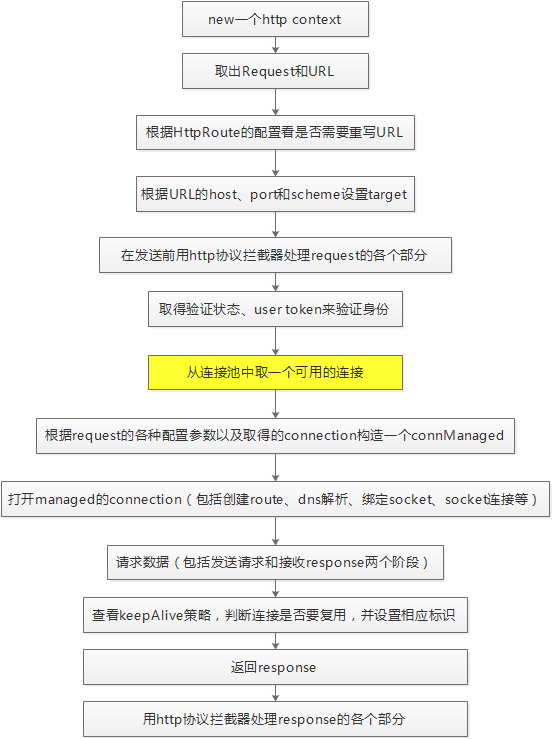
Use Apache's HttpClient to send Http requests
Use Apache's HttpClient to send Http requests 1 Basic concepts 1.1 The difference between HttpClient, TCP/IP and Socket HttpClient is an open source project in Apache. It implements all the functions ...
Example of using CloseableHttpClient to send post or get request
Example of using CloseableHttpClient to send post or get request There is a requirement in today's work schedule for me to call another system's interface to push the messages generated by our system....
HttpClient 4.5.2 version sets connection timeout - CloseableHttpClient sets Timeout
HttpClient 4.5 version sets the connection timeout - CloseableHttpClient sets Timeout (different from 4.3.2) After HttpClient is upgraded to version 4.5, there are many changes to the API. Afte...
More Recommendation
Two ways java sends http requests: HTTPClient and CloseableHttpClient
The following describes the use of HTTPClient and CloseableHTTPClient for Get and Post requests. HttpClient Using commons-httpclient.jar, maven relies on the following: The java sample code is as foll...
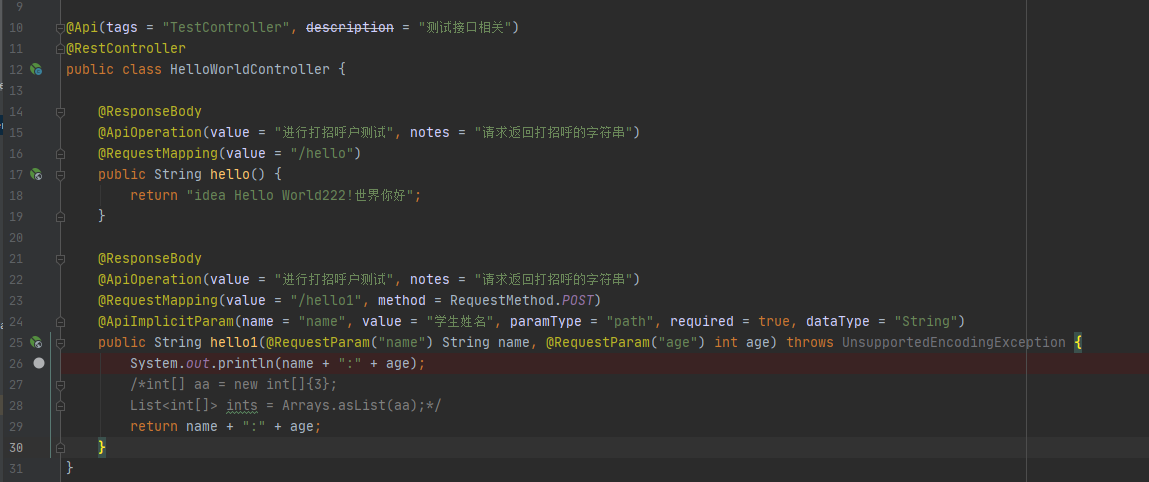
Two ways to send http requests in java: HTTPClient and CloseableHttpClient
There are three ways to send http requests in java. In addition to the native connection method HttpURLConnection, there are two other ways: HTTPClient and CloseableHttpClient The following briefly in...

Java (13) HTTPCLIENT (CloseableHttpClient) Sends GET and POST requests
1.CloseableHttpClientintroduce HttpClientYesHTTPCLIENT module in the Apache HttpComponents project。 CloseableHttpClient implements HTTPCLIENT and Closeable interfaces, where the closeable interface is...
Httpclient calls the background interface (with CloseablehttpClient sends a get/post request)
Foreword Get the data returned by the interface without a page (generally for JSON), we can simulate the HTTP request through some tools Service side analog http request Use the Java code to send the ...