Log Framework-1 Introduction to Jul and log4j and logback
background
The log framework has not been carefully sorted out, and its understanding is only at the level of basic use; on Friday, the self-testing of the small functions exposed technical loopholes 😦 It took unnecessary time, so I took the weekend to tutor and make a summary.
The topic of this article is to introduce commonly used log framework solutions in Java, including log4j+jcl and logback+slf4j, and to introduce the compatibility of log frameworks through bridging and adaptation technologies. The log framework will be split, introducing the facade layer and the impl layer and their combination relationship respectively.
1. Introduction
Logs play an important role in the life cycle of software, and logs are indispensable in all stages of development, testing and maintenance. Logs can help developer quickly track and locate problems, and can also be used for performance monitoring and later big data analysis. The function of the log framework is naturally to facilitate programmers to record logs.
1.1 Log development process

The above figure shows the development flowchart of the log framework, where log4j and jcl and log4j2 are from apache, slf4j and logback are from qos company, and jul comes from jdk; among which log4j2 is not commonly used in China, so it will not be introduced below (can be used as a substitute for log4j).
1.2 Log Framework Diagram
The log framework uses a lot of structural design patterns, including appearance, proxy, bridge, etc. jcl and slf4j are used as facades to standardize interfaces, while hiding internal implementations from the client.
jcl has different implementation solutions at the implementation layer through proxy, such as log4j or jul; while slf4j and logback were launched together by QOS, so the implementation layer of slf4j is logback by default.
Note: The following uses the facade layer to refer to jcl and slf4j, and uses the impl layer to refer to log4j and jul and logback.
The following figure shows the Java log framework diagram, which includes the facade layer and the impl layer and its combination scheme:

The solid lines in the figure represent the log solution that can be formed by combining, including:jcl+juc, jcl+log4j, slf4j+logback; The dotted line indicates that the compatibility between jul or log4j and slf4j can be achieved with the help of the corresponding dependency package.
2.facade layer
The pictures in Chapter 1.2 can be represented as shown in the following figure:

The facade layer is used to define interface specifications, so that developers can use a unified API to operate without learning the API corresponding to log4j, jul, logback and the new log framework respectively; among them: the facede layer includes jcl and slf4j, and the impl layer includes log4j, jul, logback, and 6 combination solutions can be implemented through combination, bridging, and adaptation.
2.1 jcl
jcl is a facade API launched by Apache for the java log framework. Its full name is "Jakarta Commons Logging". Because jcl belongs to Apache and the code is located under the org.apache.commons.logging package path, it can also be called "Apache Commons Logging".
pom dependencies:
<dependency>
    <groupId>commons-logging</groupId>
    <artifactId>commons-logging</artifactId>
    <version>1.2</version>
</dependency>
How to use:
// Depend on apache.commons.logging package
import org.apache.commons.logging.Log;
import org.apache.commons.logging.LogFactory;

// Get the log object, note that it is the Log type
    private static final Log LOG = LogFactory.getLog(Class name.class);

    // Print log API
        LOG.trace("String type");
        LOG.debug("test debug");
        LOG.info("test info");
        LOG.warn("test warn");
        LOG.error("test error");
        LOG.fatal("test fatal");
    }
}
jcl provides 6 log levels, from low to high: trace, debug, info, warning, error, fatal.
Note: Apache has stopped maintaining after version 1.2 (2014), so the market occupies a low amount. It should be noted that if the impl layer is not specified for jcl, jul will be used by default.
2.2 slf4j
slf4j is a facade API launched by qos for the java logging framework. Its full name is "simple logging facade for java". It is a relatively popular logging framework at present.
pom dependencies:
<dependency>
    <artifactId>slf4j-api</artifactId>
    <groupId>org.slf4j</groupId>
    <version>1.7.25</version>
</dependency>
How to use:
// Depend on org.slf4j package
import org.slf4j.Logger;
import org.slf4j.LoggerFactory;

	// Get log object, note that it is the Logger type
    private Logger LOGGER = LoggerFactory.getLogger(slf4jLogbackTest.class);

    	// Print log API
        LOGGER.trace("test trace");
        LOGGER.debug("test debug");
        LOGGER.info("test info");
        LOGGER.warn("test warn");
        LOGGER.error("test error");
slf4j provides 5 log levels, from low to high: trace, debug, info, warning, error. Compared with jcl, there is less fatal level.
Note: If the project only relies on slf4j and does not specify the impl layer, an error will be reported when starting because the StaticLoggerBinder class cannot be loaded (this class is defined in logback-classic):

3. Implementation layer
What really works in the log framework is the implementation layer, including: juc, log4j, logback.
3.1 juc
Juc is a log framework provided by jdk, so no dependencies are required;
package com.seong.test;

import org.junit.Test;
import java.util.logging.Logger;

public class JucTest {
    private static final Logger LOGGER = Logger.getLogger(JucTest.class.getName());

    @Test
    public void test() {
        LOGGER.finest("log finest");
        LOGGER.finer("log finer");
        LOGGER.fine("log fine");
        LOGGER.config("log config");
        LOGGER.info("log info");
        LOGGER.warning("log warning");
        LOGGER.severe("log severe");
    }
}
The results are as follows:

Log hierarchical printing strategy makes logs below the info level not printed (can be${JAVA_HOME}/jre/lib/logging.properties); In addition, since jul is printed with System.err, the red font is displayed.
3.2 log4j
Introducing log4j dependency package:
<dependency>
     <groupId>log4j</groupId>
     <artifactId>log4j</artifactId>
     <version>1.2.17</version>
 </dependency>
Among them: Version 1.2.17 is the latest version, and maintenance has been stopped after 2012.
Add configuration file log4j.xml:
<?xml version="1.0" encoding="UTF-8"?>
<!DOCTYPE log4j:configuration SYSTEM "log4j.dtd">

<log4j:configuration>
    <appender name="log4jConsole" class="org.apache.log4j.ConsoleAppender">
    	...
    </appender>

    ...

    <root>
        <priority value ="info"/>
        <appender-ref ref="log4jConsole"/>
        ...
    </root>
</log4j:configuration>
When log4j.xml is not configured, an error will be reported when printing the log:

Java code:
package com.seong;

import org.apache.log4j.Logger;
import org.junit.Test;

public class Log4jSingleTest {
    Logger LOGGER = Logger.getLogger(Log4jSingleTest.class);
    @Test
    public void test() {
        LOGGER.trace("test trace");
        LOGGER.debug("test debug");
        LOGGER.info("test info");
        LOGGER.warn("test warn");
        LOGGER.error("test error");
        LOGGER.fatal("test fatal");
    }
}
Note: Log4j is used separately here, and the Logger used is the class in the org.apache.log4j package.
3.3 logback
Logback includes the following 3 parts:
[1] logback-core (basic core, applied by other modules)
[2] logback-classic (completely implements SLF4J API interface)
[3] logback-access (provides the function of accessing logs through Http)
This chapter uses the logging capabilities provided by logback, but does not require the ability to access logs by http, so logback-acess dependencies are not involved;
Introducing dependency packages:
<dependency>
	<artifactId>logback-classic</artifactId>
	<groupId>ch.qos.logback</groupId>
	<version>1.2.3</version>
</dependency>
Introduced hereogback-classicDependencies also includeogback-coreandslf4j-api:

It can be seen that slf4j has been relied on in the logback package, that is, logback is set to be combined with slf4j by default.
4. Combination plan
4.1 log4j and jcl
Introducing dependency packages:
 <dependency>
     <groupId>log4j</groupId>
     <artifactId>log4j</artifactId>
     <version>1.2.17</version>
 </dependency>

 <dependency>
     <groupId>commons-logging</groupId>
     <artifactId>commons-logging</artifactId>
     <version>1.2</version>
 </dependency>
Configuration file:
<?xml version="1.0" encoding="UTF-8"?>
<!DOCTYPE log4j:configuration SYSTEM "log4j.dtd">

<log4j:configuration>
    <appender name="log4jConsole" class="org.apache.log4j.ConsoleAppender">
        <layout class="org.apache.log4j.PatternLayout">
            <param name="ConversionPattern" value="[%d{dd HH:mm:ss,SSS\} %-5p] [%t] %c{2\} - %m%n" />
        </layout>

        <filter class="org.apache.log4j.varia.LevelRangeFilter">
            <param name="levelMin" value="debug" />
            <param name="levelMax" value="warn" />
            <param name="AcceptOnMatch" value="true" />
        </filter>
    </appender>

    <appender name="log4jFile" class="org.apache.log4j.RollingFileAppender">
        <param name="File" value="/Users/seong/Documents/work/code/blog/logdemo/log/temp/log4jFile.log" />
        <!-- Set whether to add new logs to the original log when restarting the service -->
        <param name="Append" value="true" />
        <param name="MaxBackupIndex" value="10" />
        <layout class="org.apache.log4j.PatternLayout">
            <param name="ConversionPattern" value="[%d{dd HH:mm:ss,SSS\} %-5p] [%t] %c{2\} - %m%n" />
        </layout>
    </appender>

    <appender name="log4jDaily" class="org.apache.log4j.DailyRollingFileAppender">
        <param name="File" value="/Users/seong/Documents/work/code/blog/logdemo/log/temp/log4jDaily.log" />
        <param name="DatePattern" value="'.'yyyy-MM-dd'.log'" />
        <layout class="org.apache.log4j.PatternLayout">
            <param name="ConversionPattern"
                   value="[%d{MMdd HH:mm:ss SSS\} %-5p] [%t] %c{3\} - %m%n" />
        </layout>
    </appender>

    <root>
        <priority value ="info"/>
        <appender-ref ref="log4jConsole"/>
        <appender-ref ref="log4jFile"/>
        <appender-ref ref="log4jDaily"/>
    </root>
</log4j:configuration>
Java code:
package com.seong;

import org.apache.commons.logging.Log;
import org.apache.commons.logging.LogFactory;
import org.junit.Test;

public class JucLog4jTest {
    Log log = LogFactory.getLog(JucLog4jTest.class);
    @Test
    public void test() {
        log.trace("test trace");
        log.debug("test debug");
        log.info("test info");
        log.warn("test warn");
        log.error("test error");
        log.fatal("test fatal");
    }
}
4.2 logback and slf4j
Introducing dependency packages:
<dependency>
    <groupId>ch.qos.logback</groupId>
    <artifactId>logback-classic</artifactId>
    <version>1.2.3</version>
</dependency>
Add logback.xml configuration file:
<?xml version="1.0" encoding="UTF-8"?>
<configuration scanPeriod="2 seconds" debug="true">
    <!--Define the storage address of the log file. Do not use relative paths in the configuration of LogBack -->
    <property name="LOG_HOME" value="/Users/seong/Documents/work/code/blog/logdemo/log/temp" />
    <!-- Console output -->
    <appender name="STDOUT" class="ch.qos.logback.core.ConsoleAppender">
        <encoder>
            <pattern>%d{yyyy-MM-dd HH:mm:ss.SSS} [%thread] %-5level %logger{50} - %msg%n</pattern>
            <charset>UTF-8</charset>
        </encoder>
    </appender>

    <appender name="logbackFile" class="ch.qos.logback.core.FileAppender">
        <file>${LOG_HOME}/logbackFile.log</file>
        <encoder>
            <pattern>%d{yyyy-MM-dd HH:mm:ss.SSS} [%thread] %-5level %logger{50} - %msg%n</pattern>
            <charset>UTF-8</charset>
        </encoder>
    </appender>

    <appender name="logbackRollFile" class="ch.qos.logback.core.rolling.RollingFileAppender">
        <file>${LOG_HOME}/logbackRollFile.log</file>

        <encoder>
            <pattern>%d{yyyy-MM-dd HH:mm:ss.SSS} [%thread] %-5level %logger{50} - %msg%n</pattern>
            <charset>UTF-8</charset>
        </encoder>

        <rollingPolicy class="ch.qos.logback.core.rolling.TimeBasedRollingPolicy">
            <FileNamePattern>${LOG_HOME}/logbackRollFile-%d{yyyy-MM-dd}.%i.log</FileNamePattern>

            <timeBasedFileNamingAndTriggeringPolicy class="ch.qos.logback.core.rolling.SizeAndTimeBasedFNATP">
                <maxFileSize>1kb</maxFileSize>
            </timeBasedFileNamingAndTriggeringPolicy>

            <MaxHistory>30</MaxHistory>
        </rollingPolicy>

    </appender>


    <logger name="com.seong.test.LogbackTest" level="warn" />

    <!-- Log output level -->
    <root level="DEBUG">
        <appender-ref ref="STDOUT" />
        <appender-ref ref="logbackRollFile" />
        <appender-ref ref="logbackFile" />
    </root>

</configuration>
Note: When there is no configuration file, use the logback default log style.
Java code:
package com.seong;

import org.junit.Test;
import org.slf4j.Logger;
import org.slf4j.LoggerFactory;

public class slf4jLogbackTest {
    private Logger LOGGER = LoggerFactory.getLogger(slf4jLogbackTest.class);

    @Test
    public void test() {
        LOGGER.trace("test trace");
        LOGGER.debug("test debug");
        LOGGER.info("test info");
        LOGGER.warn("test warn");
        LOGGER.error("test error");
    }
}
5. Adaptation mode
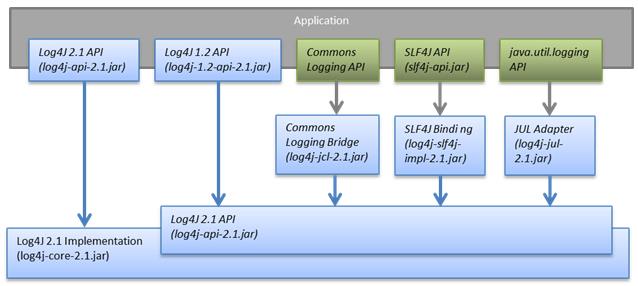
In addition to being a logback facade, slf4j can also be used as a facade of jcl, jul, log4j; at this time, it needs to be implemented with the help of adapter packages, as shown in the figure below:
 The following is
slf4j+log4jLet’s introduce it as an example.
pom dependencies:
<dependency>
    <groupId>org.slf4j</groupId>
    <artifactId>slf4j-log4j12</artifactId>
    <version>1.7.25</version>
</dependency>
slf4j-log4j12Includedlog4j andslf4j-api, so no need to introduce other dependencies, as shown in the figure below:

At this time, after configuring log4j according to the configuration file in Chapter 4, the client can use the slf4j API to record logs.
6. Bridge mode
When the dependent third-party jar package uses different log frameworks, compatibility needs to be achieved through bridge, otherwise two sets of configurations need to be maintained independently; the implementation of bridge requires the help of corresponding dependencies, as shown in the figure below:

Case introduction:
Projects use mainstreamslf4j+logbackAs a log framework, it relies on a third-party jar package that uses log4j as the log framework.
In order to ensure the normal operation of the program, the project needs to maintain two sets of log specifications, that is, maintain a configuration file for logback and log4j each. Based on the perspective of reducing duplicate work and improving the maintainability of the project, we hope that logback and log4j share a configuration file, which will bridge the log printing task of log4j to logback.
Third-party maven coordinates:
<groupId>org.example</groupId>
<artifactId>jcl-log4j</artifactId>
<version>1.0-SNAPSHOT</version>
Pom dependencies for third-party jar packages:
 <dependency>
     <groupId>log4j</groupId>
     <artifactId>log4j</artifactId>
     <version>1.2.17</version>
 </dependency>

 <dependency>
     <groupId>commons-logging</groupId>
     <artifactId>commons-logging</artifactId>
     <version>1.2</version>
 </dependency>
Project citation third parties:
 <dependency>
     <groupId>org.example</groupId>
     <artifactId>jcl-log4j</artifactId>
     <version>1.2</version>
    <exclusions>
           <exclusion>
               <artifactId>log4j</artifactId>
               <groupId>log4j</groupId>
           </exclusion>
       </exclusions>
 </dependency>
analyze:
log4j-over-slf4jDependencies are defined inlog4j-log4jExactly the same package, class, and method are used to replace log4j and forward log printing requests from the facade to logback to bridge; therefore, log4j dependencies in third-party packages need to be excluded when using it.
Intelligent Recommendation
Log framework in Java development: slf4j, log4j, logback
SLF4J does not provide a specific implementation, it can be understood as an interface-level framework, and the underlying framework should be implemented with log4j or logback. Use log4j: Add maven d...
Log framework: basic use of slf4j, log4j and logback
Slf4j is the standard of the log framework, that is, the general interface, which implements some common apis of the log framework, and log4j and logback are several of the many log frameworks. Log4j ...

Jul Log Framework
1, JUL introduction JUL is a full name Java Util Logging, located in the java.util.logging.logger package. It is a Java native log framework. There is no need to reference third-party libraries when u...
The log framework in Java jul
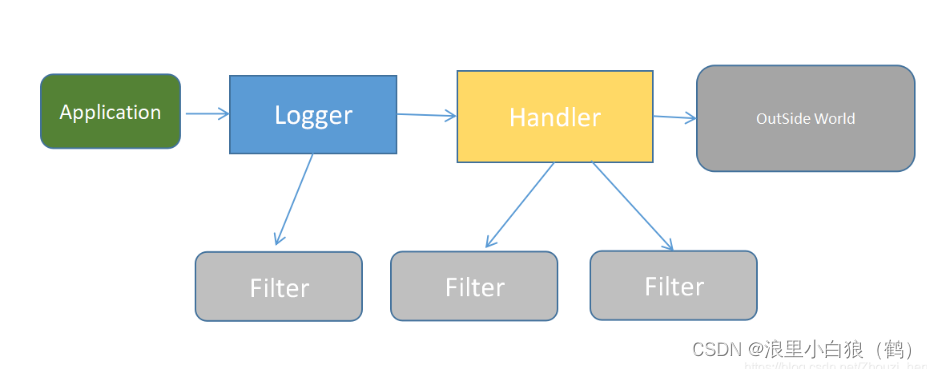
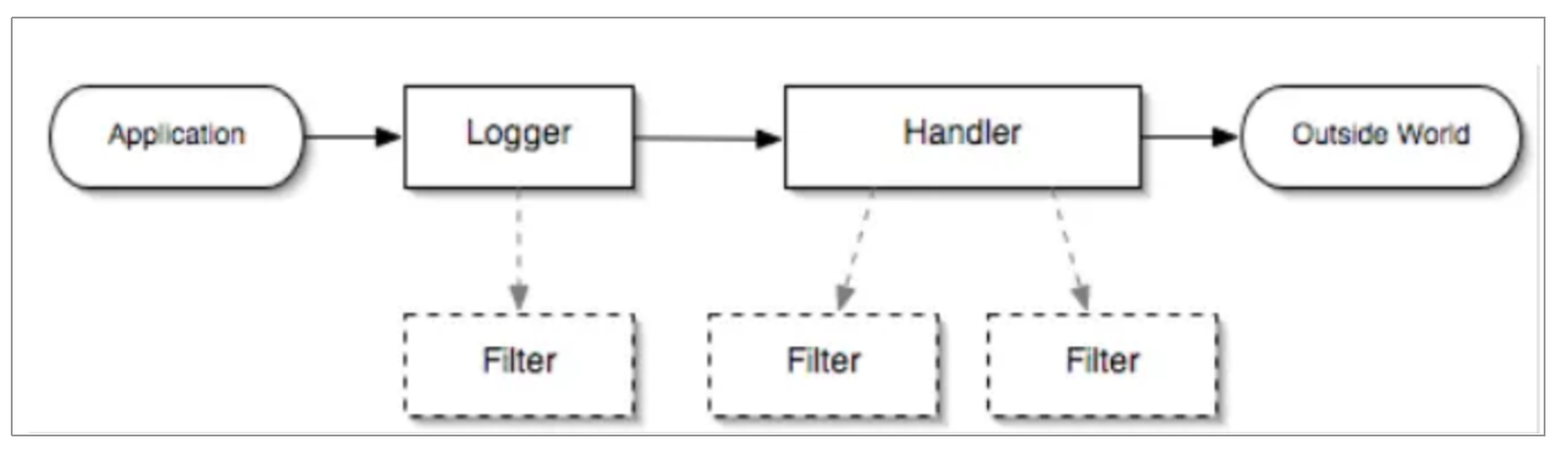
Jul (JDK comes) Suitable for small Java projects, no third -party library is required. 1. JUL's architecture is as follows LOGGERS: It is called a recorder. The application calls its API to publish lo...
JDK-Logging, Log4j, Logback log introduction and principle
2019 Unicorn Enterprise Heavy Glour Recruitment Python Engineer Standard >>> ## 0 Series Catalog ## 2 log interface frames, 4 logs implementation framework JDK-Logging, Log4j, Logback log int...
More Recommendation
JUL log level introduction
Log level Log level defined in jul * The log level is defined in java.util.logging.Level: SEVERE (highest value) WARNING INFO (default level) &n...
Java commonly used logs log facility and implementation of SLF4J, JBoss-Logging, JCL, Log4j, logback, log4j2, jul, SpringBoot integrated log4j, log4j2
Java commonly used logs logon SLF4J, JBoss-logging, JCL, log4j, and implementation 1. Java commonly used log framework 1. Log facade (log interface) 2. Realization of the facade of the log 2. SpringBo...
Use of Log4j, Log4j 2, JUL, JCL, SFL4J, Logback and Lombok
Log4J Log4j = Log for Java. Log4j is an open source project of Apache. By using Log4j, we can control the destination of log information delivery to console, file, database, etc. We can also control e...
Comparison of Log4j, Log4j 2, Logback, SFL4J, JUL, JCL
Log4j Log4j = Log for Java. author: Ceki Gülcü license: Apache License V2.0 Log4j is an open source project of Apache. By usi...
Java log (1): JUL
JUL Java logging framework Problems that the logging framework needs to solve: Existing log framework Log facade Log implementation Introduction to JUL JUL use Principles of Log Framework JUL configur...