How to generate executable files in C++
tags: Basic knowledge C++ elf linux
Recently, I found that most of the courses I learned before have almost forgotten, so I picked up the more important review and made a note.
1 How to generate executable files in C++
1.1 The four stages of compilation
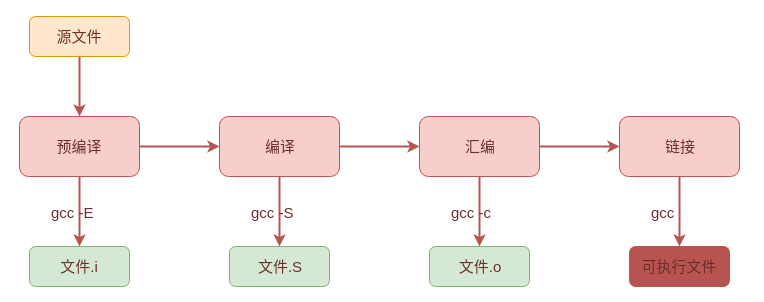
C++ goes through four processes from the source file to the final executable file as shown in the figure above: pre-compilation, compilation, assembly, and linking. The tools involved in the four stages are: preprocessor, compiler, assembler, and linker.
1.1.1 Pre-compilation
The pre-processor is used in the pre-compilation stage.
The main tasks completed are:
- Expand all macro definitions;
- Handle all conditional precompilation, such as
#if,#ifdef,#ifndef,#endif; - deal with
#includeIf the header file contains the problem, copy the included file and insert it into the corresponding position. This process can be performed recursively; - Delete all notes;
- Add line number and file mark to display debugging information;
- Keep
#pragmaCompiler instructions.
1.1.2 Compile
The compiler is used in the compilation phase.
The main tasks completed are:
- lexical analysis;
- Parsing;
- Semantic Analysis;
- Generate intermediate code;
- Code optimization.
1.1.3 Assembly
Assembler is used in the assembly stage.
The main tasks completed are:
- Compile the intermediate code into machine code, but it is not yet possible to perform operations such as address mapping that has not been performed;
- Generate symbol table;
- Generate various segments, such as data segments, code segments, etc.
1.1.4 Link
The linker is used in the link phase.
The main tasks completed are:
- Combine each segment, adjust the size and starting position of the segment;
- Symbol resolution
- Allocate address and space, find the virtual memory address corresponding to the symbol;
- Symbol relocation.
1.2 Demo
The following demo will use the following filesadd.hpp,add.cpp,main.cpp, The contents of the three files are listed below:
➜  workshop tree
.
├── add.cpp
├── add.hpp
└── main.cpp

0 directories, 3 files
//add.hpp
#pragma once
#ifndef __ADD_H__
#define __ADD_H__

#define ADD_NO(a, b) ((a) + (b))
#define CONST_VALUE 10

int add(int rst, int snd);

#endif
//add.cpp
#include "add.hpp"

int add(int rst, int snd)
{
    return rst + snd;
}
//main.cpp
#include <iostream>
#include "add.hpp"

using std::cout;
using std::endl;
//main file
int main()
{
    const int value = 20;
    int arr[CONST_VALUE];

    cout << "Macro definition add:" << ADD_NO(1, 2) << endl;
    cout << "hello generator!" << endl;
    cout << "1 + 2 == " << add(1, 2) << endl;
    int ret = add(value, ADD_NO(value, value));
    cout << "add const:" << ret << endl;
    return 0;
}
1.2.1 Pre-compilation
gcc -E main.cpp -o main.i
gcc -E add.cpp -o add.i
Can be generated by the above commandmain.i,add.iThe precompiled file is roughly as follows:
add.i:
# 1 "add.cpp"
# 1 "<built-in>"
# 1 "<command-line>"
# 1 "/usr/include/stdc-predef.h" 1 3 4
# 1 "<command-line>" 2
# 1 "add.cpp"
# 1 "add.hpp" 1


int add(int rst, int snd);
# 2 "add.cpp" 2

int add(int rst, int snd)
{
    return rst + snd;
}
main.i, Because the content of iostream is too much, it is omitted. From the following, you can see that the macro definitions have been expanded, the conditional precompilation has been replaced, and the comments have been deleted:
//A lot of iostream content is omitted here
# 2 "main.cpp" 2
# 1 "add.hpp" 1


# 8 "add.hpp"
int add(int rst, int snd);
# 3 "main.cpp" 2

using std::cout;
using std::endl;

int main()
{
    const int value = 20;
    int arr[10];

    cout << "Macro definition add:" << ((1) + (2)) << endl;
    cout << "hello generator!" << endl;
    cout << "1 + 2 == " << add(1, 2) << endl;
    int ret = add(value, ((value) + (value)));
    cout << "add const:" << ret << endl;
    return 0;
}
1.2.2 Compile
gcc -S main.cpp -o main.s
gcc -S add.cpp -o add.s
The assembly file obtained by the above command is only posted belowadd.sAnd partmain.s:
	.file	"add.cpp"
	.text
	.globl	_Z3addii
	.type	_Z3addii, @function
_Z3addii:
.LFB0:
	.cfi_startproc
	pushq	%rbp
	.cfi_def_cfa_offset 16
	.cfi_offset 6, -16
	movq	%rsp, %rbp
	.cfi_def_cfa_register 6
	movl	%edi, -4(%rbp)
	movl	%esi, -8(%rbp)
	movl	-4(%rbp), %edx
	movl	-8(%rbp), %eax
	addl	%edx, %eax
	popq	%rbp
	.cfi_def_cfa 7, 8
	ret
	.cfi_endproc
.LFE0:
	.size	_Z3addii, .-_Z3addii
	.ident	"GCC: (Ubuntu 5.4.0-6ubuntu1~16.04.12) 5.4.0 20160609"
	.section	.note.GNU-stack,"",@progbits
From the content of the excerpt, we can see that the constant strings are all placed in the constant area,constModified values are replaced with immediate numbers, such asmovl $20, -72(%rbp), Function calls are replaced with function symbols, such ascall _Z3addii, which isint add(int,int), At this time and in the following compiled code, there is no accurate function address, and link loading is required.
	.file	"main.cpp"
	.local	_ZStL8__ioinit
	.comm	_ZStL8__ioinit,1,1
	.section	.rodata
.LC0:
	.string	"\345\256\217\345\256\232\344\271\211add:"
.LC1:
	.string	"hello generator!"
.LC2:
	.string	"1 + 2 == "
.LC3:
	.string	"add const:"
	.text
	.globl	main
	.type	main, @function
main:
.LFB1021:
	.cfi_startproc
	pushq	%rbp
	.cfi_def_cfa_offset 16
	.cfi_offset 6, -16
	movq	%rsp, %rbp
	.cfi_def_cfa_register 6
	pushq	%rbx
	subq	$72, %rsp
	.cfi_offset 3, -24
	movq	%fs:40, %rax
	movq	%rax, -24(%rbp)
	xorl	%eax, %eax
	movl	$20, -72(%rbp)
	!...
	movl	$40, %esi
	movl	$20, %edi
	call	_Z3addii
	movl	%eax, -68(%rbp)
	movl	$.LC3, %esi
	movl	$_ZSt4cout, %edi
	call	_ZStlsISt11char_traitsIcEERSt13basic_ostreamIcT_ES5_PKc
    !...
1.2.3 Assembly
gcc -c main.cpp -o main.o
gcc -c add.cpp -o add.o
The machine code will be generated through the above command, but some data such as function addresses are not linked, just a symbol, so it cannot be executed. The following ismain.oPart of the content, you can see the string constants and function symbolsaddiiIt still exists, not the exact function address.
ELF>
@@
UH��SH��HdH�%(H�E�1��E�����H����H�������H�������þ����H����H����(���E����H�‹E���H����H����H�M�dH3
%(t�H��H[]�UH��H���}��u��}�u'�}���u
���������UH���������]�Macro definition add:hello generator!1 + 2 == add const:GCC: (Ubuntu 5.4.0-6ubuntu1~16.04.12) 5.4.0 20160609zRx
�
�A�C
E��
@>A�C
y
`A�C
P
��
�>I7
X�]g�����'4Lmain.cpp_ZStL8__ioinit_Z41__static_initialization_and_destruction_0ii_GLOBAL__sub_I_main_ZSt4cout_ZStlsISt11char_traitsIcEERSt13basic_ostreamIcT_ES5_PKc_ZNSolsEi_ZSt4endlIcSt11char_traitsIcEERSt13basic_ostreamIT_T0_ES6__ZNSolsEPFRSoS_E_Z3addii__stack_chk_fail_ZNSt8ios_base4InitC1Ev__dso_handle_ZNSt8ios_base4InitD1Ev__cxa_atexit
1.2.4 Link
g++ -o main main.cpp add.cpp
Use the above command to compile and link to generate the final executable file.
2 C++ executable file structure
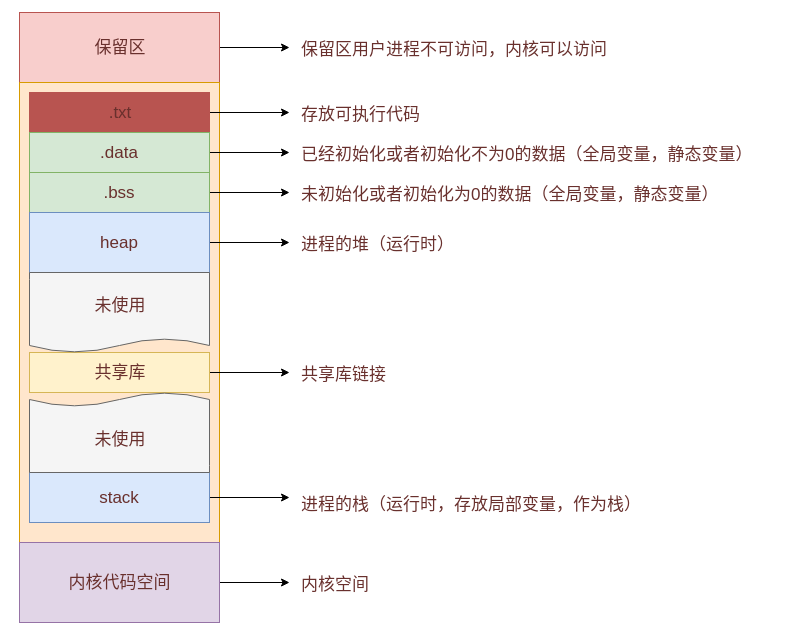
Due to the existence of virtual memory space, when the executable file is loaded to generate a process, the process itself sees only a logical virtual memory space, that is, only the kernel and its own exist. The general structure of the program state to the memory is shown in the figure above, which is mainly divided into: reserved area, process space, and kernel space.
The process space contains:
txtSegment: store executable code and some read-only string constants;dataSegment: store data that has been initialized or initialized to a value other than 0, namely global variables and static variables;bssSegment: store data that has not been initialized or initialized to 0, that is, global variables and static variables;heap: Heap, the memory space automatically applied by the user (runtime concept);Shared library: The shared library space of the process;stack: Stack space, used to store local variables and call functions as stacks (runtime concept);
By the way, the const in C++ is different from the const in the C language. From the above, you can see that the const in C++ is replaced with an immediate value at the compilation stage, so the const for user operations is still on the stack as a local variable. . However, since the replacement is done during the compile time, no matter how the user modifies the value later, it will not actually produce any effect. (Modified by pointer forced conversion).
mainExecutable file segment:
Share 31  Section header, offset from 0x1cf0  Start:

 Section header:
  [number]  Name Type Address Offset
               Size overall size flag link information alignment
  [ 0]                   NULL             0000000000000000  00000000
       0000000000000000  0000000000000000           0     0     0
  [ 1] .interp           PROGBITS         0000000000400238  00000238
       000000000000001c  0000000000000000   A       0     0     1
  [ 2] .note.ABI-tag     NOTE             0000000000400254  00000254
       0000000000000020  0000000000000000   A       0     0     4
  [ 3] .note.gnu.build-i NOTE             0000000000400274  00000274
       0000000000000024  0000000000000000   A       0     0     4
  [ 4] .gnu.hash         GNU_HASH         0000000000400298  00000298
       0000000000000030  0000000000000000   A       5     0     8
  [ 5] .dynsym           DYNSYM           00000000004002c8  000002c8
       0000000000000168  0000000000000018   A       6     1     8
  [ 6] .dynstr           STRTAB           0000000000400430  00000430
       000000000000018d  0000000000000000   A       0     0     1
  [ 7] .gnu.version      VERSYM           00000000004005be  000005be
       000000000000001e  0000000000000002   A       5     0     2
  [ 8] .gnu.version_r    VERNEED          00000000004005e0  000005e0
       0000000000000050  0000000000000000   A       6     2     8
  [ 9] .rela.dyn         RELA             0000000000400630  00000630
       0000000000000030  0000000000000018   A       5     0     8
  [10] .rela.plt         RELA             0000000000400660  00000660
       00000000000000d8  0000000000000018  AI       5    24     8
  [11] .init             PROGBITS         0000000000400738  00000738
       000000000000001a  0000000000000000  AX       0     0     4
  [12] .plt              PROGBITS         0000000000400760  00000760
       00000000000000a0  0000000000000010  AX       0     0     16
  [13] .plt.got          PROGBITS         0000000000400800  00000800
       0000000000000008  0000000000000000  AX       0     0     8
  [14] .text             PROGBITS         0000000000400810  00000810
       00000000000002d2  0000000000000000  AX       0     0     16
  [15] .fini             PROGBITS         0000000000400ae4  00000ae4
       0000000000000009  0000000000000000  AX       0     0     4
  [16] .rodata           PROGBITS         0000000000400af0  00000af0
       0000000000000038  0000000000000000   A       0     0     4
  [17] .eh_frame_hdr     PROGBITS         0000000000400b28  00000b28
       000000000000004c  0000000000000000   A       0     0     4
  [18] .eh_frame         PROGBITS         0000000000400b78  00000b78
       000000000000015c  0000000000000000   A       0     0     8
  [19] .init_array       INIT_ARRAY       0000000000600df8  00000df8
       0000000000000010  0000000000000000  WA       0     0     8
  [20] .fini_array       FINI_ARRAY       0000000000600e08  00000e08
       0000000000000008  0000000000000000  WA       0     0     8
  [21] .jcr              PROGBITS         0000000000600e10  00000e10
       0000000000000008  0000000000000000  WA       0     0     8
  [22] .dynamic          DYNAMIC          0000000000600e18  00000e18
       00000000000001e0  0000000000000010  WA       6     0     8
  [23] .got              PROGBITS         0000000000600ff8  00000ff8
       0000000000000008  0000000000000008  WA       0     0     8
  [24] .got.plt          PROGBITS         0000000000601000  00001000
       0000000000000060  0000000000000008  WA       0     0     8
  [25] .data             PROGBITS         0000000000601060  00001060
       0000000000000010  0000000000000000  WA       0     0     8
  [26] .bss              NOBITS           0000000000601080  00001070
       0000000000000118  0000000000000000  WA       0     0     32
  [27] .comment          PROGBITS         0000000000000000  00001070
       0000000000000035  0000000000000001  MS       0     0     1
  [28] .shstrtab         STRTAB           0000000000000000  00001be3
       000000000000010c  0000000000000000           0     0     1
  [29] .symtab           SYMTAB           0000000000000000  000010a8
       0000000000000780  0000000000000018          30    51     8
  [30] .strtab           STRTAB           0000000000000000  00001828
       00000000000003bb  0000000000000000           0     0     1
Key to Flags:
  W (write), A (alloc), X (execute), M (merge), S (strings), l (large)
  I (info), L (link order), G (group), T (TLS), E (exclude), x (unknown)
  O (extra OS processing required) o (OS specific), p (processor specific)
   text	   data	    bss	    dec	    hex	filename
   2680	    632	    280	   3592	    e08	main
3 Reference
- gcc-preprocessing (precompilation), compilation, assembly, linking
- To figure out where the constant is stored
- Linux: preprocessing, compilation, assembly, linking
- How to view ELF files
- The virtual address space of Linux executable files and processes
Intelligent Recommendation
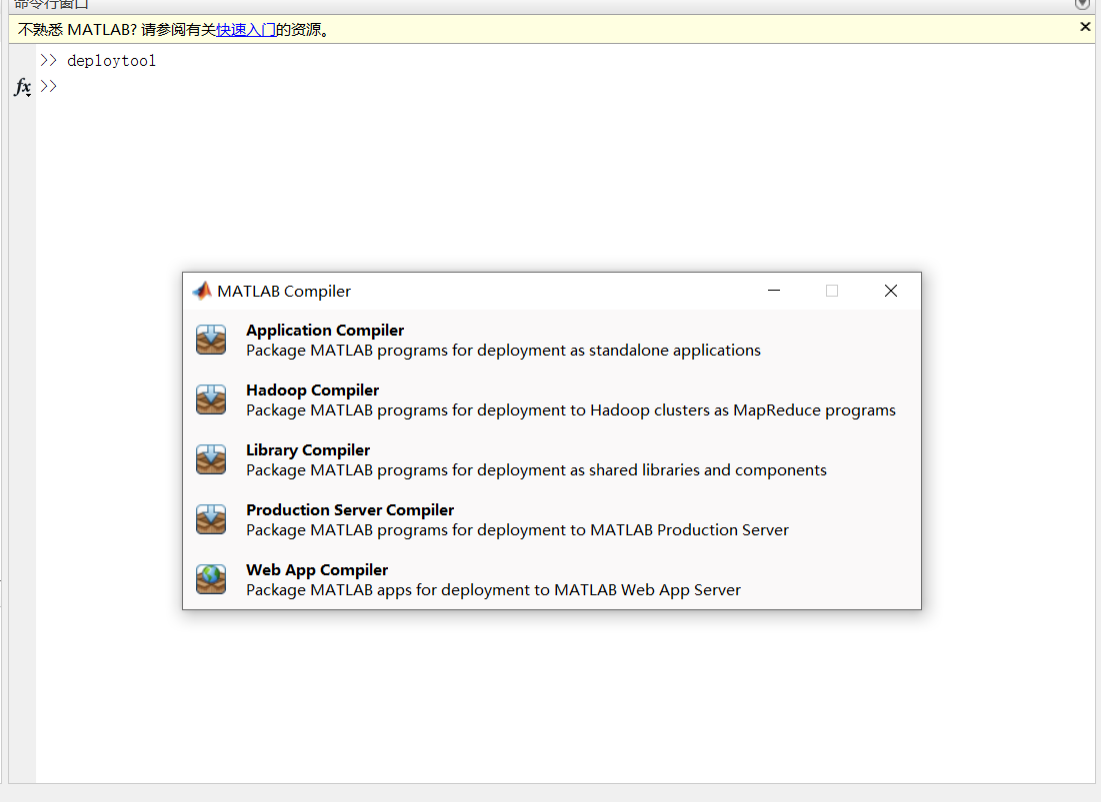
How to generate executable files with exe suffixes in MATLAB GUI
This article records the process of using matlab's gui code to generate exe suffixed executable files for self-study and provide references. 1. Enter in the command line window of matlabdeploytool, pr...
Makefile implements multiple c files to generate an executable file
Makefile code backup ...

Android C_Demo-Use NDK to compile C code and generate executable files
With a flick of a finger, I have been working for two or three years. During this period, I always wanted to use blogs to record the problems or things I learned in my work. The result has always been...
python generate executable exe files
Why should generate an executable file No need to install the corresponding programming environment Your application can be closed-source Users can quickly and directly use Strapping Tools pyinstaller...
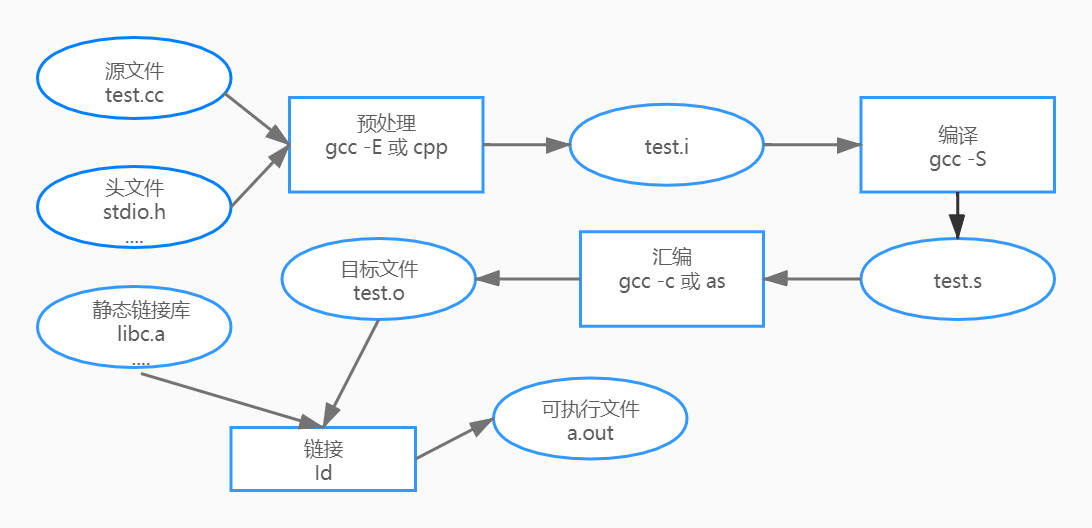
The steps to generate hello -executable files
Start with Hello worldd Below we enter through a simple program Use GCC to compile this program in Linux The above actually experienced four steps Picture from[Program Miao] What did GCC A.C go throug...
More Recommendation
Python packages .py files to generate executable files
Make sure that the PyInstaller library has been installed. If not, execute the following statement in the command window to install: After the installation is complete, in the cmd command window,cd to...
C file generate executable program
C file generate executable program Compiled environment: macOS Compilation tool: GCC Study record Compile, generate running files Perform the generated target file picture: Command run Double -click t...
How to make executable files into executable programs-Linux
After decompressing the downloaded .tar.gz software, it is very troublesome to open the software by running .sh or other files in the terminal, and it can be set into an executable icon program throug...
Makefile compile and generate multiple executable files
Explanation: $@ - the name of the target file; (2) $^ - all dependent files, separated by spaces, do not contain duplicate dependencies; (3) $< —— The name of the first dependent file. ...