join (), os.sep, os.path.join () function in python
What is os.sep
Python is cross-platform. On Windows, the path separator of the file is '\', on Linux it is '/'.
In order for the code to run on different platforms, should the path be written '\' or '/'?
If you use os.sep, you don't need to consider this. Os.sep automatically adopts the corresponding delimiter according to the platform you are on.
Examples
A path under Linux, / usr / share / python, then the above os.sep is ‘/’
The next path in windows, C: \ Users \ Public \ Desktop, then the above os.sep is ‘\’.
data_dir = os.sep.join(['hello', 'world']) 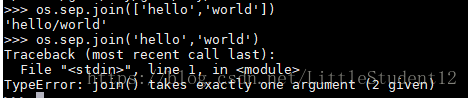
join( )
join (): join string array. Connect the elements in the string, tuple, and list with the specified characters (separator) to generate a new string
grammar:
'sep'.join(seq)
Parameter Description:
sep: separator. Can be empty
seq: sequence of elements to be connected, string, tuple, dictionary
The above syntax is: use sep as a delimiter to merge all the elements of seq into a new string
Return value: returns a string generated by connecting elements with separator sep
os.path.join()
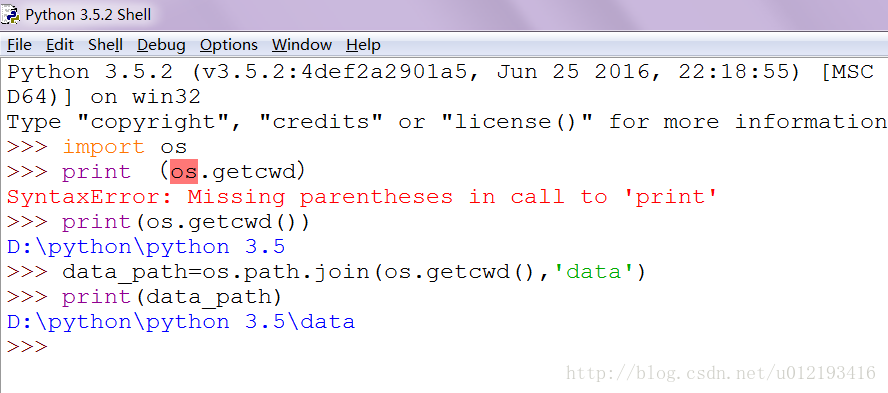
Syntax: os.path.join (path1 [, path2 [, .........]])
Return value: return after combining multiple paths
Note: Parameters before the first absolute value path will be ignored
#Operation on the sequence (using '' and ':' as delimiters respectively)

>>> seq1 = ['hello','good','boy','doiido']
>>> print ' '.join(seq1)
hello good boy doiido
>>> print ':'.join(seq1)
hello:good:boy:doiido


 #Operating on strings

>>> seq2 = "hello good boy doiido"
>>> print ':'.join(seq2)
h:e:l:l:o: :g:o:o:d: :b:o:y: :d:o:i:i:d:o


 #Operating on tuples

>>> seq3 = ('hello','good','boy','doiido')
>>> print ':'.join(seq3)
hello:good:boy:doiido


 #Operation on the dictionary

>>> seq4 = {'hello':1,'good':2,'boy':3,'doiido':4}
>>> print ':'.join(seq4)
boy:good:doiido:hello


 #Merge directories

>>> import os
>>> os.path.join('/hello/','good/boy/','doiido')
'/hello/good/boy/doiido'Intelligent Recommendation
python os.path.join() function
The output is: The result may be different from what we thought, but there is no problem because: The output result is the same...
Method python string join () and the os.path.join () difference
background Today saw a join concatenate two strings, as follows: Hey, how do I use it before and join different, remember me join my previous string is used to connect two, but not so. So, with this a...
Python 3.6: The difference between join() method and os.path.join()
1. Function: join() :The elements in sequences, strings, tuples, etc. areSpecified character concatenationGenerate a new string. os.path.join() : Combine multiple paths and return 2. Join() method des...
Python-path stitching os.path.join() function
There are two functions in Python: join() and os.path.join(). The specific functions are as follows: join(): Connect an array of strings. Connect a string, a tuple, an element in the list with the spe...
Python path stitching function os.path.join()
os.path.join() Features: Connecting two or more pathname components Demo1 : The initials of each component do not contain '/’ path10 = aaabbbccc path20 = aaa\bbb\ccc Demo2: There is a component ...
More Recommendation
python path splicing the os.path.join () function
Function: string.join () Python, the join () and the os.path.join () two functions, specifically effects include: join (): connecting string array. A string, a tuple, in the list element to specify ch...
Python path stitching function os.path.join ()
Popular science at the beginning: Is the direction of the slash ‘/’ or ‘’? The difference between slash / and backslash \ in the path What is the difference between using slash...
Python path splicing os.path.join() function
In fact, strings can do many things, as file names, paths, or even executable code. It can be passed into a specific function as a parameter for specific processing. Look at a picture first: Picture r...
Python path splicing os.path.join () function
Python path splicing OS.Path.Join () function complete tutorial Os.path.join () function is used to path splicing file path. The os.path.join () function can be passed into multiple paths: Will start ...
python path stitching os.path.join () function
os.path.join () function is used for path stitching file paths. The stitching is as follows: The following directory: Code: Output: Pay attention to the use of "/" when the stitching directo...