EventBus of Android event bus
First language
- EventBus is an Android-optimized publish/subscribe message bus, which simplifies communication between components in the application, and between components and background threads. For example, request the network, and notify the UI through the Handler or Broadcast when the network returns. The two Fragments need to communicate through the Listener. These requirements can be achieved through EventBus. Implementing decoupling makes the business code more concise, and can dynamically set event processing threads and priorities.
Functional block diagram
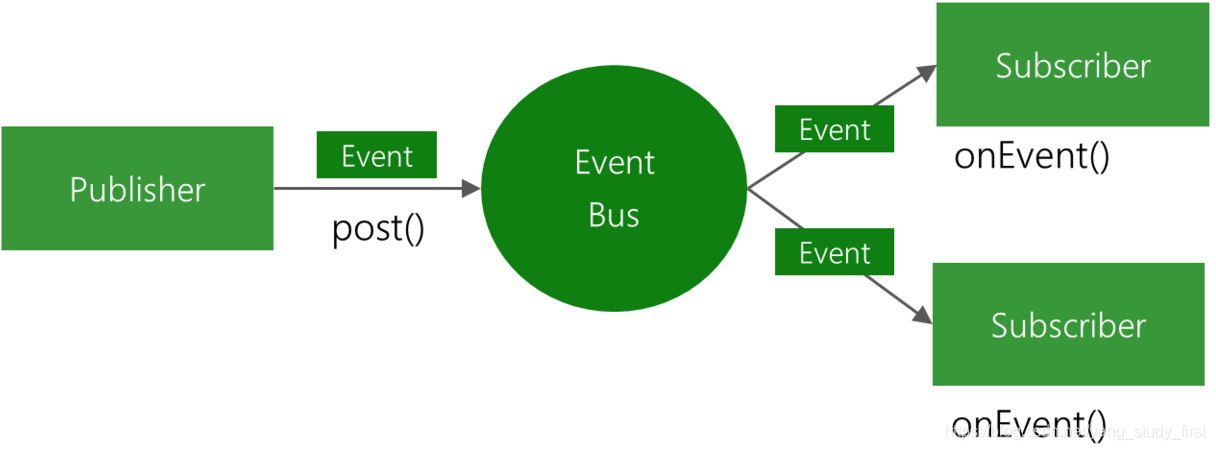
Three elements
- Event-event. He can be of any type.
- Subscriber-event subscriber. Before EventBus3.0, you must define the methods at the beginning of OnEvent, which are onEvent, onEventMainThread, onEventBackgroundThread, and onEventAsync. After 3.0, the method name of event processing can be taken at will, but you need to add the annotation @Subscribe() and specify the thread Model, the default is POSTING.
- Pusblisher-the publisher of the event. You can post events in any thread. Under normal circumstances, you can use EventBus.getDefault() to get an EventBus object, and then call the post(Object) method.
Four thread models
- PostThread (default) means that the thread of the event handler function is in the same thread as the thread that posted the event.
- MainThread indicates that the thread of the event processing function is in the main (UI) thread, so it cannot perform time-consuming operations.
- BackgroundThread indicates that the thread of the event processing function is in the background thread, so UI operations cannot be performed. If the thread posting the event is the main (UI) thread, the event processing function will start a background thread. If the thread posting the event is a background thread, then the time processing function uses that thread.
- Async means that no matter which thread the event is posted in, the event handler will always create a new sub-thread to run. Similarly, UI operations cannot be performed.
GitHub address:https://github.com/greenrobot/EventBus
Official documentation:http://greenrobot.org/eventbus/documentation
rely:implementation 'org.greenrobot:eventbus:3.1.1'
Basic usage
1. Registration Event
@Override
protected void onCreate(Bundle savedInstanceState) {
     super.onCreate(savedInstanceState);
     setContentView(R.layout.activity_main);
     EventBus.getDefault().register(this);
}
2. Unregister
@Override
protected void onDestroy() {
    super.onDestroy();
    EventBus.getDefault().unregister(this);
}
3. Construct send event class
public class MessageEvent {
    public String name;
    public String password;

    public MessageEvent(String name, String password) {
        this.name = name;
        this.password = password;
    }
}
4. Send events
EventBus.getDefault().post(new MessageEvent("dahaige","123456"));5. Handling events
@Subscribe(threadMode = ThreadMode.MainThread)//Doomed thread model
public void MessageEventBus(MessageEvent event){
    tvData.setText(event.name);
    tvTitle.setText(event.password);
}
Termination event is passed down
EventBus.getDefault().cancelEventDelivery(event);//Subscribers with high priority can terminate the event and pass it down
Sticky event
- Sticky events are those events that are cached inside EventBus. You can also receive the event by subscribing to the event after sending the event. The difference from ordinary events is that ordinary events are registered and bound before they can receive events. Sticky events send events first, and you can receive events without registering first.
1. Construct send event class
public class StickyEvent {
    public String msg;

    public StickyEvent(String msg) {
        this.msg = msg;
    }
}
2. Send sticky events
EventBus.getDefault().postSticky(new StickyEvent("I am a sticky event"));
3. Handle sticky events
@Subscribe(threadMode = ThreadMode.MainThread,sticky = true)//sticky = true, is to start the sticky event
public void StickyEventBus(StickyEvent event){
    tvResult.setText(event.msg);
}
4. Registration event
EventBus.getDefault().register(CActivity.this);5. Unregister
EventBus.getDefault().removeStickyEvent(new StickyEvent(tvResult.getText().toString()));//Remove specific sticky events
EventBus.getDefault().removeAllStickyEvents();//Remove all sticky events
to sum up
- Advantages: Simplify the communication method between components, realize decoupling to make the business code more concise, and can dynamically set the event processing thread and priority.
- Disadvantages: The only shortcomings found so far are the same criticisms as the previous strategy model. Each event must be customized with an event class, resulting in too many event classes, which virtually increases maintenance costs.
Intelligent Recommendation
Android development framework EventBus Series event bus
Android development framework EventBus Series event bus Introduction GitHub:https://github.com/greenrobot/EventBus EventBus to talk threads bus is doing, environment, advantages, disadvantages. Doing?...
Android event bus EventBus entry and use
What is the event bus? It is an implementation of the publish-subscribe model. It is a centralized event processing mechanism that allows different components to communicate with each other without in...
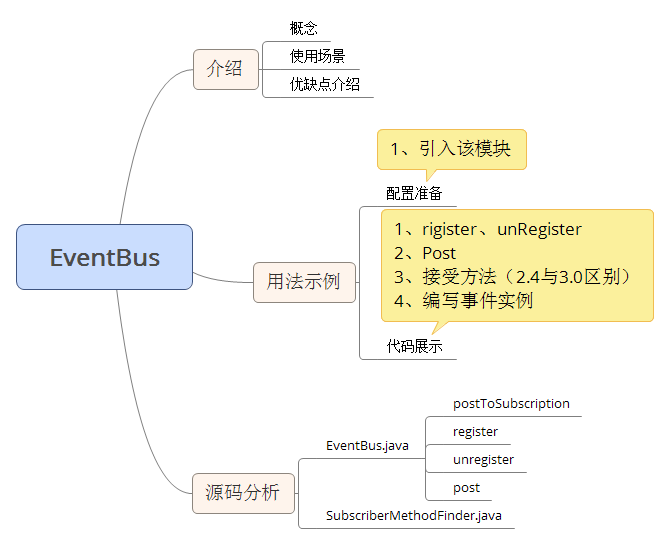
Android Event Bus EventBus 3.X.X
In order to simplify and more high-quality communication between Activity, Fragment, Thread and Service, etc., while solving the high coupling between components and still continue to communicate effi...

EventBus framework in android (subscription event bus)
EventBus is a publish/subscribe event bus optimized for Android. The main function is to replace Intent, Handler, BroadCast are passed between Fragment, Activity, Service, and threads Message. The adv...

Android publish and subscribe event bus EventBus
Overview What is EventBus? Introduction to the internal roles of EventBus Configuration Actual case Overview In the previous traditional Android development, we tended to implement Intent, Handler, Br...
More Recommendation
Basic Use of Android Event Bus Eventbus 3.0
I. Overview Android components, communication between threads, can be implemented with Handler, BroadcastReceiver, callback, etc., but the implementation of these methods is a cumbersome. Eventbus can...
VUE's EventBus-Event bus bus
In Vue, the data transmission between components is generally passed on the parent -child component, but in the actual application of the project, there is also no relationship of components that need...
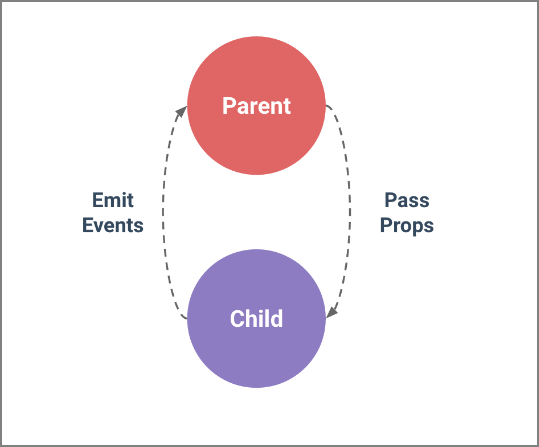
Vue.js event bus (EventBus)
The core concept of many modern JavaScript frameworks and libraries is the ability to encapsulate data and UI in modular, reusable components. This allows developers to avoid writing a lot of duplicat...
Vue event bus (EventBus)
Reference article: The core concept of many modern JavaScript frameworks and libraries is the ability to encapsulate data and UI in modular, reusable components. This allows developers to avoid writin...
ionic4-EventBus (event bus)
ionic4-EventBus (event bus) surroundings Welcome to visit me:Ionic4 column Foreword: AngularJs, we can use b r o a d c a s t 、 broadcast、 broadcast、On to send out, listen to the broadcast, to achieve ...