ABAP asset class BAPI posting BAPI_ACC_DOCUMENT_POST
I encountered some problems when using BAPI: BAPI_ACC_DOCUMENT_POST for asset posting. The posting requirements are as follows:
There are three main problems encountered:
first question:For the line items in the above figure, the first line is a fixed account code, and the second line is to fill in the account code according to the different asset numbers in the internal table. When manually posting, enter the first line item and press Enter will automatically Bring out a reconciliation account number, and then enter the second line item to post, but the reconciliation account cannot be automatically brought out in the BAPI;
second question:For asset posting, there must be an asset number and a negative asset number, otherwise it will report "the asset does not belong to the company xxxx error" when posting. To
The third question:After the current two problems are solved, the posting is successful, and it is found that the posted voucher number cannot be reversed. Comparing the voucher number generated manually and by your own program, the difference looks like the following figure:
But this is only a superficial difference, because after I modified the corresponding amount field in the BSEG table, I still couldn't write off successfully. The root cause was currency. To
I only found a solution for the problems encountered during the upload development. It may not be the best. If there is a better way, I hope to remind you. To
Description:The bapi corresponding to F-02 is BAPI_ACC_DOCUMENT_POST. This is the most commonly used bapi for generating certificates, but there are also standard transaction codes for asset retirement postings and the corresponding bapi (BAPI_ASSET_RETIREMENT_POST) in the SAP system. This article implements the F-02 correspondence BAPI for asset posting. To
Note: When posting, you must ensure that the sum of all line items is 0. When posting manually, the amount is written as a negative number, but you must write clearly whether it is positive or negative in BAPI.
Here are the implementation steps:
first step:The accounting code, payment reason code and transaction type in the posting need to be enhanced. There are many ways to enhance it on the Internet, and I will explain it here. To
1. SE11 creates a structure, as shown in the example: 
The project number must be included, and the fields below are added according to your needs. To
2. SE19 realizes BADI enhancement
ACC_DOCUMENT This enhancement is used to transfer the BAPI_ACC_DOCUMENT_POST parameter table EXTENSION2 to the system table. If there is no enhancement point, create a new enhancement point:
It should be noted that you must refer to the business type. This must be selected correctly, otherwise the BADI will not be called when executing BAPI. The commonly used ones are BKPFF and BKPF, as shown in the figure:
After the creation is complete, find the change method, this method is used to complete the field expansion, double-click to enter (you can view the implementation example of ACC_DOCUMENT CL_EXM_IM_ACC_DOCUMENT refer to the implementation of learning change method) I add the following code here:
METHOD IF_EX_ACC_DOCUMENT~CHANGE.
  DATA: WA_EXTENSION   TYPE BAPIPAREX,
       EXT_VALUE(960) TYPE C,
       WA_ACCIT       TYPE ACCIT,
       L_REF          TYPE REF TO DATA.
  DATA: WA_ZEXTEN TYPE ZEXTEN.
  FIELD-SYMBOLS: <ACCIT> TYPE ACCIT.
  FIELD-SYMBOLS: <L_STRUC> TYPE ANY,
                 <L_FIELD> TYPE ANY.
  SORT C_EXTENSION2 BY STRUCTURE.
  LOOP AT C_EXTENSION2 INTO WA_EXTENSION
         WHERE STRUCTURE ='ZEXTEN'. "Corresponds to the structure created by SE11
    WA_ZEXTEN = WA_EXTENSION-VALUEPART1.
    READ TABLE C_ACCIT ASSIGNING <ACCIT>
                WITH KEY POSNR = WA_ZEXTEN-ITEMNO_ACC.
    IF SY-SUBRC = 0.
      <ACCIT>-RSTGR = WA_ZEXTEN-RSTGR.
      <ACCIT>-BSCHL = WA_ZEXTEN-BSCHL.
      <ACCIT>-UMSKZ = WA_ZEXTEN-UMSKZ.
      <ACCIT>-ANBWA = WA_ZEXTEN-ANBWA.
      <ACCIT>-XNEGP = WA_ZEXTEN-XNEGP.
    ENDIF.
  ENDLOOP.
ENDMETHOD.
Step 2: Implement asset posting, here is the demonstration code:
FORM FRM_BAPI_DO_ACCDOCMENT CHANGING P_WS_COS LIKE WA_SHOW_COS.
  DATA: GD_DOCUMENTHEADER   LIKE BAPIACHE09,
        LT_ACCOUNTGL        LIKE TABLE OF BAPIACGL09
                                    WITH HEADER LINE,
        LT_CURRENCYAMOUNT   LIKE TABLE OF BAPIACCR09
                                    WITH HEADER LINE,
        LT_RETURN           LIKE TABLE OF BAPIRET2
                                    WITH HEADER LINE.
  DATA: LW_EXTENSION TYPE BAPIEXTC,
        LT_EXTENSION TYPE STANDARD TABLE OF BAPIPAREX
                                    WITH HEADER LINE.
  DATA: E_MONAT  LIKE BKPF-MONAT,
        E_GJAHR  LIKE BKPF-GJAHR.
  DATA: LD_GL_ACOUNT TYPE STRING.
  DATA: L_HEADTEXT TYPE STRING. "Header text
  DATA: LD_ITEM TYPE I,
        LD_ITEM_TEMP TYPE I.
  DATA: E_SAKNR LIKE BSEG-SAKNR.
  DATA: LW_ZFIDOCEXT TYPE ZEXTEN."ZFIDOCEXT.
  DATA: GL_MESSAGE TYPE STRING.

  REFRESH : LT_ACCOUNTGL[],LT_CURRENCYAMOUNT[],LT_EXTENSION[].
  REFRESH : LT_RETURN[].
  CLEAR : GD_DOCUMENTHEADER,LW_ZFIDOCEXT.

  LD_ITEM = 1.
  E_GJAHR = SY-DATUM+0(4).
  E_MONAT = SY-DATUM+4(2).
     L_HEADTEXT ='Mould financial retirement certificate'.

     GD_DOCUMENTHEADER-USERNAME = SY-UNAME. "Enter user (required)
     GD_DOCUMENTHEADER-COMP_CODE = P_BUKRS. "Company code (required)
     GD_DOCUMENTHEADER-DOC_DATE = SY-DATUM. "Document date (required)
     GD_DOCUMENTHEADER-PSTNG_DATE = P_WS_COS-ZCWBFD. "Posting date (required)
     GD_DOCUMENTHEADER-FIS_PERIOD = E_MONAT. "Posting period (required)
     GD_DOCUMENTHEADER-DOC_TYPE ='SA'. "Certificate type (required)
     GD_DOCUMENTHEADER-FISC_YEAR = E_GJAHR. "Financial Year
 * GD_DOCUMENTHEADER-BUS_ACT ='RMWE'. "Business transaction
 * GD_DOCUMENTHEADER-OBJ_TYPE ='BKPFF'. "Reference transaction

     CONCATENATE'Mold scrap' SY-DATUM INTO LD_GL_ACOUNT.
     LT_ACCOUNTGL-ITEMNO_ACC = LD_ITEM. "Accounting document line item number
     LT_ACCOUNTGL-GL_ACCOUNT = '6602010100'. "General Ledger Account
     LT_ACCOUNTGL-COSTCENTER = P_WS_COS-KOSTL. "Cost Center
 * LT_ACCOUNTGL-BUS_AREA = P_WS_COS-GSBER. "Business Scope
     LT_ACCOUNTGL-ITEM_TEXT = LD_GL_ACOUNT. "Item text
     LT_ACCOUNTGL-ALLOC_NMBR = LD_GL_ACOUNT. "Allocation
  APPEND LT_ACCOUNTGL.
  CLEAR  LT_ACCOUNTGL.

     "Add amount
  LT_CURRENCYAMOUNT-ITEMNO_ACC = LD_ITEM.
     LT_CURRENCYAMOUNT-AMT_DOCCUR = P_WS_COS-ZMOJZ. "Document currency amount
  LT_CURRENCYAMOUNT-CURR_TYPE  = '10'.
  LT_CURRENCYAMOUNT-CURRENCY   = 'CNY'.
  APPEND LT_CURRENCYAMOUNT.
  CLEAR  LT_CURRENCYAMOUNT.

     "Add amount (**Repeat adding amount is to solve the problem that cannot be reversed**)
  LT_CURRENCYAMOUNT-ITEMNO_ACC = LD_ITEM.
     LT_CURRENCYAMOUNT-AMT_DOCCUR = P_WS_COS-ZMOJZ. "Document currency amount
  LT_CURRENCYAMOUNT-CURR_TYPE  = '00'.
  LT_CURRENCYAMOUNT-CURRENCY   = 'CNY'.
  APPEND LT_CURRENCYAMOUNT.
  CLEAR  LT_CURRENCYAMOUNT.

     "Add accounting code
  LW_ZFIDOCEXT-ITEMNO_ACC = LD_ITEM.  "Item No
     LW_ZFIDOCEXT-BSCHL = '40'. "Accounting code

 *Whether to create a pre-made voucher, otherwise the voucher will be posted directly
  LT_EXTENSION-STRUCTURE =  'ZEXTEN'.
  LT_EXTENSION-VALUEPART1 = LW_ZFIDOCEXT.
  APPEND LT_EXTENSION.
  CLEAR : LT_EXTENSION,LW_ZFIDOCEXT.

     "Account Code 75
  LD_ITEM = LD_ITEM + 1.
  LT_ACCOUNTGL-ITEMNO_ACC = LD_ITEM.
     LT_ACCOUNTGL-ASSET_NO = P_WS_COS-ANLN1. "Main Asset Number
     LT_ACCOUNTGL-ACCT_TYPE ='A'. "Account Type
     LT_ACCOUNTGL-SUB_NUMBER = P_WS_COS-ANLN2. "Sub asset number
     LT_ACCOUNTGL-COSTCENTER = P_WS_COS-KOSTL. "Cost Center
     LT_ACCOUNTGL-ALLOC_NMBR = LD_GL_ACOUNT. "Allocation
     LT_ACCOUNTGL-ITEM_TEXT = LD_GL_ACOUNT. "Text
*  LT_ACCOUNTGL-COMP_CODE  = P_BUKRS.

  APPEND LT_ACCOUNTGL.
  CLEAR  LT_ACCOUNTGL.

     "Add amount
  LT_CURRENCYAMOUNT-ITEMNO_ACC = LD_ITEM.
     LT_CURRENCYAMOUNT-AMT_DOCCUR = P_WS_COS-ZMOJZ * (-1 ). "Document currency amount
  LT_CURRENCYAMOUNT-CURR_TYPE  = '10'.
  LT_CURRENCYAMOUNT-CURRENCY   = 'CNY'.
  APPEND LT_CURRENCYAMOUNT.
  CLEAR  LT_CURRENCYAMOUNT.

     "Add amount
  LT_CURRENCYAMOUNT-ITEMNO_ACC = LD_ITEM.
     LT_CURRENCYAMOUNT-AMT_DOCCUR = P_WS_COS-ZMOJZ * (-1 ). "Document currency amount
  LT_CURRENCYAMOUNT-CURR_TYPE  = '00'.
  LT_CURRENCYAMOUNT-CURRENCY   = 'CNY'.
  APPEND LT_CURRENCYAMOUNT.
  CLEAR  LT_CURRENCYAMOUNT.

     "Accounting Code
  LW_ZFIDOCEXT-ITEMNO_ACC = LD_ITEM.  "Item No
     LW_ZFIDOCEXT-BSCHL = '75'. "Accounting code
  LW_ZFIDOCEXT-ANBWA      = '100'.

 *Whether to create a pre-made voucher, otherwise the voucher will be posted directly
  LT_EXTENSION-STRUCTURE =  'ZEXTEN'.
  LT_EXTENSION-VALUEPART1 = LW_ZFIDOCEXT.
  APPEND LT_EXTENSION.
  CLEAR : LT_EXTENSION,LW_ZFIDOCEXT.

  CALL FUNCTION 'BAPI_ACC_DOCUMENT_POST'
  EXPORTING
    DOCUMENTHEADER = GD_DOCUMENTHEADER
  TABLES
    ACCOUNTGL      = LT_ACCOUNTGL
    CURRENCYAMOUNT = LT_CURRENCYAMOUNT
    RETURN         = LT_RETURN
    EXTENSION2     = LT_EXTENSION.

  READ TABLE LT_RETURN WITH KEY TYPE = 'E'.
*  BREAK-POINT.
  IF SY-SUBRC <> 0.
    CALL FUNCTION 'BAPI_TRANSACTION_COMMIT'
    EXPORTING
      WAIT   = 'X'
    IMPORTING
      RETURN = LT_RETURN.
    READ TABLE LT_RETURN INDEX 1.
    IF SY-SUBRC = 0.
             "Retirement Certificate
      P_WS_COS-ZCWBFI = LT_RETURN-MESSAGE_V2+0(10).
             "Empty Reversal Voucher
      CLEAR : P_WS_COS-ZCXBFI,P_WS_COS-ZCXBFD.
    ENDIF.
  ELSE.
    CLEAR GL_MESSAGE.
    LOOP AT LT_RETURN WHERE TYPE = 'E'.
      IF SY-TABIX = 1.
        CONTINUE.
      ENDIF.
      CONCATENATE GL_MESSAGE '|' LT_RETURN-MESSAGE
                                      INTO GL_MESSAGE.
    ENDLOOP.
    CALL FUNCTION 'BAPI_TRANSACTION_ROLLBACK'
    IMPORTING
      RETURN = LT_RETURN.
    MESSAGE E001(Z001) WITH GL_MESSAGE.
  ENDIF.
ENDFORM.                    " FRM_BAPI_DO_ACCDOCMENT
It can be found that the amount has been repeatedly added in the code, and the corresponding "CURR_TYPE" is "00" and "10" respectively, so that the generated voucher number can be successfully reversed as normal as the manual generated. To
As for the write-off, use BDC. It is easy to write off, so I won’t introduce it here.
Intelligent Recommendation
[ABAP] BAPI opens PO
Mainly, the information supplementation of the PO will be completed, but it is also necessary to check if the purchasing environment has been maintained before opening the PO. This time only provides ...
ABAP commonly used BAPI
Calling BAPI requires the Return message type. If there is no error, if there is no error, the BAPI_TRANSACTION_COMMIT and Commit Work and Wait., Otherwise the bapi_transaction_rollback. At the same t...
SAP ABAP BAPI_ACC_Document_post creates accounting credentials
Standard function function is not input and output Standard Function Is Just Input And Output About input About Input About output About Input About data About Data First create a variable to store th...
BAPI: BAPI_ACC_DOCUMENT_POST Error message: The merged company XXXX and ' ' are different
Call BAPI to report error message: The merged company XXXX and ' ' are different. The reason is that when BP was created, the trading partner was assigned, and the type of certificate does not support...
BAPI - BAPI_ACC_Document_post creates accounting credentials, table enhances extension fields
Creating an accounting credential using BAPI is a point where you need to pay attention to the maximum of 1000 lines. SE19 implements BADI enhancement ACC_Document, this enhancement is used to pass th...
More Recommendation
[BAPI] Fixed asset scrap -bAPI_ASSET_RETIREMENT_POS
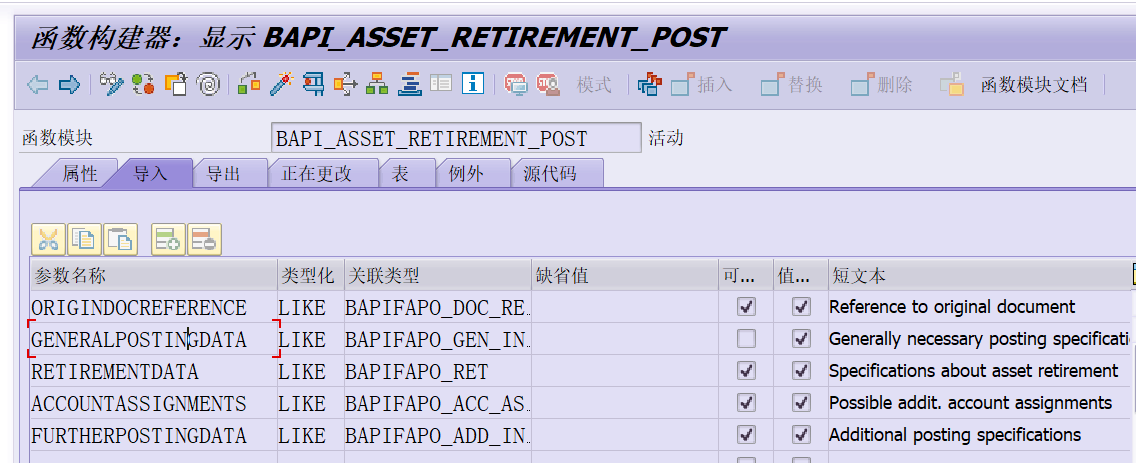
The front desk TCODE: ABAVN scrapped fixed assets, the BAPI corresponding to this TCODE is BAPI_ASSET_RETIREMENT_POST. The parameters above are:...

ABAP method to find system BAPI
Find BAPI Method 1: Find by Tcode 1. Take VA03 as an example, first check the system status 2. Double-click the Dynpro program to enter the program interface 3. Click to display the object list and go...