d3 axis simple case
<!DOCTYPE html>
<html>
	<head>
		<meta charset="utf-8">
		<title></title>
		<script src="https://d3js.org/d3.v4.js"></script>
	</head>
	<body>

		<div>
			<button οnclick="renderAll(d3.axisBottom)">
				horizontal bottom
			</button>
			<button οnclick="renderAll(d3.axisTop)">
				horizontal top
			</button>
			<button οnclick="renderAll(d3.axisLeft)">
				vertical left
			</button>
			<button οnclick="renderAll(d3.axisRight)">
				vertical right
			</button>
		</div>

		<script type="text/javascript">

			var height = 500, width = 500,
				margin = 25, offset = 50,
				axisWidth = width - 2 * margin,
				svg

			function createSvg() {
				svg = d3.select('body')
						.append('svg')
						.attr('class', 'axis')
						.attr('width', width)
						.attr('height', height)
			}

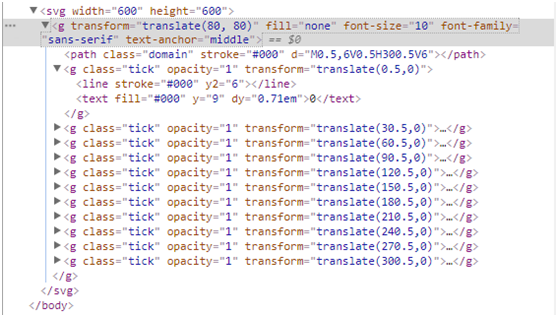
			function renderAxis(fn, scale, i) {
				var axis = fn().scale(scale)
							.ticks(5)

				svg.append('g')
					.attr('transform', function() {
						if([d3.axisTop, d3.axisBottom].indexOf(fn) >= 0) {
							return `translate(${margin}, ${i * offset})`
						}
						else {
							return `translate(${i * offset}, ${margin})`
						}
					}).call(axis)

			}

			function renderAll(fn) {
				if(svg) svg.remove()

				createSvg()
				renderAxis(fn, d3.scaleLinear().domain([0, 1000]).range([0, axisWidth]), 1)
			}

		</script>

	</body>
</html>
Intelligent Recommendation

Publish a simple case of webservice and axis calling webservice
There are many cxf, xfire, axis, etc. ways to call the webservice interface. This demo uses the axis method. 1. Use the axis method to introduce dependencies Then we go to the demo: The last picture a...
Learn D3JS in depth: d3-axis
The purpose of axis is to add a ruler to the axis. Draw through the scale defined in advance, so first understand the method of the scale object. Behind more. ...
D3.js axis method deprecated
Before v4 After v4 Reprinted at: https://www.jianshu.com/p/e32b21376775...
Lesson axis 7 D3.js
Lesson axis 7 D3.js Visualization chart, a graphical recurrent aSegmentswithGraduationcomposition. Coordinate axisSVG IsNo ready-made graphical elementsof,Made of other combinations of the elements。 D...
Data visualization D3.JS - axis
Association knowledge D3.js Use base axis Open the local copy of the following file in the web browser: Code slightly First let's take a look at the following code: Code slightly The front code only d...
More Recommendation
D3.JS coordinate axis setting
Common code: First, define the coordinate axis D3.Svg.axis (): The components of the coordinate axis in D3 can generate an element that constitutes a coordinate axis in the SVG. Scale (): Specifies th...
D3 bubble chart axis non-number type
Requirement: d3 Usually we see that either the x y axis is number or one of them is number So how do you draw x-y axes that are non-numeric bubble charts? To achieve the following picture: Using the v...
D3 x-axis text rotation display
background: In order to make the x-axis text more, do not squeeze together to display, then to achieve x-axis text rotation display, the effect is as follows: Implementation: This starts with the star...
D3 v5 study notes-3 axis overview
In D3, the scale and the axis are two very important and closely related concepts. </u> scale: D3 scale:https://github.com/xswei/d3-scale/blob/master/README.md#api-reference The scale is an impo...
D3.js learning summary (four)-coordinate axis
Axis is the visual display of the scale on the interface, so the axis must be bound to a scale. d3.js provides ready-made grammar codes, which can easily draw coordinate extraction. as follows: Define...