Notepad ++ run directly in the browser to view web results
Before viewing the page is not configured, you need to open the location where the html file, right-click the .html file, select the browser open in the "Open with" in order to see the effect. A lot of trouble to constantly switch between the browser, Notepad ++ and folders, is there a more simple way, directly in Notepad ++ which it called browser to see the effect? ? ?
It is very simple configuration, but can be more than a little convenient Oh!
1. Select "Run"

2. In the box that pops up to fillYou specify the browser path + space + "$ (FULL_CURRENT_PATH)"
I address here is this:C:\Users\Alate\AppData\Local\Google\Chrome\Application\chrome.exe
thenA space, Plus"$(FULL_CURRENT_PATH)"
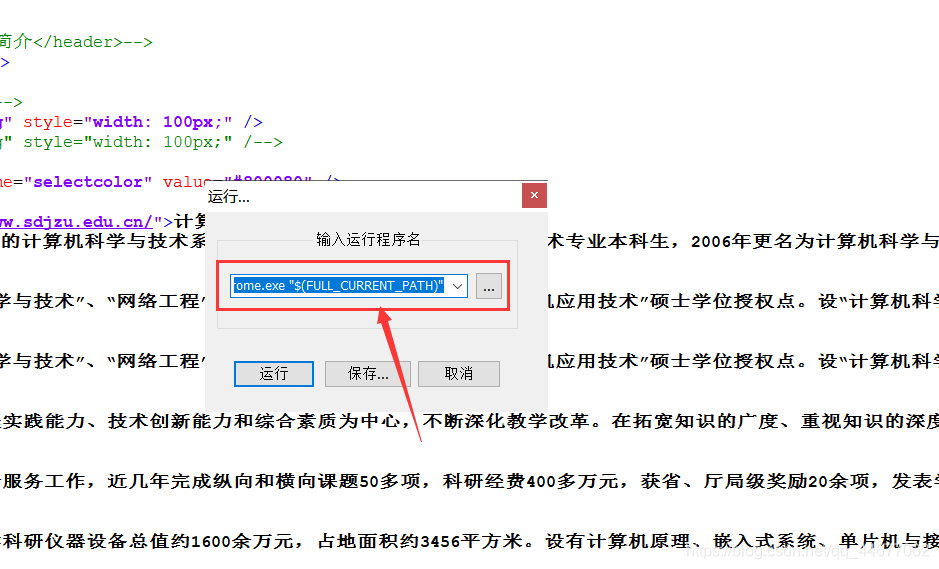
3. Click Run, OK, next time you can click to run, you can run directly in Notepad ++ inside ~ ~
Intelligent Recommendation
Log in to the Ubuntu server from the Mac terminal and run the tensorboard local browser to view the results
Mac terminal login remote Ubuntu server Local port: When viewing the tensorboard results, the port number when entering the address in the browser (eg: 10086) TensorBoard port: the port specified when...

Essential text editor Notepad ++, free installation, directly run
Notepad ++ programmers must-text editor, compact and efficient software can perfectly replace Microsoft Notepad, recommended download. Built-in support for up to 27 kinds of syntax highlighting...
Let the Vue file run directly in the browser
Background of the project I am very annoying WebPack, this thing is complicated, and there are many concepts. It is difficult to understand that the main body is not consistent with the plug-in. I hav...
notepad++ run
Compile and run in one step: Compile the source code: Run the executable file generated in the previous step: Python compile and run: Open the current directory in the dos window: Open the current dir...
More Recommendation

Run (PowerApps) app in a web browser
Describe how to get from a web browserDynamics 365 home pageRun the canvas or model-driven application. To follow this quick start tutorial, you need the following: PowerApps license. It is included w...
FLUTTER Web Development Browser Run
New Flutter project, only support android, iOS by default, can be run through the command line configuration Cut to Flutter Beta version first Restart the current Flutter project after running the --e...

centos7 | hdfs web download error report | local can create new directories, upload files, run examples, view output results; web can view the file directory; only download from the web
Foreword: As the title, system cenos7. Xiaobai, learn to configure hdfs for the first time, single node: In the order shown by the teacher, the absolute path of Java is set in the hadoop-env.sh file, ...
Local server browser to view the results of open tensorboard
Use xshell connect to the server, open tensorboard, use the local browser to view the chart. 1. xshell server operation 2. Local Browser Access http://127.0.0.1:16006/ in the local browser...
View gwas results by playing GM browser
Welcome to pay attention to "Shengxin Practice Manual"! IGV supports dynamic viewing of gwas analysis results. For gwas results, at least the following columns are required CHR BP SNP P Ther...