Battle PYQT5: 114-color qcolor
tags: coding python pyqt5 pyside2 qt GUI programming
Qcolor Introduction
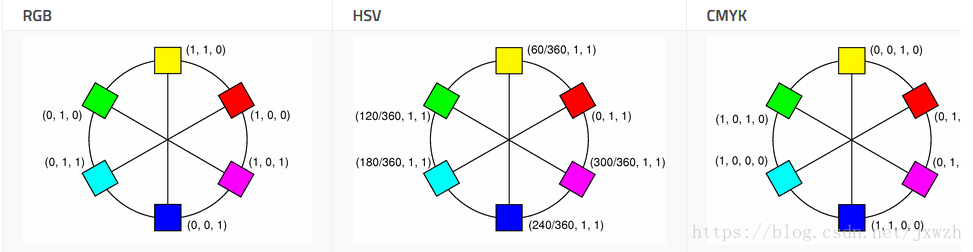
The QColor class provides a color based on RGB, HSV or CMYK values. Colors typically specify with RGB (red, green, and blue) components, but also specify with HSV (color phase, saturation and value) and CMYK (cyan, magenta, yellow and black) components. In addition, you can use the color name to specify a color (color name can be any color name of SVG 1.0).
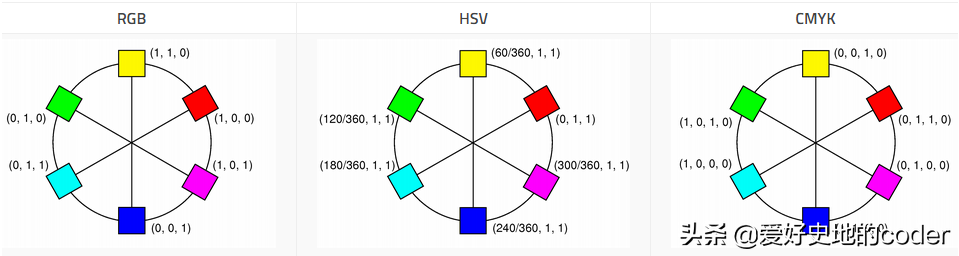
Image source: doc.qt.io
QColor objects are created based on RGB colors. If you want to make QColor based on HSV (or CMYK), use functions toHSV () and TOCMYK (), these functions returns a desired format QColor object. In addition, use static functions fromRGB (), fromHSV () and fromCMYK () functions can create QColor objects in the corresponding format. Or use the converTto () function, which returns the QColor object in the desired format. You can also use SetRGB (), setHSV (), setCMYK () function to change the color format.
Colors can be set by passing the RGB string (e.g., "# 112233") or the Argb string (e.g., "# ff11233") or color name (eg, "Blue") to the setNamedColor () function. The color name is taken from the SVG 1.0 color name. The format returned by the Name () function is the name of the "#rggbb" color. You can also use setRGB (), setHSV () and setCMYK () to set color. To get a shallow or deeper color, use the LIGHTER () and DARKER () functions separately.
The isvalid () function represents whether QColor is legal. For example, the RGB value of the RGB color is illegal. Due to performance reasons, QColor basically does not consider illegal colors, so the result of using invalid colors cannot be defined.
Color components can be retrieved separately, for example. Red (), hue () and cyan () can be obtained by red, hue, and cyan color components. You can also use GETRGB (), getHSV () and getCmyk () functions at once. When using the RGB color model, you can use the RGB () to access the color component.
Qcolor supports floating point precision, providing floating-point versions of all color component functions, such as getRGBF (), huef (), and fromCMYKF (). Note that since the component is stored using a 16-bit integer, there may be a small deviation between the values returned by the setRGBF () and getRGBF () functions.
The value based on the integer range is 0-255 (hue () except, its value must be in the range of 0-359, based on the floating point function accepts a value of 0.0 - 1.0.
QColor also supports Alpha mix, the color Alpha channel specifies the transparent effect, 0 represents a completely transparent color, and 255 represents a completely opaque color. E.g:
# Specify a translucent red
painter.setBrush(QColor(255, 0, 0, 127))
painter.drawRect(0, 0, self.width()/2, self.height())
 # Specify a translucent blue
painter.setBrush(QColor(0,0,255,127))
painter.drawRect(0, 0, self.width(), self.height()/2)
The above code produces the following display effect:
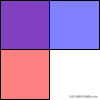
Image source: doc.qt.io
If the value of the color is an integer, you can use the alpha () and setalpha () functions to retrieve and set the color Alpha channel; if the value is QReal, Alphaf () and setalphaf () can be used to retrieve and set up colour. By default, the Alpha channel is set to 255 (opaque). To retrieve and set all RGB color components (including ALPHA channels), use the RGBA () and setRGBA () functions.
Qcolor common function
- Alpha (Self), Alphaf (Self): Returns Alpha Parts
- Black (self), Blackf (Self): Returns black components of colors
- CYAN (Self), Cyanf (Self): Returns the cyan component of this color
- Yellow (Self), Yellowf (Self): Returns the yellow component of this color
- Magenta (Self), Magentaf (Self): Returns the magenta component of this color
- RED (Self), REDF (Self): Returns Red Components of Colors
- Green (Self), Greenf (Self): Returns green components of colors
- Blue (Self), Buef (Self): Returns blue components of colors
- ColorNames (Self): Returns a list of names that contain predefined colors in QT
- ConvertTo (Self, Colorspec):colorSpecSpecified format createdthisColor copy
- DARKER (Self, Factor): Returns Dark (or Shallow) Colors
- Lighter (Self, Factor): Returns a shallow (or darker) color
- FromCMYK (C, M, Y, K, A), fromCMYKF (C, M, Y, K, A): Static function, returns QColor objects built from a given CMYK color value
- FromHSL (H, S, L, A), fromHSLF (H, S, L, A): Static function, which returns QColor objects built from a given HSV color value.s,lwithaThe value must be within 0-255;hThe value must be in the range of 0-359.
- FromRGB (R, G, B, A), ProMRGBF (R, G, B, A): Static function, returns QColor objects built from a given RGB color value.
- Gethsl (self), gethslf (Self): Get HSL color values
- GetCMYK (Self). getCMYKF (Self): Get a CMYK color value
- GETRGB (Self), getRGBF (Self): Get RGB color value
- HSLHUE (Self), HSLHUEF (Self): Return to HSL Tonance Color Component
- Hslsaturation (Self), HSLSATURATIONF (Self): Returns HSL Saturation Color Component
- HSVHUE (Self), HSLHUEF (Self): Return to HSV Tonance Color Component
- HSVSArature (Self), HSVSATURATIONF (Self): Returns HSV Saturation Color Component
- Hue (self), huef (self): Returns HSV tone color components
- Saturation (Self), Saturationf (Self) Returns the saturation of the color
- Lightness (Self), Lightnessf (Self): Returns brightness color components
- Value (Self), Valuef (Self): Returns Value Components in HSV
- Isvalid: Effective color returns true, otherwise returns false
- Name (Self): Returns the name of the color in "#rggbb"; that is, a "#" character, followed by two two hexadecimal numbers.
- Name (Self, Format): Returns the name of the color with the specified format format
- Setalpha (Self, Alpha), Setalphaf (): Sets the alpha value of the color to alpha.
- Setred (Self, R), Setredf (Self, R): Sets the red component of the color
- Setgreen (Self, G), Setgreenf (Self, R): Setting the green component of the color
- SetBlue (Self, B), SetBluef (Self, B): Setting color blue components
- SetCMYK (SELF, C, M, Y, K, A), SetCMYKF (SELF, C, M, Y, K, A) set of CMYK color values
- Sethsl (SELF, H, S, L, A), SETHSLF (SELF, H, S, L, A) HSL color value
- SetHSV (SELF, H, S, V, A), SETHSVF (SELF, H, S, V, A) HSV color value
- TOCMYK (Self): Create and return QColor objects of CMYK based on this color
- ToHSL (Self): Create and return to HSL qcolor objects based on this color
- ToHSV: QColor objects created and returned to HSV based on this color
- TorgB (Self): Create and return QColor objects based on this color
test
The test program uses QLabel to display the color of the QT internal predefined name, the full code is as follows:
import sys
from PyQt5 import QtCore, QtGui, QtWidgets
from PyQt5.QtGui import QColor
from PyQt5.QtWidgets import QApplication, QWidget, QGridLayout, QLabel

class DemoColor(QWidget):
    def __init__(self, parent=None):
        super(DemoColor, self).__init__(parent)

# Set the window title
 SELF.SETWINDOWTILE ('actual combat PYQT5: QColor predefined color table ")

        self.initUi()

    def initUi(self):
        layout = QGridLayout()

 LINE_COUNT = 8 # Months of each line
        index = 0

        print(len(QColor.colorNames()))
        for name in QColor.colorNames():
            color_label = QLabel()
            color_label.setMinimumHeight(24)
            color_label.setText(name)

 # Set background color, border and text color
            styleSheet = 'QLabel{background-color: ' + name + '; border:1px solid 0; font: 16px;color: black;}'
            if (QColor(name).getHsv()[2] < 200) and (name != 'transparent'):
                styleSheet = 'QLabel{background-color: ' + name + '; border:1px solid 0; font: 16px;color: white;}'
            color_label.setStyleSheet(styleSheet)

            layout.addWidget(color_label, index//line_count, index % line_count)
            index += 1

        self.setLayout(layout)

if __name__ == '__main__':
    app = QApplication(sys.argv)
    window = DemoColor()
    window.show()
    sys.exit(app.exec())
The results are shown below:
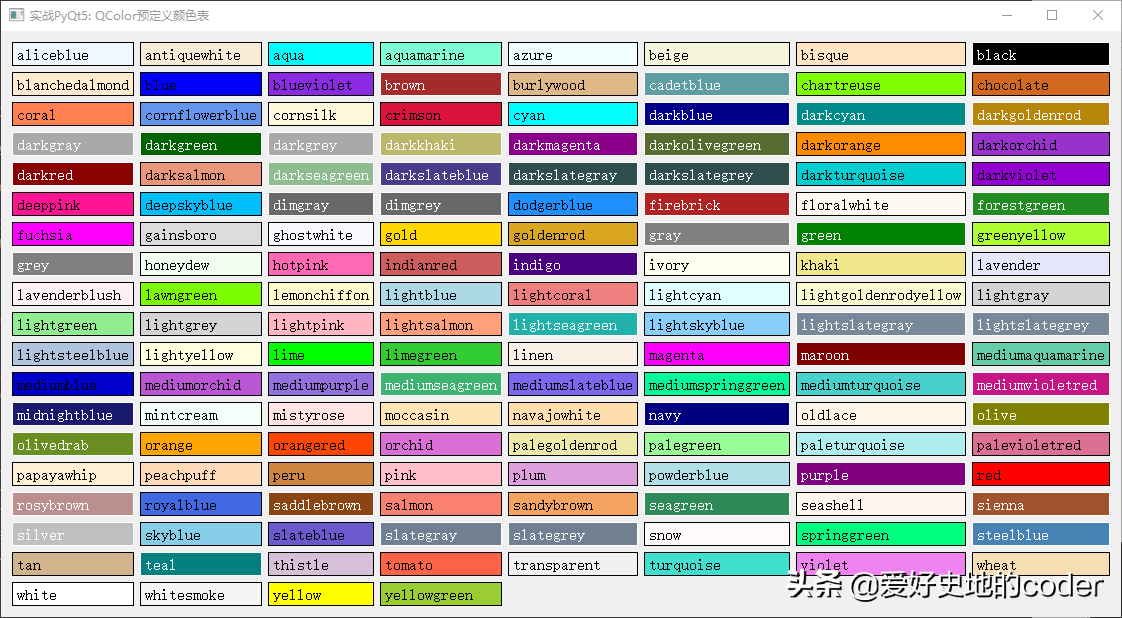
Qt internal predefined color value
This article knowledge points
- The QColor class provides a color based on RGB, HSV or CMYK values.
- The conversion between the RGB, HSV or CMYK values.
- QT internal predefined colors.
Previous Article:Battle PYQT5: 113-QSS + Custom Window Title Bar
Intelligent Recommendation

Battle PYQT5: 088-QopengLwidget parts
QopengLwidget Introduction The QopengLwidget class is a component for rendering OpenGL graphics. QopengLWidget provides features for displaying OpenGL graphics integrated into the QT application. Usin...

Battle PYQT5: 085-Scene QGRAPHICSSCENE
Introduction to QGRAPHICSSCENE QGraphicsscene is an integral part of the graphical view frame. It provides a surface for managing a large number of 2D primitives (SURFACE). QGraphicsScene is used as a...
Battle PYQT5: 098-mouse event
Another important interaction mode in the mouse GUI program, the mouse event in the QT includes the mouse click, release the mouse button, move the mouse to the specified area or leave the specific ar...
Battle PYQT5: 097-Keyboard Event
In a GUI desktop application, the interaction between users and programs is generally done by the keyboard and the mouse, and the processing with the keyboard and the mouse is a GUI program that is al...
Battle PYQT5: 096- window event
Window events include changing window status, adjusting location, and size, window drawing, window shutdown events, etc. Change the window status The following method is used to change or determine th...
More Recommendation

Battle PYQT5: 103 - Custom Event
Create a custom event Although QT has built a large number of event classes to meet the majority of applications, it is sometimes we want to use custom events to achieve a purpose. The steps to implem...
Battle PYQT5: 101- use clipboard
The exchange data between applications can also use a clipboard in addition to the drag and drop technology. An application puts the data in the clipboard and another application proposes data from th...
Battle PYQT5: 118-palette QPALETTE
Introduction to QPALETTE QPaletTTET (Palette, Palette) class is equivalent to a window or space palette, which manages color information of the control or window, each component (widget) contains a QP...
Use of QColor
The QColor class provides colors based on RGB, HSV or CMYK values. Colors are usually specified with RGB (red, green, and blue) components, but can also be specified with HSV (hue, saturation, and val...
About QColor
1.QColor class 2. Color debugger and others...